Sleep time record charts

Sleep time record charts


다운로드: App Store
로고: Sleep time record charts

취침 시간 기록 차트: 데이터 기반 정확도로 휴식을 마스터하세요

미니멀리스트, 웨어러블 기기 불필요한 추적기로 높은 성과를 내는 사람들과 가족을 위한 앱. 수면을 기록하고, 기상 시 기분과 연관시키고, 상세한 생체 리듬 차트로 장기적인 패턴을 시각화하세요.

다운로드: App Store

개발사

YUTAKA IZUMIYAMA

카테고리

Health & Fitness

다운로드

300

사용자 평점

3.9/5

총 평가 수

0

지원 언어

2

당신의 수면, 시각화

이 인터페이스를 사용하는 300 명의 사용자.

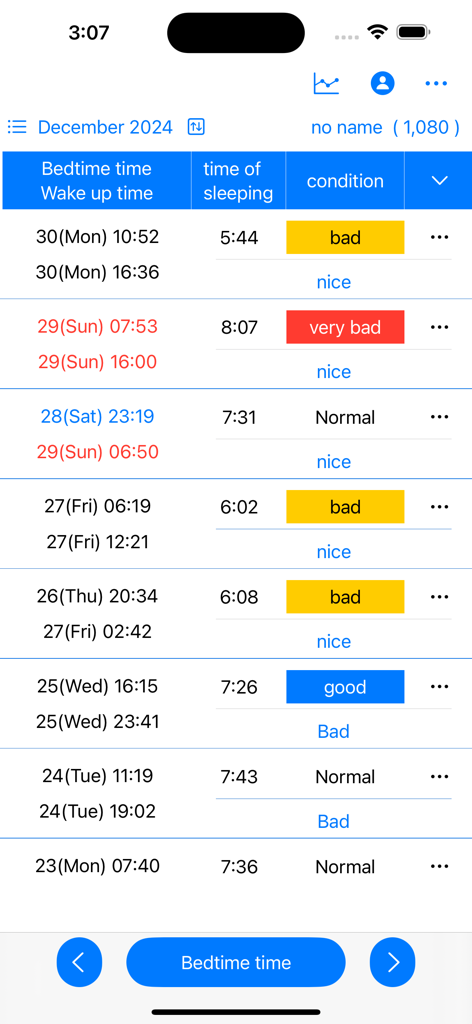
좋음 또는 나쁨과 같은 기분 상태 레이블이 있는 취침 시간, 기상 시간, 수면 시간, 기분 상태를 보여주는 표의 수동 수면 로그 인터페이스.

좋음 또는 나쁨과 같은 기분 상태 레이블이 있는 취침 시간, 기상 시간, 수면 시간, 기분 상태를 보여주는 표의 수동 수면 로그 인터페이스.

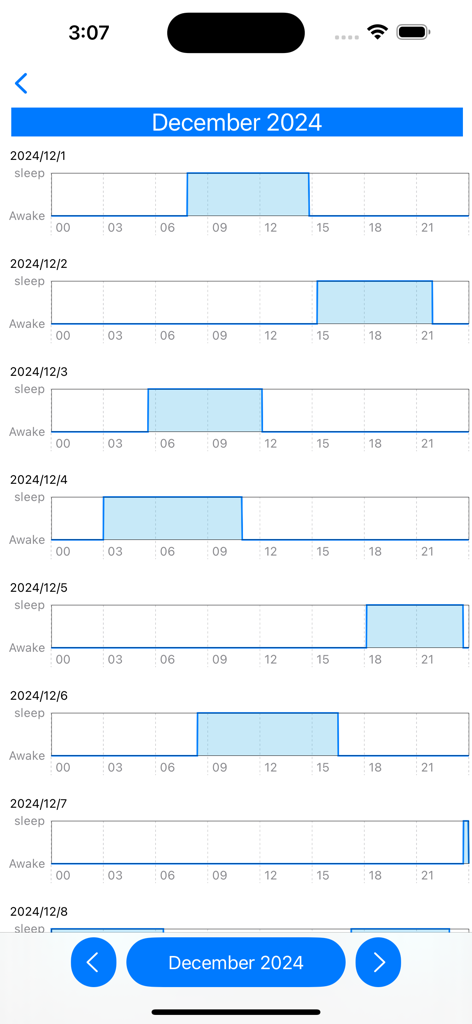
12월의 일별 수면 및 기상 패턴을 보여주는 수평 막대 그래프의 세로 목록.

12월의 일별 수면 및 기상 패턴을 보여주는 수평 막대 그래프의 세로 목록.

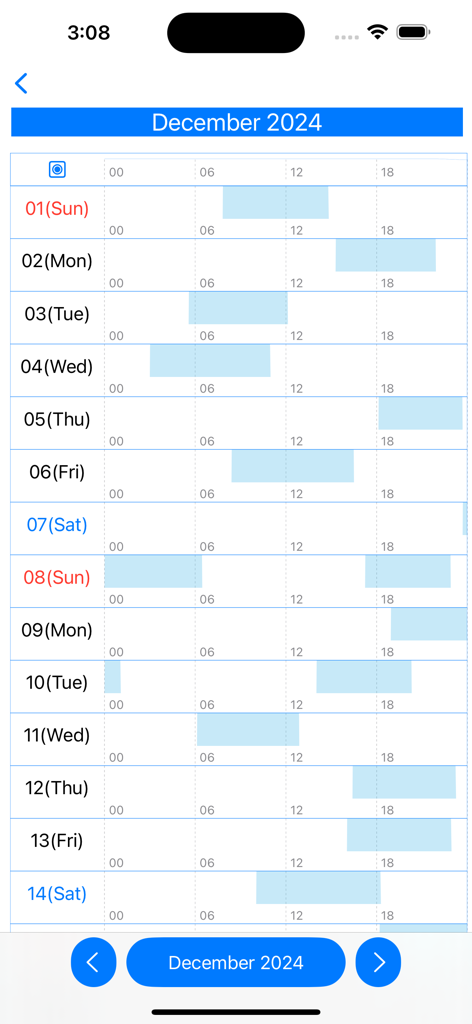
일별 수면 및 기상 패턴을 보여주는 월별 수면 리듬 차트

일별 수면 및 기상 패턴을 보여주는 월별 수면 리듬 차트

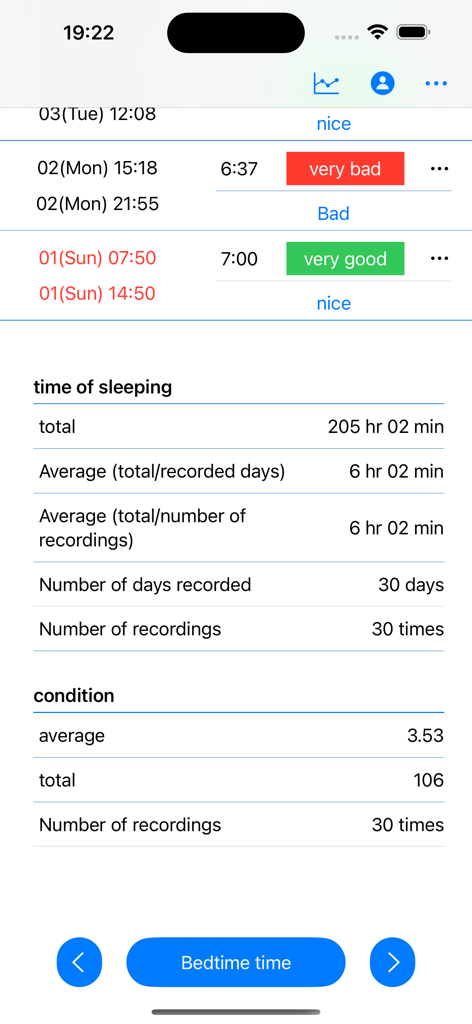
총 수면 시간, 30일간의 일일 평균, 기상 시 상태 기록과 같은 수면 통계를 보여주는 수면 추적 앱 화면.

총 수면 시간, 30일간의 일일 평균, 기상 시 상태 기록과 같은 수면 통계를 보여주는 수면 추적 앱 화면.

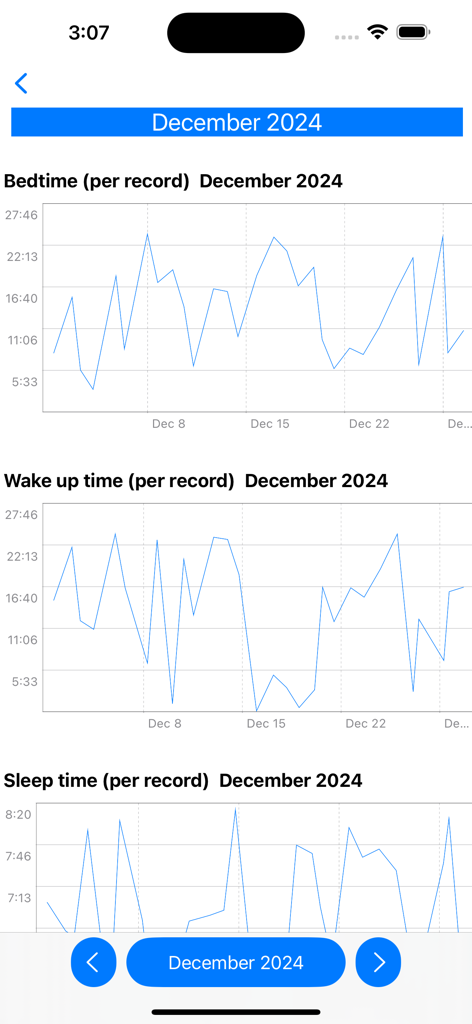
2024년 12월의 취침 시간, 기상 시간, 총 수면 시간 기록을 보여주는 월별 선 그래프.

2024년 12월의 취침 시간, 기상 시간, 총 수면 시간 기록을 보여주는 월별 선 그래프.

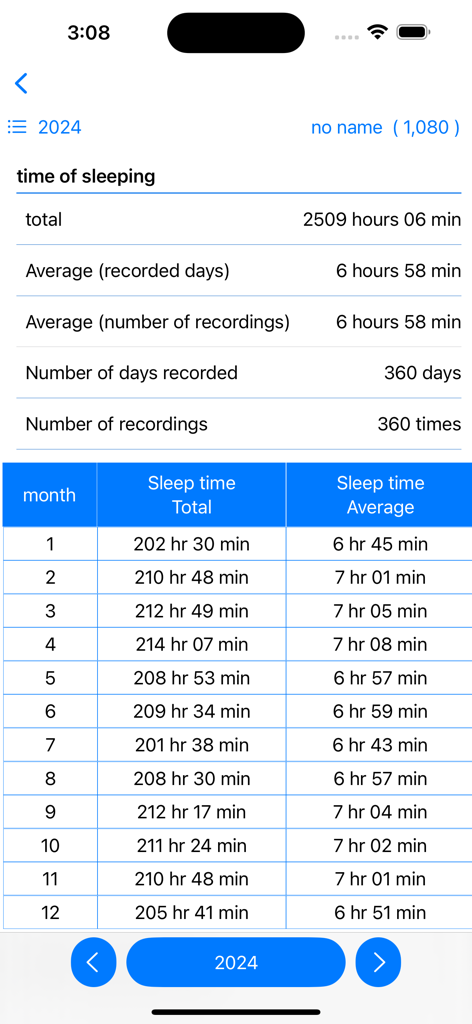
표 형식으로 월별 총계 및 평균을 포함한 2024년 연간 수면 데이터 요약을 보여주는 모바일 화면.

표 형식으로 월별 총계 및 평균을 포함한 2024년 연간 수면 데이터 요약을 보여주는 모바일 화면.

더 나은 휴식을 위한 경로를 시각화하세요

이 앱을 돋보이게 하는 도구, 300 명의 사용자가 선택.

🎯

정확한 수동 기록

침습적인 센서나 배터리 소모가 없습니다. 실제로 신뢰할 수 있는 데이터를 위해 몇 초 만에 정확한 취침 시간을 기록하세요.

📊

고급 리듬 분석

자연스러운 생체 리듬 패턴을 보여주는 상세한 선 그래프와 월별 차트로 이상적인 수면 시간을 파악하세요.

🧠

컨디션 & 기분 추적

기상 시 기분을 기록하여 수면 시간과 일일 최고 성과 사이의 완벽한 균형을 찾으세요.

앱 소개

에 대해 알아야 할 모든 것 Sleep time record charts.

설명

Sleep time is calculated and displayed based on bedtime and wake-up date and time. Displays sleep time in a line graph. ・Record bedtime 1. Tap the "Bedtime" button. If you press/tap for a long time, step 2/step 3 will be skipped. The current date and time will be set. 2. Select the year, month, and day and tap "Next". 3. Select your bedtime and tap OK. ・When recording the wake-up date and time 1. Tap the "Wake up date and time" button in the wake up date and time column of the table. If you press/tap for a long time, step 2/step 3 will be skipped. The current date and time will be set. 2. Select the year, month, and day and tap "Next". 3. Select your wake-up time and tap "OK". ▼Sleep time The sleep time in the table is automatically displayed based on the bedtime and wake-up date and time. ▼When recording your mood when you wake up 1. Tap "Condition" in the Condition column of the table. 2. Select a condition. ▼Display chart 1. Press the line chart button at the top. 2. Click the displayed chart from the menu below. Monthly chart sleep/wake chart sleep/wake rhythm chart Annual total/average/chart Full period chart ▼Add user 1. Press the user button at the top 2. Press add user 3. Enter the username and press OK. ▼Edit username 1. Press the user button at the top 2. Press user edit and delete 3. Press the username from the list. 4. Edit the user name on the edit screen and press OK. ▼Delete username 1. Press the user button at the top 2. Press user edit and delete 3. Swipe the username you want to delete from the list from the left and press Delete. ▼If you want to delete all records From the menu on the top right, select Erase all data. You can delete all records.

최신 버전

25.11.23

크기

4.1 MB

출시일

2024년 5월 3일

수면 리듬을 통제하세요

정돈된 수동 기록과 데이터 기반 차트를 사용하여 휴식과 일일 성과를 최적화하는 의도적인 수면자들과 함께하세요.

다운로드: App Store

App information, icons, screenshots, and descriptions displayed on this page are sourced from the Apple App Store and are the property of their respective developers. Download estimates and rankings are based on MWM's proprietary models and may not reflect actual figures. This page is provided for informational and analytical purposes only.

Believe this page infringes your intellectual property? File a dispute