수동 노트 작성에 시간을 낭비하지 마세요. 즉시 스마트 플래시카드를 생성하고, 릴 스타일 리뷰를 스와이프하며, 개인 AI 학습 도우미로 시험을 마스터하세요.
개발사
Siarhei Huminski
카테고리
Education
다운로드
300
사용자 평점
5.0/5
총 평가 수
0
지원 언어
4
실행 중인 학습
이 인터페이스를 사용하는 300 명의 사용자.
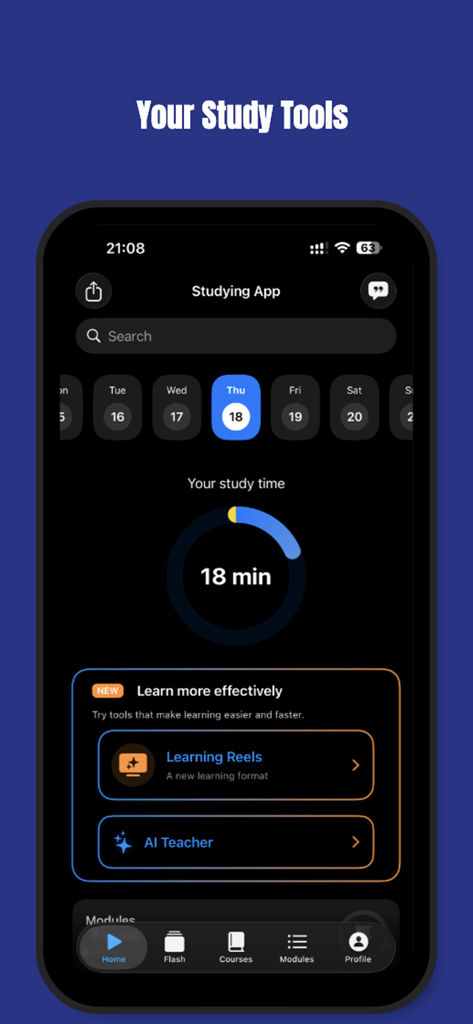
Studying 앱의 홈 화면으로, 일일 학습 시간 추적기와 AI 학습 도구에 대한 접근을 표시합니다.
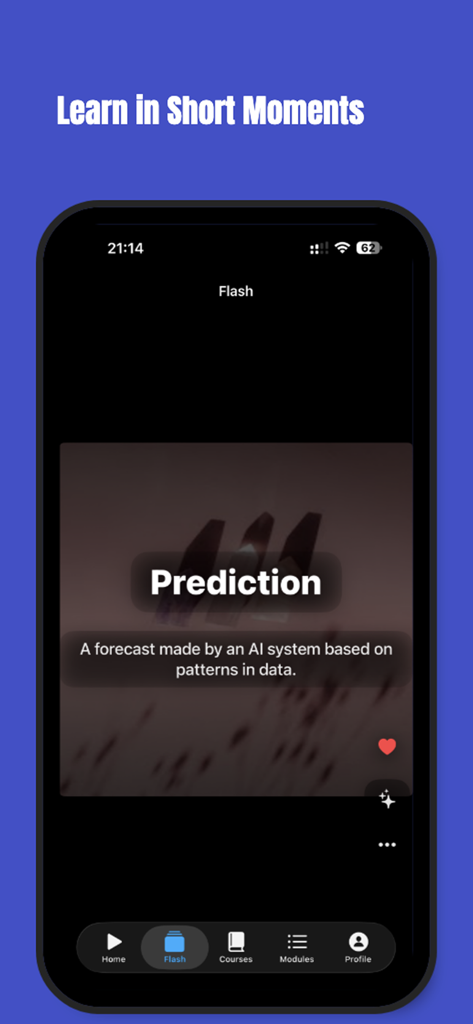
Studying 앱의 모바일 인터페이스로, 단어 예측을 위한 릴 스타일 AI 플래시카드를 특징으로 합니다.
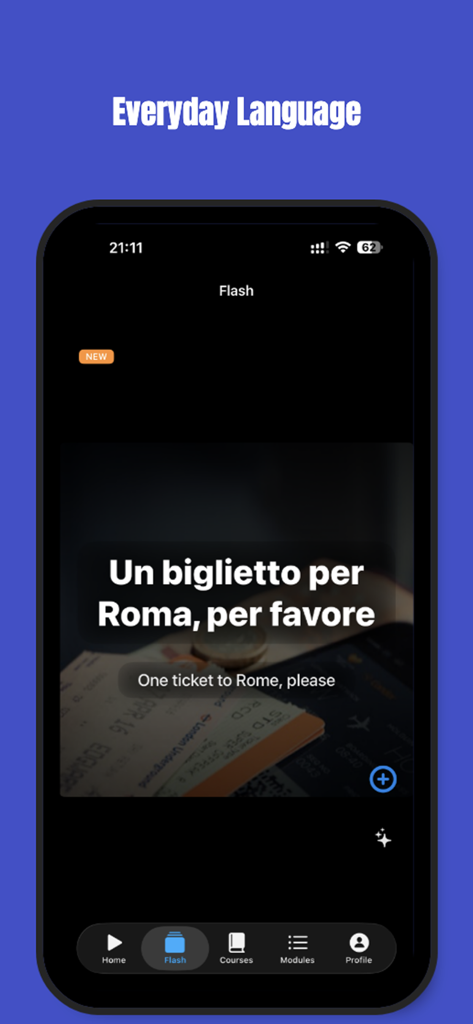
Studying 앱의 모바일 화면으로, 이탈리아어 구문 학습을 위한 릴 스타일 플래시카드를 보여줍니다.
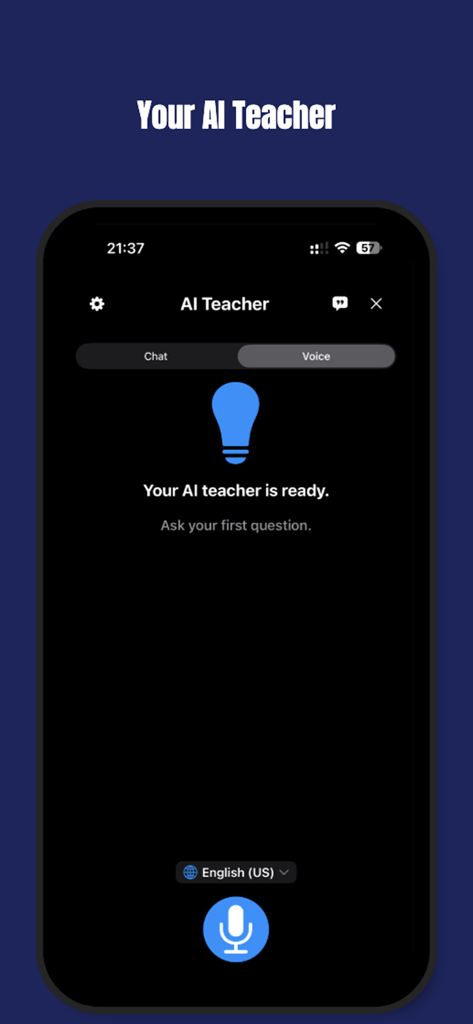
Studying 앱의 AI Teacher 기능 인터페이스로, 언어 연습을 위한 음성 상호 작용 모드를 보여줍니다.
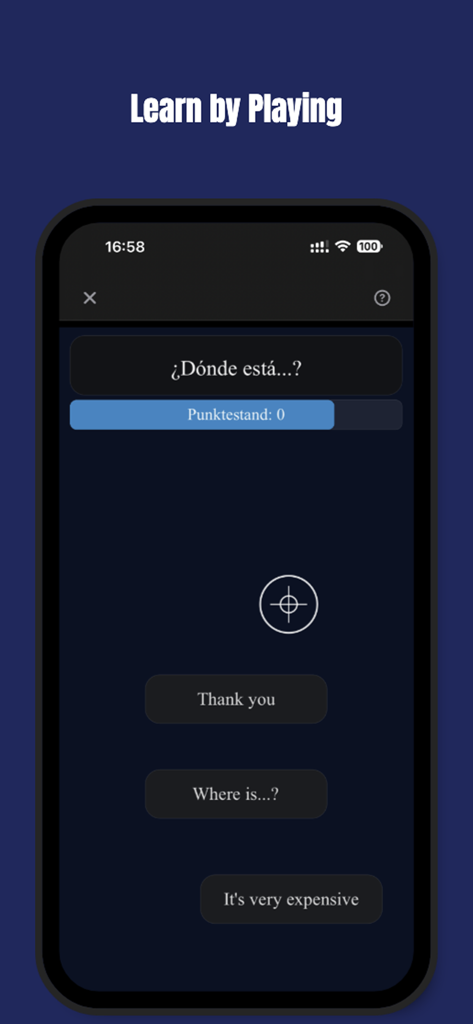
Studying 앱의 언어 학습 게임 인터페이스로, 객관식 선택지가 있는 스페인어 구문 번역 퀴즈를 보여줍니다.
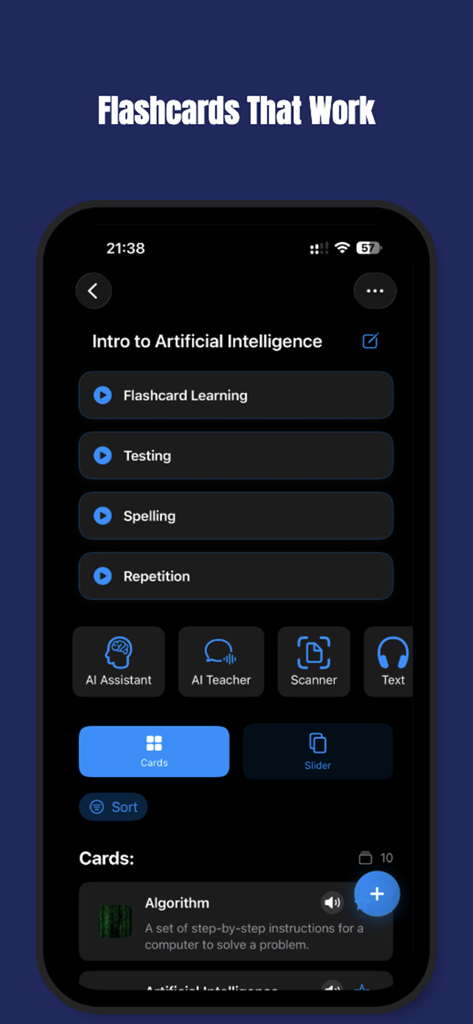
Studying 앱의 메인 인터페이스로, 테스트, 반복 및 AI 지원 옵션이 있는 인공 지능 소개 플래시카드 덱을 보여줍니다.
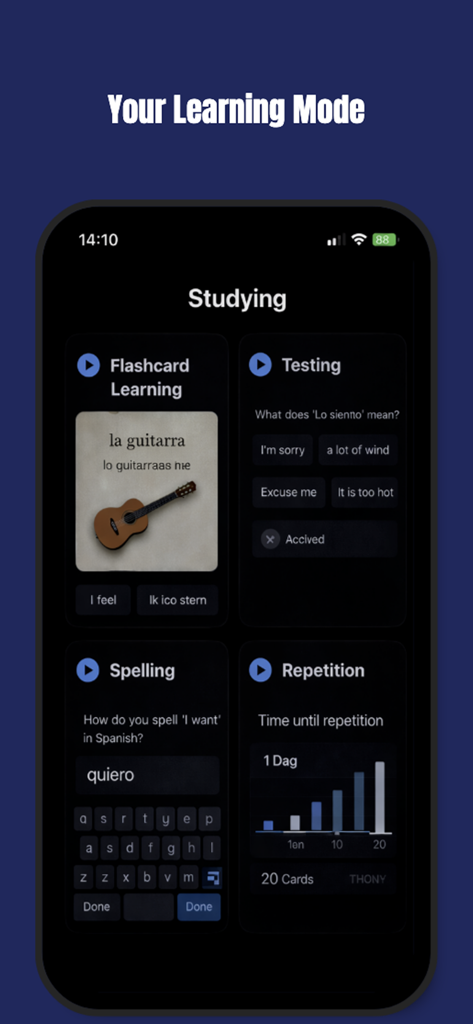
Studying 앱의 인터페이스로, 플래시카드 학습, 테스트, 철자 및 반복 기능을 보여줍니다.
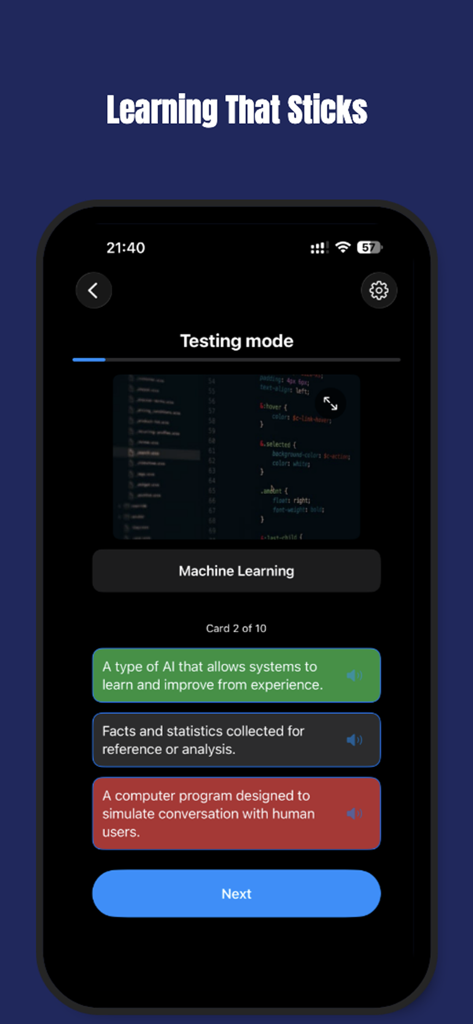
모바일 앱 화면으로, 객관식 선택지와 다음 버튼이 있는 기계 학습 테스트 모드를 보여줍니다.
AI 정밀도로 커리큘럼 마스터하기
이 앱을 돋보이게 하는 도구, 300 명의 사용자가 선택.
⚡
즉각적인 AI 생성 세트
복잡한 주제나 노트 사진을 몇 초 안에 전문가 수준의 플래시카드로 변환하세요. 수동 입력이 필요 없습니다.
📱
릴 스타일 고속 학습
익숙한 세로 스와이프 인터페이스로 집중력을 극대화하세요. '둠 스크롤링'을 생산적인 마이크로 학습 세션으로 바꿔보세요.
🧠
스마트 간격 반복
저희 알고리즘은 언제 잊어버릴 가능성이 높은지 정확히 예측하여 완벽한 순간에 복습을 예약하여 100% 기억하도록 합니다.
앱 소개
에 대해 알아야 할 모든 것 Studying.
설명
AI Learning Made Simple
Studying is the complete AI-powered study app that combines flashcards, spaced repetition, active recall, and a built-in study assistant to help you learn faster, remember longer, and achieve your goals. Whether you are a student, a language learner, or a professional, Studying makes learning easier and smarter.
Practice Speaking with AI
Now you can improve your speaking skills in any language. Talk with your AI teacher, practice pronunciation and listening, and build real confidence in conversation — all inside the app.
Meet the New AI Assistant
Our AI Assistant helps you understand complex topics by providing clear explanations directly in the app. Learn more efficiently, deepen your knowledge, and reduce confusion — all in one place.
Learn with AI Flashcards
Flashcards are one of the most effective ways to study, but creating them manually takes time. With Studying, you can instantly generate AI-powered flashcards on any subject. Just enter a topic and the AI creates clear, useful cards for learning. Perfect for languages, coding, medicine, history, law, business, exams, and more.
Boost Memory with AI Spaced Repetition
Studying uses an intelligent repetition algorithm to schedule reviews at the optimal time. Spaced repetition strengthens memory, reduces forgetting, and helps you master knowledge in less time.
Practice with AI Active Recall
Active recall is the key to effective learning. Instead of passively reading, practice retrieving knowledge through smart quizzes. The AI Assistant adapts to your answers, highlights mistakes, and builds a personalized review plan.
Prepare for Popular Exams
Get ready for well-known exams with AI-generated practice tests. Whether you’re studying for TOEFL, IELTS, SAT, GRE, GMAT, medical boards, or professional certifications, Studying creates tailored quizzes and mock exams to match the format and difficulty level — so you can train with confidence.
Reels-Style Flashcards (New Feature)
Study faster and stay focused with our new Reels-mode flashcards. Swipe through cards in a dynamic, social-style format designed for high-speed learning and maximum engagement. It’s the most intuitive and enjoyable way to review — anytime, anywhere.
Scan and Learn
Turn your physical notes, textbooks, or handouts into study material. With the built-in scanner, you can quickly digitize text and start creating AI flashcards or summaries. While the scanner is currently a simple helper, it’s designed to grow into a powerful AI study tool.
Learn Faster with Game Mode
Learning doesn’t have to feel slow or repetitive. Studying includes a dedicated game mode that turns flashcard practice into a fast, interactive experience.
Instead of passively reviewing cards, you actively respond under time pressure, reinforce correct answers, and quickly identify weak areas. This playful format keeps you focused, increases engagement, and helps information stick naturally — without feeling like traditional studying.
Game mode is designed for quick sessions, making it perfect for short breaks, daily practice, or rapid revision before exams. It’s learning by doing — faster, more dynamic, and more effective.
최신 버전
9.5.0
크기
35.1 MB
출시일
2020년 12월 6일
더 열심히 공부하지 말고, 더 똑똑하게 학습하세요.
수동 노트와 수동적 읽기에서 벗어나세요. AI를 사용하여 플래시카드를 자동화하고, 시험을 완벽하게 치르며, 기록적인 시간 안에 모든 과목을 마스터하는 상위 성적자들과 함께하세요.
FAQ
자주 묻는 질문
에 대해 알아야 할 모든 것 Studying
Studying 앱이란 무엇인가요?
Studying은 플래시카드, 간격 반복, 능동 회상 및 학습 도우미를 통합한 AI 기반 앱입니다. 사용자가 더 빨리 배우고, 정보를 더 오래 기억하며, 학업 또는 직업 목표를 효율적으로 달성하도록 돕습니다.
Studying 앱은 어떻게 플래시카드를 만드나요?
네, Studying 앱은 모든 주제에서 AI 기반 플래시카드를 즉시 생성합니다. 사용자가 주제를 입력하면 AI가 명확하고 유용한 플래시카드를 만들어 학습 과정을 간소화합니다.
Studying 앱은 학습을 위해 간격 반복을 사용하나요?
네, Studying 앱은 지능형 간격 반복 알고리즘을 활용합니다. 이 시스템은 기억을 강화하고, 망각을 줄이며, 사용자가 지식을 효율적으로 마스터하도록 돕기 위해 최적의 시간에 복습을 예약합니다.
Studying 앱은 능동 회상을 어떻게 촉진하나요?
Studying 앱은 스마트 퀴즈를 통해 능동 회상을 지원합니다. AI 도우미는 사용자 응답에 맞춰 실수를 식별하고 학습 및 기억력 향상을 위한 맞춤형 복습 계획을 구축합니다.
Studying 앱에서 AI와 말하기 연습을 할 수 있나요?
네, 사용자는 Studying 앱의 AI 선생님과 어떤 언어로든 말하기 연습을 할 수 있습니다. 이 기능은 발음, 듣기 능력을 향상시키고 대화 자신감을 키우는 데 도움이 됩니다.
Studying 앱의 AI 도우미는 무엇을 하나요?
Studying 앱의 AI 도우미는 앱 내에서 복잡한 주제에 대한 명확한 설명을 제공합니다. 사용자가 효율적으로 이해하고, 지식을 심화하며, 학습 중 혼란을 줄이도록 돕습니다.
Studying 앱은 TOEFL 또는 SAT 시험 준비를 제공하나요?
네, Studying 앱은 TOEFL, IELTS, SAT, GRE, GMAT 및 의학 시험과 같은 시험을 준비하도록 돕습니다. 형식과 난이도에 맞는 맞춤형 AI 생성 연습 테스트 및 모의 시험을 만듭니다.
Studying 앱의 릴스 스타일 플래시카드는 무엇인가요?
릴스 스타일 플래시카드는 Studying 앱의 새로운 기능으로, 고속 학습을 위한 역동적이고 소셜 스타일의 형식을 제공합니다. 사용자는 카드를 스와이프하여 더 빠르게 학습하고 최대 참여로 집중력을 유지합니다.
Studying 앱은 물리적 문서를 스캔하여 학습 자료를 만들 수 있나요?
네, Studying 앱은 내장 스캐너를 갖추고 있습니다. 사용자는 물리적 메모, 교과서 또는 유인물을 디지털화한 다음 학습 자료로 AI 플래시카드 또는 요약으로 변환할 수 있습니다.
Studying 앱의 게임 모드는 어떻게 작동하나요?
Studying 앱의 게임 모드는 플래시카드 연습을 빠르고 상호 작용적인 경험으로 바꿉니다. 사용자는 시간 압박 속에서 답변에 응답하여 답변을 강화하고, 약점을 식별하며, 학습을 흥미롭고 효과적으로 만듭니다.
Studying 앱은 제 학습 시간을 추적하나요?
네, Studying 앱은 사용자의 학습 시간을 추적하고 표시합니다. 앱의 대시보드에는 '내 학습 시간'이 '18분'과 같은 시간과 함께 표시되어 일별 또는 세션별 진행 상황을 나타냅니다.
Studying 앱의 AI 선생님은 어떤 언어를 지원하나요?
Studying 앱의 AI 선생님은 대화 연습을 위해 다양한 언어를 지원합니다. 스크린샷 #4에는 '영어 (미국)' 옵션이 표시되어 사용자에게 다국어 지원을 나타냅니다.
App information, icons, screenshots, and descriptions displayed on this page are sourced from the Apple App Store and are the property of their respective developers. Download estimates and rankings are based on MWM's proprietary models and may not reflect actual figures. This page is provided for informational and analytical purposes only.
Believe this page infringes your intellectual property? File a dispute