@UKR.NET Mail App

@UKR.NET Mail App

다운로드: App Store
로고: @UKR.NET Mail App

@UKR.NET 메일 앱: 우크라이나 인기 이메일로 집과 계속 연결하세요

미국에서 100GB 파일 전송, 오프라인 액세스, 국경을 넘나드는 생활에 맞춰 설계된 네이티브 언어 인터페이스로 모든 계정을 안전하게 관리하세요.

개발사

Ukrnet LLC

카테고리

Productivity

다운로드

698K+

사용자 평점

3.9/5

총 평가 수

1K+

지원 언어

2

내부 보기

이 인터페이스를 사용하는 698K+ 명의 사용자.

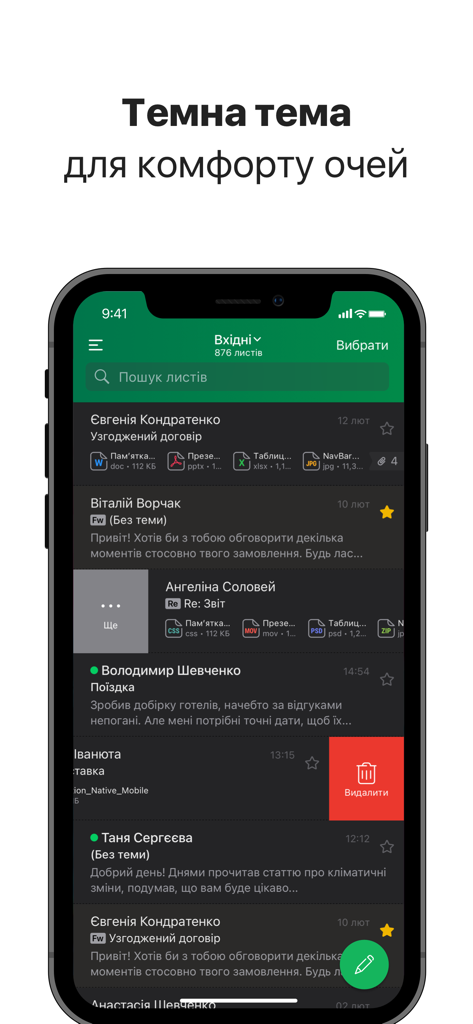
모바일 장치에서 @UKR.NET 메일 앱의 다크 모드 받은 편지함 인터페이스

모바일 장치에서 @UKR.NET 메일 앱의 다크 모드 받은 편지함 인터페이스

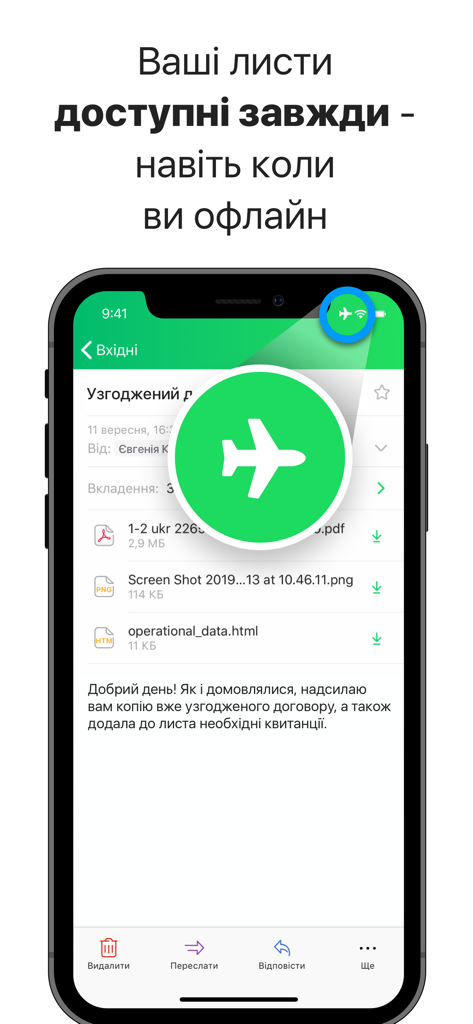
오프라인 모드 기능을 강조하는 항공기 아이콘이 있는 UKR.NET 메일 앱을 표시하는 스마트폰 화면

오프라인 모드 기능을 강조하는 항공기 아이콘이 있는 UKR.NET 메일 앱을 표시하는 스마트폰 화면

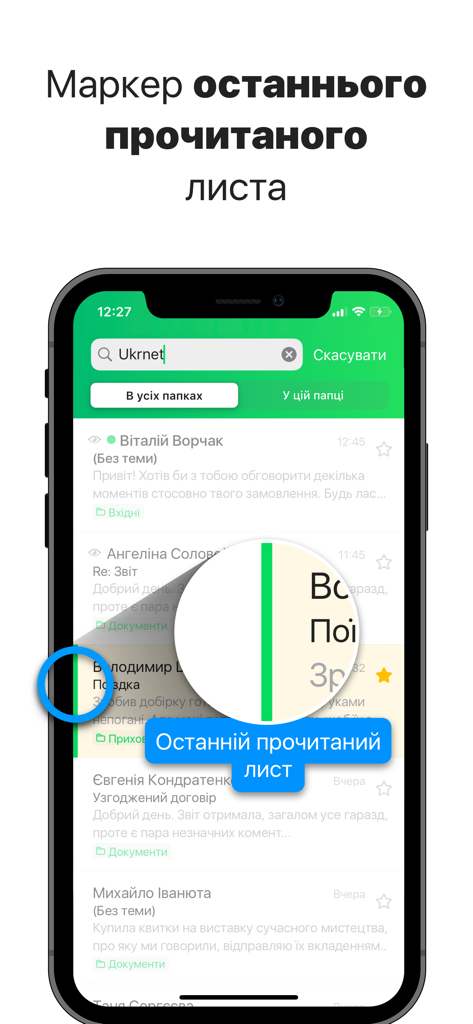
받은 편지함 목록에서 마지막으로 읽은 이메일을 나타내는 녹색 수직선이 표시된 UKR.NET 메일 앱 스크린샷.

받은 편지함 목록에서 마지막으로 읽은 이메일을 나타내는 녹색 수직선이 표시된 UKR.NET 메일 앱 스크린샷.

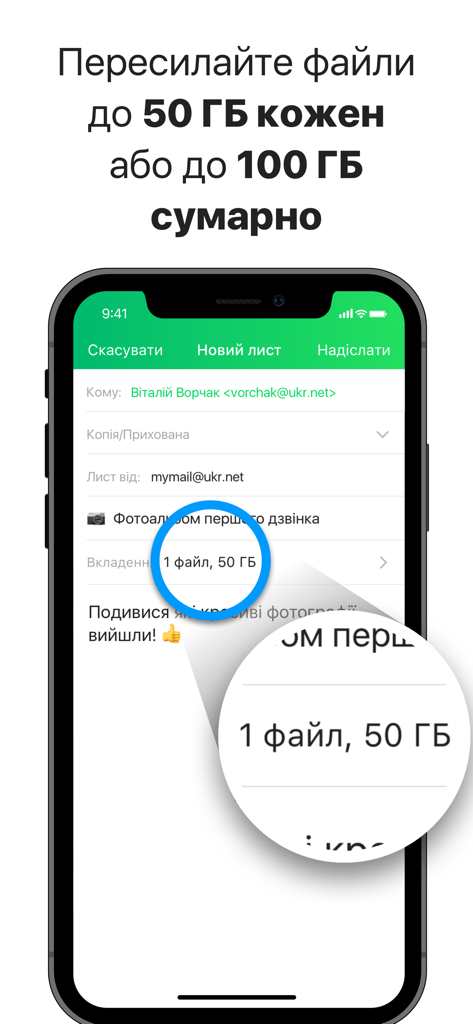
각각 최대 50GB, 총 100GB의 파일을 보낼 수 있는 기능을 보여주는 UKR.NET 메일 앱 스크린샷.

각각 최대 50GB, 총 100GB의 파일을 보낼 수 있는 기능을 보여주는 UKR.NET 메일 앱 스크린샷.

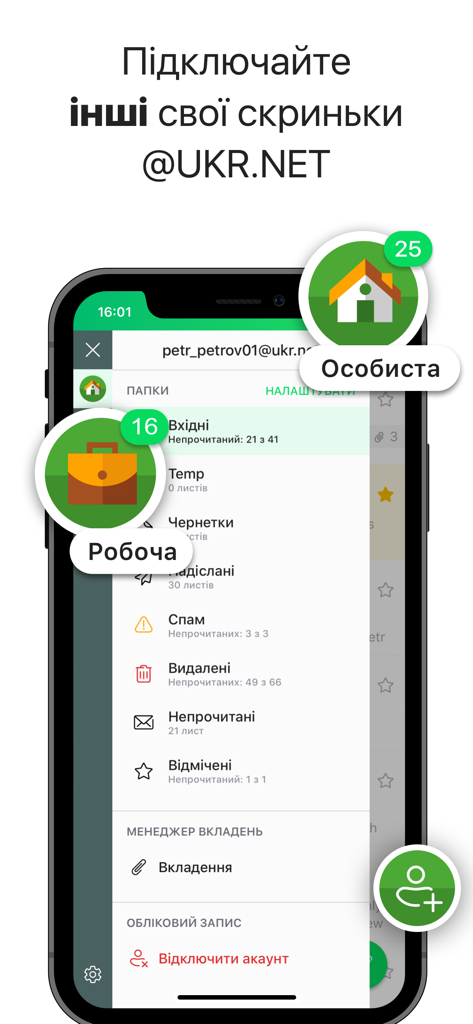
개인 및 업무 이메일 계정 관리를 보여주는 iPhone의 @UKR.NET 메일 앱

개인 및 업무 이메일 계정 관리를 보여주는 iPhone의 @UKR.NET 메일 앱

속도와 연결을 위해 제작됨

이 앱을 돋보이게 하는 도구, 698K+ 명의 사용자가 선택.

📦

비교할 수 없는 파일 제한

25MB 제한에서 벗어나세요. 받은 편지함에서 직접 최대 100GB까지 고해상도 가족 비디오 또는 대용량 법률 문서를 전달하세요.

✈️

완전한 오프라인 생산성

장거리 비행 중이나 신호가 약한 지역에서 답장을 읽고 작성하세요. 다시 연결하자마자 받은 편지함이 자동으로 동기화됩니다.

🔒

신뢰할 수 있는 개인 정보 보호

Face ID 및 PIN 코드로 민감한 통신을 보호하세요. 기기에서 모든 메일 데이터를 즉시 삭제하는 옵션으로 안전하게 로그아웃하세요.

앱 소개

에 대해 알아야 할 모든 것 @UKR.NET Mail App.

설명

The new official @UKR.NET Mail App. Add all your @UKR.NET accounts to the App. Read messages regardless the Internet and Wi-Fi connection. Forward files up to 100 GB from your other emails. The new official @UKR.NET Mail App designed for convenient work with all your @UKR.NET accounts. Receive and send messages, forward big attachments, work with your mailbox regardless the Internet and Wi-Fi connection, enable and set up push notifications. Instant performance. The application ensures infinite scrolling through message, file and folder lists, fast moving between screens and prompt opening of the heaviest messages. Simple and clear interface. Easy to use application. The interface is intuitive and not overloaded with design solutions. Manage your folder pane that appears on the Side Menu, by creating folders’ position hierarchy and hiding the folders, rarely used. Convenient work with your multiple @UKR.NET accounts. Add, manage and run your @UKR.NET accounts, both personal and work, from one App. There’s no need to sign out of one account to switch to another - see them all on the Side Menu and just flip between. Offline mode. Your mail is always at the fingertips - regardless of the speed and Internet/Wi-Fi connection itself. For example, while in the Flight mode, when you are offline, you can still read and work with your messages: mark them as important, move to other folders, compose replies - they will be sent as soon as the device connects to the network. Simultaneously, the latest changes will be applied to ensure the same account state on all devices, accessing it. Instant synchronization. @UKR.NET is constantly maintaining the same account state on different devices, you’re signed in on. Thus, you do not need to update the interface manually. Whether you add new folders, move messages between them, edit drafts or delete emails, all changes will be applied instantly on all devices, accessing your account. Important information. Find out vital information without opening a message: we display the attached file details and a short fragment of message body right on the list. Convenient work with attachments. Review the attached files in the App. Save files on your device to make them available for reviewing offline later on. You can also forward the file as an attachment to another message, share it in the messengers, copy or save to Files or online workspace. Forward files up to 100 GB. Forward big files up to 50 GB each or up to 100 GB in total from other @UKR.NET emails. Search. Find messages with Search, choosing either the whole mailbox, or the folder you are in. Protect your App. Select a Face/Touch ID and PIN-code to protect your App and set the Auto-Lock timing and actions. Disconnect account. To ensure a higher level of security and privacy, when signing out of your account from the App, you are granted to choose clearing all mail data from the device. This makes it impossible to restore your mailbox contents even with special tools. If you are sure, that unauthorized usage of your device is impossible, select to keep mail data. Economy. The application is designed for optimum mobile traffic consumption.

최신 버전

1.40.4

크기

16.3 MB

출시일

2019년 10월 7일

공식 @UKR.NET 메일 앱으로 집과 계속 연결하세요

어디를 가든 모든 @UKR.NET 계정을 쉽게 관리하고, 최대 100GB의 파일을 보내고, 오프라인으로 작업하세요. 지금 iOS용 가장 신뢰할 수 있는 우크라이나 메일 클라이언트를 다운로드하세요.

다운로드: App Store
FAQ

자주 묻는 질문

에 대해 알아야 할 모든 것 @UKR.NET Mail App

UKR.NET 메일 앱으로 오프라인에서 이메일을 읽을 수 있나요?

네, UKR.NET 메일 앱을 사용하면 인터넷 연결 없이도 메시지를 읽고, 표시하고, 이동하고, 답장 초안을 작성할 수 있습니다. 이러한 작업은 다시 연결되면 동기화됩니다.

UKR.NET 메일 앱에서 여러 UKR.NET 계정을 어떻게 관리하나요?

사용자는 앱 내 사이드 메뉴에서 개인 및 업무용 UKR.NET 계정을 직접 추가, 관리, 전환할 수 있습니다. 전환을 위해 로그아웃할 필요는 없습니다.

UKR.NET 메일 앱에서 첨부 파일을 전달할 때 최대 파일 크기는 얼마인가요?

UKR.NET 메일 앱은 각각 최대 50GB의 개별 파일을 전달할 수 있도록 허용합니다. 다른 UKR.NET 이메일에서 전달되는 파일의 총 크기 제한은 최대 100GB입니다.

UKR.NET 메일 앱에는 Face ID 또는 PIN 코드와 같은 보안 기능이 있나요?

네, UKR.NET 메일 앱은 Face ID, Touch ID 및 PIN 코드 보호를 지원합니다. 사용자는 향상된 앱 보안을 위해 자동 잠금 타이밍 및 특정 작업을 구성할 수도 있습니다.

UKR.NET 메일 앱 계정을 연결 해제할 때 기기에서 메일 데이터를 삭제할 수 있나요?

네, 계정을 연결 해제할 때 UKR.NET 메일 앱은 기기에서 모든 메일 데이터를 삭제하는 옵션을 제공합니다. 이를 통해 더 높은 수준의 보안과 개인 정보를 보장합니다.

UKR.NET 메일 앱에는 시각적 편의를 위한 다크 테마가 있나요?

네, UKR.NET 메일 앱에는 다크 테마가 포함되어 있습니다. 이 기능은 앱 인터페이스에서 보여주듯이 사용자에게 시각적 편안함을 제공하도록 설계되었습니다.

UKR.NET 메일 앱은 모바일 데이터 사용량을 어떻게 최적화하나요?

UKR.NET 메일 앱은 최적의 모바일 트래픽 소비를 위해 특별히 설계되었습니다. 이를 통해 애플리케이션을 작동하는 동안 모바일 데이터를 효율적으로 사용할 수 있습니다.

App information, icons, screenshots, and descriptions displayed on this page are sourced from the Apple App Store and are the property of their respective developers. Download estimates and rankings are based on MWM's proprietary models and may not reflect actual figures. This page is provided for informational and analytical purposes only.

Believe this page infringes your intellectual property? File a dispute