Website Downloader & Copier

Website Downloader & Copier

다운로드: App Store
로고: Website Downloader & Copier

웹사이트 다운로더 및 복사기: 원클릭으로 모든 웹 페이지 아카이브

디자이너, 개발자 및 연구원을 위한 경량 Safari 확장 프로그램입니다. 오프라인 액세스 및 디지털 보존을 위해 HTML, CSS 및 애셋을 로컬 ZIP 아카이브로 쉽게 캡처합니다.

다운로드: App Store

개발사

Pierre Stanislas

카테고리

Utilities

다운로드

500

사용자 평점

1.0/5

총 평가 수

0

지원 언어

1

내부 미리보기

이 인터페이스를 사용하는 500 명의 사용자.

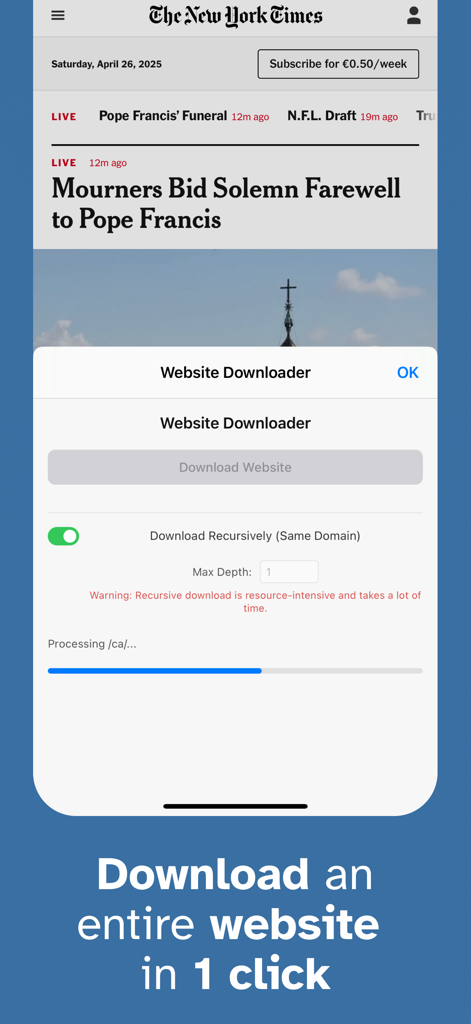
전체 웹페이지를 캡처하기 위한 원클릭 다운로드 버튼과 진행률 표시줄을 보여주는 웹사이트 다운로더 Safari 확장 프로그램의 인터페이스.

전체 웹페이지를 캡처하기 위한 원클릭 다운로드 버튼과 진행률 표시줄을 보여주는 웹사이트 다운로더 Safari 확장 프로그램의 인터페이스.

전문적인 워크플로우를 위한 강력한 기능

이 앱을 돋보이게 하는 도구, 500 명의 사용자가 선택.

📦

전체 애셋 캡처

모든 HTML, CSS, JavaScript 및 이미지 파일을 자동으로 가져옵니다. 소스 코드를 연구하거나 개인 디자인 스와이프 파일을 만드는 데 적합합니다.

원클릭 Safari 통합

복잡한 명령줄 도구는 건너뛰세요. 깔끔하고 미니멀한 인터페이스로 브라우저에서 직접 전문적인 웹사이트 복제 기능에 액세스하세요.

📂

즉각적인 휴대용 아카이브

다운로드한 파일은 단일 ZIP 파일로 깔끔하게 패키징되어 프로젝트 보드에 첨부하거나 클라이언트와 공유하거나 어디서든 오프라인으로 탐색하기 쉽습니다.

앱 소개

에 대해 알아야 할 모든 것 Website Downloader & Copier.

설명

Website Downloader is a lightweight Safari extension that lets you capture and save the full content of any web page effortlessly. Whether you need a local backup, offline access, or a complete snapshot for research, Website Downloader makes the process as smooth as possible. → Key Features • One-Click Download Simply click the Website Downloader icon in your Safari toolbar and hit "Download Website" in the popup. Instantly start capturing everything you see. • Complete Resource Capture Downloads all vital resources of the current page, including: - HTML source code - CSS stylesheets (both linked and inline) - JavaScript files (both linked and inline) - Images (including background images in CSS) - Fonts and other embedded assets where feasible • Live Progress Tracking Stay informed with a clean, modern progress bar that clearly shows the status of your download in real time. • Instant Zip Archive Creation Once downloaded, all resources are neatly packaged into a single zip file. The archive is automatically named after the page title or defaults to "website_download.zip" if unavailable. • No Complicated Setup No additional configuration needed. Install, click, and download — all within seconds. → Built for a Seamless Experience Beautiful, minimalistic popup UI designed for clarity and ease of use Lightweight performance that won't slow down your browsing Designed to handle websites of varying complexity with graceful error handling for network issues and dynamic content limitations → Why Choose Website Downloader? • Offline browsing made effortless • Easy archival of important webpages • Useful for researchers, developers, students, and digital archivists • Privacy-conscious: your downloads stay local and secure Capture the web, your way — with Website Downloader for Safari.

최신 버전

1.0

크기

13.8 MB

출시일

2025년 4월 27일

북마크를 멈추고 아카이빙을 시작하세요

한 번의 클릭으로 완전하고 고품질의 웹 리소스를 캡처하는 전문 디자이너, 개발자 및 연구원들과 함께하세요. 지금 Mac, iPhone 및 iPad용 Safari 확장 프로그램을 확보하세요.

다운로드: App Store

App information, icons, screenshots, and descriptions displayed on this page are sourced from the Apple App Store and are the property of their respective developers. Download estimates and rankings are based on MWM's proprietary models and may not reflect actual figures. This page is provided for informational and analytical purposes only.

Believe this page infringes your intellectual property? File a dispute