Wifi Analyzer Network Analyzer

Wifi Analyzer Network Analyzer


다운로드: App Store
로고: Wifi Analyzer Network Analyzer

와이파이 분석기 네트워크 분석기: 네트워크를 마스터하고 지연 시간을 없애세요

ISP를 감사하고, 연결된 장치를 검색하고, 원활한 게임 및 원격 작업을 위해 연결을 최적화하는 궁극의 전문가급 툴킷입니다.

개발사

LE NGUYEN QUANG PHUOC

카테고리

Utilities

다운로드

1M+

사용자 평점

4.4/5

총 평가 수

10K+

지원 언어

1

네트워크 상태를 한눈에 파악하세요

이 인터페이스를 사용하는 1M+ 명의 사용자.

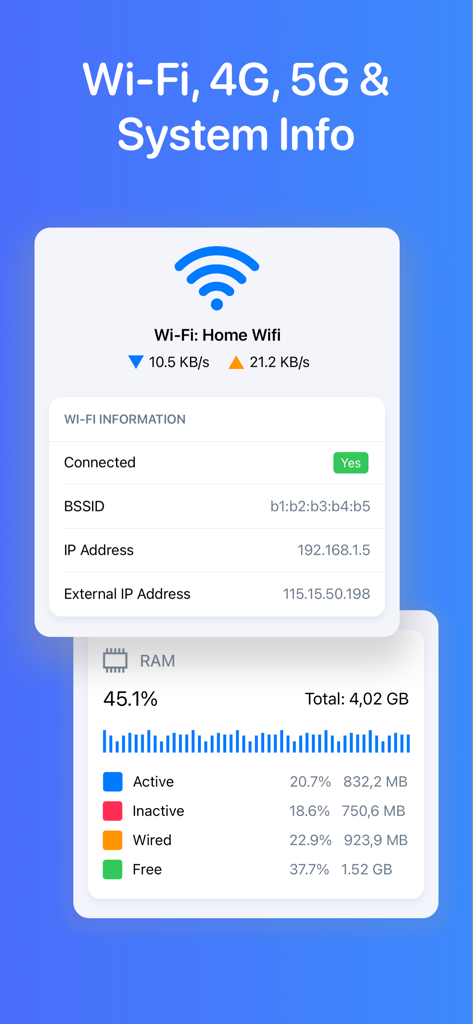
WiFi 연결 세부 정보와 실시간 RAM 사용량 통계를 보여주는 앱 화면

WiFi 연결 세부 정보와 실시간 RAM 사용량 통계를 보여주는 앱 화면

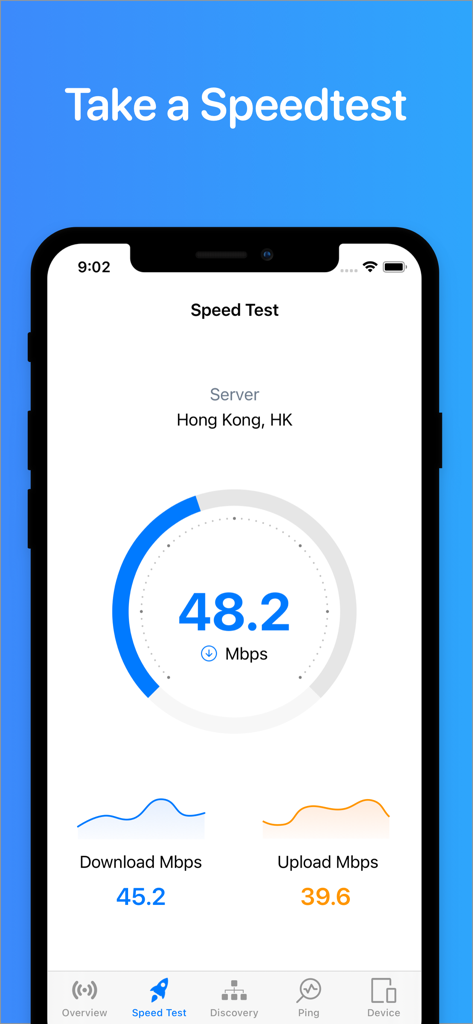
다운로드 및 업로드 메트릭을 포함한 인터넷 속도 테스트를 보여주는 모바일 앱 인터페이스

다운로드 및 업로드 메트릭을 포함한 인터넷 속도 테스트를 보여주는 모바일 앱 인터페이스

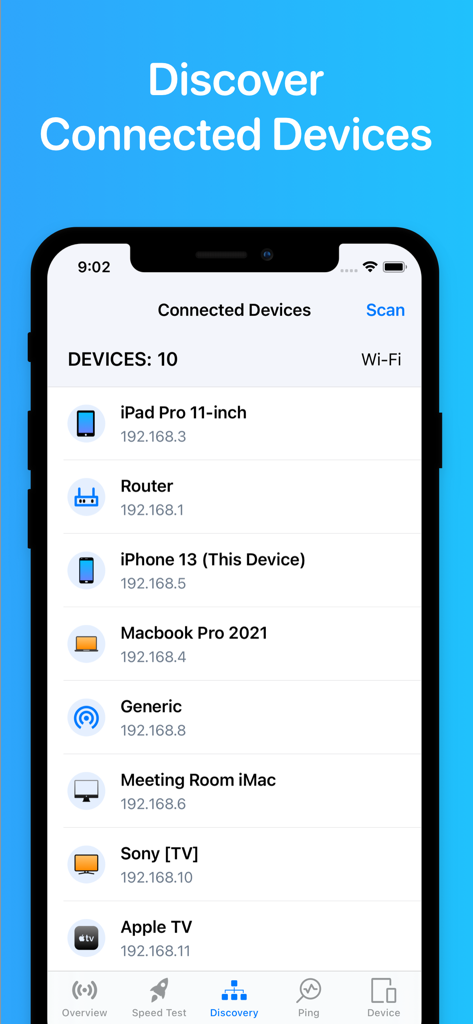
스마트폰 및 컴퓨터를 포함하여 로컬 와이파이 네트워크에 연결된 장치 목록을 보여주는 앱 화면

스마트폰 및 컴퓨터를 포함하여 로컬 와이파이 네트워크에 연결된 장치 목록을 보여주는 앱 화면

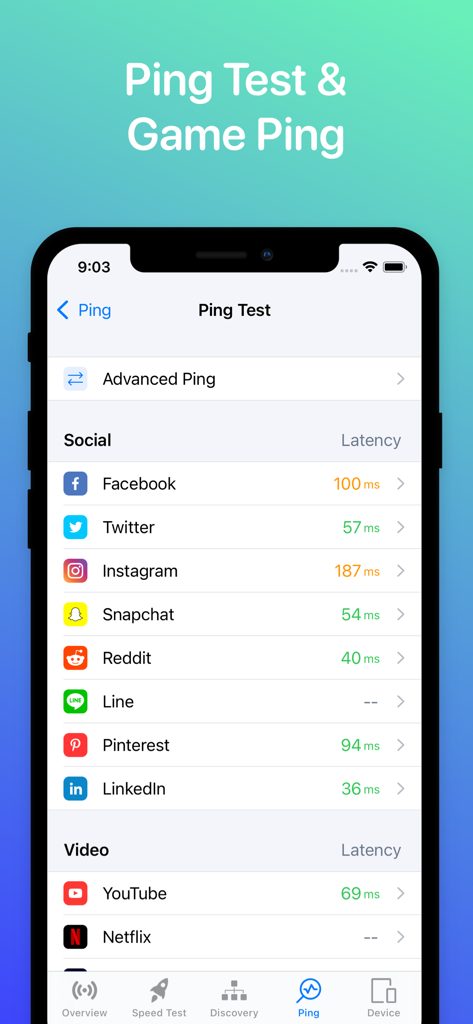
소셜 미디어 및 비디오 앱의 지연 시간 측정을 보여주는 핑 테스트 화면인 와이파이 분석기 앱의 스크린샷

소셜 미디어 및 비디오 앱의 지연 시간 측정을 보여주는 핑 테스트 화면인 와이파이 분석기 앱의 스크린샷

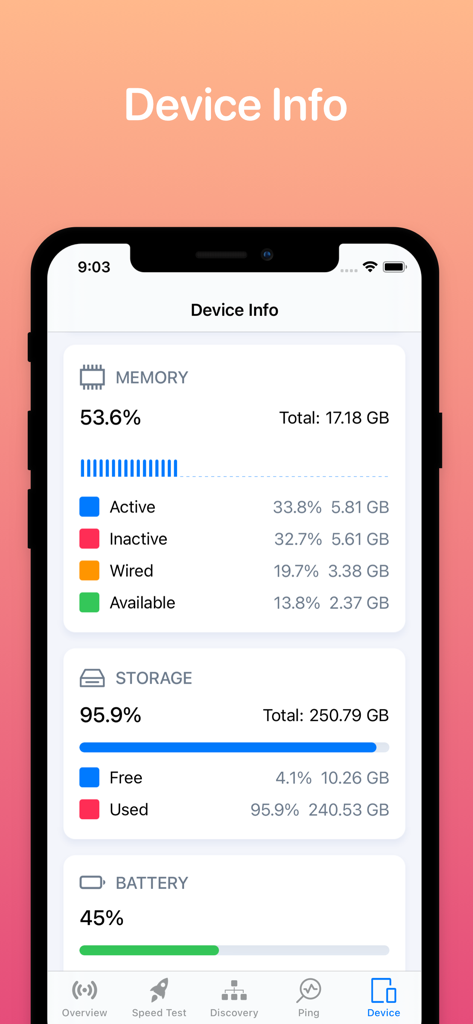
장치의 메모리, 저장 공간 및 배터리 상태에 대한 자세한 정보를 보여주는 와이파이 분석기 앱의 인터페이스

장치의 메모리, 저장 공간 및 배터리 상태에 대한 자세한 정보를 보여주는 와이파이 분석기 앱의 인터페이스

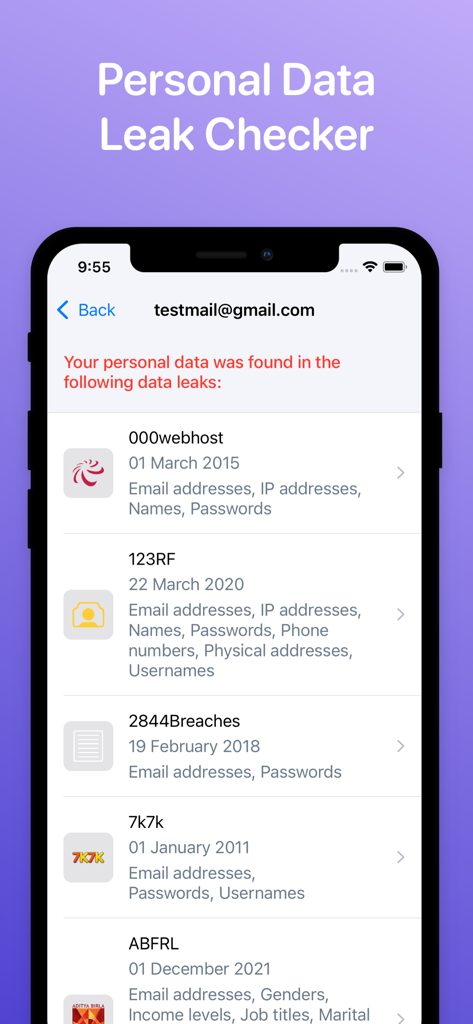
이메일 주소에 대한 개인 데이터 유출 및 유출된 정보를 식별하는 인터페이스

이메일 주소에 대한 개인 데이터 유출 및 유출된 정보를 식별하는 인터페이스

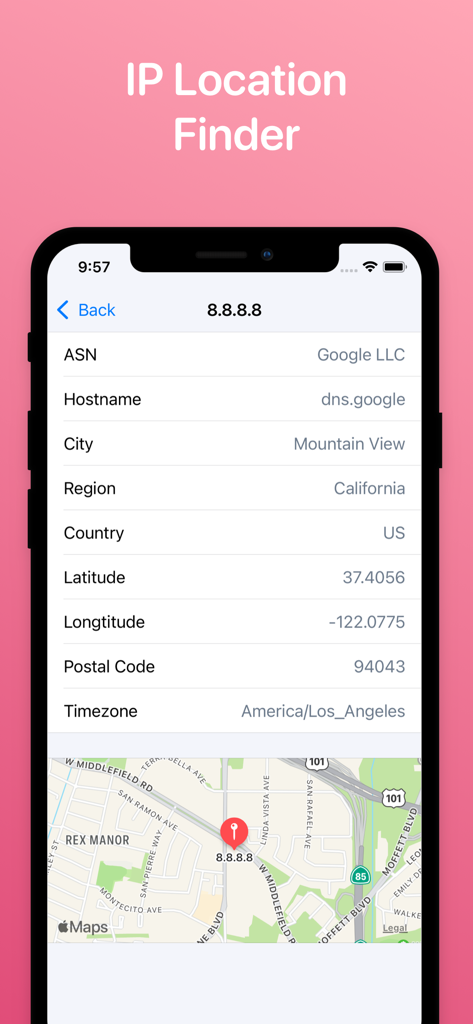
IP 주소에 대한 상세한 지리 정보와 지도 보기를 보여주는 IP 위치 찾기 도구의 모바일 인터페이스

IP 주소에 대한 상세한 지리 정보와 지도 보기를 보여주는 IP 위치 찾기 도구의 모바일 인터페이스

전문가처럼 홈 네트워크를 마스터하세요

이 앱을 돋보이게 하는 도구, 1M+ 명의 사용자가 선택.

🔍

완벽한 장치 투명성

WLAN에 연결된 모든 장치를 즉시 매핑하세요. 대역폭을 많이 사용하는 장치를 식별하고 무단 침입자가 개인 신호를 이용하지 않도록 하세요.

🚀

최적화된 게임 및 스트리밍

정밀 속도 테스트를 실행하고 게임 핑을 실시간으로 모니터링하세요. 지연 시간을 없애고 4K 스트리밍 및 경쟁 플레이에 적합한 네트워크를 준비하세요.

🛠️

전문 진단 스위트

ISP 지원팀에 전화하는 것을 건너뛰세요. 내장된 Traceroute, DNS 및 WHOIS 도구를 사용하여 네트워크 병목 현상을 직접 식별하고 수정하세요.

리뷰 분석

사용자 리뷰 인사이트.

감정 점수

14%
부정적

요약

The mobile app receives overwhelmingly negative feedback from users. Many criticisms center on the app's failure to provide promised Wi-Fi analysis capabilities, such as scanning nearby networks or analyzing channel usage, with some users noting iOS platform limitations as a contributing factor. A significant number of reviews also highlight the presence of excessive and intrusive advertisements, frequent app instability, and issues with unexpected pricing or mandatory subscriptions for basic features. While some users find the app useful for detecting devices on their network and appreciate its simplicity, these positive points are overshadowed by a multitude of functional and monetization-related problems.

주요 테마

Intrusive Advertisements(12)
WiFi Analysis Limitations(9)
App Functionality Issues(8)
Pricing & Subscription Concerns(8)
Device Detection(5)
General Usefulness(4)
Data Inaccuracy/Privacy(4)
iOS Platform Restrictions(1)

앱 소개

에 대해 알아야 할 모든 것 Wifi Analyzer Network Analyzer.

설명

WiFi Status is a powerful tool that allows you to analyze the state of Wi-Fi networks, discover devices connected to WLAN and detect network problems. ▲ Main features: - Discovers all devices connected to the network. - Network information: Default gateway, Wi-Fi network, Cell (3G, LTE) network, ... - Test your download & upload speed - One-tap to test speed for 2G, 3G, 4G, 5G, DSL, ADSL, and Wi-Fi. - Ping test & Game Ping. - View system info: CPU, memory, storage, device info, ... - Real-time network speed and traffic. - Network tools: Traceroute, DNS, WHOIS, Find open ports ▲ Simple, intuitive, and modern design. ADDITIONAL SUBSCRIPTION INFORMATION: Subscription price: - 1 week: $2.99 - 1 month: $5.99 (3 days free trial) - Lifetime: $14.99 - Subscription may be canceled at any time within the iTunes and App Store Apple ID Settings. All prices include applicable local sales taxes. - Payment will be charged to iTunes Account at confirmation of purchase. - Subscription automatically renews unless auto-renew is turned off at least 24-hours before the end of the current period. - The account will be charged for renewal within 24-hours prior to the end of the current period, and identify the cost of the renewal. - Subscriptions may be managed by the user and auto-renewal may be turned off by going to the user's Account Settings after purchase. - No cancellation of the current subscription is allowed during active subscription period. - Any unused portion of a free trial period, if offered, will be forfeited when the user purchases a subscription to that publication, where applicable Privacy policy: https://sites.google.com/view/tlabs91 Terms of service: https://sites.google.com/view/tlabs-termofservice

최신 버전

2.7

크기

47.0 MB

출시일

2022년 1월 3일

홈 네트워크를 직접 제어하세요

전문가급 툴킷으로 지연 시간을 없애고 연결을 보호하는 1백만 명 이상의 파워 유저와 함께하세요. 지금 다운로드하여 최적화를 시작하세요.

다운로드: App Store
FAQ

자주 묻는 질문

에 대해 알아야 할 모든 것 Wifi Analyzer Network Analyzer

Wifi Analyzer Network Analyzer란 무엇인가요?

WiFi Status라고도 알려진 Wifi Analyzer Network Analyzer는 Wi-Fi 네트워크를 분석하고, 연결된 장치를 검색하고, 네트워크 문제를 감지하는 강력한 도구입니다. 또한 속도 테스트와 시스템 정보도 제공합니다.

Wifi Analyzer Network Analyzer로 인터넷 속도를 테스트할 수 있나요?

예, Wifi Analyzer Network Analyzer는 2G, 3G, 4G, 5G, DSL, ADSL 및 Wi-Fi를 포함한 다양한 연결에 대해 다운로드 및 업로드 속도를 한 번의 탭으로 테스트할 수 있습니다.

Wifi Analyzer Network Analyzer는 내 네트워크의 장치를 어떻게 검색하나요?

Wifi Analyzer Network Analyzer 앱은 Wi-Fi 네트워크에 연결된 모든 장치를 검색합니다. "Discovery" 섹션에서 IP 주소를 포함한 연결된 장치 목록을 표시합니다.

Wifi Analyzer Network Analyzer에는 핑 테스트가 포함되어 있나요?

예, Wifi Analyzer Network Analyzer 앱에는 게임 핑도 제공하는 핑 테스트 기능이 포함되어 있습니다. 사용자는 다양한 소셜 및 비디오 서비스에 대한 지연 시간을 볼 수 있습니다.

Wifi Analyzer Network Analyzer는 어떤 종류의 시스템 정보를 제공하나요?

Wifi Analyzer Network Analyzer는 CPU, 메모리, 저장 공간 및 일반 장치 세부 정보를 포함한 시스템 정보를 제공합니다. 또한 실시간 네트워크 속도 및 트래픽도 표시합니다.

Wifi Analyzer Network Analyzer의 구독 옵션은 무엇인가요?

Wifi Analyzer Network Analyzer는 주간 구독(2.99달러), 월간 구독(5.99달러, 3일 무료 체험 포함), 평생 구독(14.99달러)을 제공합니다.

Wifi Analyzer Network Analyzer 구독을 취소할 수 있나요?

예, iTunes 및 App Store Apple ID 설정에서 언제든지 Wifi Analyzer Network Analyzer 구독을 취소할 수 있습니다. 자동 갱신은 기간이 종료되기 24시간 전에 해제해야 합니다.

Wifi Analyzer Network Analyzer는 개인 데이터 유출을 확인하나요?

예, Wifi Analyzer Network Analyzer 앱에는 "개인 데이터 유출 검사기" 기능이 포함되어 있습니다. 사용자는 이메일 주소를 입력하여 자신의 개인 데이터가 알려진 유출 사고에서 발견되었는지 확인할 수 있습니다.

Wifi Analyzer Network Analyzer는 IP 주소의 위치를 찾을 수 있나요?

예, Wifi Analyzer Network Analyzer 앱에는 "IP 위치 찾기" 기능이 있습니다. 지정된 IP 주소에 대해 ASN, 호스트 이름, 도시, 국가, 위도, 경도 및 시간대와 같은 세부 정보를 제공합니다.

App information, icons, screenshots, and descriptions displayed on this page are sourced from the Apple App Store and are the property of their respective developers. Download estimates and rankings are based on MWM's proprietary models and may not reflect actual figures. This page is provided for informational and analytical purposes only.

Believe this page infringes your intellectual property? File a dispute