WorkOutDoors

WorkOutDoors

다운로드: App Store
로고: WorkOutDoors

WorkOutDoors: Apple Watch를 위한 전문가급 스포츠 컴퓨터

오프라인 벡터 지도, 800개 이상의 맞춤 설정 가능한 데이터 필드, 고급 경로 안내 기능으로 시계를 강력한 내비게이션 및 데이터 도구로 바꿔보세요. 구독은 없으며, 제한도 없습니다. 러너, 하이커, 사이클리스트를 위한 최고의 성능만 제공합니다.

개발사

Ian Muriss

카테고리

Health & Fitness

다운로드

479K+

사용자 평점

4.7/5

총 평가 수

8K+

지원 언어

1

모든 픽셀의 정밀함

이 인터페이스를 사용하는 479K+ 명의 사용자.

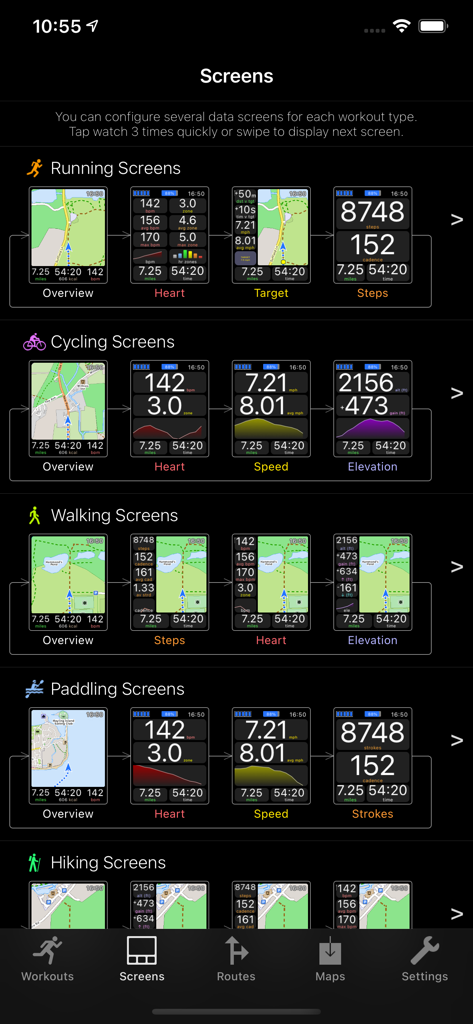
러닝, 사이클링, 하이킹 등 다양한 활동을 위한 맞춤 데이터 화면을 보여주는 WorkOutDoors 앱 인터페이스

러닝, 사이클링, 하이킹 등 다양한 활동을 위한 맞춤 데이터 화면을 보여주는 WorkOutDoors 앱 인터페이스

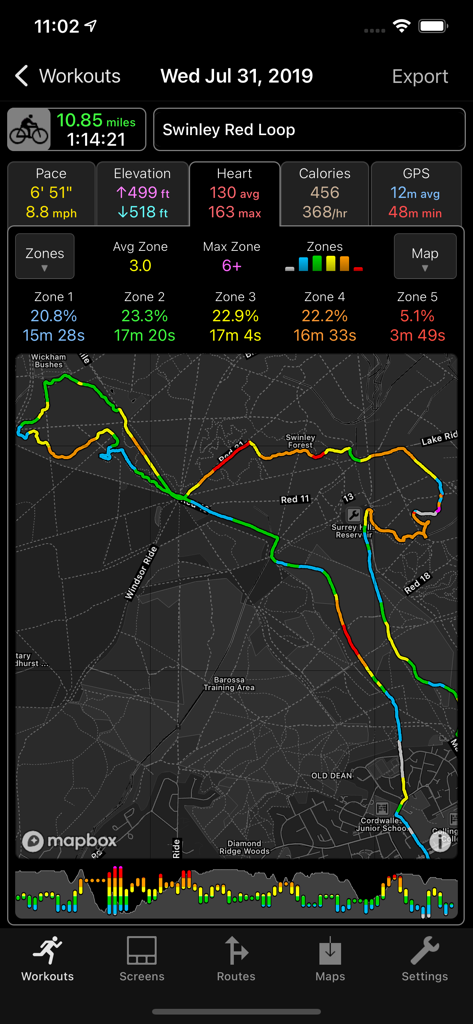
경로 지도와 심박수 구역을 보여주는 WorkOutDoors 앱의 상세 사이클링 운동 요약

경로 지도와 심박수 구역을 보여주는 WorkOutDoors 앱의 상세 사이클링 운동 요약

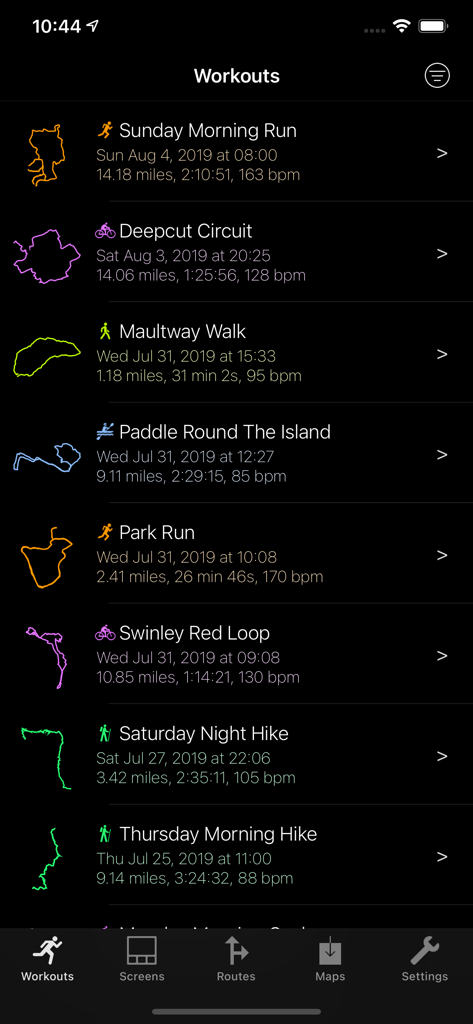
거리, 시간, 심박수, GPS 추적을 보여주는 WorkOutDoors 앱의 완료된 운동 목록

거리, 시간, 심박수, GPS 추적을 보여주는 WorkOutDoors 앱의 완료된 운동 목록

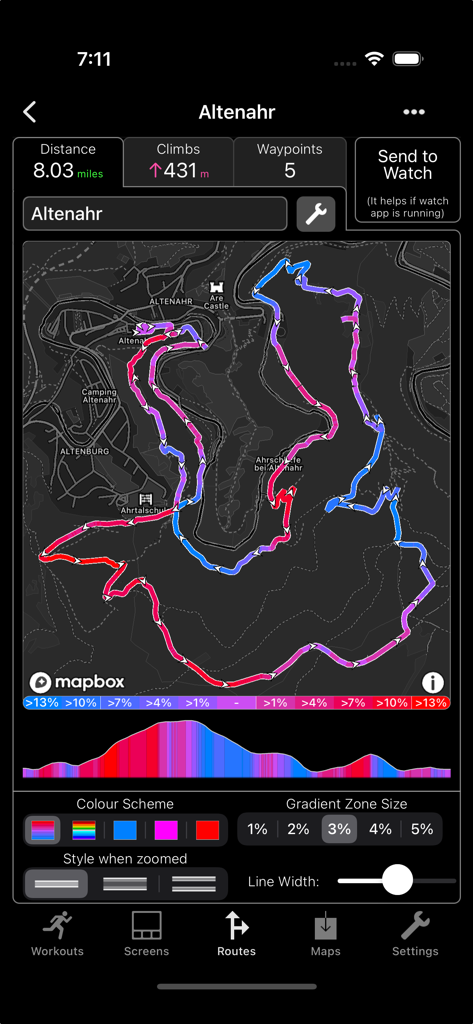
고도 프로필 및 경사도 색상 코딩이 있는 상세 지형 경로 지도를 보여주는 WorkOutDoors 앱 화면

고도 프로필 및 경사도 색상 코딩이 있는 상세 지형 경로 지도를 보여주는 WorkOutDoors 앱 화면

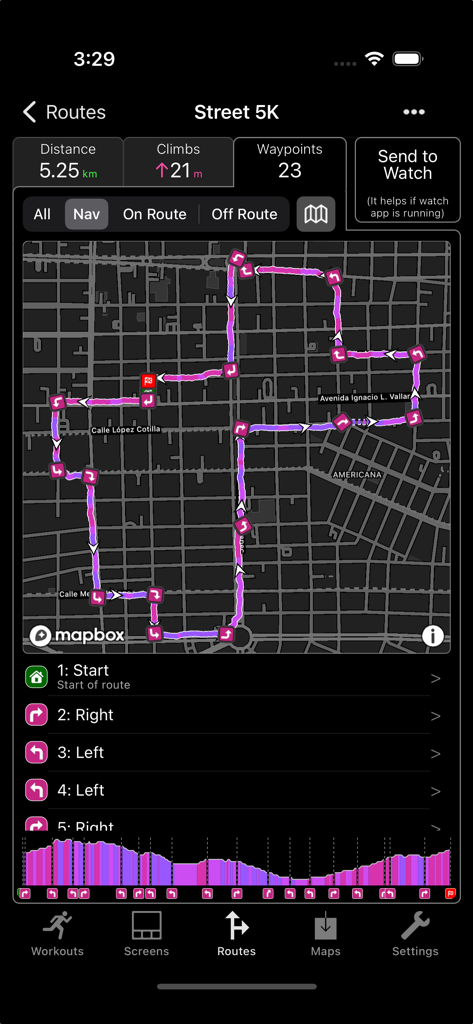
턴바이턴 방향과 고도 프로필이 있는 상세 5K 경로 지도를 보여주는 WorkOutDoors 앱

턴바이턴 방향과 고도 프로필이 있는 상세 5K 경로 지도를 보여주는 WorkOutDoors 앱

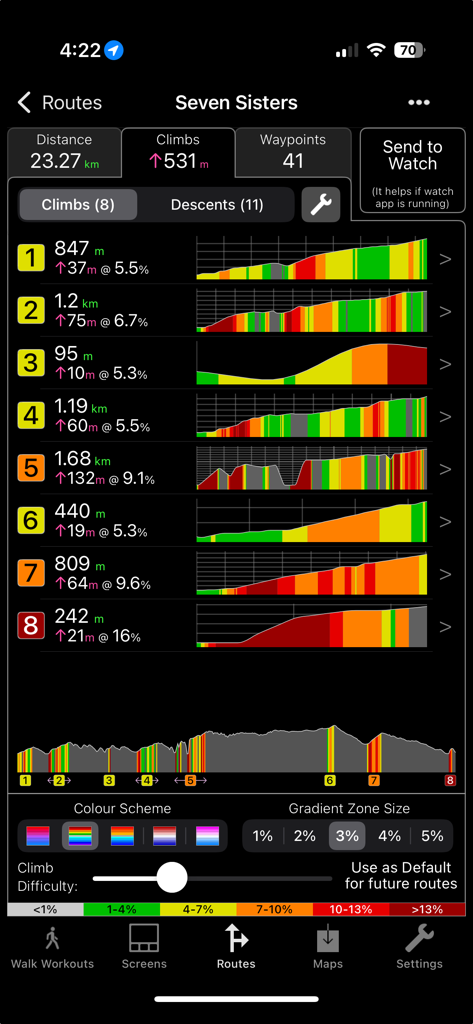
WorkOutDoors 앱에서 하이킹 경로의 상세 고도 프로필 및 등반 통계

WorkOutDoors 앱에서 하이킹 경로의 상세 고도 프로필 및 등반 통계

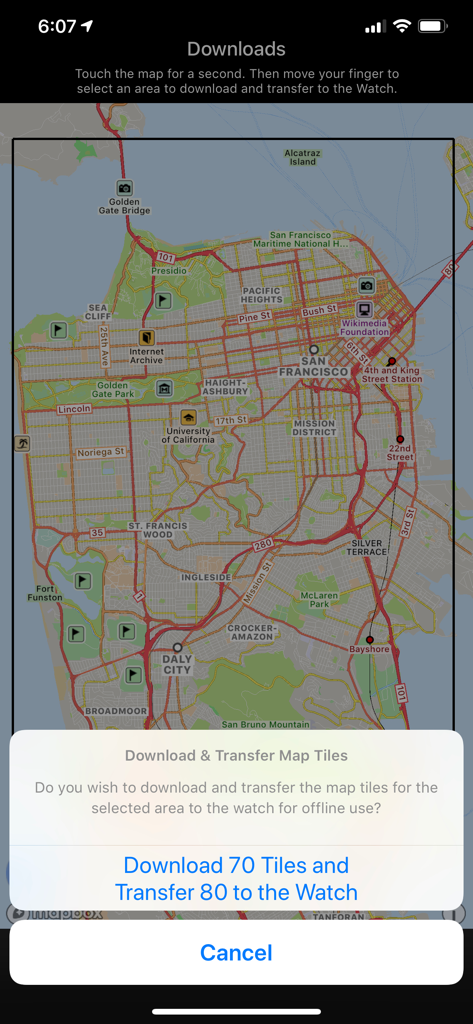
WorkOutDoors 앱에서 Apple Watch용 오프라인 지도 타일 다운로드

WorkOutDoors 앱에서 Apple Watch용 오프라인 지도 타일 다운로드

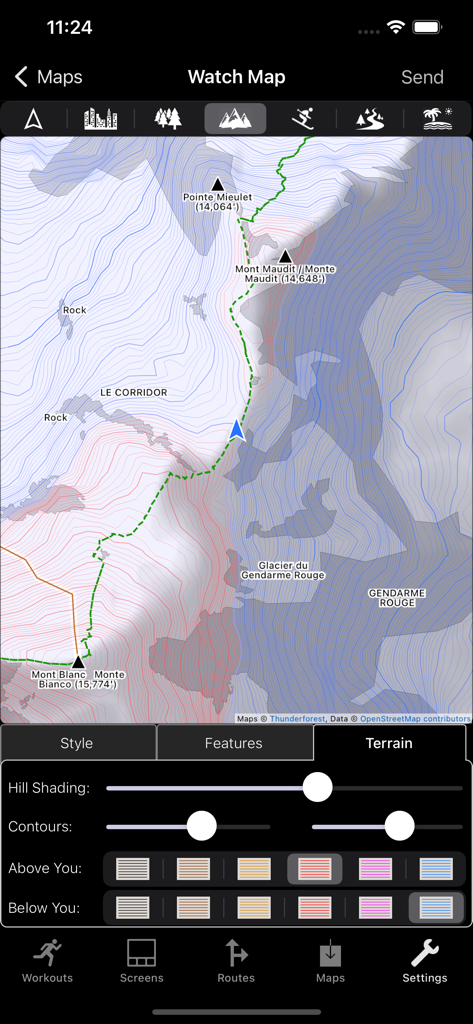
음영 및 등고선 색상을 포함한 지형 지도 지형 사용자 정의를 위한 WorkOutDoors 앱 인터페이스

음영 및 등고선 색상을 포함한 지형 지도 지형 사용자 정의를 위한 WorkOutDoors 앱 인터페이스

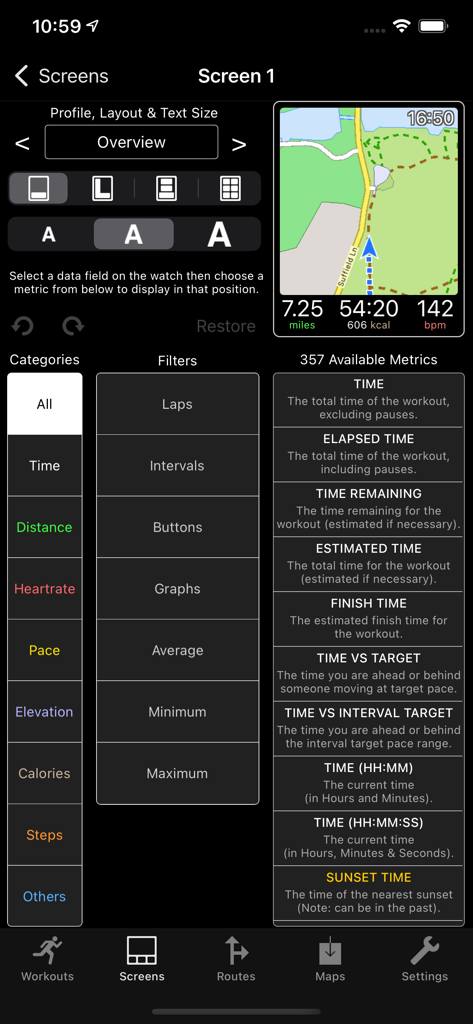
WorkOutDoors iPhone 앱에서 Apple Watch 운동 화면 및 데이터 필드를 사용자 정의하기 위한 인터페이스

WorkOutDoors iPhone 앱에서 Apple Watch 운동 화면 및 데이터 필드를 사용자 정의하기 위한 인터페이스

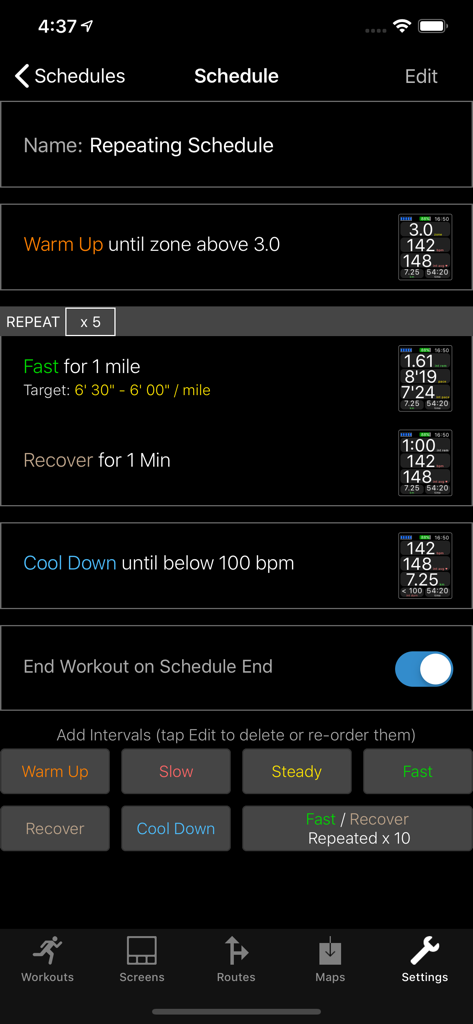
Apple Watch 운동을 위한 WorkOutDoors 앱 인터벌 트레이닝 스케줄 편집기

Apple Watch 운동을 위한 WorkOutDoors 앱 인터벌 트레이닝 스케줄 편집기

Apple Watch를 전문가 스포츠 컴퓨터로 전환하세요

이 앱을 돋보이게 하는 도구, 479K+ 명의 사용자가 선택.

🗺️

고급 오프라인 매핑

휴대폰 신호 없이도 완벽하게 작동하는 부드러운 벡터 지도, 등고선, 빵 부스러기 추적으로 백컨트리 트레일을 탐색하세요.

📊

궁극의 데이터 맞춤 설정

800개 이상의 데이터 필드 중에서 선택하여 완벽한 디스플레이를 만드세요. 손목에서 실시간 그래프로 심박수 구역, 파워, 페이스를 모니터링하세요.

🏷️

월간 구독 없음

SaaS 피로에 지치셨나요? 단 한 번의 결제로 모든 전문가 기능을 이용하고 향후 업데이트도 받을 수 있습니다. 숨겨진 비용 없이 순수한 성능만 제공합니다.

앱 소개

에 대해 알아야 할 모든 것 WorkOutDoors.

설명

WorkOutDoors is the most advanced and most configurable workout app for the Apple Watch. It's perfect for running, cycling, hiking and any other indoor or outdoor activity. Note: WorkOutDoors requires an Apple Watch Series 3 or later. It is not necessary to have your iPhone with you during a workout. The app uses Apple’s workout system, so all workouts are saved to the Health system. However it also provides many extra features over Apple's app, such as: - a super-smooth vector map that can be shown during a workout; - multiple configurable screens with metrics and graphs from a pool of 800+ data fields; - route files can be imported and used for navigation (including turn by turn directions); - dozens of configurable alerts (e.g. every mile; high heart rate; low pace; off-route etc); - interval schedules can be created using the larger screen of the phone app; - climbs and descents are supported with notifications and on-screen data and graphs; - waypoints can be created, navigated to, and exported; - use shortcuts to associate operations with gestures (e.g. double tap to hear configurable metrics); - compare pace against a target or a previous workout (using metrics and a dot on the map); - show zones for pace and power as well as heart rate (with optional coloured backgrounds); - auto-pause is available for all outdoor activities; - shows GPS and heart rate before starting a workout, so that you can wait for good signals; - configure distance and pace for running / walking to come from Apple’s pedometer or from GPS; - workouts can be exported in FIT / TCX / GPX files, or automatically sent to Strava; - workouts created by the app can be analysed in great depth in the iPhone app. The app also has many more features. The map is a particular highlight. It uses OpenStreetMap, which provides worldwide coverage and includes the trails necessary for outdoor workouts. It also has several features that help you navigate during a workout: - maps can be smoothly panned and zoomed, and can rotate according to the compass; - a breadcrumb trail of your whole route is displayed on the map during the workout; - topographic data can be shown, with configurable contour colours and hill shading; - map-only mode is provided for when you don't want to start a workout and just need a map; - a circular scale is shown when you zoom, making it easy to see the distance to features; - maps can be stored on the watch for use when offline (they are downloaded as required if online); - a red compass points north and a green compass points to the start; - choose a waypoint to see a compass and distance to it in the corner of the map; - you can also navigate to waypoints on the map, such as hospitals, sights, cafes etc. If you load a route from a GPX / TCX / FIT file then navigation is even easier: - your position is shown on an elevation profile of the route; - the remaining distance, time and ascent can also be displayed; - you can get alerted when you go off-route; - when off-route then a compass is shown which points to the nearest part of the route; - if the route contains turn by turn directions then these can be used like a sat nav; - if there are no directions then the app can use “bend detection” to generate them; - the next direction is shown as an icon and distance in the corner of the map; - the map can automatically zoom in when you are approaching a turn; - you can use shake gestures to hear the distance to the next turn or the end of the route; - routes are coloured by gradient: from red for steep uphill to blue for steep downhill; - you can configure what information is displayed during a climb or descent. All this is included for a single one-off payment. No extra in-app purchases or subscriptions are required (although there is a completely optional in-app tip jar which was requested by long-term users). If you own an Apple Watch and do any form of exercise, then WorkOutDoors is the app for you. Give it a go!

최신 버전

6.1

크기

45.8 MB

출시일

2017년 7월 13일

Apple Watch를 전문가 스포츠 컴퓨터로 전환하세요

479,000명 이상의 파워 유저와 함께 구독 없이 한 번의 결제로 800개 이상의 데이터 필드, 오프라인 벡터 지도, 최고급 내비게이션을 이용하세요. 절대 구독이 필요 없습니다.

다운로드: App Store
FAQ

자주 묻는 질문

에 대해 알아야 할 모든 것 WorkOutDoors

WorkOutDoors란 무엇인가요?

WorkOutDoors는 Apple Watch Series 3 이상을 위한 고급스럽고 구성 가능한 운동 앱입니다. 달리기, 사이클링, 하이킹 등 다양한 실내 및 실외 활동을 지원합니다.

운동 중 WorkOutDoors에 아이폰이 필요한가요?

아니요, WorkOutDoors는 운동 중에 아이폰이 필요하지 않습니다. 이 앱은 Apple Watch Series 3 이상에서 직접 실행됩니다.

WorkOutDoors는 Apple Health와 어떻게 통합되나요?

WorkOutDoors는 Apple의 운동 시스템을 사용하여 완료된 모든 운동이 Health 시스템에 자동으로 저장되도록 합니다. 또한 상세 분석을 위한 많은 추가 기능을 제공합니다.

사용자는 WorkOutDoors에서 운동 데이터 화면을 사용자 정의할 수 있나요?

네, WorkOutDoors는 운동 데이터 화면의 광범위한 사용자 정의를 허용합니다. 사용자는 800개 이상의 데이터 필드 풀에서 선택한 측정값과 그래프로 여러 화면을 구성할 수 있습니다.

WorkOutDoors는 턴바이턴 경로 탐색을 제공하나요?

네, WorkOutDoors는 경로 파일에 방향 정보가 포함된 경우 턴바이턴 탐색을 제공합니다. 이 앱은 방향 정보가 미리 존재하지 않는 경우 "굴곡 감지"를 통해 방향을 생성할 수도 있습니다.

WorkOutDoors는 Apple Watch에서 오프라인 지도 사용을 지원하나요?

네, WorkOutDoors는 오프라인 지도 사용을 지원합니다. 지도는 Apple Watch에 직접 저장할 수 있어 운동 중에 인터넷 연결 없이도 액세스할 수 있습니다.

WorkOutDoors의 가격 모델은 무엇인가요?

WorkOutDoors는 일회성 결제 모델을 사용합니다. 추가적인 인앱 구매나 구독이 필요하지 않지만, 완전히 선택적인 팁 주머니를 사용할 수 있습니다.

WorkOutDoors는 운동 활동 데이터를 내보낼 수 있나요?

네, WorkOutDoors는 운동 활동 데이터를 내보낼 수 있습니다. 운동은 FIT, TCX 또는 GPX 파일 형식으로 내보낼 수 있으며 Strava로 자동 전송할 수도 있습니다.

WorkOutDoors는 지형도 데이터를 제공하나요?

네, WorkOutDoors는 지형도 데이터를 제공합니다. 구성 가능한 등고선 색상 및 음영 처리를 표시하여 실외 활동의 탐색을 향상시킵니다.

WorkOutDoors에서 인터벌 운동 일정을 사용할 수 있나요?

네, WorkOutDoors에는 인터벌 운동 일정이 포함되어 있습니다. 이러한 일정은 연결된 iPhone 앱의 더 큰 화면을 사용하여 생성 및 구성됩니다.

WorkOutDoors는 어떤 활동을 지원하나요?

WorkOutDoors는 달리기, 사이클링, 하이킹 및 기타 실내 또는 실외 운동을 포함한 광범위한 활동을 지원합니다. Apple Watch에서 포괄적인 운동 추적을 위해 설계되었습니다.

WorkOutDoors는 경로 중에 등반 및 하강을 추적하나요?

네, WorkOutDoors는 등반 및 하강을 추적합니다. 고도 변화에 대한 알림, 화면 데이터 및 그래프를 제공하며, 경로를 기울기에 따라 색상으로 표시할 수 있습니다.

App information, icons, screenshots, and descriptions displayed on this page are sourced from the Apple App Store and are the property of their respective developers. Download estimates and rankings are based on MWM's proprietary models and may not reflect actual figures. This page is provided for informational and analytical purposes only.

Believe this page infringes your intellectual property? File a dispute