2Do - Todo List, Tasks & Notes

2Do - Todo List, Tasks & Notes

Herunterladen auf App Store
Logo von 2Do - Todo List, Tasks & Notes

2Do: Der leistungsstarke Aufgabenmanager, der sich an Ihr Leben anpasst

Entwickelt für Power-User, die die totale Kontrolle verlangen. Von GTD-Projekten bis hin zu intelligenten Listen und Stapelbearbeitung – erleben Sie einen Workflow auf Desktop-Niveau, der genau so funktioniert, wie Sie es tun.

Herausgeber

Beehive Innovations Services

Kategorie

Productivity

Downloads

537K+

Bewertung

4.3/5

Bewertungen gesamt

59K+

Sprachen

18

Präzision auf einen Blick

Entdecken Sie die Oberfläche, die von 537K+ Nutzern verwendet wird.

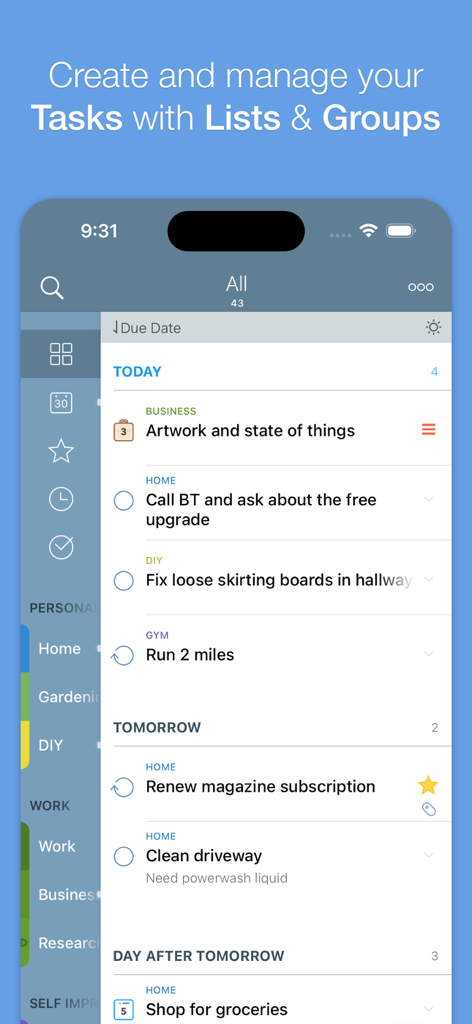
2Do App Aufgabenlistenansicht mit geplanten Aufgaben, kategorisiert nach Tags und Fälligkeitsdaten.
2Do App Aufgabenlistenansicht mit geplanten Aufgaben, kategorisiert nach Tags und Fälligkeitsdaten.

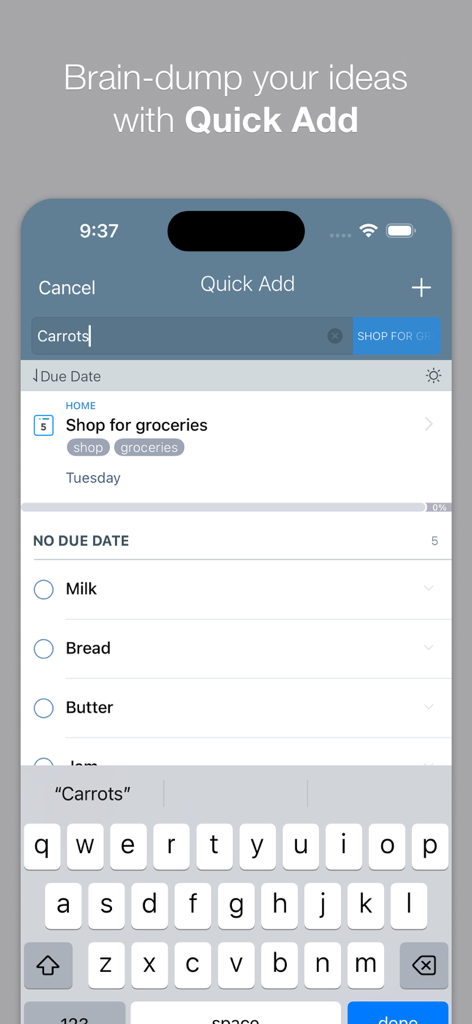
2Do App-Oberfläche mit der Schnell-Hinzufügen-Funktion zur schnellen Eingabe von Aufgaben auf einem iPhone
2Do App-Oberfläche mit der Schnell-Hinzufügen-Funktion zur schnellen Eingabe von Aufgaben auf einem iPhone

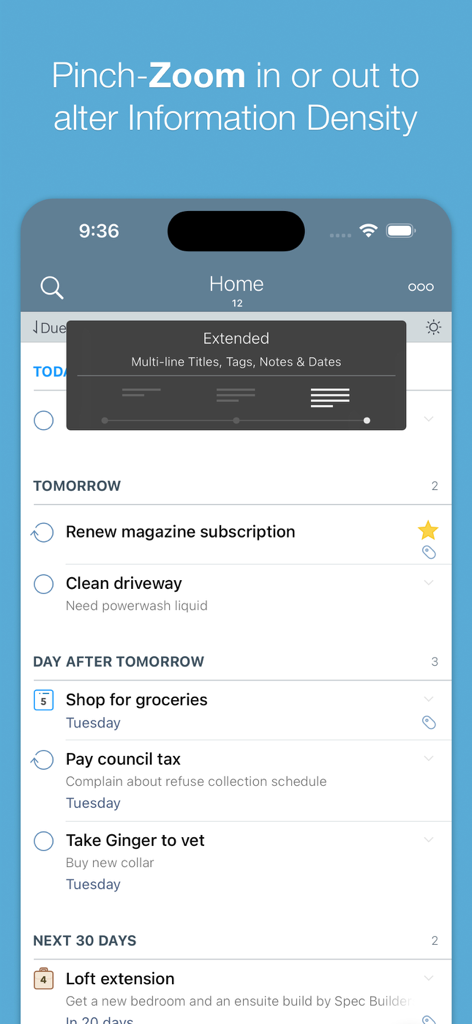
Screenshot der 2Do App-Aufgabenliste mit der Pinch-Zoom-Funktion zur Anpassung der Informationsdichte
Screenshot der 2Do App-Aufgabenliste mit der Pinch-Zoom-Funktion zur Anpassung der Informationsdichte

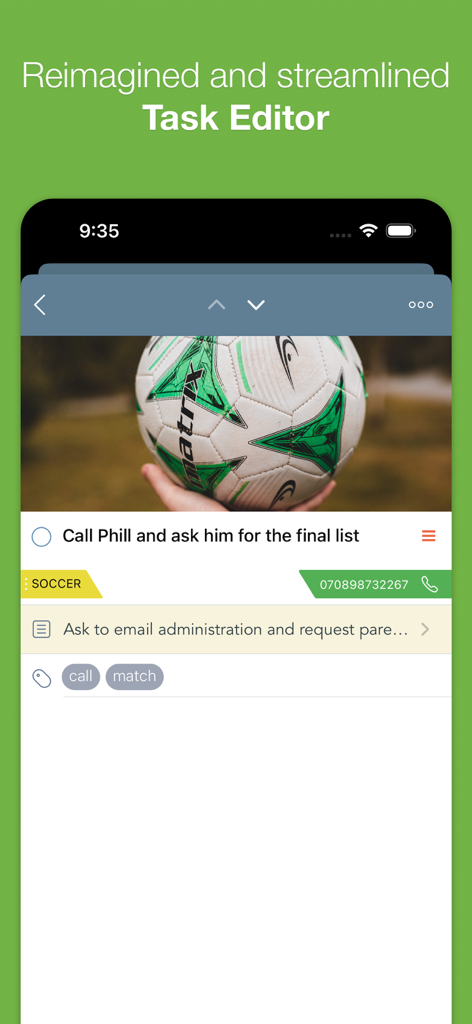
Oberfläche des 2Do App-Aufgabeneditors, die eine Aufgabe mit einem angehängten Bild, Tags und Kontaktdaten zeigt
Oberfläche des 2Do App-Aufgabeneditors, die eine Aufgabe mit einem angehängten Bild, Tags und Kontaktdaten zeigt

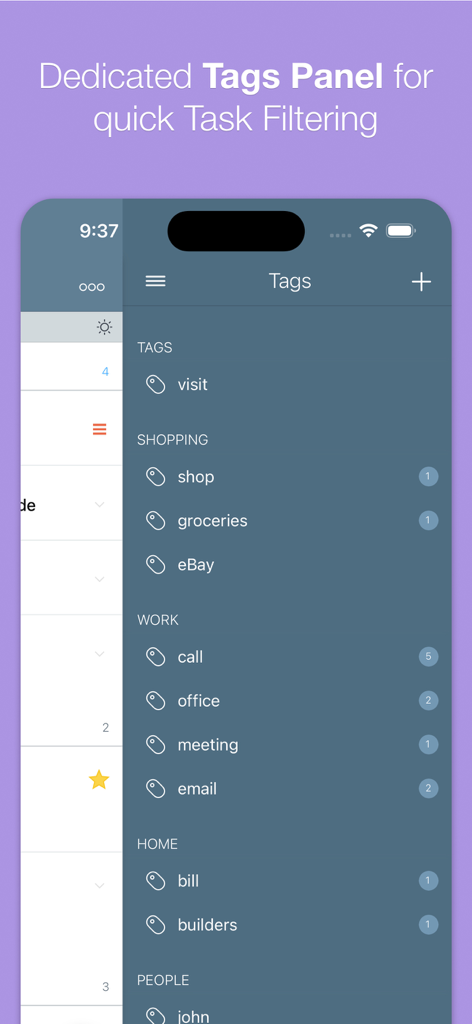
Ein mobiler Screenshot der 2Do App, der das dedizierte Tag-Panel zur Organisation und Filterung von Aufgaben zeigt

Ein mobiler Screenshot der 2Do App, der das dedizierte Tag-Panel zur Organisation und Filterung von Aufgaben zeigt

Aufgabenverwaltung ohne Kompromisse

Die Tools, die diese App auszeichnen, gewählt von 537K+ Nutzern.

🎯

Methodenunabhängig

Lassen Sie sich nicht in starre Systeme zwingen. Egal, ob Sie GTD, benutzerdefinierte Projekte oder einfache Listen verwenden, 2Do passt sich Ihrem einzigartigen Workflow und Ihren Gewohnheiten an.

⚙️

Erweiterte intelligente Filterung

Nutzen Sie die Leistung benutzerdefinierter intelligenter Listen und die Pinch-to-Zoom-Dichtesteuerung, um komplexe Projekte zu durchsuchen und sich auf das zu konzentrieren, was wirklich zählt.

Effizienz auf Profi-Niveau

Steigern Sie Ihre Leistung mit Stapelbearbeitung, standortbasierten Benachrichtigungen und nahtloser Synchronisierung im gesamten Apple-Ökosystem über Dropbox oder private CalDAV-Server.

Über die App

Alles, was Sie über wissen müssen 2Do - Todo List, Tasks & Notes.

Beschreibung

"2Do adapts to my needs, not the other way around. 2Do gets me."- Macstories 2Do lets you take a completely different approach to managing your tasks. With its extremely simple-to-use interface and a comprehensive and flexible set of powerful features, it lets you focus on what's most important to you: your life. There is no wrong way of using 2Do, and unlike other to-do apps, it won't force you in adhering to a particular task management methodology. AWARDS • Macstories: App of the Year 2015 • Apple - App of the week, June 2015 • Apple - Mac App Store “Best of 2013” • “Best App Ever Awards” Winner • Cult Of Mac - 5/5 • Gizmodo "Best app for forgetful people" - Gold Medal PLUGINS: Email to 2Do: Optional plugin that allows you to integrate your email address directly with 2Do, thus allowing you to email yourself tasks from anywhere. You can even use automation, such as IFTTT, to add reminders to your list. SYNC • Stay in sync using one of the following: Dropbox, Reminders (CalDAV), Toodledo, Fruux (CalDAV), Calendar Server (CalDAV), ownCloud (CalDAV), SabreDAV (CalDAV) or a 3rd party CalDAV Server of choice. • Using Reminders CalDAV sync enables Siri • Periodic automatic backups are created for you (compatible with 2Do for Mac) for a rainy day. • Automatic Push sync between devices SIMPLE TASKS, CHECKLISTS & PROJECTS • Create simple tasks, or checklists and projects with sub-tasks. Tasks can have notes, attachments and multiple alarms. • Set any task to repeat using a flexible set of options. • Assign multiple alerts / reminders PASSWORD PROTECTION • Set a lock to the whole app or individual lists LIST GROUPS, LISTS, INBOX & SMART LISTS • In addition to built-in Focus lists that allow you to conveniently view upcoming, starred or scheduled tasks, you can create multiple lists to manage and organize your tasks. • Built-in support for GTD Inbox • Smart lists let you harness the true potential of 2Do using a number of search options, filters and search pre-sets. Using Smart Lists, you can create custom views of your tasks and use them to focus-in or find frequently managed tasks. 
 PINCH ZOOMING • Control the amount of information you wish to see with a simple pinch-to-zoom gesture, from single line titles to multiple lines of titles, notes and tags.
 BATCH EDITING & SHARING • Drag & Drop support to move tasks between lists or drop on calendar to defer • Batch tagging, starring, marking tasks done and more • Task Sharing via AirDrop, iMessage and Email REIMAGINED TASK EDITOR & QUICK ADD • With focus on switching between editors effortlessly using a single tap only, you’ll save dozens of taps and swipes when editing your tasks. • Save your thoughts as they come to you, by using Quick Add (Tap-hold on [+]) • X-callback-url support TAGS • Manage tags from a dedicated Tags Panel • Organize your tags within groups • Leverage the powerful integration of Tags & Smart Lists to filter on frequently managed tasks. 
• Find Used vs. Unused tags YOUR TASKS UNLIMITED • Set a Start Date to hide tasks from a list before they're relevant and add Duration to put an estimate on the amount of time you’ll be spending on your task • Add an action to call, write an email or trigger a URL Scheme right from 2Do • Attach an image or a voice note to your tasks • Customizations for time management • Use as an events / party planner, or an effective birthday reminder • Desktop-class Task Manager ALERTS • Attach multiple alerts to each task • Attach locations to tasks and get nearby alerts as you approach assigned locations DESKTOP-CLASS IPAD APP • Everything from Tasks to Calendar Events - all managed from the same screen. • Manage calendar events and schedules • Split-screen support • Keyboard shortcuts EXTRAS • TextExpander support Follow us: Twitter: @2DoApp Facebook.com/The2DoApp Youtube.com/user/The2DoApp

Neueste Version

3.83

Größe

81.7 MB

Erstveröffentlichung

15. Okt. 2009

Sind Sie bereit, Ihren Arbeitsablauf zu meistern?

Schließen Sie sich über 500.000 Power-Usern an, die einen Aufgabenmanager verlangen, der sich ihnen anpasst und nicht umgekehrt. Erleben Sie Produktivität auf Desktop-Niveau unterwegs.

Herunterladen auf App Store

App information, icons, screenshots, and descriptions displayed on this page are sourced from the Apple App Store and are the property of their respective developers. Download estimates and rankings are based on MWM's proprietary models and may not reflect actual figures. This page is provided for informational and analytical purposes only.

Believe this page infringes your intellectual property? File a dispute