
Diese Seite ist keine offizielle Seite der App oder ihres Entwicklers, sondern eine unabhängige redaktionelle Veröffentlichung, die zu Informations- und Kommentarzwecken erstellt wurde. Sofern nicht ausdrücklich anders angegeben, sind weder die App noch ihr Entwickler mit MWM, Apple, Google Play, dem App-Herausgeber oder dem Entwickler der App verbunden, von ihnen unterstützt, gesponsert, autorisiert oder anderweitig offiziell verbunden, und nichts auf dieser Seite impliziert, dass die App unter Verwendung der Dienste von MWM entwickelt wurde. Alle Marken, Logos, Screenshots und andere Inhalte bleiben Eigentum ihrer jeweiligen Inhaber.

7-Eleven Multicopy
Plötzlich wird jeder 7-Eleven in Japan zur persönlichen Druckerei. Ihr Smartphone ist der Schlüssel, der diese Türen öffnet.
Downloads
12.5M+Bewertung
Bewertungen gesamt
41.3KHerausgeber
Kategorie
UtilitiesSprachen
2Neueste Version
1.5.13Größe
64.5 MBErstveröffentlichung
11. Mai 2021Analyse der Kernfunktionen von 7-Eleven Multicopy
Eine detaillierte Bewertung der App aus Sicht eines Tech-Analysten für den japanischen Markt, der den Bedarf an schnellen, zugänglichen Druck- und Scanservices adressiert.
Nahtlose Integration in das 7-Eleven Filialnetz
Die App ermöglicht die direkte Nutzung der umfangreichen Multi-Kopiergeräte in den überall in Japan verfügbaren 7-Eleven Filialen. Dies bietet eine unvergleichliche Bequemlichkeit und Zugänglichkeit für Druck- und Scanbedürfnisse.
Umfassende Druckdienste direkt vom Smartphone
Es ermöglicht Nutzern, Fotos, Dokumente und sogar Postkarten schnell und unkompliziert von ihrem Smartphone aus zu drucken, was eine hohe Flexibilität für private und geschäftliche Anforderungen bietet.
Einfaches Digitalisieren physischer Dokumente
Die App erlaubt das Scannen von physischen Dokumenten und das direkte Speichern der digitalisierten Daten auf dem Smartphone. Dies ist ideal für die Archivierung oder das Teilen wichtiger Unterlagen.
Direkte Wi-Fi-Verbindung für schnellen Datentransfer
Dieses Tool unterstützt die direkte Wi-Fi-Verbindung zu den Multi-Kopiergeräten, wodurch ein schneller und sicherer Datenaustausch ohne Kabel oder umständliche Übertragungsschritte gewährleistet wird.
Intuitive Bedienung ohne Passworteingabe
Die App ist auf einfache Handhabung ausgelegt und erfordert keine Passworteingabe für Druck- oder Scanvorgänge, was den Prozess beschleunigt und gleichzeitig die Datensicherheit gewährleistet.
Vielseitige Druckoptionen für verschiedene Medien
Die App bietet spezialisierte Druckfunktionen für Fotos, Dokumente und Postkarten. Es besteht sogar die Möglichkeit, eigene Postkartenrohlinge zu verwenden, was die Anwendung sehr flexibel macht.
Breite Unterstützung von Dateiformaten
Es werden gängige Dateiformate wie JPEG, TIFF, BMP, PNG, PDF, XPS und XDW für Druck und Scan unterstützt, was eine hohe Kompatibilität und weniger Konvertierungsaufwand für die Nutzer bedeutet.
Hochauflösendes Scannen für beste Qualität
Dieses Tool ermöglicht das Scannen in hoher Auflösung (600dpi für Schwarz-Weiß, 400dpi für Farbe), wodurch eine exzellente Qualität der digitalisierten Dokumente und Bilder sichergestellt wird.
Häufig gestellte Fragen
Alles, was Sie über wissen müssen 7-Eleven Multicopy
What is the primary function of the 7-Eleven Multicopy app?
The 7-Eleven Multicopy app prints photos and documents from smartphones and saves scanned physical documents to the device at 7-Eleven stores in Japan.
How do I print documents using the 7-Eleven Multicopy app?
Users send documents via Wi-Fi from the 7-Eleven Multicopy app to a Multi-copy machine in 7-Eleven stores in Japan. The process uses a QR code and requires no password.
Can I scan documents with the 7-Eleven Multicopy app?
Yes, the 7-Eleven Multicopy app scans physical documents to save images directly to your smartphone. It offers high-resolution scanning at 600dpi B&W or 400dpi full-color.
What file formats does the 7-Eleven Multicopy app support for printing?
For photos, the 7-Eleven Multicopy app supports JPEG, TIFF, BMP, and PNG. For documents and postcards, it supports PDF, XPS, XDW, JPEG, TIFF, BMP, and PNG.
Where can I use the 7-Eleven Multicopy app?
The 7-Eleven Multicopy app exclusively works with Multi-copy machines located at 7-Eleven stores in Japan. It does not operate outside this specific region.
What types of prints are available through the 7-Eleven Multicopy app?
The 7-Eleven Multicopy app offers Document Print, Photograph Print, and Postcard Print services. Users can also utilize their own postcard paper for printing.
Does the 7-Eleven Multicopy app require a password for operation?
No, the 7-Eleven Multicopy app provides simple operation without requiring any password. Security is ensured through its Wi-Fi connection method.
What are the supported operating systems for the 7-Eleven Multicopy app?
The 7-Eleven Multicopy app supports iOS/iPadOS versions 17 to 18, and 26.
What types of photo prints can the 7-Eleven Multicopy app produce?
The 7-Eleven Multicopy app produces various photo prints including 2L/L size, Shuffle print, ID photo, Share Print, and Square.
Is there a cost associated with using the 7-Eleven Multicopy app services?
Yes, users pay for printing documents or photos, and for saving scanned data using the 7-Eleven Multicopy app.
What is the maximum file size for printing with the 7-Eleven Multicopy app?
The maximum file size for Photograph, Document, or Postcard Print with the 7-Eleven Multicopy app is 30 MB per file. A maximum of 60 items is allowed.
What file formats are supported for saving scanned data using the 7-Eleven Multicopy app?
The 7-Eleven Multicopy app supports saving scanned data in PDF, XDW, JPEG, and TIFF formats.
Die folgenden Screenshots und die Beschreibung stammen direkt aus dem offiziellen Store-Eintrag der App und sind Eigentum des Entwicklers.
App Store
Screenshots

Druckdienste im Überblick
Die App präsentiert ihre Hauptfunktionen für Druckdienste, indem sie übersichtlich Optionen wie 'Photograph Print' und 'Document Print' anzeigt, welche den einfachen Zugriff auf das Drucken von Fotos und Dokumenten ermöglichen.

QR-Code scannen & drucken
Nutzer können den angezeigten QR-Code direkt von der App aus nutzen, um eine schnelle Verbindung mit dem Multi-Kopiergerät herzustellen und den Druckvorgang durch das Halten des QR-Codes vor das Gerät zu initiieren.
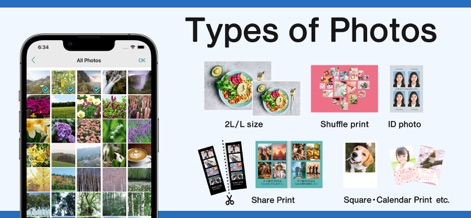
Vielfältige Fotodruck-Optionen
Die App ermöglicht die komfortable Auswahl von Bildern aus der persönlichen Galerie und bietet eine breite Palette an Druckformaten, darunter spezielle Optionen wie 'ID photo' und kreative 'Shuffle print' für vielfältige Anwendungen.
Beschreibung
Download
Ähnliche Apps
Apps mit ähnlichen Funktionen und Nutzererfahrung

Photo Print: CVS Quick Prints
PlusMinusOne, Inc.

Princh
Princh ApS

COPIX
KOPIKS, OOO
Network Print
Sharp Corporation

ファミマネットワークプリント
FamilyMart Co.,Ltd.
FUJIFILM WPS Photo Transfer
FUJIFILM Corporation

printingbox
VISIONOTS Co.,Ltd

Wepa Print
WEPA Inc.

Xerox® Workplace
Xerox Corporation
Diese Seite ist keine offizielle Seite der App oder ihres Entwicklers, sondern eine unabhängige redaktionelle Veröffentlichung, die zu Informations- und Kommentarzwecken erstellt wurde. Sofern nicht ausdrücklich anders angegeben, sind weder die App noch ihr Entwickler mit MWM, Apple, Google Play, dem App-Herausgeber oder dem Entwickler der App verbunden, von ihnen unterstützt, gesponsert, autorisiert oder anderweitig offiziell verbunden, und nichts auf dieser Seite impliziert, dass die App unter Verwendung der Dienste von MWM entwickelt wurde. Alle Marken, Logos, Screenshots und andere Inhalte bleiben Eigentum ihrer jeweiligen Inhaber.