Activity Tracker・FitnessView
Herunterladen auf App Store

Diese Seite ist keine offizielle Seite der App oder ihres Entwicklers, sondern eine unabhängige redaktionelle Veröffentlichung, die zu Informations- und Kommentarzwecken erstellt wurde. Sofern nicht ausdrücklich anders angegeben, sind weder die App noch ihr Entwickler mit MWM, Apple, Google Play, dem App-Herausgeber oder dem Entwickler der App verbunden, von ihnen unterstützt, gesponsert, autorisiert oder anderweitig offiziell verbunden, und nichts auf dieser Seite impliziert, dass die App unter Verwendung der Dienste von MWM entwickelt wurde. Alle Marken, Logos, Screenshots und andere Inhalte bleiben Eigentum ihrer jeweiligen Inhaber.

Logo von Activity Tracker・FitnessView
Herunterladen auf App Store

Activity Tracker・FitnessView

Verwandeln Sie rohe Gesundheitsmetriken in umsetzbare Erkenntnisse. Personalisieren Sie Ihr Dashboard, passen Sie tiefgehende Widgets an und meistern Sie Ihre Fitnessziele mit dem leistungsstärksten Datenvisualisierer für das Apple-Ökosystem.

Kennzahlen

Downloads

963K+

Bewertung

4.6/5

Bewertungen gesamt

7K+

Herausgeber

Funn Media, LLC

Kategorie

Health & Fitness

Sprachen

12

Neueste Version

2.8.3

Größe

240.6 MB

Erstveröffentlichung

14. Juli 2021
Funktionen

ÜBERNEHMEN SIE DIE KONTROLLE ÜBER IHRE GESUNDHEITSDATEN

FitnessView verwandelt die komplexen Metriken von Apple Health in ein schönes, umsetzbares Dashboard, das speziell auf Ihre einzigartige Fitnessreise und Ihre Lebensstilziele zugeschnitten ist.

Personalisiertes Gesundheits-Dashboard

Erstellen Sie Ihr ultimatives Kontrollzentrum. Wählen Sie aus über 50 Datensätzen – wie aktive Kalorien, Flüssigkeitsaufnahme und Makronährstoffe – um auf einen Blick zu sehen, was Ihnen wirklich wichtig ist.

Schnell einsehbare Widgets & Komplikationen

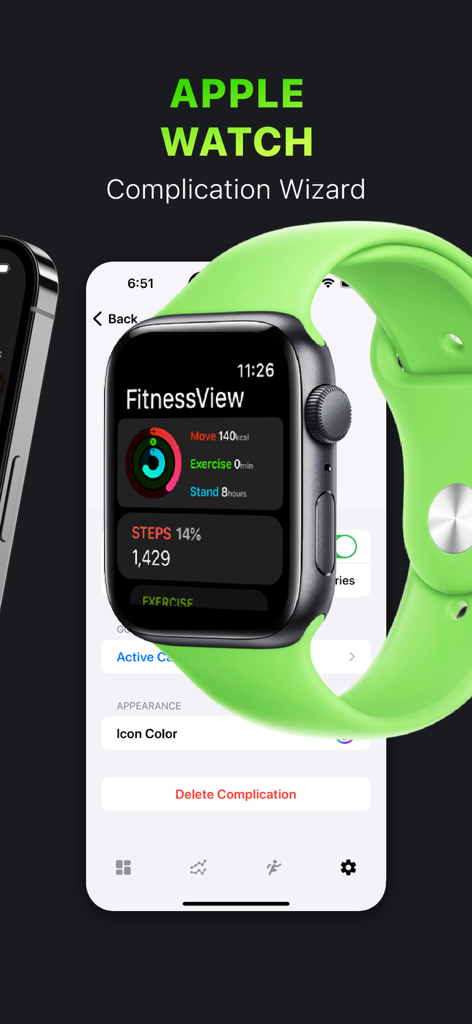
Bringen Sie Ihren Fortschritt in den Vordergrund. Verwenden Sie leistungsstarke Widgets für den Homescreen und benutzerdefinierte Apple Watch Komplikationen, um Ihre Serien und Ziele zu überwachen, ohne die App öffnen zu müssen.

Die folgenden Screenshots und die Beschreibung stammen direkt aus dem offiziellen Store-Eintrag der App und sind Eigentum des Entwicklers.

App Store

Screenshots
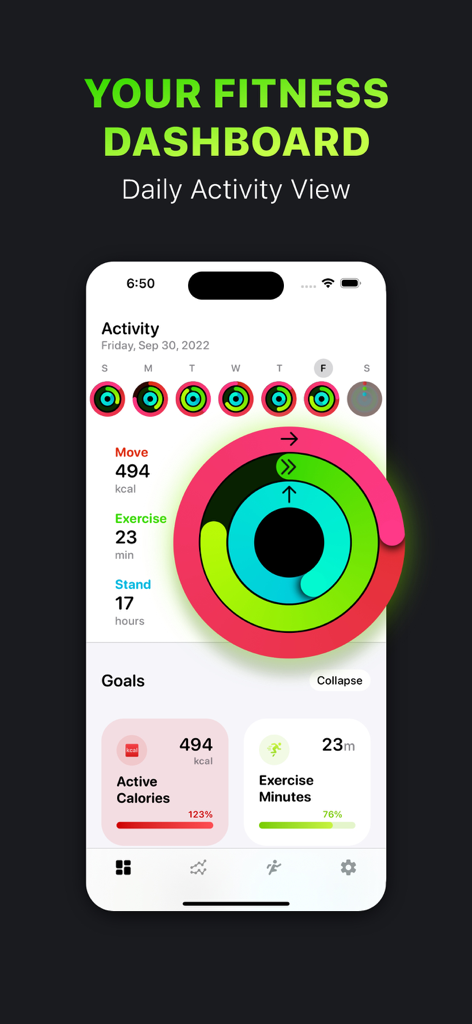
Activity Tracker・FitnessView - FitnessView App-Oberfläche auf einem iPhone, die Aktivitätsringe und den Fortschritt von Fitnesszielen anzeigt
FitnessView App-Oberfläche auf einem iPhone, die Aktivitätsringe und den Fortschritt von Fitnesszielen anzeigt

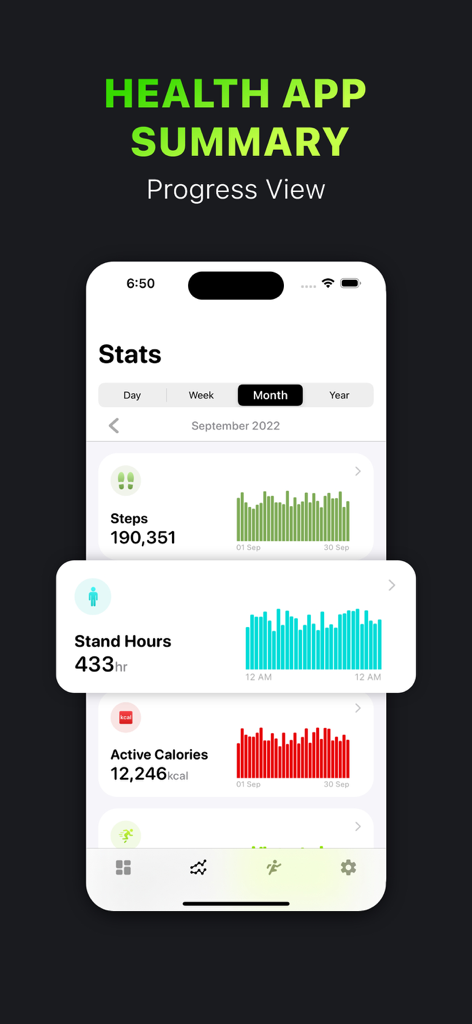
Activity Tracker・FitnessView - FitnessView App monatliche Gesundheitsstatistiken Dashboard mit Schritten, Stehzeit und aktiven Kalorien mit Fortschrittsgrafiken
FitnessView App monatliche Gesundheitsstatistiken Dashboard mit Schritten, Stehzeit und aktiven Kalorien mit Fortschrittsgrafiken

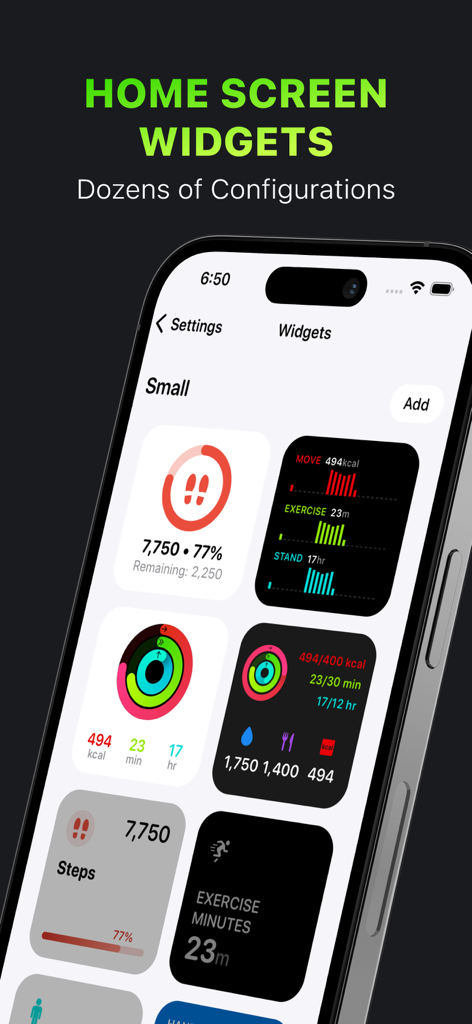
Activity Tracker・FitnessView - Eine Auswahl an anpassbaren Fitness- und Gesundheits-Tracking-Widgets für den iPhone-Homescreen

Eine Auswahl an anpassbaren Fitness- und Gesundheits-Tracking-Widgets für den iPhone-Homescreen
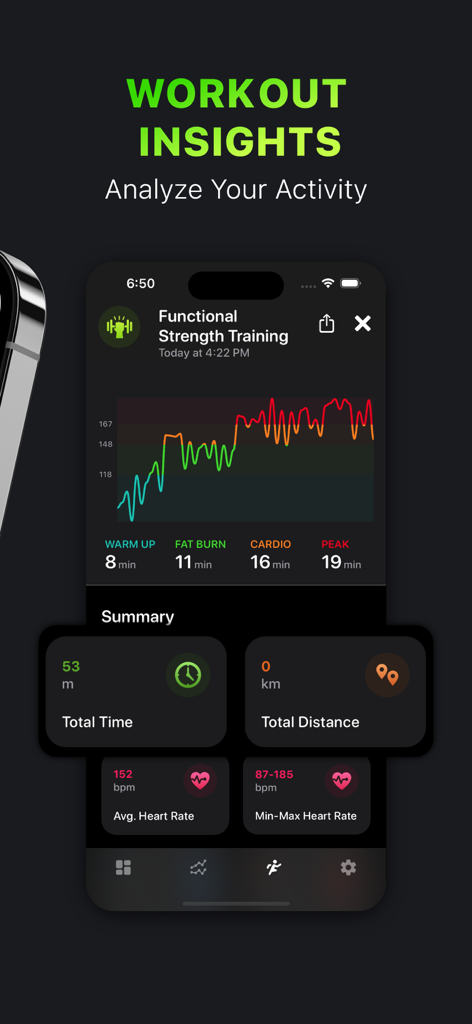
Activity Tracker・FitnessView - FitnessView App-Screenshot, der Trainingsanalysen für funktionelles Krafttraining mit Herzfrequenzgrafiken und Aktivitätsstatistiken zeigt
FitnessView App-Screenshot, der Trainingsanalysen für funktionelles Krafttraining mit Herzfrequenzgrafiken und Aktivitätsstatistiken zeigt

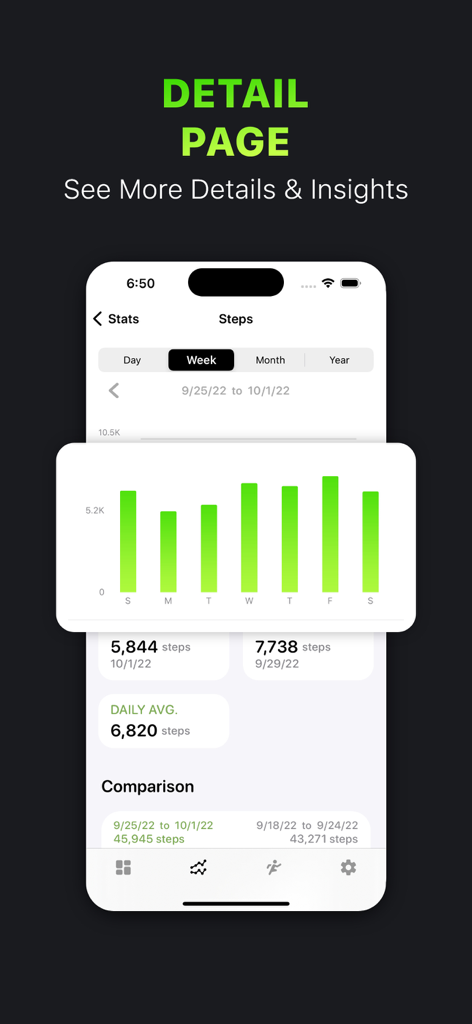
Activity Tracker・FitnessView - FitnessView App zeigt wöchentliche Schrittstatistiken und Fortschrittsgrafik
FitnessView App zeigt wöchentliche Schrittstatistiken und Fortschrittsgrafik

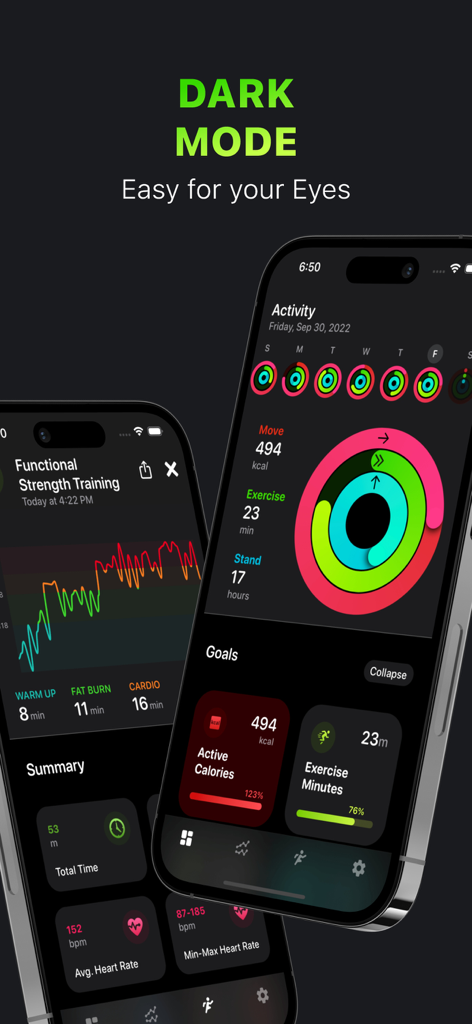
Activity Tracker・FitnessView - FitnessView Mobile App-Oberfläche im Dark Mode, die Aktivitätsringe und Gesundheitsstatistiken zeigt
FitnessView Mobile App-Oberfläche im Dark Mode, die Aktivitätsringe und Gesundheitsstatistiken zeigt

Activity Tracker・FitnessView - Apple Watch zeigt FitnessView Aktivitätsstatistiken neben den Komplikations-Wizard-Einstellungen des iPhones.
Apple Watch zeigt FitnessView Aktivitätsstatistiken neben den Komplikations-Wizard-Einstellungen des iPhones.

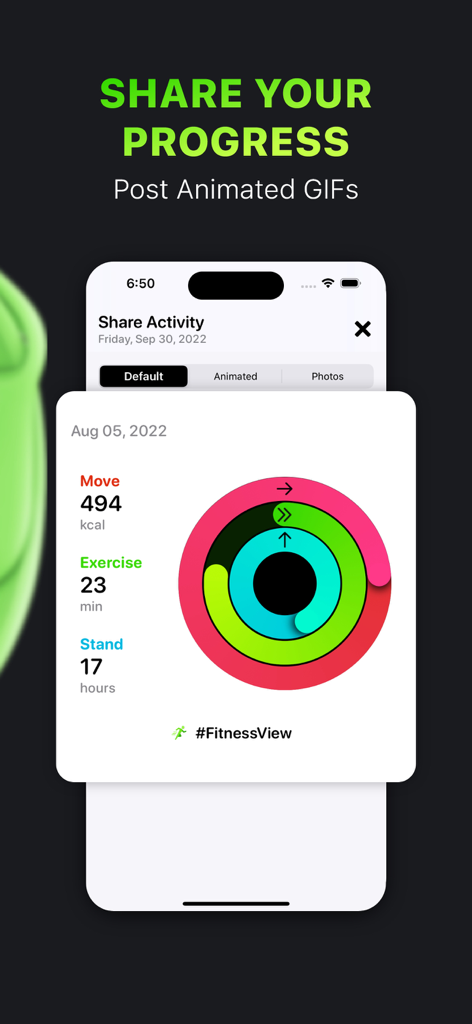
Activity Tracker・FitnessView - iPhone-Bildschirm zeigt die Aktivitäts-Fortschrittsfreigabe-Funktion in der FitnessView-App mit bunten Aktivitätsringen und Fortschrittsdaten
iPhone-Bildschirm zeigt die Aktivitäts-Fortschrittsfreigabe-Funktion in der FitnessView-App mit bunten Aktivitätsringen und Fortschrittsdaten

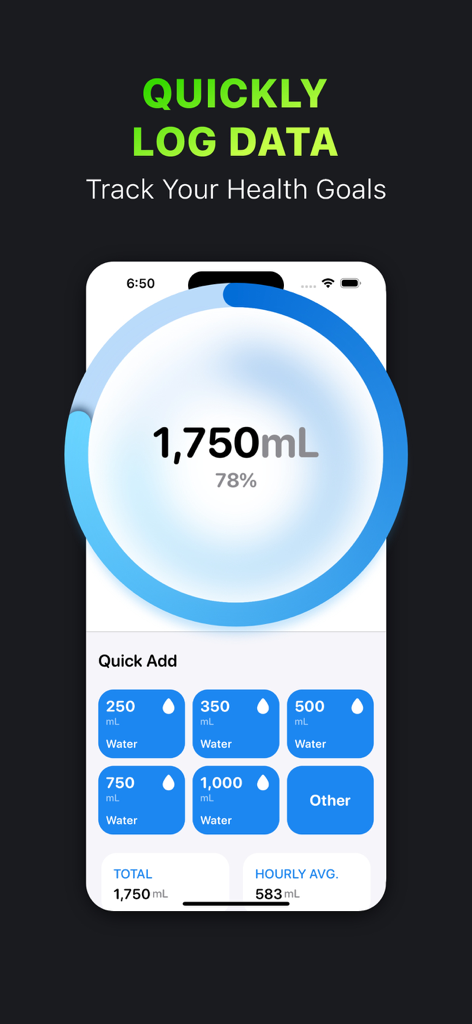
Activity Tracker・FitnessView - FitnessView App-Oberfläche zur Verfolgung der täglichen Wasseraufnahme mit einem Fortschrittsring und Schaltflächen zur schnellen Volumenhinzufügung
FitnessView App-Oberfläche zur Verfolgung der täglichen Wasseraufnahme mit einem Fortschrittsring und Schaltflächen zur schnellen Volumenhinzufügung

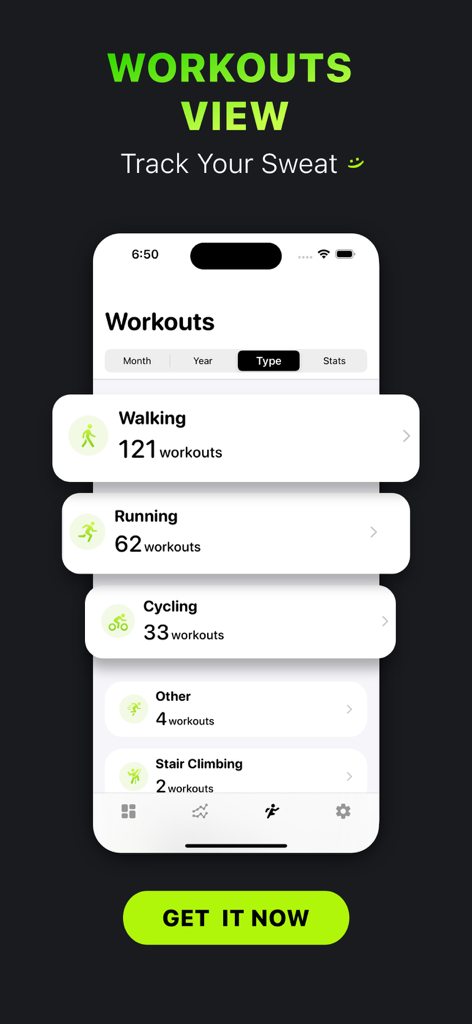
Activity Tracker・FitnessView - FitnessView App-Oberfläche auf einem iPhone, die eine Zusammenfassung von Trainings nach Typ anzeigt, wie z. B. Gehen, Laufen und Radfahren

FitnessView App-Oberfläche auf einem iPhone, die eine Zusammenfassung von Trainings nach Typ anzeigt, wie z. B. Gehen, Laufen und Radfahren

Beschreibung

FitnessView integrates with the Watch Activity and Health apps - it allows you to see your health & fitness data in a dashboard style and a different way, by allowing you to drill down to more details in an easy and insightful way! HEALTH & FITNESS APP DASHBOARD Right on the Home Screen of the app, you will be able to see your Activity, Today’s Goals and Recent Workout. Activity area allows you to see at a glance your Activity Rings progress (Move, Exercise, Stand) - you can even see it as a week quick view. Today’s Goals area is where you track your daily health goals like Active Calories, Steps, Hydration, Calories Eaten, Hand Washing and more! You can even log your hydration or calories! Recent Workout shows the last logged workout in your Activity Health app. HEALTH STATISTICS Glance through your Health App data, see a snapshot of the day, week, month or year right in the list! When you tap on the dataset, you will be able to see your health data charts, average line graph and some insights like: total, goal progress, min/max values or completed days - streaks. WORKOUTS VIEW Scroll through All of your logged workouts, see how many you did in a month, what is the total calories burned in a month. View workouts by type, know exactly how many you have logged in past. See general summary stats of your workouts. WATCH FITNESS/HEALTH APP The FitnessView Watch app allows you to see your daily goal summary and more insights. It also allows you to create multiple watch face complications and configure the style, color and which goal to show. View your activity levels from your pedometer data - this feature is very convenient if you want to glance over your activity data quickly. HOME SCREEN WIDGETS See your health and fitness data at a glance right on your Home Screen! Customizable look and feel, view all goals/datasets that you have configured. Widget wizard allows you to change styles, background colors and which health app data to be displayed. See your health, activity and fitness info on a widget! PDF REPORT Export your data into a PDF report that shows your Fitness and Health data. Add a comparison graph to see your progress. This is a great feature if you would like to share your data with a health provider or your fitness coach! EXPORT TO CSV Simple export of your health data in to a CSV file format. Export by type, daily or hourly. PREMIUM FEATURES Unlimited Goals - Configure all available goals (Free version only allows up to three goals). View All Stats - Daily insights, weekly and monthly comparisons, completed days in week or months and more! Watch Complications - Customize your watch face with multiple complication options and features. Widgets - Create and configure dozens of Home Screen widgets. View All Workouts - Better understand your workout data, warm up time, fat burn, cardio and other insights. Log Data - Log data for supported goals from the detail screen like Water, Calories, Macros. Export to CSV PDF Report POPULAR SUPPORTED GOALS/DATASETS: Active Calories Steps Count Walking + Running Distance Exercise Minutes Hand Washing Burned Calories Resting Calories Total Calories Blood Glucose Blood Pressure Body Fat Weight A1C Lean Body Mass Body Temperature Stand Hours Water Workout Time Flights Climbed Pushes Sleep Dietary Calories Caffeine Calcium Carbohydrates Cholesterol Monounsaturated Fat Cycling Distance Fiber Insulin Delivery Iron Mindful Minutes Nike Fuel Ovulation Potassium Protein Saturated Fat Sleep Sodium Swimming Distance Swimming Strokes Vitamin B12, B6 Vitamin C Vitamin D Wheelchair Distance Magnesium Respiratory Rate Cardio Fitness and more! ------------- NOTE: FitnessView reads data only from Apple Health app. No data is being sent outside of your device. Health app access required. Apple Watch device recommended for workout and health tracking. Privacy Policy: https://www.iubenda.com/privacy-policy/73977646 Terms of Use: http://funnmedia.com/fitnessview/terms.html

Download

Herunterladen auf App Store

Diese Seite ist keine offizielle Seite der App oder ihres Entwicklers, sondern eine unabhängige redaktionelle Veröffentlichung, die zu Informations- und Kommentarzwecken erstellt wurde. Sofern nicht ausdrücklich anders angegeben, sind weder die App noch ihr Entwickler mit MWM, Apple, Google Play, dem App-Herausgeber oder dem Entwickler der App verbunden, von ihnen unterstützt, gesponsert, autorisiert oder anderweitig offiziell verbunden, und nichts auf dieser Seite impliziert, dass die App unter Verwendung der Dienste von MWM entwickelt wurde. Alle Marken, Logos, Screenshots und andere Inhalte bleiben Eigentum ihrer jeweiligen Inhaber.