AI Background Eraser: CleanCut
Herunterladen auf App Store

Diese Seite ist keine offizielle Seite der App oder ihres Entwicklers, sondern eine unabhängige redaktionelle Veröffentlichung, die zu Informations- und Kommentarzwecken erstellt wurde. Sofern nicht ausdrücklich anders angegeben, sind weder die App noch ihr Entwickler mit MWM, Apple, Google Play, dem App-Herausgeber oder dem Entwickler der App verbunden, von ihnen unterstützt, gesponsert, autorisiert oder anderweitig offiziell verbunden, und nichts auf dieser Seite impliziert, dass die App unter Verwendung der Dienste von MWM entwickelt wurde. Alle Marken, Logos, Screenshots und andere Inhalte bleiben Eigentum ihrer jeweiligen Inhaber.


Logo von AI Background Eraser: CleanCut
Herunterladen auf App Store

AI Background Eraser: CleanCut

Stärken Sie Ihr Nebengeschäft oder Ihre Social-Media-Präsenz mit Bildern in Studioqualität. Löschen Sie mühelos Hintergründe, verarbeiten Sie Produktfotos stapelweise und entfernen Sie unerwünschte Objekte mit präziser KI auf Knopfdruck.

Kennzahlen

Downloads

10K+

Bewertung

4.8/5

Bewertungen gesamt

0

Herausgeber

Duc Lai

Kategorie

Graphics & Design

Sprachen

1

Neueste Version

1.4.5

Größe

41.9 MB

Erstveröffentlichung

22. Juli 2024
Funktionen

Erstellen Sie professionelle Fotos in Sekunden

Leistungsstarke KI-Tools, die für Solopreneure und Kreative entwickelt wurden, um die Hintergrundentfernung, Stapelverarbeitung und Fotoretusche zu automatisieren.

KI-Hintergrundentferner mit einem Tippen

Erhalten Sie sofort pixelgenaue Ausschnitte. Ideal für hochkonvertierende E-Commerce-Listings und klare Social-Media-Ästhetik.

Effizienzsteigernder Stapelmodus

Verarbeiten Sie Dutzende von Fotos gleichzeitig. Sparen Sie Stunden manueller Arbeit und konzentrieren Sie sich auf die Skalierung Ihres Unternehmens oder Ihrer Marke.

Die folgenden Screenshots und die Beschreibung stammen direkt aus dem offiziellen Store-Eintrag der App und sind Eigentum des Entwicklers.

App Store

Screenshots
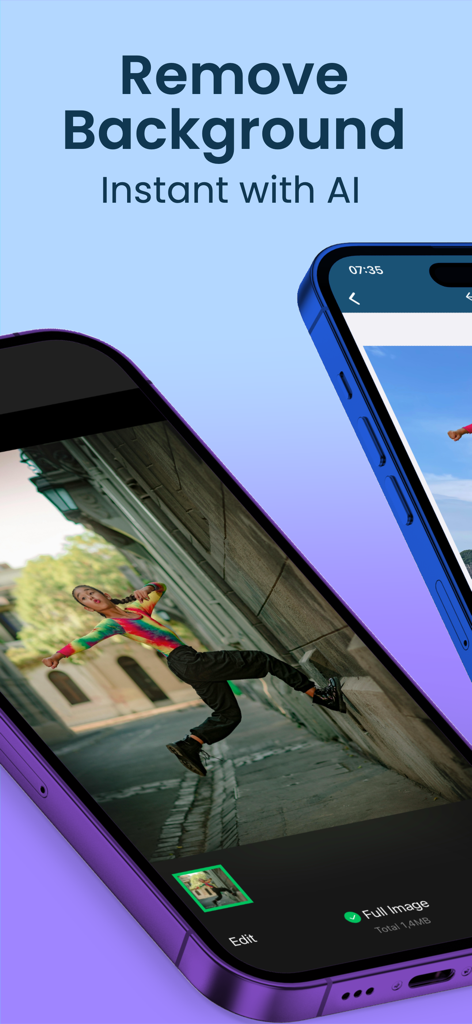
AI Background Eraser: CleanCut - Bildschirm eines Mobiltelefons, das die KI-Hintergrundentferner-App mit einer Person in einem Gassenfoto zeigt
Bildschirm eines Mobiltelefons, das die KI-Hintergrundentferner-App mit einer Person in einem Gassenfoto zeigt

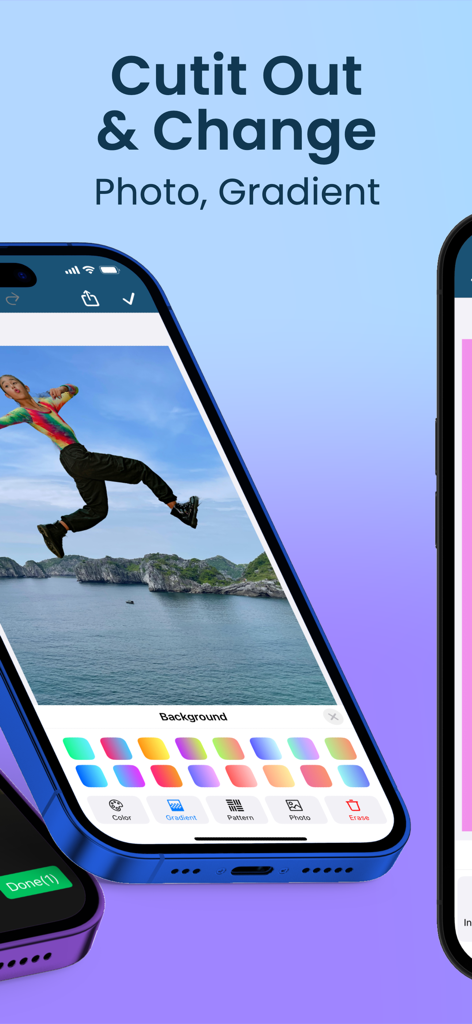
AI Background Eraser: CleanCut - CleanCut App-Oberfläche, die die Funktion zum Ausschneiden von Fotos und Ersetzen von Hintergründen durch Farbverlaufsoptionen zeigt
CleanCut App-Oberfläche, die die Funktion zum Ausschneiden von Fotos und Ersetzen von Hintergründen durch Farbverlaufsoptionen zeigt

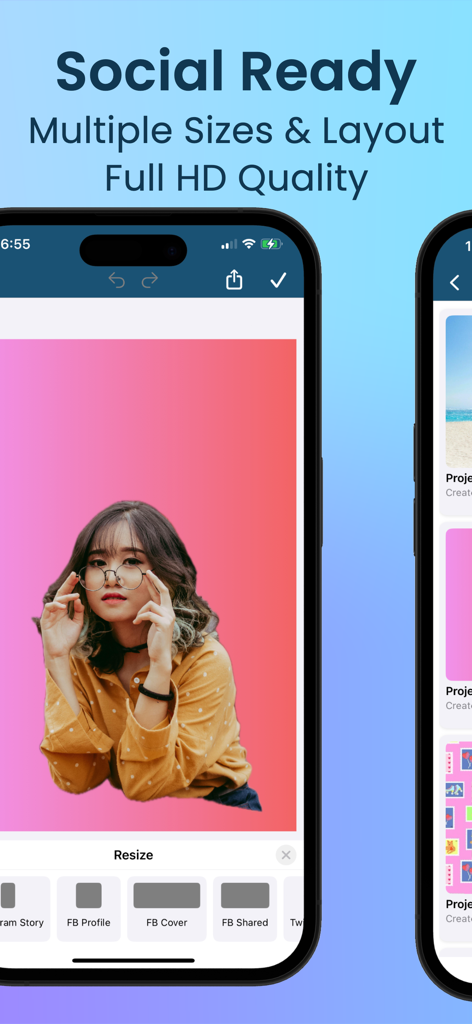
AI Background Eraser: CleanCut - CleanCut App-Oberfläche, die Werkzeuge zur Größenänderung für soziale Medien für Facebook- und Instagram-Profile und -Cover zeigt.

CleanCut App-Oberfläche, die Werkzeuge zur Größenänderung für soziale Medien für Facebook- und Instagram-Profile und -Cover zeigt.

AI Background Eraser: CleanCut - Oberfläche einer mobilen App, die eine Galerie gespeicherter Fotoprojekte mit verschiedenen bearbeiteten Hintergründen zeigt

Oberfläche einer mobilen App, die eine Galerie gespeicherter Fotoprojekte mit verschiedenen bearbeiteten Hintergründen zeigt

Beschreibung

Transform Your Photos with AI Background Eraser: CleanCut CleanCut: AI Background Eraser is the ultimate tool for background removal and photo editing. Powered by advanced AI technology, our app ensures precise and fast removal of backgrounds, making your images look professional and clean. Perfect for social media, e-commerce, personal use, and more, AI Background Eraser Pro offers a suite of powerful tools to enhance, retouch, and improve your photos. Download now to elevate your photo editing experience! ◆ Key Features ◆ 1. Automatic Background Removal AI-Powered: Effortlessly erase backgrounds with a single tap. Smart Detection: Our AI technology accurately detects and removes backgrounds, providing precise and smooth editing. 2. Versatile Photo Editor Comprehensive Tools: Modify, replace, or erase backgrounds with ease. Flexible Options: Add new backgrounds, keep them transparent, or use pixel-perfect cutouts to suit your needs. Crop & Resize: Easily crop and resize your photos for the perfect composition. 3. High-Quality Cutouts Detailed Precision: Achieve accurate cutouts with our high-quality AI algorithms. Professional Results: Isolate subjects for stunning, professional-grade photos. Lasso Tool: Precisely select objects using the lasso tool for perfect isolation. Magic Selection: Utilize the magic tool for quick and effortless background removal. 4. Create Transparent Backgrounds Ideal for Various Uses: Perfect for profiles, presentations, e-commerce product images, and more. Enhance Visual Appeal: Make your subjects stand out with clean and transparent backgrounds. 5. User-Friendly Interface Intuitive Design: Easy navigation ensures a smooth editing workflow. Accessible to All: Whether you're a professional photographer or a casual user, you'll find AI Background Eraser Pro simple to use. 6. Batch Processing Save Time: Edit multiple photos simultaneously with our batch processing feature. Efficiency: Ideal for high-volume tasks, enhancing productivity. 7. Enhance Photos with Filters and Effects Creative Tools: Apply a variety of filters, blur, and sharpen effects to make your images pop. Vibrant Colors: Add stunning highlight and contrast adjustments to elevate your photos. 8. Adjust and Customize Advanced Editing: Fine-tune brightness, contrast, saturation, and more. Precision Control: Customize your photos to achieve the perfect look. 9. In-App Tutorials and Tips Learn with Ease: Our tutorials and tips guide you through the editing process. Get Pro Results: Ensure you achieve the best results every time with our precision tools. 10. Save and Share High-Resolution Saves: Save your edited photos in high quality, including JPG, PNG, and GIF formats. Direct Sharing: Share your photos directly to Instagram, Facebook, Twitter, and more. 11. Object and Pimple Removal Unwanted Objects: Remove unwanted objects seamlessly for a flawless image. Pimple Retouch: Smooth out blemishes and imperfections with our retouch tools. 12. Manage and Organize Organize Your Photos: Keep your edited photos organized with our management tools. Store Efficiently: Save and store your images securely within the app. ∞ Why Choose AI Background Eraser: CleanCut? ∞ ‣ Cutting-edge AI Technology: Experience seamless background removal and photo editing like never before. ‣ Comprehensive Toolset: Beyond background removal, enjoy a full suite of editing tools for resizing, cropping, retouching, and more. ‣ User-Centric Design: Designed for both professionals and casual users to deliver exceptional results effortlessly. ‣ Versatile Editing: Handle various photo editing tasks with ease, making the app suitable for any project. ► Download AI Background Eraser: CleanCut Now! ⁕ Don’t wait. Download AI Background Eraser: CleanCut today and transform your photo editing experience. With our advanced AI tools, create stunning photos that stand out. Get the best photo editor and background remover on the market!

Download

Herunterladen auf App Store

Diese Seite ist keine offizielle Seite der App oder ihres Entwicklers, sondern eine unabhängige redaktionelle Veröffentlichung, die zu Informations- und Kommentarzwecken erstellt wurde. Sofern nicht ausdrücklich anders angegeben, sind weder die App noch ihr Entwickler mit MWM, Apple, Google Play, dem App-Herausgeber oder dem Entwickler der App verbunden, von ihnen unterstützt, gesponsert, autorisiert oder anderweitig offiziell verbunden, und nichts auf dieser Seite impliziert, dass die App unter Verwendung der Dienste von MWM entwickelt wurde. Alle Marken, Logos, Screenshots und andere Inhalte bleiben Eigentum ihrer jeweiligen Inhaber.







