
Diese Seite ist keine offizielle Seite der App oder ihres Entwicklers, sondern eine unabhängige redaktionelle Veröffentlichung, die zu Informations- und Kommentarzwecken erstellt wurde. Sofern nicht ausdrücklich anders angegeben, sind weder die App noch ihr Entwickler mit MWM, Apple, Google Play, dem App-Herausgeber oder dem Entwickler der App verbunden, von ihnen unterstützt, gesponsert, autorisiert oder anderweitig offiziell verbunden, und nichts auf dieser Seite impliziert, dass die App unter Verwendung der Dienste von MWM entwickelt wurde. Alle Marken, Logos, Screenshots und andere Inhalte bleiben Eigentum ihrer jeweiligen Inhaber.


Airbrush: Face Photo Editor
Ein Klick, und Ihr digitales Ich entspricht endlich der idealisierten Erwartung.
Downloads
25M+Bewertung
Bewertungen gesamt
624.7KHerausgeber
Kategorie
Photo & VideoSprachen
9Neueste Version
8.5.0Größe
596.1 MBErstveröffentlichung
8. Okt. 2015Analyse der Kernfunktionen von Airbrush: Face Photo Editor
Eine detaillierte Betrachtung der Schlüsselmerkmale, die Airbrush zu einem bevorzugten Tool für die soziale Medienoptimierung machen.
Video-Gesichtsretusche
Dieses Feature wendet die bewährte Gesichtsretusche auch auf Videos an, um Nutzern zu ermöglichen, stets perfekt auszusehen, selbst in bewegten Bildern.
KI-Retusche
Die App ermöglicht Nutzern, Porträts mithilfe künstlicher Intelligenz präzise zu verfeinern und jedes Detail zur Perfektion zu optimieren.
KI-generierte Headshots
Es ermöglicht die sofortige Erstellung professioneller Headshots, wodurch Studiobesuche überflüssig werden und dennoch hohe Qualität gewährleistet ist.
Gesichtsformung
Dieses Tool ermöglicht Nutzern, Gesichtsmerkmale mühelos zu modellieren und zu formen, um stets den vorteilhaftesten Winkel zu präsentieren.
Makel-Entfernung
Die App bietet eine präzise Bearbeitung zur Beseitigung von Akne und Hautunreinheiten, was zu einem makellosen Hautbild führt.
Filter & Effekte
Es verfügt über eine Vielzahl von Filtern und Effekten, die die Kreativität der Nutzer fördern und individuelle Ausdrucksmöglichkeiten eröffnen.
Hautglättung
Die App glättet Falten und gleicht Hauttöne aus, um den Nutzern einen jugendlichen und strahlenden Teint zu verleihen.
Virtuelles Make-up
Es bietet virtuelle Make-up-Tools für Augenbrauen, Lippenstift und mehr, die es Nutzern ermöglichen, Looks zu vervollständigen und zu experimentieren.
Zahnaufhellung & Kleidung
Die App hilft Nutzern, ein strahlenderes Lächeln zu erzielen und Kleidung aufzuhellen, um das Erscheinungsbild insgesamt makellos zu halten.
Objektentfernung
Dieses Tool entfernt unerwünschte Objekte und Unordnung aus Fotos, um saubere und professionell aussehende Aufnahmen zu gewährleisten.
Häufig gestellte Fragen
Alles, was Sie über wissen müssen Airbrush: Face Photo Editor
Does Airbrush use AI for photo retouching?
Yes, Airbrush features AI Retouch to fine-tune portrait details. It leverages artificial intelligence to elevate photo quality with precision.
Can Airbrush remove blemishes from photos?
Yes, Airbrush provides a Blemish Removal tool. This precision editing feature eliminates acne and blemishes, leaving skin spotless and smooth in photos.
How does Airbrush smooth skin in photos?
Airbrush uses its Smooth feature to soften wrinkles and balance skin tones. This contributes to a natural, youthful glow in portraits, enhancing overall appearance.
Does Airbrush have a highlighter tool for features?
Yes, Airbrush includes a Highlighter tool. It illuminates your best features by adding texture or highlighter, making them pop and enhancing natural beauty in photos.
Can I reshape facial features using Airbrush?
Yes, Airbrush offers a Reshape tool. It allows users to effortlessly sculpt facial features, ensuring every angle presents their best appearance in photos.
What eye enhancements does Airbrush offer?
Airbrush's Eye Enhancer feature allows users to overcome red eyes, erase dark circles, and experiment with vibrant eye colors. This creates a captivating look.
Can Airbrush whiten teeth in photos?
Yes, Airbrush features a Teeth tool to brighten smiles. It also offers the capability to whiten clothing, ensuring an immaculate and polished style in photos.
Does Airbrush offer virtual makeup tools?
Yes, Airbrush includes comprehensive virtual Makeup tools. Users can apply makeup, from eyebrows to lipstick, rivaling a professional beauty editor's kit.
Can I change hair color with Airbrush?
Yes, Airbrush's Hair feature allows users to add depth, explore new hair colors, or darken tresses. This creates dramatic effects and personalized styles in photos.
How do I change photo backgrounds in Airbrush?
Airbrush's Background feature enables seamless swapping or blurring of distractions. This allows users to creatively compose scenes by altering the photo background.
Can Airbrush remove unwanted objects from photos?
Yes, Airbrush provides a Photo Cleaner with Eraser or Stamp tools. These features efficiently remove unwanted objects and clutter, perfecting the shot.
Does Airbrush use AI for photo adjustments?
Yes, Airbrush incorporates AI-Powered Adjustments. This feature optimizes image balance by intelligently tweaking photo temperature, saturation, and other elements.
Does Airbrush include photo filters and effects?
Yes, Airbrush offers a variety of Filter & Effects. Users can apply these to their photos to enhance creativity and achieve different artistic styles.
Can Airbrush enhance low-quality photos?
Yes, Airbrush features AI Repair to enhance lower quality photos. It effortlessly breathes new life into every pixel, improving overall image clarity and detail.
Can Airbrush retouch faces in videos?
Yes, Airbrush extends its renowned face retouching capabilities to videos. Users can apply these enhancements for perfected video selfies and footage.
Does Airbrush support object removal in videos?
Yes, Airbrush includes Object Removal for videos. This feature allows users to clear up scenes by effectively removing unwanted distractions from their footage.
How does Airbrush enhance video quality?
Airbrush enhances video quality by upgrading clarity. This feature ensures every video moment becomes crisp, memorable, and visually superior for users.
Can Airbrush change facial expressions in photos?
Yes, Airbrush features a Mood Swapper tool. It allows users to change facial expressions in seconds, adding versatility and different emotions to portraits.
Does Airbrush offer style variations for portraits?
Yes, Airbrush's Style Explorer allows users to see themselves in various styles. This feature helps discover unique portrait variations, showcasing individual versatility.
Can Airbrush generate professional headshots?
Yes, Airbrush offers a Pro Headshots feature. It instantly generates professional headshots without needing a studio, maintaining high quality and convenience.
Does Airbrush offer body contouring?
Yes, Airbrush includes Body Contouring features. Options like Slim, Waist, Arms, and Breast adjustments are available to reshape body figures within photos.
Can Airbrush adjust lighting in photos?
Yes, Airbrush's 'Relight Photos' feature allows users to adjust lighting. Options include Flash, Sunlit, Custom, and various Studio settings for enhanced illumination.
What is included with Airbrush Premium?
Airbrush Premium grants unlimited access to its full suite of advanced retouching tools, cutting-edge AI tools, filters, and other exclusive features.
Does Airbrush offer a free trial for Premium?
Yes, Airbrush Premium offers a free trial to start a subscription. This trial is limited to one per Apple account for eligible users.
What happens after the Airbrush Premium free trial ends?
After the Airbrush Premium free trial concludes, users are charged a nominal subscription fee. The subscription automatically renews unless manually turned off.
How do I cancel Airbrush Premium auto-renewal?
To cancel Airbrush Premium auto-renewal, turn off the auto-renew option in your Apple account settings. This must be done at least 24 hours before the current period ends.
Does a promotional discount for Airbrush Premium last indefinitely?
No, any promotional discount for Airbrush Premium expires at the end of the current period. Upon renewal, the standard subscription rate applies automatically.
Where do I manage my Airbrush Premium subscription?
Users manage their Airbrush Premium subscription, including turning off auto-renew and viewing billing details, directly through their Apple account settings.
Where can I find Airbrush's Privacy Policy?
The official Privacy Policy for Airbrush is available on its website. Access it directly via the provided link: https://airbrush.com/legal/privacy-policy.
Die folgenden Screenshots und die Beschreibung stammen direkt aus dem offiziellen Store-Eintrag der App und sind Eigentum des Entwicklers.
App Store
Screenshots
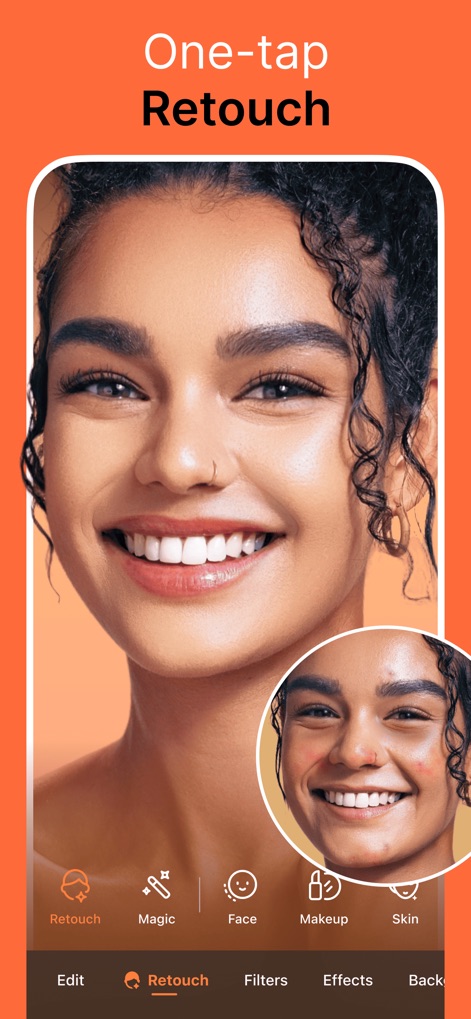
Ein-Tipp-Retusche
Dieses Tool ermöglicht eine schnelle Optimierung von Porträts, indem es mittels eines Vorher-Nachher-Vergleichs sofortige Ergebnisse bei der Beseitigung von Hautunreinheiten anzeigt.
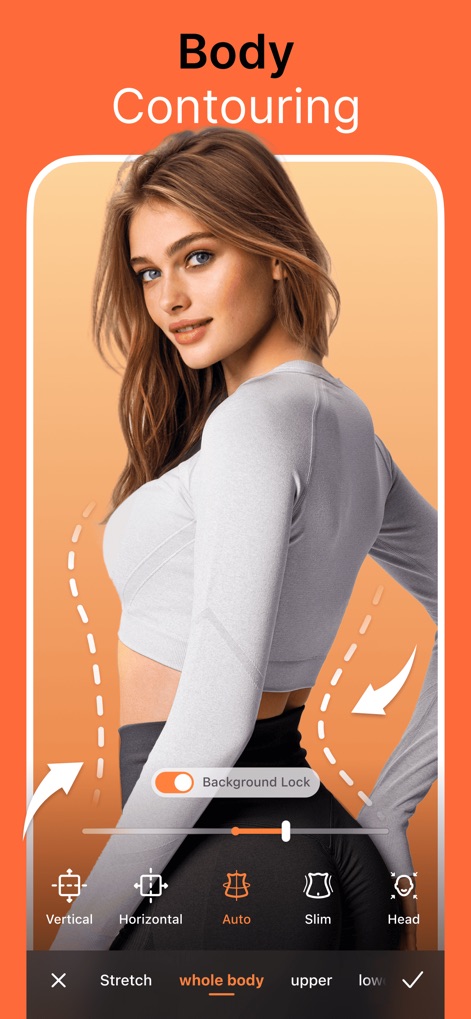
Körperformung Leicht Gemacht
Nutzer können mit präzisen Konturierungslinien und Pfeilen den Körper formen und dabei zwischen verschiedenen Optionen wie "Slim" oder "Auto" wählen, um die Figur zu definieren.
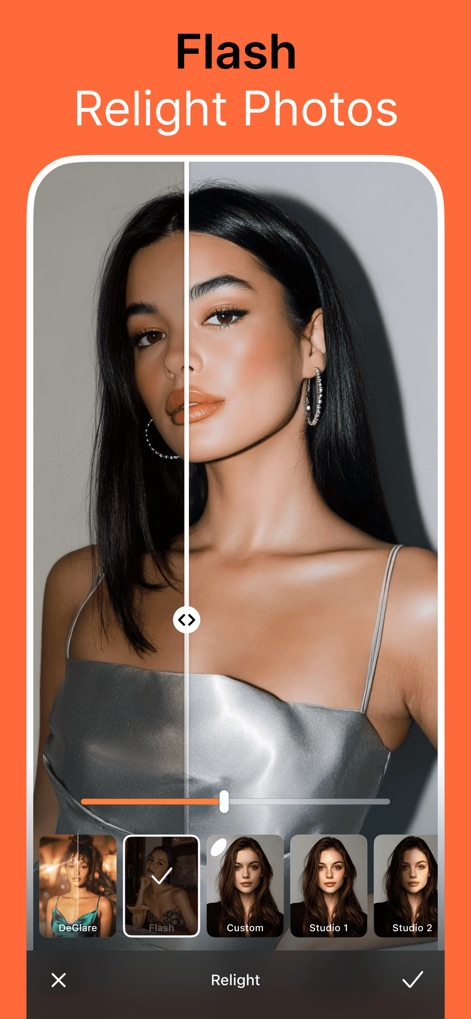
Beleuchtung neu definieren
Die App präsentiert einen geteilten Bildschirmvergleich, der drastische Beleuchtungseffekte durch die Anwendung der "Flash"-Option hervorhebt und so die Stimmung des Fotos verändert.
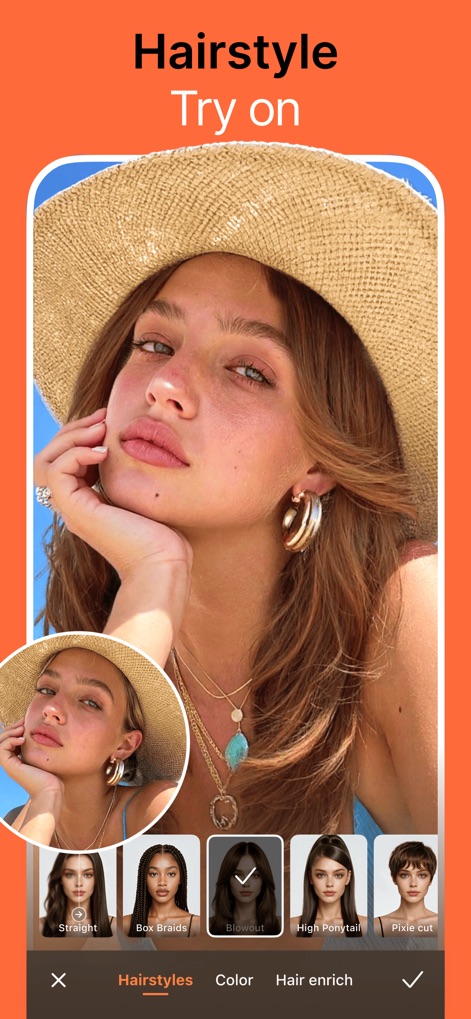
Frisuren virtuell testen
Nutzer können mit dieser Funktion verschiedene Frisurenoptionen wie "Blowout" oder "Pixie Cut" virtuell ausprobieren, wobei die ausgewählte Frisur direkt im Hauptbild sichtbar wird.
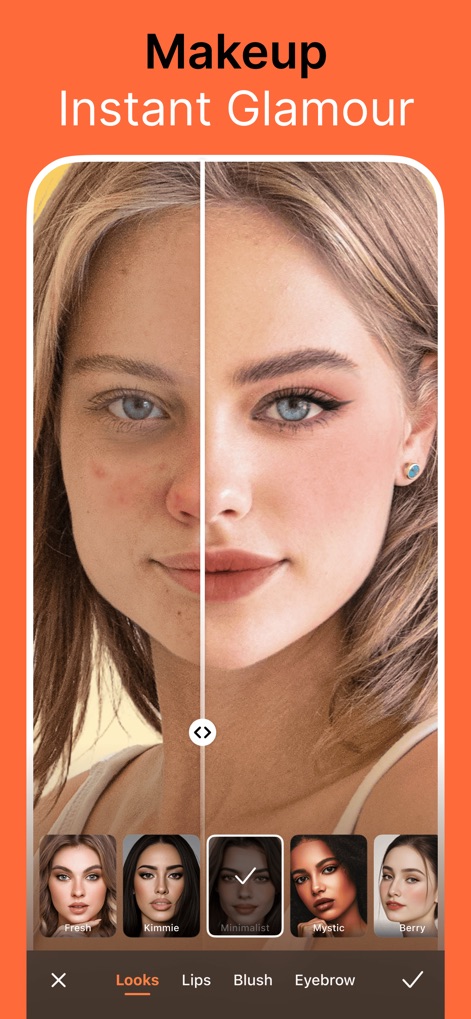
Sofortiges Make-up anwenden
Die App ermöglicht einen deutlichen Vorher-Nachher-Vergleich mit Make-up, indem sie verschiedene Stile wie "Minimalist" oder "Mystic" zur Auswahl anbietet, um den Look zu perfektionieren.
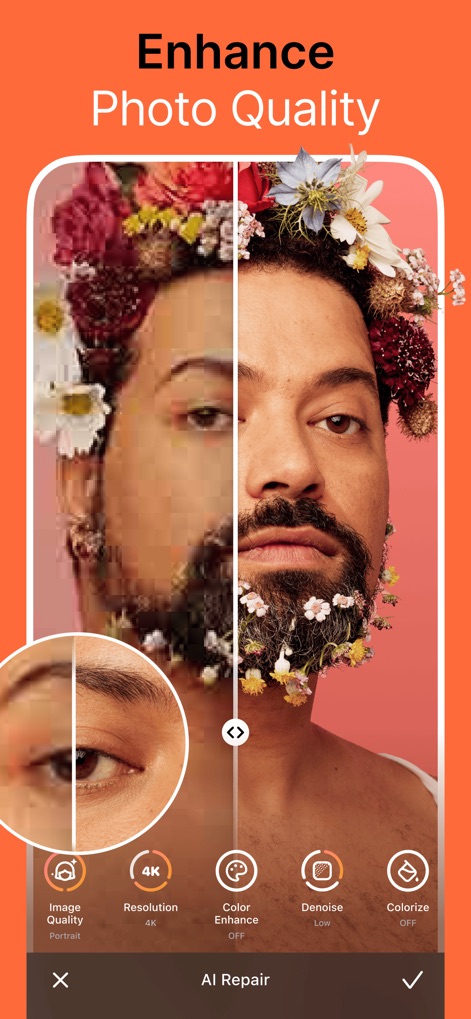
Bildqualität verbessern
Dieses Tool demonstriert eine signifikante Verbesserung der Bildqualität, indem es Pixelartefakte entfernt und gleichzeitig eine verbesserte Bildschärfe durch Optionen wie die "4K Resolution" hinzufügt.
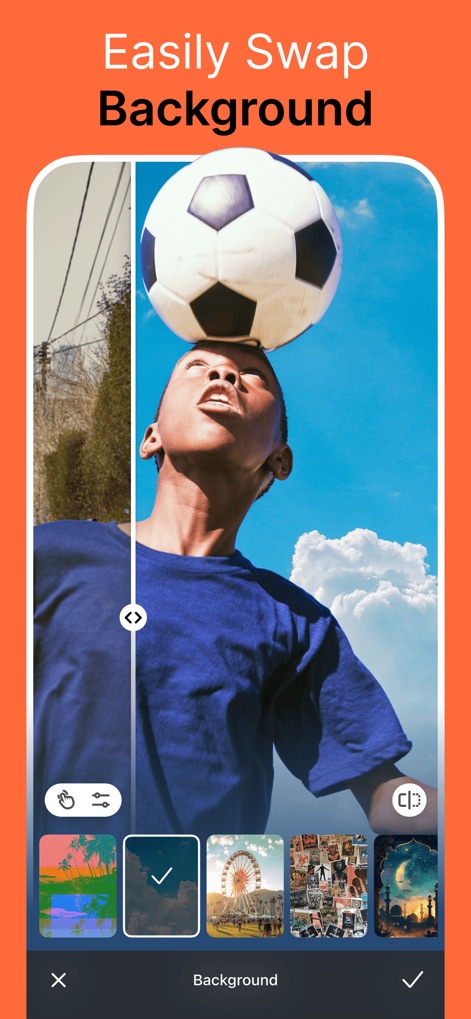
Hintergründe schnell tauschen
Die App erlaubt Nutzern den einfachen Austausch des Originalhintergrunds gegen neue Szenen, wie hier einen bewölkten Himmel, was die kreative Freiheit erheblich erweitert.
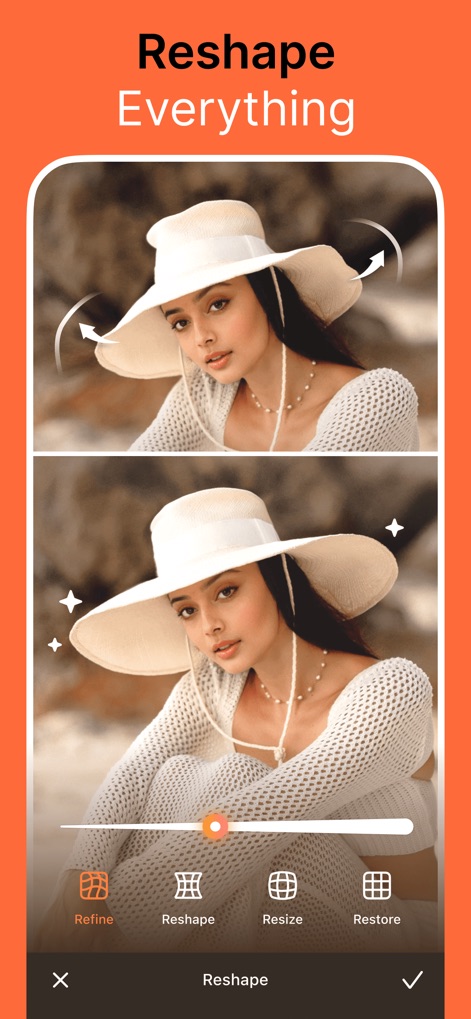
Alles neu formen
Nutzer können mit dieser Funktion diskret die Körperform anpassen und dabei einen Steuerungsregler verwenden, um die Intensität der Änderungen von "Reshape" oder "Refine" präzise zu steuern.
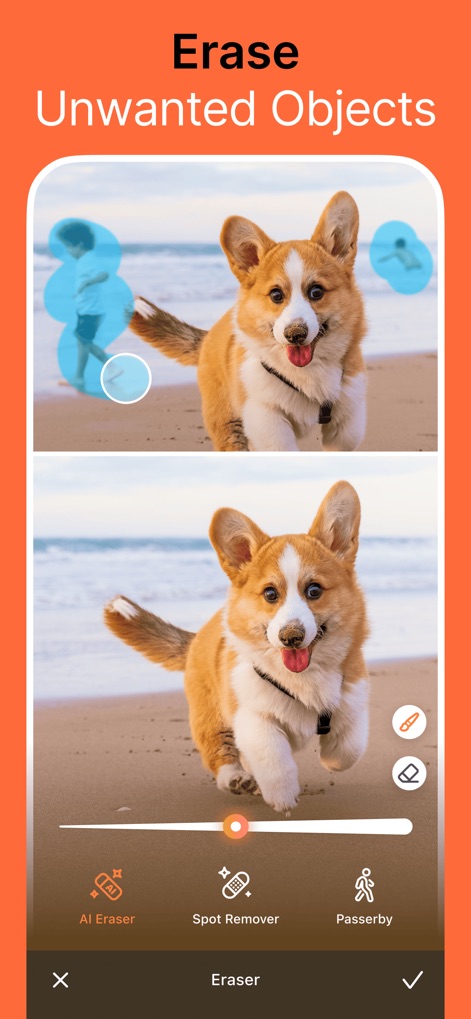
Unerwünschte Objekte entfernen
Dieses Tool hebt unerwünschte Objekte hervor und demonstriert deren erfolgreiche Entfernung aus dem Bild, was eine saubere und fokussierte Komposition ermöglicht.
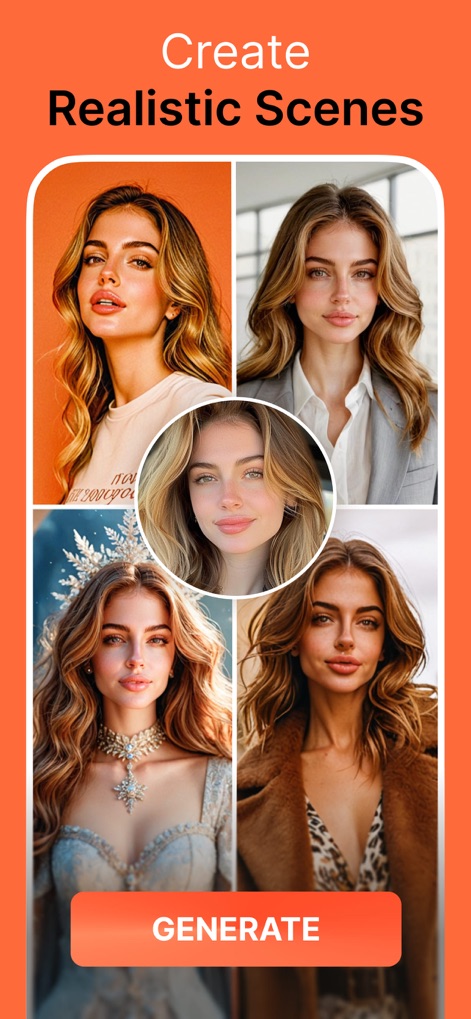
Realistische Szenen kreieren
Nutzer können mit einer zentralen Originalaufnahme eine Vielfalt an generierten Stilvariationen erstellen, die von elegant bis fantasievoll reichen und die Vielseitigkeit des Tools zeigen.
Beschreibung
Download
Ähnliche Apps
Apps mit ähnlichen Funktionen und Nutzererfahrung

Meitu- AI Photo & Video Editor
Xiamen Meitu Technology Co., Ltd.
BeautyCam-AI Photo Editor
Xiamen Meitu Technology Co., Ltd.

BeautyPlus-Selfie Photo Editor
PIXOCIAL TECHNOLOGY (SINGAPORE) PTE. LTD.

Peachy - AI Face & Body Editor
SHANTANU PTE. LTD.
YouCam Perfect AI Photo Editor
PERFECT MOBILE CORP.

Persona: AI Beauty Editor
TICKET TO THE MOON, INC.

Wuta Camera - Nice Shot Always
Shanghai Benqumark Network Tech Co., Ltd.

Perfect365 Makeup Photo Editor
Perfect365, Inc.

Polish - AI Photo Editor
SHANTANU PTE. LTD.
Diese Seite ist keine offizielle Seite der App oder ihres Entwicklers, sondern eine unabhängige redaktionelle Veröffentlichung, die zu Informations- und Kommentarzwecken erstellt wurde. Sofern nicht ausdrücklich anders angegeben, sind weder die App noch ihr Entwickler mit MWM, Apple, Google Play, dem App-Herausgeber oder dem Entwickler der App verbunden, von ihnen unterstützt, gesponsert, autorisiert oder anderweitig offiziell verbunden, und nichts auf dieser Seite impliziert, dass die App unter Verwendung der Dienste von MWM entwickelt wurde. Alle Marken, Logos, Screenshots und andere Inhalte bleiben Eigentum ihrer jeweiligen Inhaber.