
Diese Seite ist keine offizielle Seite der App oder ihres Entwicklers, sondern eine unabhängige redaktionelle Veröffentlichung, die zu Informations- und Kommentarzwecken erstellt wurde. Sofern nicht ausdrücklich anders angegeben, sind weder die App noch ihr Entwickler mit MWM, Apple, Google Play, dem App-Herausgeber oder dem Entwickler der App verbunden, von ihnen unterstützt, gesponsert, autorisiert oder anderweitig offiziell verbunden, und nichts auf dieser Seite impliziert, dass die App unter Verwendung der Dienste von MWM entwickelt wurde. Alle Marken, Logos, Screenshots und andere Inhalte bleiben Eigentum ihrer jeweiligen Inhaber.


Blackmagic Camera
Die mobile Videografie hing am Gängelband simpler Aufnahmen. Blackmagic Design liefert nun das Werkzeug, um daraus echte Kinobilder zu schmieden.
Downloads
12.5M+Bewertung
Bewertungen gesamt
105.0KHerausgeber
Kategorie
Photo & VideoSprachen
9Neueste Version
3.2Größe
180.0 MBErstveröffentlichung
14. Sept. 2023Blackmagic Camera App: Kernfunktionen für den professionellen Einsatz
Eine detaillierte Analyse der Kernfunktionen für professionelle Videoproduktionen.
Direkte Aufnahme in Blackmagic Cloud (10-Bit Apple ProRes 4K)
Dieses Tool ermöglicht die direkte Aufnahme von branchenüblichen 10-Bit Apple ProRes Dateien in bis zu 4K Auflösung in die Blackmagic Cloud.
Nahtlose Zusammenarbeit über Blackmagic Cloud mit DaVinci Resolve
Es ermöglicht die weltweite Zusammenarbeit an DaVinci Resolve Projekten in Echtzeit durch die Speicherung der Aufnahmen in der Blackmagic Cloud.
Digitale Filmkamera-Steuerung und -Betriebssystem
Die App repliziert die Steuerung und das Betriebssystem professioneller Blackmagic Design Kameras und ermöglicht es Nutzern, einen kinoreifen Look wie bei Hollywood-Filmen zu erzielen.
Live-Synchronisation mit Blackmagic Cloud (Proxies & Originale)
Die Funktion ermöglicht eine Live-Synchronisation der Aufnahmen mit der Blackmagic Cloud als Proxy-Dateien, gefolgt von den Originaldateien, um einen schnellen Start des Bearbeitungsprozesses zu gewährleisten.
Erweiterte Kameraeinstellungen und Kontrolle
Die App bietet umfassende Kontrolle über fortgeschrittene Kameraeinstellungen wie Videoauflösung, Aufnahmeformate (ProRes, H.264/H.265), anamorphotisches De-Squeeze, professionelle Audiooptionen und die Anwendung von 3D LUTs.
Umfassendes Medienmanagement und DaVinci Resolve Integration
Dieses Tool bietet umfangreiche Medienverwaltungsfunktionen, einschließlich Browsing, Sortieren, Hochladestatus und die Möglichkeit, Medien direkt in DaVinci Resolve Projekte zu synchronisieren.
Detailliertes Heads-Up-Display (HUD)
Das integrierte Heads-Up-Display (HUD) liefert wichtige visuelle Hilfen wie Histogramm, Fokus-Peaking-Indikatoren, Pegelanzeigen und Bildbegrenzungen für präzise Aufnahmen.
Interaktive Steuerung für schnelle Anpassungen
Die interaktive Benutzeroberfläche und das Heads-Up-Display (HUD) bieten schnellen Zugriff auf alle wichtigen Kameraeinstellungen und Statusinformationen, ohne komplexe Menüs durchsuchen zu müssen.
Mobile professionelle Einsatzmöglichkeiten (ENG, B-Cam)
Die App kann als vielseitige mobile Kamera für spontane Aufnahmen wie aktuelle Nachrichten oder als B-Kamera für schwer zugängliche Winkel eingesetzt werden, während wichtige Einstellungen erhalten bleiben.
Flexible Aufnahme-Seitenverhältnisse
Die App unterstützt flexible Seitenverhältnisse, einschließlich 16:9 und vertikale Formate, und ermöglicht sogar das Aufnehmen von 16:9-Material im Hochformat für diskrete Aufnahmen.
Häufig gestellte Fragen
Alles, was Sie über wissen müssen Blackmagic Camera
What is the Blackmagic Camera app?
Blackmagic Camera transforms an iPhone or iPad into a digital film camera. It provides professional controls and an operating system, enabling cinematic video production on mobile devices.
What advanced camera controls does Blackmagic Camera offer?
Blackmagic Camera offers digital film controls for frame rate, shutter angle, white balance, and ISO. Users adjust these settings with a single tap through the interactive interface and HUD.
Can Blackmagic Camera record 4K video?
Yes, Blackmagic Camera records industry-standard 10-bit Apple ProRes files up to 4K resolution. This ensures high-quality cinematic video capture on supported iPhone and iPad devices.
Does Blackmagic Camera support cloud collaboration?
Yes, Blackmagic Camera supports cloud collaboration by recording directly to Blackmagic Cloud. This feature allows users to work on DaVinci Resolve projects with editors globally.
What video recording formats are available in Blackmagic Camera?
Blackmagic Camera supports industry-standard Apple ProRes, H.264, and H.265 recording formats. Users manage video resolution and format through the dedicated settings menu.
How does Blackmagic Camera create cinematic video?
Blackmagic Camera provides professional features required for feature film, television, and documentaries. It enables users to achieve a cinematic look and broadcast quality for their content.
Does Blackmagic Camera feature an on-screen display (HUD)?
Yes, Blackmagic Camera features a Heads Up Display (HUD). This display shows status, record parameters, histogram, focus peaking, levels, and frame guides, which users can show or hide.
Can Blackmagic Camera record video vertically?
Yes, Blackmagic Camera allows recording in 16:9 or vertical aspect ratios. It also supports shooting 16:9 while holding the phone vertically for discrete recording.
How can I manage my media files within Blackmagic Camera?
Blackmagic Camera's media tab allows browsing, scrubbing, searching, and sorting clips. Users view upload status and can save files locally, to Blackmagic Cloud, or project libraries.
Does Blackmagic Camera support external microphones?
Yes, Blackmagic Camera supports external microphones. It offers professional audio options like AAC and PCM formats, with VU or PPM audio metering for precise sound control.
Can 3D LUTs be used with Blackmagic Camera?
Yes, Blackmagic Camera allows users to add 3D LUTs. This feature integrates specific film looks, providing creative control for achieving desired visual styles in recordings.
Does Blackmagic Camera offer live media syncing to the cloud?
Yes, Blackmagic Camera provides live sync to Blackmagic Cloud Storage. It instantly uploads proxy files, followed by camera originals, streamlining the workflow for quick editing access.
Die folgenden Screenshots und die Beschreibung stammen direkt aus dem offiziellen Store-Eintrag der App und sind Eigentum des Entwicklers.
App Store
Screenshots

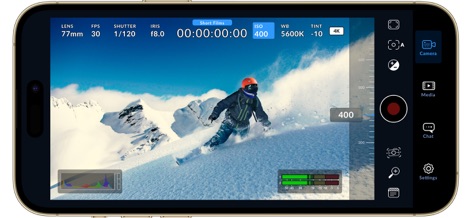
Direkte Filmsteuerung
Dieser Screenshot zeigt die vollständige Kameraoberfläche im Querformat mit einem Skifahrer im Fokus, wobei der umfassende HUD alle wichtigen Einstellungen und die Echtzeit-Audiopegel für präzise Aufnahmen anzeigt.
Präzise ISO-Anpassung
Die Abbildung demonstriert die intuitive Anpassung der ISO-Empfindlichkeit über einen interaktiven Regler, wobei die sofortige Aktualisierung der ISO-Einstellung von 800 auf 400 direkt im HUD sichtbar wird.

Scharfe Fokus-Assistenz
Nutzer können die Präzision ihrer Aufnahmen mit der aktiven Fokus-Peaking-Anzeige verbessern, während ein interaktiver Schieberegler an der Seite zusätzliche Kontrolle über Belichtungs- und Fokushilfen bietet.

Professionelle Clip-Daten
Dieses Bild illustriert die professionelle Metadateneingabe für Clips, einschließlich detaillierter Metadatenfelder für Reel, Szene und Take sowie intuitiver Auswahlen für Aufnahmebedingungen wie "Interior" oder "Day".

Medienübersicht Cloud
Die App bietet eine klare Übersicht über alle aufgenommenen Clips als Thumbnails, ergänzt durch die nahtlose Integration und Anmeldemöglichkeit für Blackmagic Cloud, um Projekte zu verwalten.

Medienverwaltung Projekte
Nutzer profitieren von einer strukturierten Medienverwaltung mit dedizierten Projektordnern wie „Short Films“ und „Documentary“, die jeweils die Anzahl der enthaltenen Clips anzeigen.
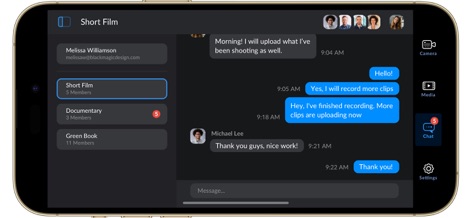
Team-Kollaboration Echtzeit
Dieser Screenshot zeigt die Echtzeit-Kollaborationsfunktion über projektbezogene Chaträume, in denen Nutzer Nachrichten austauschen und den Kommunikationsverlauf der Teammitglieder verfolgen können.
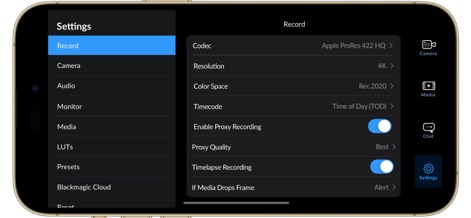
Erweiterte Aufnahmeeinstellungen
Die App bietet umfangreiche Aufnahmeeinstellungen, einschließlich der Auswahl professioneller Codecs wie Apple ProRes 422 HQ und präziser Optionen für Auflösung und Farbraum.

Vertikale Filmansicht
Die App ermöglicht den vertikalen Aufnahmemodus, wobei der vollständige HUD alle wichtigen Parameter wie LENS, FPS und SHUTTER übersichtlich darstellt.

ISO-Anpassung Hochformat
Nutzer können die ISO-Einstellung schnell über einen interaktiven Schieberegler im Hochformat anpassen, wobei die Zahl „1600“ und die Hervorhebung im HUD die direkte visuelle Bestätigung der Änderung liefern.
Beschreibung
Download
Ähnliche Apps
Apps mit ähnlichen Funktionen und Nutzererfahrung

飓风相机
Hangzhou Ostar Media Co.,Ltd.

ProMovie Recorder
Panda Apps Limited

ReLens Camera-DSLR Portrait
Pixl Concerto Technology Limited

Leica LUX - Pro Manual Camera
Leica Camera AG

FotorGear - Camera in Pocket
Shenzhen Fotorgear Technology Co., Ltd.

Unsharp
北北 宋

ProCam:Professional RAW Camera
BRAND CELLAR HOLDINGS PTE LTD

Vibe Cam - Moments Never Fade
森 林
Final Cut Camera
Apple Inc.
Diese Seite ist keine offizielle Seite der App oder ihres Entwicklers, sondern eine unabhängige redaktionelle Veröffentlichung, die zu Informations- und Kommentarzwecken erstellt wurde. Sofern nicht ausdrücklich anders angegeben, sind weder die App noch ihr Entwickler mit MWM, Apple, Google Play, dem App-Herausgeber oder dem Entwickler der App verbunden, von ihnen unterstützt, gesponsert, autorisiert oder anderweitig offiziell verbunden, und nichts auf dieser Seite impliziert, dass die App unter Verwendung der Dienste von MWM entwickelt wurde. Alle Marken, Logos, Screenshots und andere Inhalte bleiben Eigentum ihrer jeweiligen Inhaber.