
Diese Seite ist keine offizielle Seite der App oder ihres Entwicklers, sondern eine unabhängige redaktionelle Veröffentlichung, die zu Informations- und Kommentarzwecken erstellt wurde. Sofern nicht ausdrücklich anders angegeben, sind weder die App noch ihr Entwickler mit MWM, Apple, Google Play, dem App-Herausgeber oder dem Entwickler der App verbunden, von ihnen unterstützt, gesponsert, autorisiert oder anderweitig offiziell verbunden, und nichts auf dieser Seite impliziert, dass die App unter Verwendung der Dienste von MWM entwickelt wurde. Alle Marken, Logos, Screenshots und andere Inhalte bleiben Eigentum ihrer jeweiligen Inhaber.

Camo Studio – Stream & Record
Verwandeln Sie Ihr iPad in eine studiogerechte Kommandozentrale. Streamen Sie Konsolenspiele auf Twitch, nehmen Sie in 4K mit professionellen Overlays auf und gehen Sie überall live mit der Leistung eines Desktop-Setups in Ihrem Rucksack.
Downloads
258K+Bewertung
Bewertungen gesamt
2K+Herausgeber
Kategorie
Photo & VideoSprachen
1Neueste Version
2.4.1Größe
112.1 MBErstveröffentlichung
18. Sept. 2023Alles, was Sie brauchen, um wie ein Profi zu kreieren
Camo Studio bringt Desktop-Streaming- und Aufnahmewerkzeuge auf Ihr iPad, damit Sie hochwertige Inhalte von überall produzieren können.
Das ultimative Gaming-Setup
Verbinden Sie Ihre Konsole über eine Capture Card, um Ihr iPad als scharfen, tragbaren Monitor zu verwenden, während Sie live auf Ihre Lieblingsplattformen streamen.
Profi-Overlays & Szenen
Werten Sie Ihre Marke mit Web-Overlays von StreamElements auf und passen Sie mehrere Szenen für ein dynamisches, interaktives Zuschauererlebnis an.
Häufig gestellte Fragen
Alles, was Sie über wissen müssen Camo Studio – Stream & Record
Was ist Camo Studio für iPad?
Camo Studio für iPad ermöglicht es Benutzern, Videos zu streamen und aufzunehmen, Kameras und Mikrofone zu verbinden und Live-Inhalte direkt von ihrem iPad aus zu verwalten. Es war ein Finalist bei den Apple Design Awards 2023.
Kann Camo Studio Videos direkt auf einem iPad aufnehmen?
Ja, Camo Studio nimmt Videos gleichzeitig auf dem internen Speicher des iPads oder einer angeschlossenen SD-Karte auf, während es streamt. Dies ermöglicht später die Bearbeitung von Inhalten in hoher Qualität.
Welche Plattformen unterstützt Camo Studio für das Streaming von Konsolenspielen?
Camo Studio unterstützt das Streaming von Konsolenspielen auf Plattformen wie Twitch, YouTube und Trovo. Benutzer konfigurieren Szenen mit Multi-Feed- und Bild-im-Bild-Optionen für ihre Streams.
Kann ich mein iPad mit Camo Studio als Monitor verwenden?
Ja, Camo Studio verwandelt Ihr iPad in einen tragbaren Monitor. Verbinden Sie es mit Konsolen wie Nintendo Switch für einen größeren Bildschirm oder mit DSLR-/Spiegellosen Kameras für einen besseren Sucher.
Unterstützt Camo Studio benutzerdefinierte Web-Overlays für Streams?
Ja, Camo Studio unterstützt Web-Overlays von Diensten wie StreamElements, Stream Labs und Uno Overlays. Benutzer importieren benutzerdefinierte oder Vorlagen-Overlays mit Live-Inhalten, Benachrichtigungen und Widgets.
Welche Video-Verbesserungen sind in Camo Studio verfügbar?
Camo Studio bietet leistungsstarke Video-Verbesserungen wie den 'Bokeh'-Hintergrundeffekt, die Ersetzung oder Entfernung von Hintergründen und Bildanpassungen. Es enthält auch Auto-Framing-Modi, um Motive im Bild zu halten.
Sind meine Daten bei der Verwendung von Camo Studio zum Streamen und Aufnehmen privat?
Ja, Camo Studio legt Wert auf die Privatsphäre der Benutzer. Es überträgt Videos direkt an ausgewählte Streaming-Dienste, und alle Aufnahmen bleiben lokal auf dem iPad oder auf externen Speichern. Ihre Daten werden nicht gesammelt.
Welche Videoauflösungen unterstützt Camo Studio?
Camo Studio unterstützt professionelle Videoauflösungen wie 4K UHD, 1080p HD und 720p. Es unterstützt auch sowohl Quer- als auch Hochformat-Ausrichtungen für die vielfältige Inhaltserstellung.
Kann Camo Studio für iPad im Hintergrund ausgeführt werden?
Ja, iPads mit M1- und M2-Chips ermöglichen es Camo Studio, während des Streamens oder Aufnehmens im Hintergrund ausgeführt zu werden. Diese Funktionalität unterstützt auch die gleichzeitige Bildschirmaufnahme vom Gerät.
Enthält Camo Studio Werbung?
Nein, Camo Studio für iPad enthält keine Werbung innerhalb der Anwendung, was ein ununterbrochenes Benutzererlebnis gewährleistet.
Die folgenden Screenshots und die Beschreibung stammen direkt aus dem offiziellen Store-Eintrag der App und sind Eigentum des Entwicklers.
App Store
Screenshots
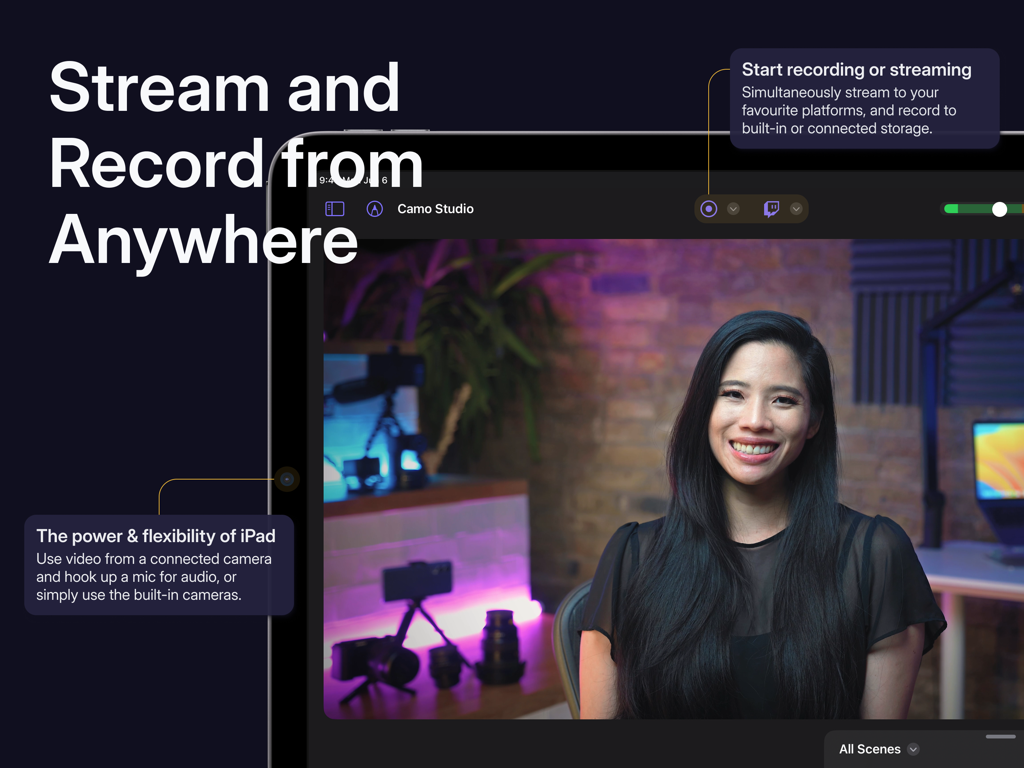
Camo Studio App-Oberfläche auf dem iPad, die einen Live-Videostream und Aufnahmekontrollen zeigt
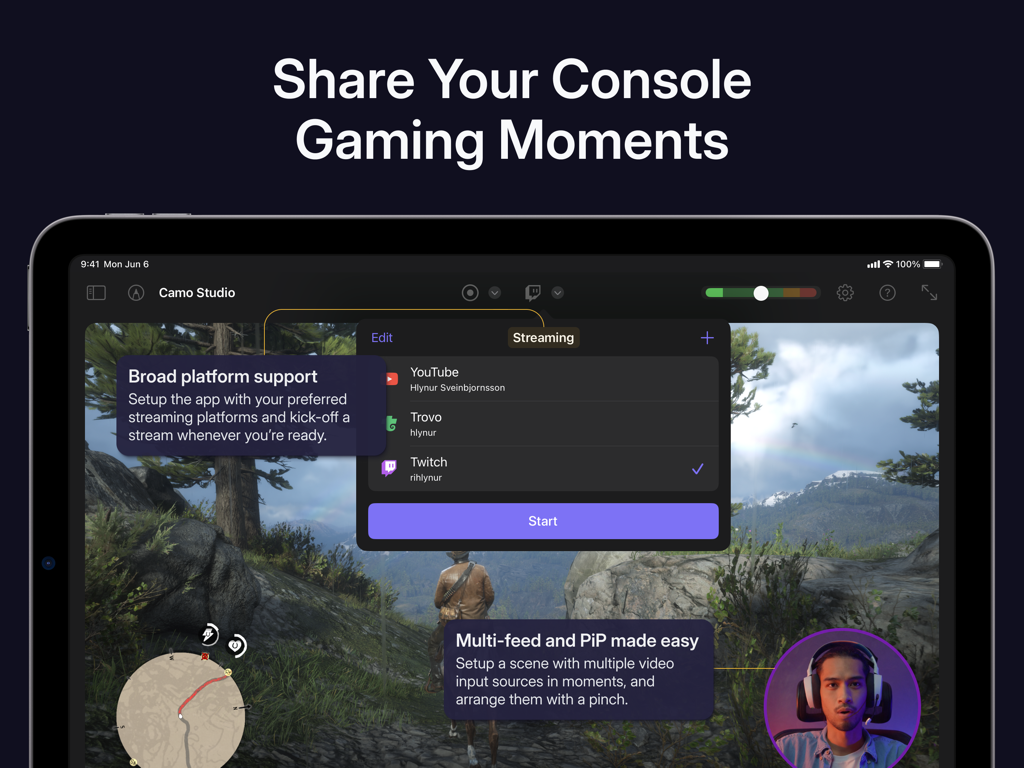
iPad-Oberfläche von Camo Studio, die die Konsolenspiel-Streaming-Einrichtung mit Plattformoptionen und Bild-in-Bild zeigt
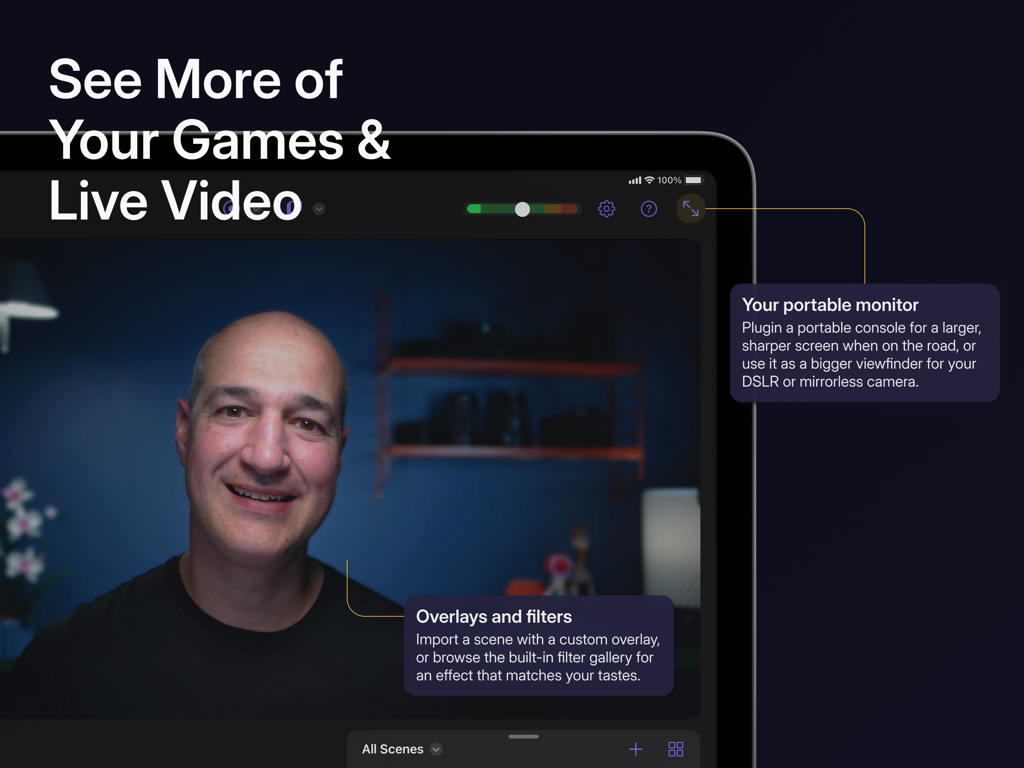
Eine Person, die Camo Studio auf einem iPad als tragbaren Monitor für Live-Video und Spiele mit benutzerdefinierten Overlays und Filtern verwendet.
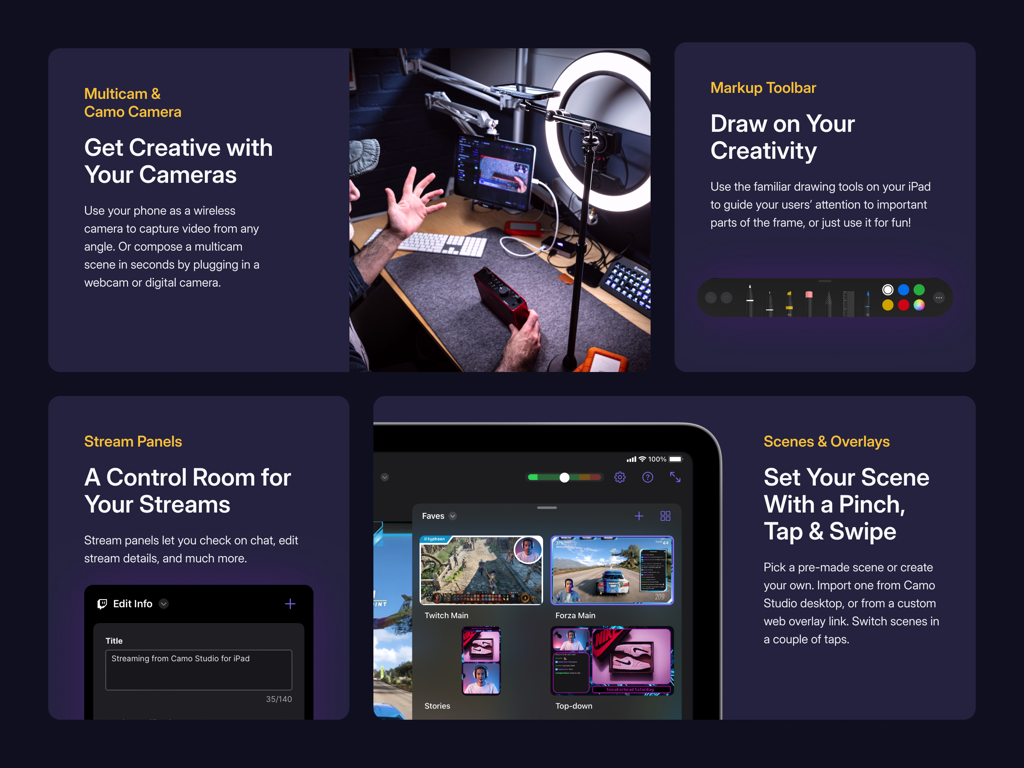
Camo Studio App-Oberfläche, die Multicam-Unterstützung, Stream-Panels und Szenen-Overlays zeigt
Beschreibung
Download
Ähnliche Apps
Apps mit ähnlichen Funktionen und Nutzererfahrung

Switcher: Live Streaming App
Switcher Inc.
Logitech Mevo Multicam
Logitech Inc.
Logitech Mevo
Logitech Inc.

CameraFi Live
Vault Micro Inc.

Lazy Lighting
AUDITY APPS LLC

Larix Broadcaster: Live Stream
Furtree Systems, Inc.

ManyCam - Easy live streaming.
AVM Software, Inc
RTMP Live Streaming Publisher
WarthogLab
Diese Seite ist keine offizielle Seite der App oder ihres Entwicklers, sondern eine unabhängige redaktionelle Veröffentlichung, die zu Informations- und Kommentarzwecken erstellt wurde. Sofern nicht ausdrücklich anders angegeben, sind weder die App noch ihr Entwickler mit MWM, Apple, Google Play, dem App-Herausgeber oder dem Entwickler der App verbunden, von ihnen unterstützt, gesponsert, autorisiert oder anderweitig offiziell verbunden, und nichts auf dieser Seite impliziert, dass die App unter Verwendung der Dienste von MWM entwickelt wurde. Alle Marken, Logos, Screenshots und andere Inhalte bleiben Eigentum ihrer jeweiligen Inhaber.