
Diese Seite ist keine offizielle Seite der App oder ihres Entwicklers, sondern eine unabhängige redaktionelle Veröffentlichung, die zu Informations- und Kommentarzwecken erstellt wurde. Sofern nicht ausdrücklich anders angegeben, sind weder die App noch ihr Entwickler mit MWM, Apple, Google Play, dem App-Herausgeber oder dem Entwickler der App verbunden, von ihnen unterstützt, gesponsert, autorisiert oder anderweitig offiziell verbunden, und nichts auf dieser Seite impliziert, dass die App unter Verwendung der Dienste von MWM entwickelt wurde. Alle Marken, Logos, Screenshots und andere Inhalte bleiben Eigentum ihrer jeweiligen Inhaber.


Canon PRINT Business
Keine Ausreden mehr für Papierkram: Diese App zwingt Canon-Drucker ins Mobilzeitalter.
Downloads
2.5M+Bewertung
Bewertungen gesamt
770Herausgeber
Kategorie
BusinessSprachen
12Neueste Version
8.3.3Größe
23.8 MBErstveröffentlichung
26. Nov. 2012Eine Bewertung der mobilen Effizienz und Integration für professionelle Büroumgebungen.
Analyse der Kernfunktionen von Canon PRINT Business
Mobiles Drucken von Dokumenten
Die App bietet die Möglichkeit, gescannte Daten, Bilder, Dokumente, Kamerarollenfotos und Webseiten direkt von einem Mobilgerät zu drucken.
Cloud-Integration
Dieses Tool verfügt über die Fähigkeit, Dateien in lokalen oder Cloud-Speichern zu verwalten und hochzuladen, was die Zusammenarbeit und den Zugriff auf Dokumente verbessert.
Fernsteuerung des Bedienfelds
Es ermöglicht Nutzern, die Remote-Operation-Funktion zu nutzen, um das Bedienfeld des Multifunktionsgeräts und/oder Druckers auf einem Mobilterminal anzuzeigen und zu bedienen.
Integrierte MFD-Funktionen
Die App bietet die Möglichkeit, Kopier-, Fax- oder Scan-und-per-E-Mail-Senden-Funktionen direkt von einem Multifunktionsgerät oder Drucker aus zu steuern.
Fernüberwachung des Gerätestatus
Dieses Tool verfügt über eine Remote UI, die es ermöglicht, den Zustand eines Multifunktionsgeräts oder Druckers detailliert zu überprüfen, einschließlich des Gerätestatus.
Direkter Scan-Zugriff
Es ermöglicht Nutzern, gescannte Daten direkt von einem Multifunktionsgerät zu lesen und auf dem Mobilgerät zu verwalten.
Synchronisation des Adressbuchs
Dieses Tool ermöglicht die Nutzung des Adressbuchs eines Mobilterminals anstelle des im Multifunktionsgerät registrierten Adressbuchs, was die Effizienz beim Versenden von Dokumenten steigert.
Einfache Geräteerkennung
Die App bietet eine automatische Erkennung von Multifunktionsgeräten und/oder Druckern im Netzwerk oder die manuelle Suche per IP-Adresse oder DNS, was die Einrichtung vereinfacht.
Bluetooth-Konnektivität & Login
Es ermöglicht Nutzern, Multifunktionsgeräte und/oder Drucker über Bluetooth zu suchen und sich durch Berühren des Mobilterminals anzumelden (für Bluetooth-fähige Geräte).
QR-Code-Registrierung
Die App bietet die Möglichkeit, Multifunktionsgeräte und/oder Drucker mittels QR-Code zu registrieren, was die schnelle Inbetriebnahme neuer Geräte unterstützt.
Häufig gestellte Fragen
Alles, was Sie über wissen müssen Canon PRINT Business
What is Canon PRINT Business?
Canon PRINT Business is a free application for iPhone and iPad. It enables printing, scanning, and uploading data to cloud storage from Canon laser multi-function devices or laser printers.
Is Canon PRINT Business a free application?
Yes, Canon PRINT Business is a free application. It allows users to print, scan, and manage documents from compatible Canon laser devices using an iPhone or iPad.
What are the main features of Canon PRINT Business?
Canon PRINT Business allows printing, scanning data, capturing images, and working with local or cloud storage files. It also supports device detection, remote operation, copying, faxing, and emailing.
How do I connect a printer to Canon PRINT Business?
Canon PRINT Business can automatically detect devices on a network or manually search via IP address/DNS. Users can also connect using Bluetooth or register devices with a QR code.
Which devices are supported by Canon PRINT Business?
Canon PRINT Business supports imageRUNNER ADVANCE, Color imageRUNNER, imageRUNNER, Color imageCLASS, imageCLASS, i-SENSYS, imagePRESS, LBP, Satera, Laser Shot, and Business Inkjet series.
Can I print photos with Canon PRINT Business?
Yes, Canon PRINT Business allows users to print photographs, documents, camera roll photos, and web pages from an iPhone or iPad to compatible Canon laser devices.
What settings can be adjusted when printing with Canon PRINT Business?
Print settings in Canon PRINT Business include output method, Department ID Management, User Authentication, output size, copies, print range, paper source, color, 2-sided, staple, and image quality.
What settings can be adjusted when scanning with Canon PRINT Business?
Scan settings in Canon PRINT Business include color, resolution, original size, file format, 2-sided, original type, density, and original placement.
Can I scan and send documents via email using Canon PRINT Business?
Yes, Canon PRINT Business allows users to scan and send documents by e-mail directly from a multi-function device or printer using the app.
Is Canon PRINT Business being replaced?
Yes, Canon PRINT Business has been merged with Canon PRINT. Users are advised to use Canon PRINT in the future for their printing and scanning needs.
Does Canon PRINT Business support Bluetooth connectivity for devices?
Yes, Canon PRINT Business can search for multi-function devices and/or printers using Bluetooth. It also supports logging in by touching the mobile terminal to a Bluetooth-installed machine.
Die folgenden Screenshots und die Beschreibung stammen direkt aus dem offiziellen Store-Eintrag der App und sind Eigentum des Entwicklers.
App Store
Screenshots
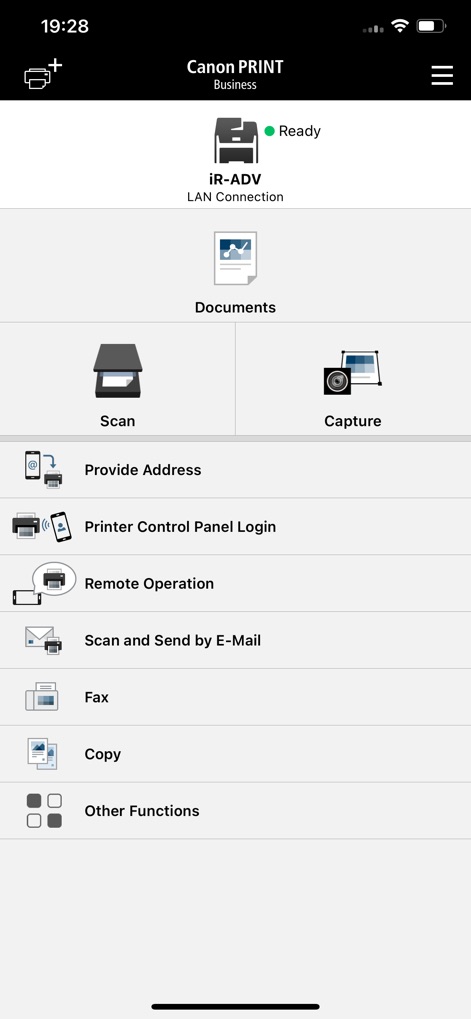
Die App präsentiert ein übersichtliches Hauptmenü, das Nutzern schnellen Zugriff auf Funktionen wie "Scannen" und "Dokumente" ermöglicht und gleichzeitig den Status des verbundenen Druckers anzeigt.
Zentrale App-Steuerung

Nutzer können hier eine detaillierte Druckvorschau ihres Dokuments sehen und grundlegende Druckeinstellungen wie das Papierformat A4 sowie die Anzahl der Kopien anpassen.
Dokumente druckfertig prüfen

Dieses Fenster zeigt die umfassenden Scaneinstellungen der App, die es ermöglichen, Parameter wie die Auflösung und das gewünschte Dateiformat (z.B. PDF Compact) individuell anzupassen.
Scan-Optionen konfigurieren

Die App erleichtert die Geräteauswahl durch eine übersichtliche Auflistung erkannter Drucker und bietet diverse Verbindungsoptionen, darunter die automatische Suche oder die Registrierung via QR-Code.
Drucker schnell verbinden
Beschreibung
Download
Ähnliche Apps
Apps mit ähnlichen Funktionen und Nutzererfahrung

DJI Mimo
SZ DJI TECHNOLOGY CO., LTD

DJI Ronin
SZ DJI TECHNOLOGY CO., LTD

Roku TV Remote Control & Cast
Aleh Piashkou

Remote for Hisense TV.
Duscov Stepan

Alpha Linker - Camera Transfer
恒茂 刘

MyCentsys Pro
Centurion Systems (Pty) Ltd

Roku TV Remote Control・
Artur Belov

Luminair
Synthe FX, LLC

FUJIFILM XApp
FUJIFILM Corporation
Diese Seite ist keine offizielle Seite der App oder ihres Entwicklers, sondern eine unabhängige redaktionelle Veröffentlichung, die zu Informations- und Kommentarzwecken erstellt wurde. Sofern nicht ausdrücklich anders angegeben, sind weder die App noch ihr Entwickler mit MWM, Apple, Google Play, dem App-Herausgeber oder dem Entwickler der App verbunden, von ihnen unterstützt, gesponsert, autorisiert oder anderweitig offiziell verbunden, und nichts auf dieser Seite impliziert, dass die App unter Verwendung der Dienste von MWM entwickelt wurde. Alle Marken, Logos, Screenshots und andere Inhalte bleiben Eigentum ihrer jeweiligen Inhaber.