
Diese Seite ist keine offizielle Seite der App oder ihres Entwicklers, sondern eine unabhängige redaktionelle Veröffentlichung, die zu Informations- und Kommentarzwecken erstellt wurde. Sofern nicht ausdrücklich anders angegeben, sind weder die App noch ihr Entwickler mit MWM, Apple, Google Play, dem App-Herausgeber oder dem Entwickler der App verbunden, von ihnen unterstützt, gesponsert, autorisiert oder anderweitig offiziell verbunden, und nichts auf dieser Seite impliziert, dass die App unter Verwendung der Dienste von MWM entwickelt wurde. Alle Marken, Logos, Screenshots und andere Inhalte bleiben Eigentum ihrer jeweiligen Inhaber.


Capture 365 Journal
Dokumentieren Sie Ihre Welt nahtlos mit professioneller Automatisierung, Synchronisierung über mehrere Geräte hinweg und sicherer Verschlüsselung. Von Social-Media-Feeds bis hin zu privaten Reflexionen – bewahren Sie jeden Meilenstein auf Ihrem iPhone, iPad und Mac auf.
Downloads
212K+Bewertung
Bewertungen gesamt
300Herausgeber
Kategorie
LifestyleSprachen
2Neueste Version
3.7.10Größe
78.0 MBErstveröffentlichung
23. Sept. 2015Halten Sie Ihre Lebensreise mühelos fest
Das All-in-One-Digitalarchiv für das Apple-Ökosystem. Synchronisieren Sie Ihre Gedanken, Medien und Meilensteine sicher über alle Ihre Geräte hinweg, während die Automatisierung die Details übernimmt.
Intelligente Automatisierung
Beseitigen Sie das Problem der 'leeren Seite', indem Sie automatisch Social-Media-Posts, Kalenderereignisse und Standorte direkt in Ihre private Timeline importieren.
Nahtloses Apple-Ökosystem
Entwickelt für Power-User. Beginnen Sie einen Eintrag auf Ihrem iPhone, fügen Sie Fotos von Ihrer Apple Watch hinzu und vervollständigen Sie Ihre Gedanken auf Ihrem Mac mit sofortiger iCloud-Synchronisierung.
Die folgenden Screenshots und die Beschreibung stammen direkt aus dem offiziellen Store-Eintrag der App und sind Eigentum des Entwicklers.
App Store
Screenshots

Timeline-Ansicht der Capture 365 Journal-Einträge mit Reiseerinnerungen und Fotos
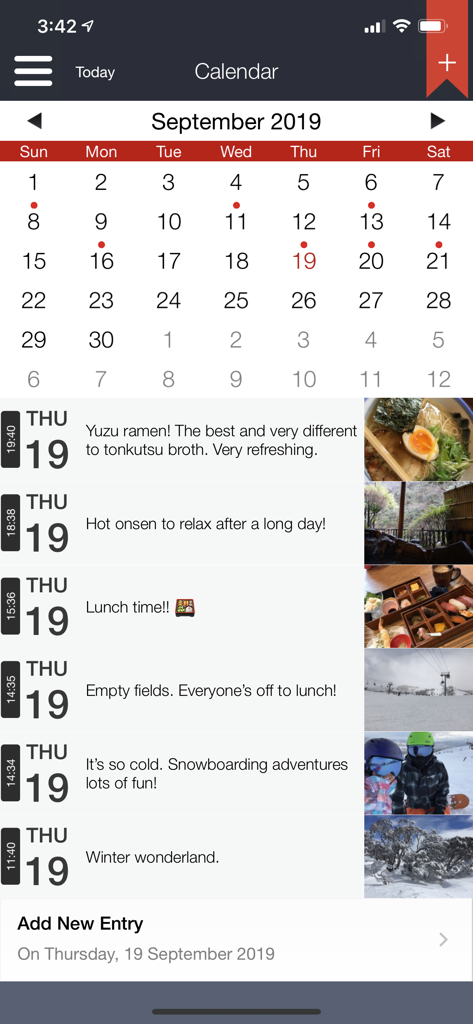
Die Capture 365 Journal-App mit Kalenderansicht und einer täglichen Zeitleiste von Einträgen mit Fotos und Beschreibungen.

Eine Fotogalerie-Ansicht in der Capture 365 Journal-App, die ein Raster von Erinnerungen mit Daten zeigt

Mobile Ansicht von Capture 365 Journal mit einem Fotoeintrag sowie automatischer Wetter- und Standortkennzeichnung

Kartenansicht von Capture 365 Journal, die einen Reisejournal-Eintrag mit einem in Tokio, Japan, angehefteten Foto anzeigt
Beschreibung
Download
Ähnliche Apps
Top-gerankte Apps in derselben Kategorie

Pinterest, Inc.

Alipay - Simplify Your Life
Alipay (Hangzhou) Technology Co., Ltd.

Dianping: Discover Good Places
Hanhai Information Technology (Shanghai) Co.Ltd

美团-美好生活小帮手
Sankuai Technology Co., Ltd.

Lemon8 - Lifestyle Community
TIKTOK PTE. LTD.

Xiaomi Home
Beijing Xiaomi Co., Ltd

Tinder Dating App: Date & Chat
Tinder LLC

SmartThings
Samsung Electronics Co., Ltd.

VNeTraffic
GLOBAL TECHNOLOGY - TELECOMMUNICATIONS CORPORATION
Diese Seite ist keine offizielle Seite der App oder ihres Entwicklers, sondern eine unabhängige redaktionelle Veröffentlichung, die zu Informations- und Kommentarzwecken erstellt wurde. Sofern nicht ausdrücklich anders angegeben, sind weder die App noch ihr Entwickler mit MWM, Apple, Google Play, dem App-Herausgeber oder dem Entwickler der App verbunden, von ihnen unterstützt, gesponsert, autorisiert oder anderweitig offiziell verbunden, und nichts auf dieser Seite impliziert, dass die App unter Verwendung der Dienste von MWM entwickelt wurde. Alle Marken, Logos, Screenshots und andere Inhalte bleiben Eigentum ihrer jeweiligen Inhaber.