classroom.cloud Student
Herunterladen auf App Store

Diese Seite ist keine offizielle Seite der App oder ihres Entwicklers, sondern eine unabhängige redaktionelle Veröffentlichung, die zu Informations- und Kommentarzwecken erstellt wurde. Sofern nicht ausdrücklich anders angegeben, sind weder die App noch ihr Entwickler mit MWM, Apple, Google Play, dem App-Herausgeber oder dem Entwickler der App verbunden, von ihnen unterstützt, gesponsert, autorisiert oder anderweitig offiziell verbunden, und nichts auf dieser Seite impliziert, dass die App unter Verwendung der Dienste von MWM entwickelt wurde. Alle Marken, Logos, Screenshots und andere Inhalte bleiben Eigentum ihrer jeweiligen Inhaber.

Logo von classroom.cloud Student
Herunterladen auf App Store

classroom.cloud Student

Die einfache, cloudbasierte Plattform für Lehrer zur Verwaltung von Klassenverhalten, Überwachung der Online-Aktivität und zum Schutz des Wohlbefindens der Schüler auf jedem Schul-iPad.

Kennzahlen

Downloads

400

Bewertung

1.5/5

Bewertungen gesamt

0

Herausgeber

NetSupport Ltd

Kategorie

Education

Sprachen

24

Neueste Version

2.10.0000

Größe

26.8 MB

Erstveröffentlichung

1. Dez. 2021
Funktionen

Unterricht fördern und Schülersicherheit gewährleisten

Eine komplette cloudbasierte Plattform, die für K-12-Umgebungen entwickelt wurde, um das Engagement im Klassenzimmer zu steigern, die IT-Verwaltung zu optimieren und Schüler online zu schützen.

Steigern Sie das Schülerengagement

Halten Sie Schüler mit Echtzeit-Bildschirmüberwachung, sofortigem Starten von Websites und interaktiven Kursumfragen zur Erfassung des Verständnisses auf Kurs.

Erweiterter Schutz

Schützen Sie Ihre digitale Umgebung mit Schlüsselwortalarmen bei Mobbing oder Selbstverletzung und einem diskreten Tool für Schüler, um Bedenken zu melden.

Die folgenden Screenshots und die Beschreibung stammen direkt aus dem offiziellen Store-Eintrag der App und sind Eigentum des Entwicklers.

App Store

Screenshots
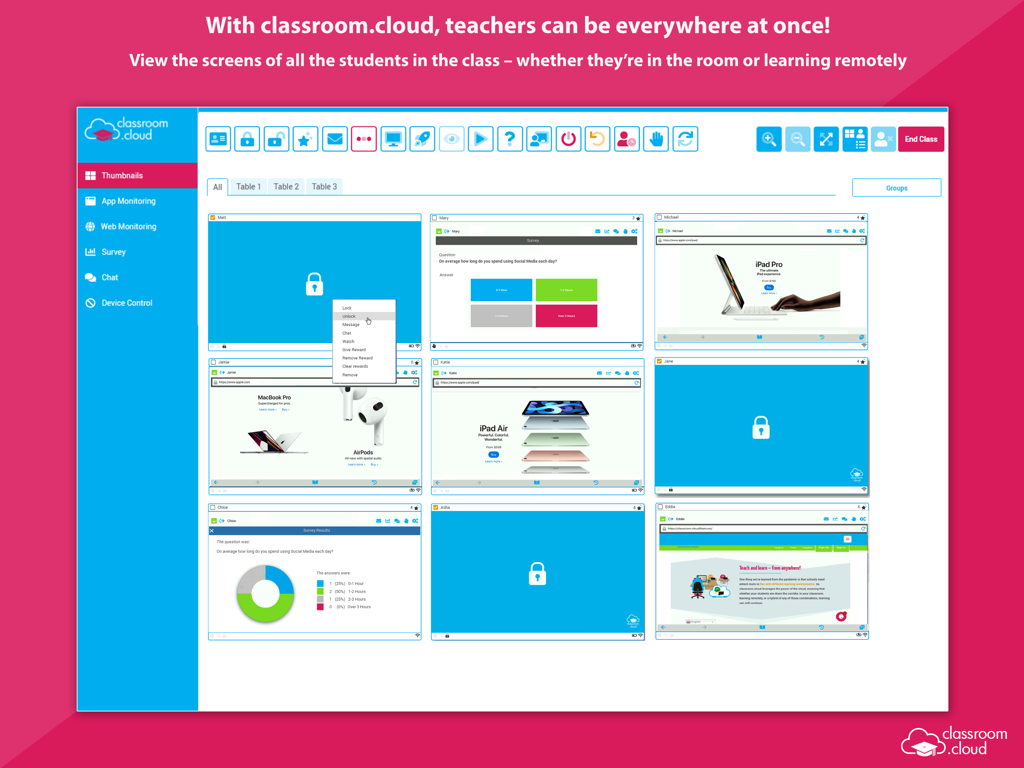
classroom.cloud Student - Dashboard für Klassenraummanagement, das Echtzeit-Thumbnails von iPad-Bildschirmen der Schüler anzeigt.
Dashboard für Klassenraummanagement, das Echtzeit-Thumbnails von iPad-Bildschirmen der Schüler anzeigt.

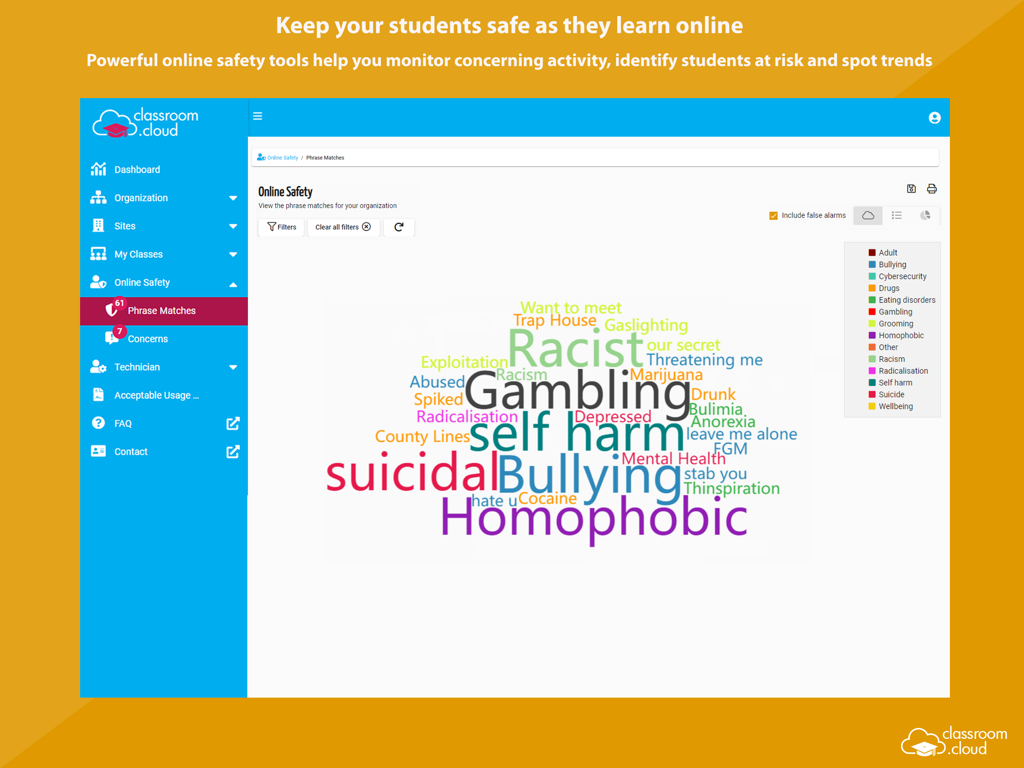
classroom.cloud Student - Classroom Cloud Student Sicherheits-Dashboard mit einer Wortwolke überwachter Schlüsselwörter.
Classroom Cloud Student Sicherheits-Dashboard mit einer Wortwolke überwachter Schlüsselwörter.

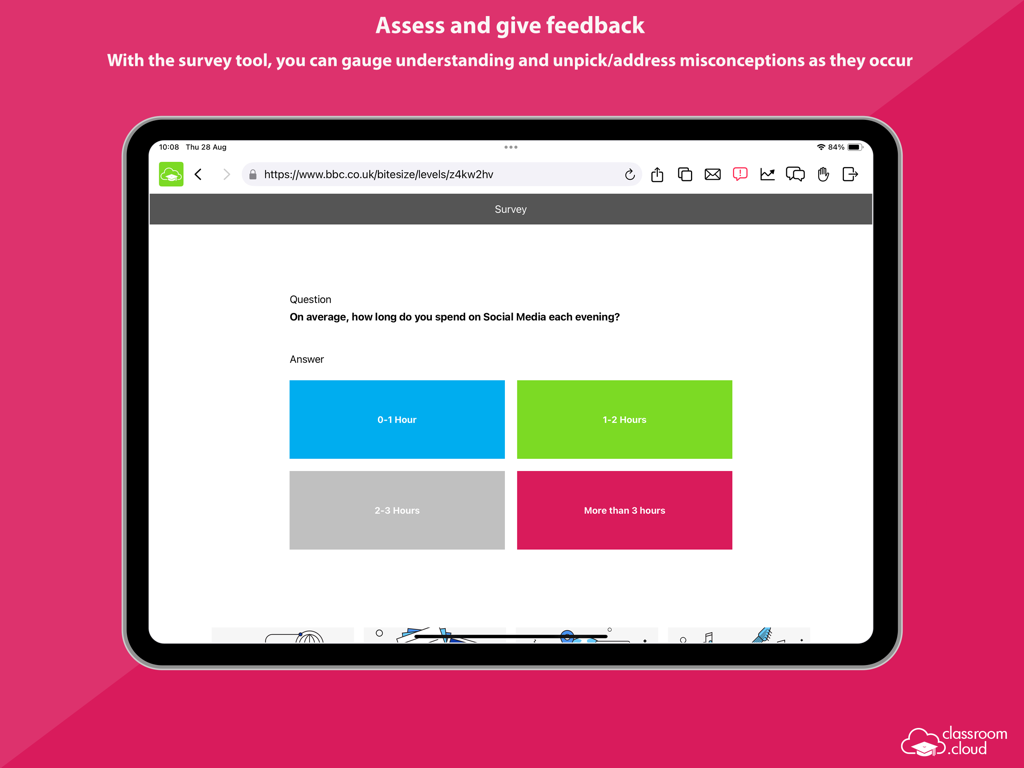
classroom.cloud Student - Screenshot eines Umfragetools in der classroom.cloud Student App auf einem iPad.
Screenshot eines Umfragetools in der classroom.cloud Student App auf einem iPad.

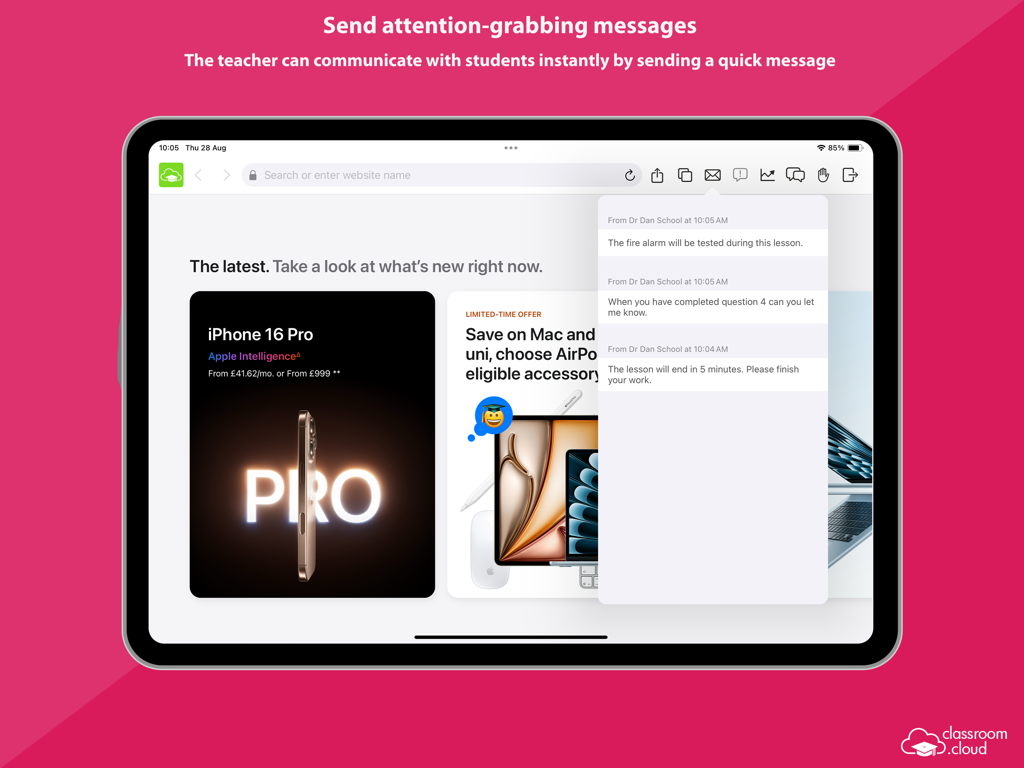
classroom.cloud Student - Ein iPad, das die classroom cloud student App mit sofortigen Lehrernachrichten und Benachrichtigungen anzeigt.
Ein iPad, das die classroom cloud student App mit sofortigen Lehrernachrichten und Benachrichtigungen anzeigt.

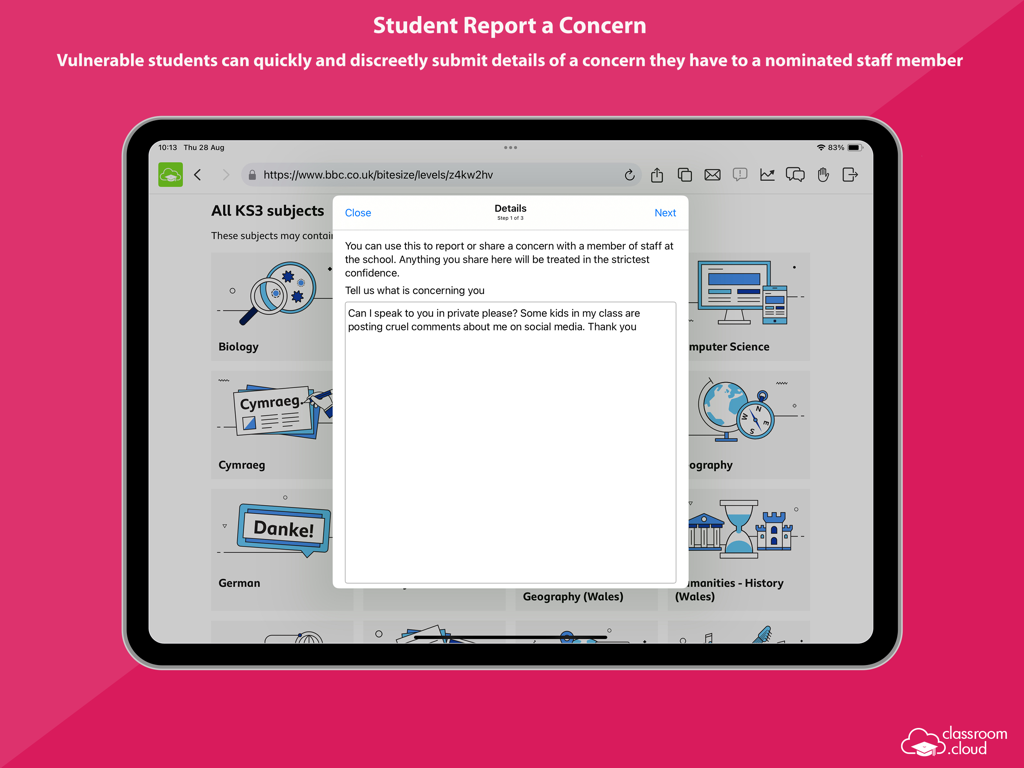
classroom.cloud Student - Ein Schüler nutzt die classroom.cloud App auf einem iPad, um diskret ein Anliegen an Schulpersonal zu melden.
Ein Schüler nutzt die classroom.cloud App auf einem iPad, um diskret ein Anliegen an Schulpersonal zu melden.

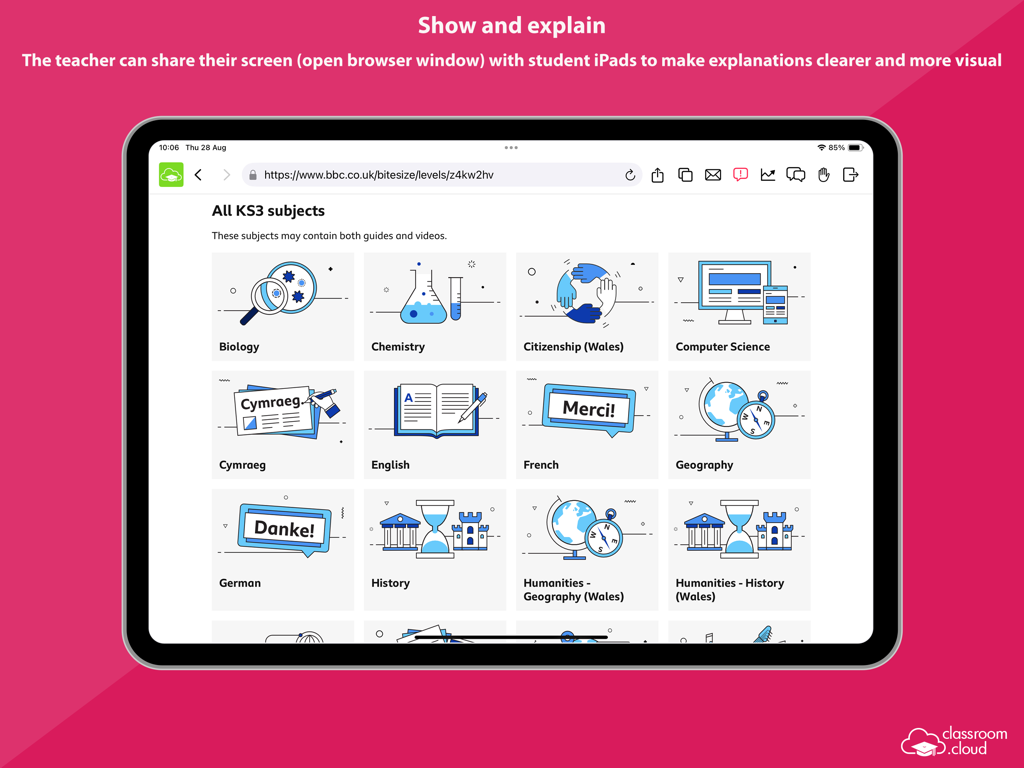
classroom.cloud Student - Lehrer teilt den Bildschirm einer Bildungswebsite mit den iPads der Schüler für Erklärungen im Klassenzimmer.
Lehrer teilt den Bildschirm einer Bildungswebsite mit den iPads der Schüler für Erklärungen im Klassenzimmer.

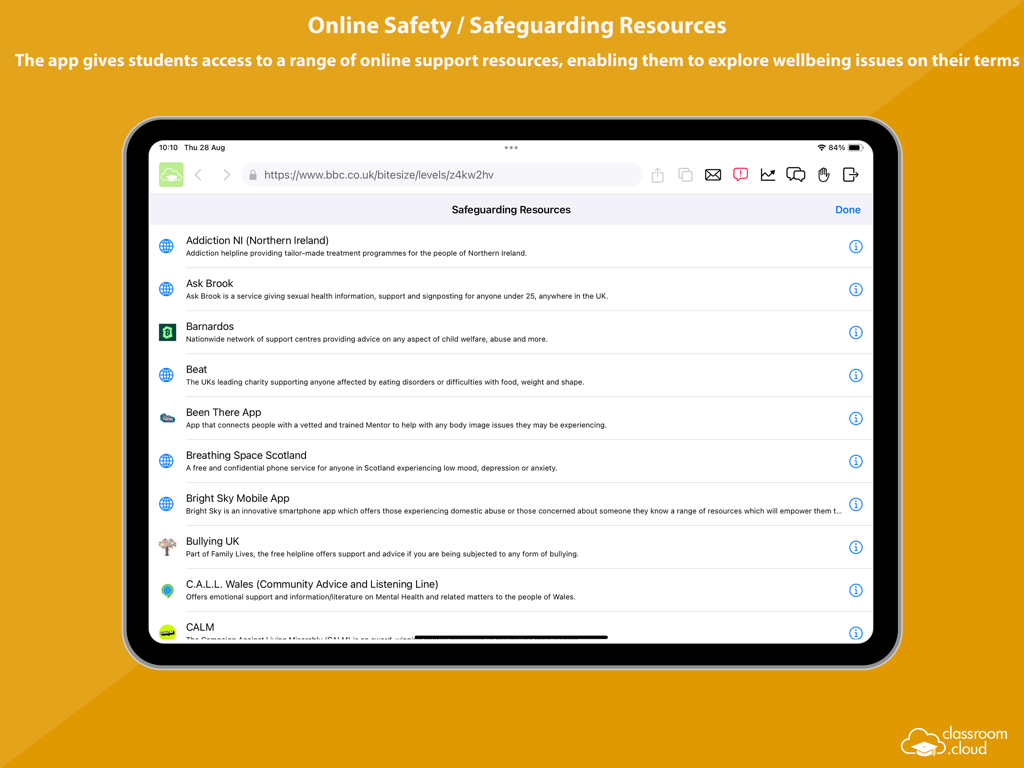
classroom.cloud Student - Eine Liste von Online-Sicherheits- und Schutzressourcen für Schüler in der classroom cloud App auf einem iPad.
Eine Liste von Online-Sicherheits- und Schutzressourcen für Schüler in der classroom cloud App auf einem iPad.

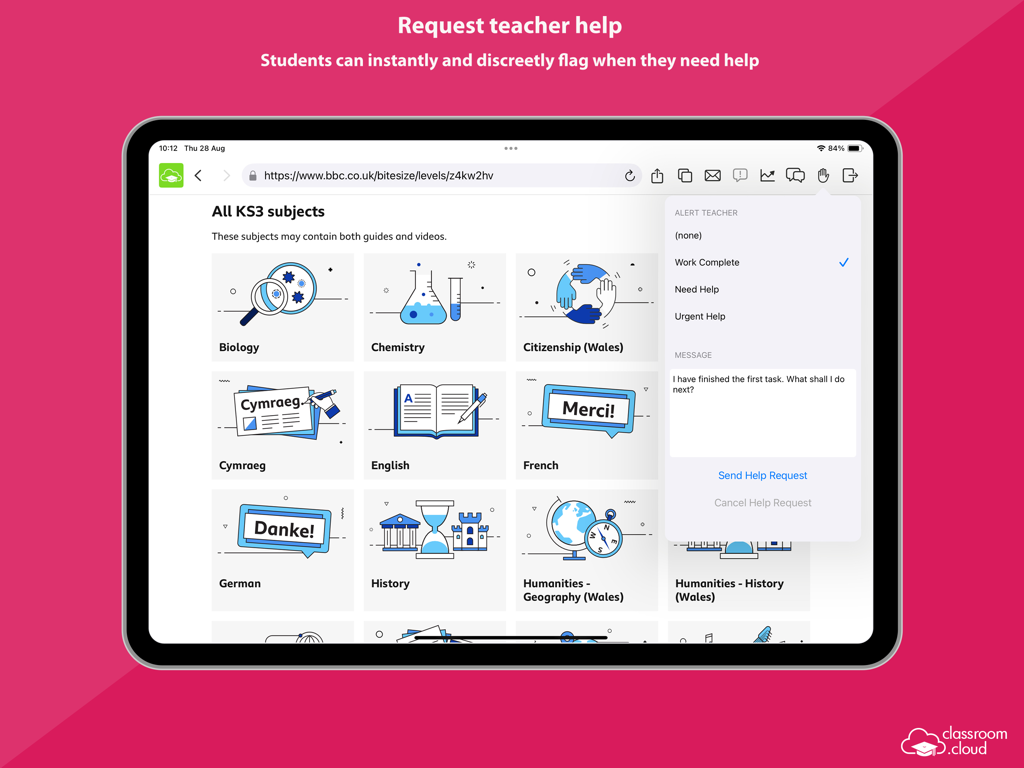
classroom.cloud Student - iPad-Oberfläche der classroom.cloud Student App, die zeigt, wie ein Schüler einem Lehrer diskret um Hilfe bittet, während er Bildungsinhalte durchsucht.
iPad-Oberfläche der classroom.cloud Student App, die zeigt, wie ein Schüler einem Lehrer diskret um Hilfe bittet, während er Bildungsinhalte durchsucht.

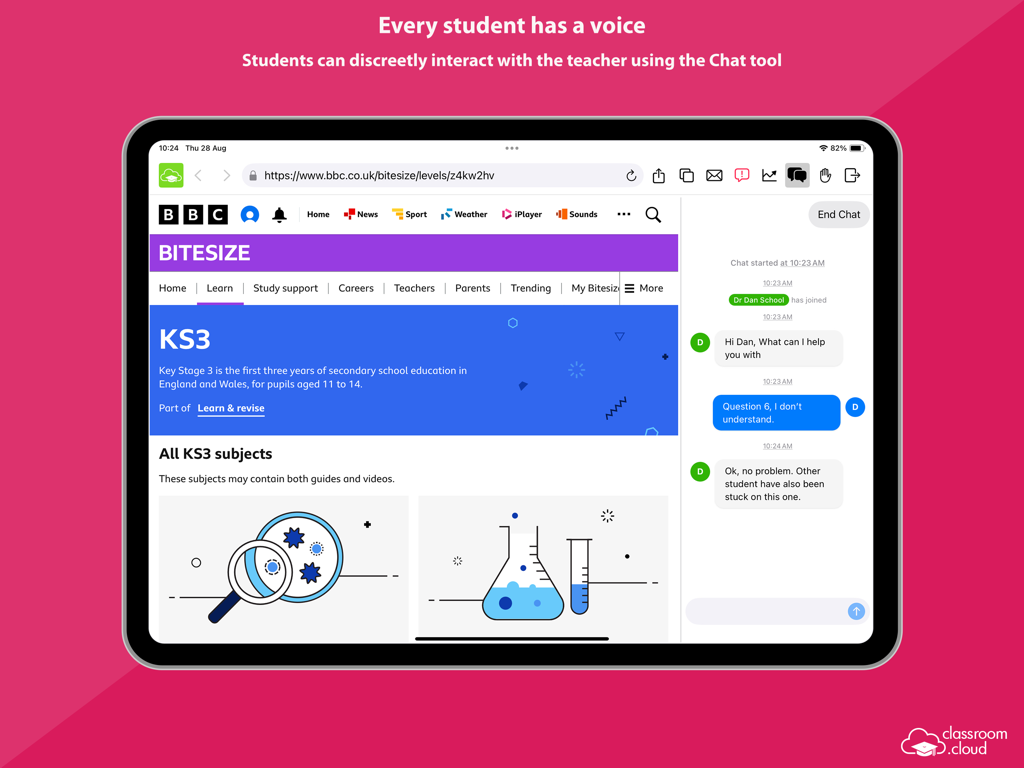
classroom.cloud Student - Ein Schüler nutzt das classroom.cloud Chat-Tool auf einem iPad, um einem Lehrer während des Unterrichts diskret um Hilfe zu bitten.
Ein Schüler nutzt das classroom.cloud Chat-Tool auf einem iPad, um einem Lehrer während des Unterrichts diskret um Hilfe zu bitten.

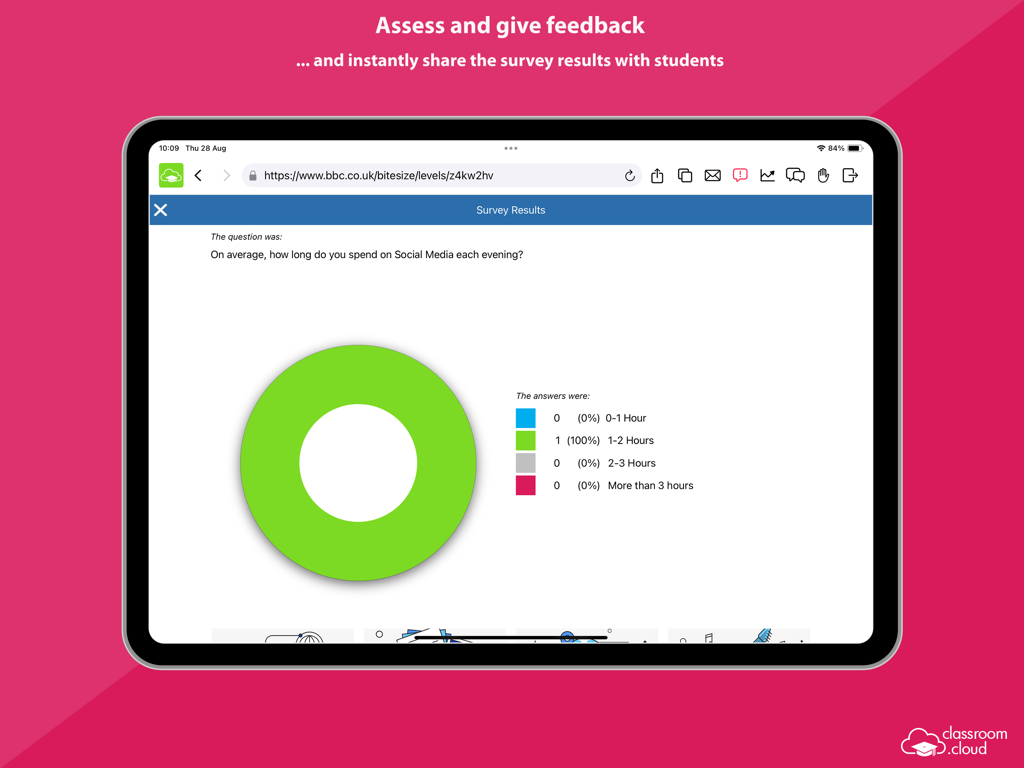
classroom.cloud Student - Ein Kreisdiagramm, das die Ergebnisse einer Schülerumfrage in der classroom.cloud App für iPad zeigt.

Ein Kreisdiagramm, das die Ergebnisse einer Schülerumfrage in der classroom.cloud App für iPad zeigt.

Beschreibung

Designed for use within schools and other educational institutions, this Student browser app for iOS is for use with classroom.cloud, the easy breezy, low-cost, cloud-based IT management, online safety and teaching platform for schools. classroom.cloud is a teacher’s dream come true. Incredibly easy to use, it provides a range of teaching tools that can flex to any learning environment – both in school and with remote learners. From real-time instruction and assessment tools, to boosting collaboration and support, as well as helping manage online behavior – it has it all! With the optional online safety toolkit, selected staff can monitor online activity, identify students at risk, and spot concerning trends. And, with its range of IT management tools, school techs can manage teacher and student devices centrally, as well as see at a glance how your technology is being used and how to maximize it – saving you a bunch of time and money! Once your school has registered online with classroom.cloud, the app can be easily deployed by the IT team to student iPads (iOS 14 and above), enabling teachers to connect instantly and securely to the devices from the cloud-based Teacher console and allowing school techs to deliver instant remote support and device management. The classroom.cloud student app can be set as the default browser on devices and offers support for Entra ID and Google authentication, allowing you to force students to sign-in to the app with Microsoft or Google credentials if applicable. Teacher Tools: • Choice of flexible connection methods – connect to a pre-defined group of student devices, a specified list of device or student names, or on the fly using a Class Code. • Easily monitor students’ internet use via crystal-clear thumbnails. Zoom in using Watch/View Mode to take a closer look at activity on a single student device. • Broadcast the teacher’s screen and audio to connected student devices to help show/talk them through explanations and lesson activities. • Lock students’ screens in a single click to gain attention. • Present students with the lesson objectives and their expected learning outcomes. • Chat, send a message, and support your students via help requests – without their peers knowing. • Get a feel for students’ understanding of the topic you have just taught them by sending out a quick survey for them to respond to. • See details of the websites that students are currently viewing to check they are focused on the task at hand. • Restrict internet use by employing ‘approved’ and ‘restricted’ website lists during the lesson. • Save yourself a heap of time by launching a website on the students’ devices. • Recognize good work or behaviour by assigning Rewards to students during the lesson. Admin/Technician Tools: • Retrieve a real-time view of the hardware and software installed on each student device. • Monitor internet usage. • Send instant notifications to student iPads. • Send Acceptable Use Policies (AUPs) to student iPads and track acknowledgements in the Web Portal. Online Safety Tools: • Keyword monitoring - alerts nominated staff when students type or search for any terms that match with those in the classroom.cloud keyword database – providing internet safety indicators for self-harm, bullying, sexual and criminal exploitation, and much more. Language packs are included to ensure your school can monitor concerning activity in students’ first languages. • Report a concern - students who feel vulnerable can use the app to 'report concerns' directly and discreetly to the online safety team. • Online resources - gives students instant access to a list of relevant online agencies should they want to seek external help with a particular problem or concern. The innovation behind classroom.cloud comes from NetSupport, the trusted developer of effective classroom management tools for schools for more than 35 years.

Download

Herunterladen auf App Store

Diese Seite ist keine offizielle Seite der App oder ihres Entwicklers, sondern eine unabhängige redaktionelle Veröffentlichung, die zu Informations- und Kommentarzwecken erstellt wurde. Sofern nicht ausdrücklich anders angegeben, sind weder die App noch ihr Entwickler mit MWM, Apple, Google Play, dem App-Herausgeber oder dem Entwickler der App verbunden, von ihnen unterstützt, gesponsert, autorisiert oder anderweitig offiziell verbunden, und nichts auf dieser Seite impliziert, dass die App unter Verwendung der Dienste von MWM entwickelt wurde. Alle Marken, Logos, Screenshots und andere Inhalte bleiben Eigentum ihrer jeweiligen Inhaber.








