
Diese Seite ist keine offizielle Seite der App oder ihres Entwicklers, sondern eine unabhängige redaktionelle Veröffentlichung, die zu Informations- und Kommentarzwecken erstellt wurde. Sofern nicht ausdrücklich anders angegeben, sind weder die App noch ihr Entwickler mit MWM, Apple, Google Play, dem App-Herausgeber oder dem Entwickler der App verbunden, von ihnen unterstützt, gesponsert, autorisiert oder anderweitig offiziell verbunden, und nichts auf dieser Seite impliziert, dass die App unter Verwendung der Dienste von MWM entwickelt wurde. Alle Marken, Logos, Screenshots und andere Inhalte bleiben Eigentum ihrer jeweiligen Inhaber.

Cut Notes
Hören Sie auf, nach unten zu schreiben. Erfassen Sie exakte Rückmeldungen mit einem einzigen Fingertipp und exportieren Sie Marker direkt in Premiere Pro, Avid und Final Cut Pro.
Downloads
22K+Bewertung
Bewertungen gesamt
0Herausgeber
Kategorie
UtilitiesSprachen
1Neueste Version
2.6.1Größe
10.1 MBErstveröffentlichung
20. Dez. 2010Optimieren Sie Ihren Postproduktions-Workflow
Cut Notes schließt die Lücke zwischen Betrachten und Bearbeiten und ermöglicht es Ihnen, exakte Notizen auf Ihrem iPad zu machen, die sofort mit Ihrer professionellen Bearbeitungssuite synchronisiert werden.
Exakte Synchronisation
Verbinden Sie sich direkt mit Premiere Pro, Avid oder FCPX. Ihre Notizen werden automatisch mit dem exakten Frame Ihres Schnitts versehen, ohne manuelle Timecode-Eingabe.
Sofortige Ein-Tipp-Protokollierung
Bleiben Sie mit anpassbaren Voreinstellungstasten auf den Bildschirm konzentriert. Protokollieren Sie häufige Probleme wie 'Tolle Aufnahme' oder 'Audio reparieren' mit einem einzigen Fingertipp, während Sie den Schnitt im Auge behalten.
Häufig gestellte Fragen
Alles, was Sie über wissen müssen Cut Notes
Was ist Cut Notes?
Cut Notes ist eine Notiz-App für das iPad, die sich an Postproduktionsprofis richtet. Sie ermöglicht es Benutzern, schnell Notizen mit voreingestellten Tasten zu machen, die alle mit dem Timecode ihrer Schnittanwendung synchronisiert werden.
Spielt Cut Notes Videoinhalte ab?
Nein, Cut Notes spielt keine Videoinhalte ab. Es fungiert ausschließlich als Begleit-App, die für Notizen mit einer externen Videoquelle oder Schnittanwendung synchronisiert werden kann.
Welche Schnittsoftware unterstützt Cut Notes für die Timecode-Synchronisation?
Cut Notes unterstützt die Timecode-Synchronisation mit Kollaborate, Final Cut Pro (6/7/X), Adobe Premiere Pro (CS 6.0.2/CC), Avid Media Composer/Symphony, Adobe Audition, Pro Tools und jeder App, die MIDI-Timecode unterstützt.
Wie ermöglicht Cut Notes eine schnelle Eingabe von Notizen?
Cut Notes ermöglicht eine schnelle Eingabe von Notizen über seine Notizschlüssel. Durch Tippen auf einen Notizschlüssel wird die Notiz sofort an der aktuellen Timecode-Position hinzugefügt. Benutzer können Notizen organisieren, indem sie benutzerdefinierte Notizschlüssel-Sets erstellen.
Ist eine manuelle Eingabe von Notizen in Cut Notes verfügbar?
Ja, in Cut Notes ist eine manuelle Eingabe von Notizen verfügbar. Benutzer können benutzerdefinierte Notizen in das dafür vorgesehene Textfeld eingeben. Die App fügt die Notiz zu dem Zeitpunkt ein, an dem der Benutzer mit der Eingabe beginnt, wodurch die Eile entfällt.
Welche Exportoptionen stehen für Notizen aus Cut Notes zur Verfügung?
Cut Notes exportiert Notizen nach Final Cut Pro 6/7, Final Cut Pro X, Avid Media Composer und Pro Tools. Für Pro Tools ist für den Export die Drittanbieteranwendung EdiMarker erforderlich, die separat erhältlich ist.
Bietet Cut Notes Cloud-Integrationsfunktionen?
Ja, Cut Notes integriert sich in die Kollaborate-Cloud-Plattform. Diese Integration ermöglicht den Austausch von Notizen mit Kollegen, kollaborative Notizsitzungen, Timecode-Synchronisation aus einem Webbrowser und die Fernsteuerung der Wiedergabe.
Können Benutzer die Notizschlüssel-Tasten in Cut Notes anpassen?
Ja, Benutzer können die Notizschlüssel-Tasten in Cut Notes anpassen. Die App ermöglicht das Ändern bestehender Notizschlüssel, das Erstellen neuer Notizschlüssel-Sets und das Zuweisen eindeutiger Farbcodes zu den einzelnen Schlüsseln.
Wer ist die Zielgruppe für die Cut Notes App?
Cut Notes wurde für Postproduktionsprofis entwickelt, darunter Studios und Freiberufler. Sie dient als dediziertes Notizwerkzeug für das iPad, um Arbeitsabläufe in der Film- und Videobearbeitung zu optimieren.
Die folgenden Screenshots und die Beschreibung stammen direkt aus dem offiziellen Store-Eintrag der App und sind Eigentum des Entwicklers.
App Store
Screenshots
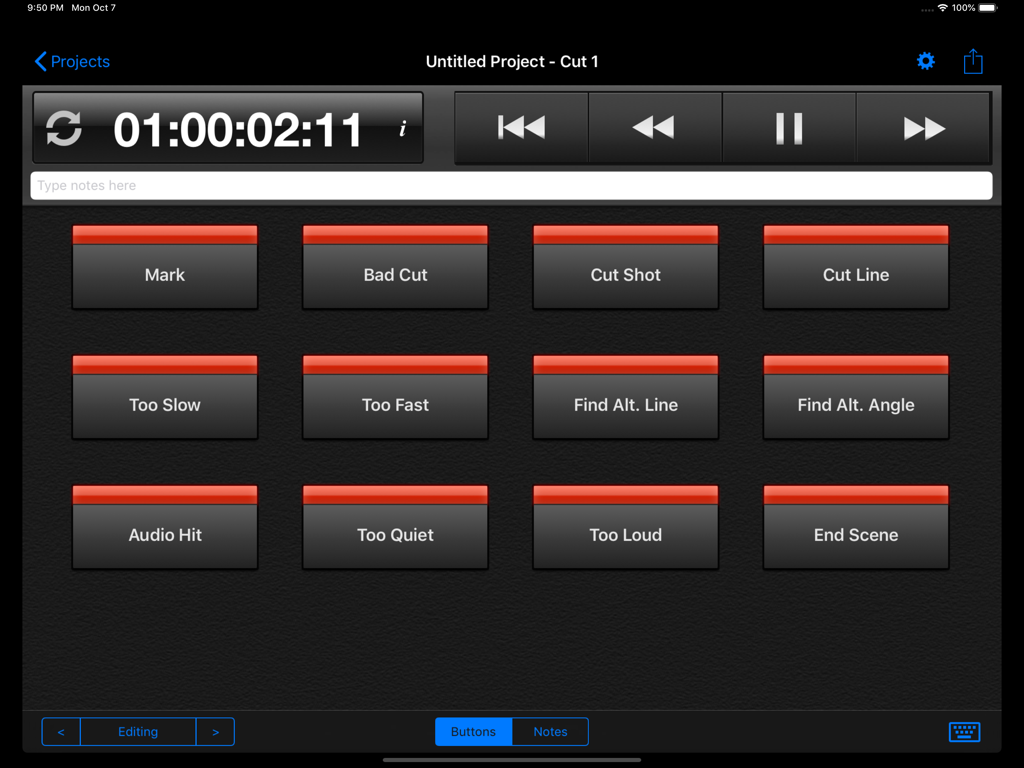
Cut Notes iPad App-Oberfläche mit Zeitanzeige und benutzerdefinierten Notiz-Shortcut-Tasten für die Videobearbeitung
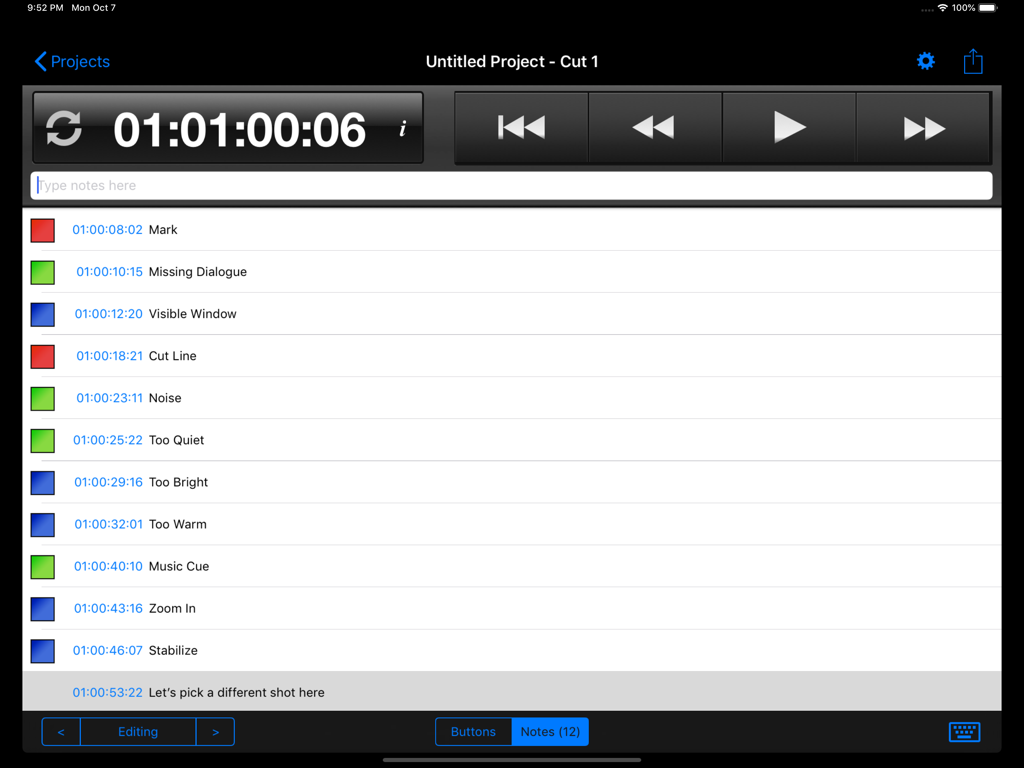
Oberfläche der Cut Notes App auf einem iPad mit einer Liste von zeitgestempelten Videobearbeitungsnotizen und Transportersteuerungen.
Beschreibung
Download
Ähnliche Apps
Top-gerankte Apps in derselben Kategorie

Google LLC

Google Chrome
Google LLC

中国移动(手机营业厅)
China Mobile Online Services Co., Ltd.

Google Authenticator
Google LLC

CNH do Brasil
Servicos e Informacoes do Brasil

Cleanup: Phone Storage Cleaner
DEEP FLOW SOFTWARE SERVICES - FZCO

gov.br
Servicos e Informacoes do Brasil

中国电信-全国统一官方服务平台
CHINA TELECOM Corporation Ltd.

Microsoft Edge: AI Browser
Microsoft Corporation
Diese Seite ist keine offizielle Seite der App oder ihres Entwicklers, sondern eine unabhängige redaktionelle Veröffentlichung, die zu Informations- und Kommentarzwecken erstellt wurde. Sofern nicht ausdrücklich anders angegeben, sind weder die App noch ihr Entwickler mit MWM, Apple, Google Play, dem App-Herausgeber oder dem Entwickler der App verbunden, von ihnen unterstützt, gesponsert, autorisiert oder anderweitig offiziell verbunden, und nichts auf dieser Seite impliziert, dass die App unter Verwendung der Dienste von MWM entwickelt wurde. Alle Marken, Logos, Screenshots und andere Inhalte bleiben Eigentum ihrer jeweiligen Inhaber.