
Diese Seite ist keine offizielle Seite der App oder ihres Entwicklers, sondern eine unabhängige redaktionelle Veröffentlichung, die zu Informations- und Kommentarzwecken erstellt wurde. Sofern nicht ausdrücklich anders angegeben, sind weder die App noch ihr Entwickler mit MWM, Apple, Google Play, dem App-Herausgeber oder dem Entwickler der App verbunden, von ihnen unterstützt, gesponsert, autorisiert oder anderweitig offiziell verbunden, und nichts auf dieser Seite impliziert, dass die App unter Verwendung der Dienste von MWM entwickelt wurde. Alle Marken, Logos, Screenshots und andere Inhalte bleiben Eigentum ihrer jeweiligen Inhaber.


DoubleTake - Multicam video
Zwei Kameras gleichzeitig. MWMs Kreation liefert die Lizenz zum Filmen, ohne das übliche Gedöns.
Downloads
1M+Bewertung
Bewertungen gesamt
320Herausgeber
Kategorie
Photo & VideoSprachen
11Neueste Version
3.1.2Größe
64.6 MBErstveröffentlichung
28. Jan. 2020Eine Bewertung der Schlüsselmerkmale für professionelle mobile Videoproduzenten und Content Creator.
Analyse der Kernfunktionen von DoubleTake - Multicam video
Simultane Dual-Kamera-Aufzeichnung
Die App ermöglicht die gleichzeitige Videoaufnahme von zwei Kameras auf einem einzigen kompatiblen iPhone oder iPad, was eine revolutionäre Flexibilität bei der mobilen Videoproduktion bietet.
Individuelle Fokus- und Belichtungssteuerung
Dieses Tool erlaubt die unabhängige Einstellung und Sperrung von Fokus und Belichtung für jede der beiden verwendeten Kameras, was eine präzise kreative Kontrolle über die Bildgestaltung ermöglicht.
Flexible Ausgabeformate
Es bietet die Option, Videos entweder als Bild-im-Bild-Komposition (PiP), im geteilten Bildschirm oder als separate, diskrete Dateien zu speichern, was die Nachbearbeitung erheblich vereinfacht.
Umfassende Kameravisualisierung
Die App verfügt über eine Kameraauswahlansicht, die alle verfügbaren Kameras des Geräts visualisiert, um Nutzern die optimale Wahl und Bildkomposition vor der Aufnahme zu erleichtern.
Multi-Brennweiten-Aufnahme
Es erlaubt die gleichzeitige Erfassung desselben Motivs mit unterschiedlichen Brennweiten (z.B. Ultra-Weitwinkel und Teleobjektiv), ideal für dynamische Schnittbilder und Kontextualisierung.
Professionelle Bildraten
Die App unterstützt wählbare Broadcast-Bildraten wie 24fps, 25fps und 30fps, was für die Kompatibilität mit professionellen Projektanforderungen unerlässlich ist.
Die folgenden Screenshots und die Beschreibung stammen direkt aus dem offiziellen Store-Eintrag der App und sind Eigentum des Entwicklers.
App Store
Screenshots
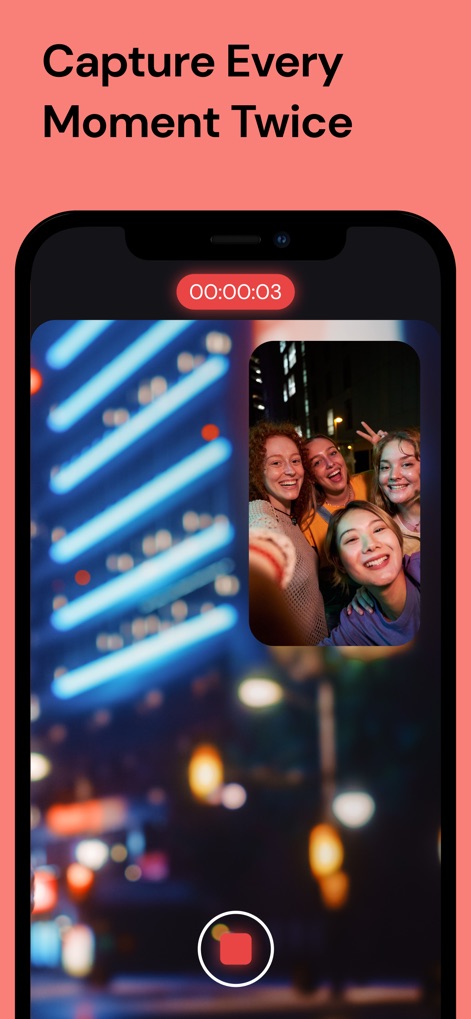
Nutzer können mehrere Perspektiven gleichzeitig erfassen, wobei das Hauptvideo im Vollbildmodus und eine zweite Aufnahme als Bild-in-Bild-Fenster mit aktivem Aufnahmetimer angezeigt werden.
PiP-Aufnahme leicht gemacht

Dieses Tool präsentiert vielseitige Aufnahmemodi wie "Picture in Picture" und "Split Screen", die über intuitive Schaltflächen über einer Wüstenlandschaft zur Auswahl stehen.
Kreative Aufnahmemodi entdecken

Die App ermöglicht die Auswahl verschiedener Kameralinsen wie "Ultra wide" und "Selfie", indem die gewünschten Optionen über nummerierte Indikatoren ausgewählt werden.
Flexible Kameraauswahl

Nutzer können Videoeinstellungen wie die Bildrate mit "60fps" und die Auflösung mit "4K" detailliert anpassen, um die optimale Aufnahmequalität zu gewährleisten.
Qualitätseinstellungen präzise anpassen

Die App bietet eine übersichtliche Mediathek, in der Nutzer Videos über anklickbare Thumbnails auswählen und anschließend über die Export- und Löschoptionen verwalten können.
Mediathek verwalten
Beschreibung
Download
Ähnliche Apps
Apps mit ähnlichen Funktionen und Nutzererfahrung

2Camera Dual Camera Front Back
自力 黄
CamFusion - Dual Camera 视频抽帧截图
Liangjie Information Technology (Chengmai) Co., Ltd.

Double Camera •
Dayworks, LLC
2Cam – Dual & Double Camera
VISION FZ LLE
Dualgram
Just2us Pte Ltd
Dual Camera Split Videos: Revo
Applorium Ltd
DUBL Pro
DUBL, INC.
Diese Seite ist keine offizielle Seite der App oder ihres Entwicklers, sondern eine unabhängige redaktionelle Veröffentlichung, die zu Informations- und Kommentarzwecken erstellt wurde. Sofern nicht ausdrücklich anders angegeben, sind weder die App noch ihr Entwickler mit MWM, Apple, Google Play, dem App-Herausgeber oder dem Entwickler der App verbunden, von ihnen unterstützt, gesponsert, autorisiert oder anderweitig offiziell verbunden, und nichts auf dieser Seite impliziert, dass die App unter Verwendung der Dienste von MWM entwickelt wurde. Alle Marken, Logos, Screenshots und andere Inhalte bleiben Eigentum ihrer jeweiligen Inhaber.