DS1 Companion
DS1 Companion
Herunterladen auf App Store

Diese Seite ist keine offizielle Seite der App oder ihres Entwicklers, sondern eine unabhängige redaktionelle Veröffentlichung, die zu Informations- und Kommentarzwecken erstellt wurde. Sofern nicht ausdrücklich anders angegeben, sind weder die App noch ihr Entwickler mit MWM, Apple, Google Play, dem App-Herausgeber oder dem Entwickler der App verbunden, von ihnen unterstützt, gesponsert, autorisiert oder anderweitig offiziell verbunden, und nichts auf dieser Seite impliziert, dass die App unter Verwendung der Dienste von MWM entwickelt wurde. Alle Marken, Logos, Screenshots und andere Inhalte bleiben Eigentum ihrer jeweiligen Inhaber.

Logo von DS1 Companion
Herunterladen auf App Store

DS1 Companion

Verwandeln Sie Ihren Radarwarner in ein intelligentes Kommandozentrum. Erleben Sie fortschrittliches SpotLocks™ Stummschalten, hochauflösende HUD-Visualisierung und präzise Signalanalysen, die für den ernsthaften Fahrer entwickelt wurden.

Kennzahlen

Downloads

2K+

Bewertung

4.8/5

Bewertungen gesamt

100

Herausgeber

Angela Mcarthur

Kategorie

Utilities

Sprachen

1

Neueste Version

1.10.8

Größe

7.7 MB

Erstveröffentlichung

1. Sept. 2023
Funktionen

Beherrschen Sie Ihre Fahrt

Entfesseln Sie das volle Potenzial Ihres Radenso DS1 mit professionellen Alarmen, intelligentem Stummschalten und einem hochauflösenden taktischen Dashboard.

Präzisions SpotLocks™

Schalten Sie wiederkehrende Fehlalarme automatisch mit GPS-basiertem Lernen stumm, damit Ihre Kabine leise bleibt, bis eine echte Bedrohung auftaucht.

Taktische HUD-Anzeige

Erhalten Sie hochauflösende visuelle Rückmeldungen mit farbcodierten Messgeräten und Näherungsdaten, die weit über die Standardanzeige des Detektors hinausgehen.

Die folgenden Screenshots und die Beschreibung stammen direkt aus dem offiziellen Store-Eintrag der App und sind Eigentum des Entwicklers.

App Store

Screenshots
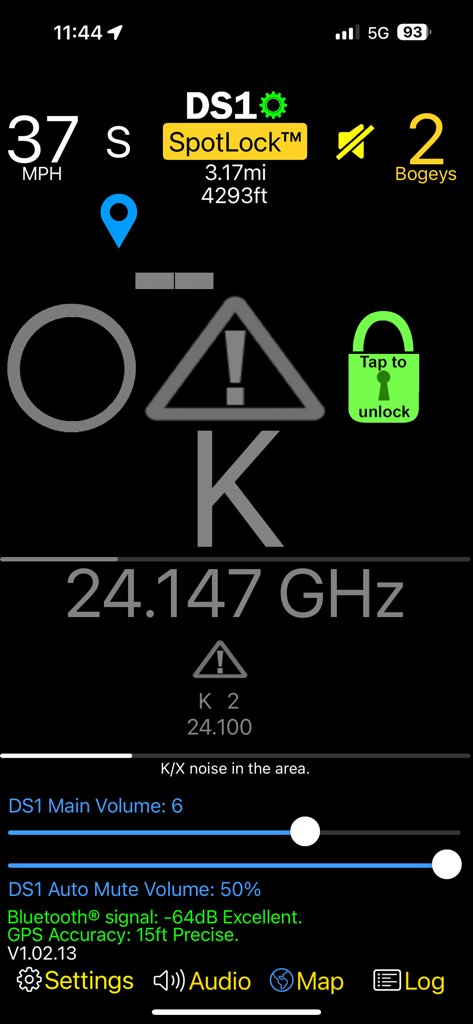
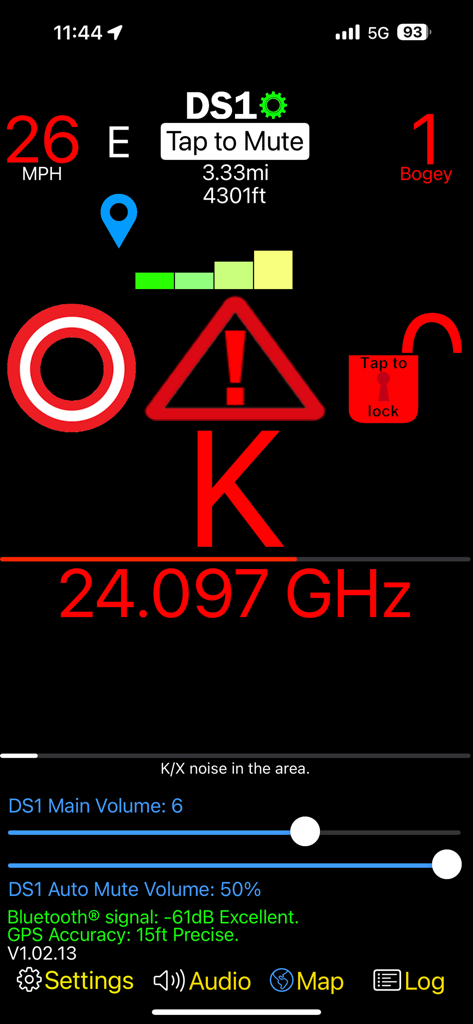
DS1 Companion - Oberfläche der DS1 Companion App, die eine K-Band-Radarwarnung, Frequenzdaten und Fahrzeuggeschwindigkeit anzeigt
Oberfläche der DS1 Companion App, die eine K-Band-Radarwarnung, Frequenzdaten und Fahrzeuggeschwindigkeit anzeigt

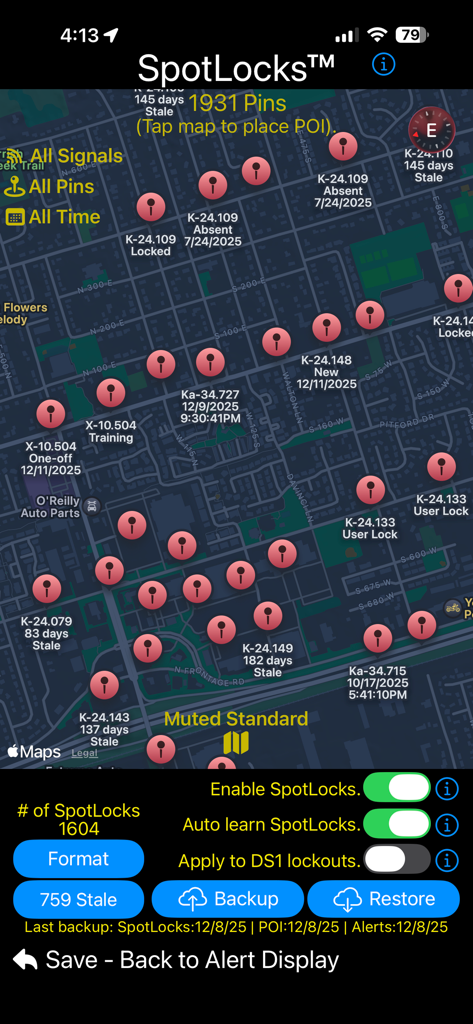
DS1 Companion - Eine Kartenoberfläche in der DS1 Companion App, die zahlreiche Radarsignal-Pins und SpotLocks-Stummschaltsteuerelemente anzeigt
Eine Kartenoberfläche in der DS1 Companion App, die zahlreiche Radarsignal-Pins und SpotLocks-Stummschaltsteuerelemente anzeigt

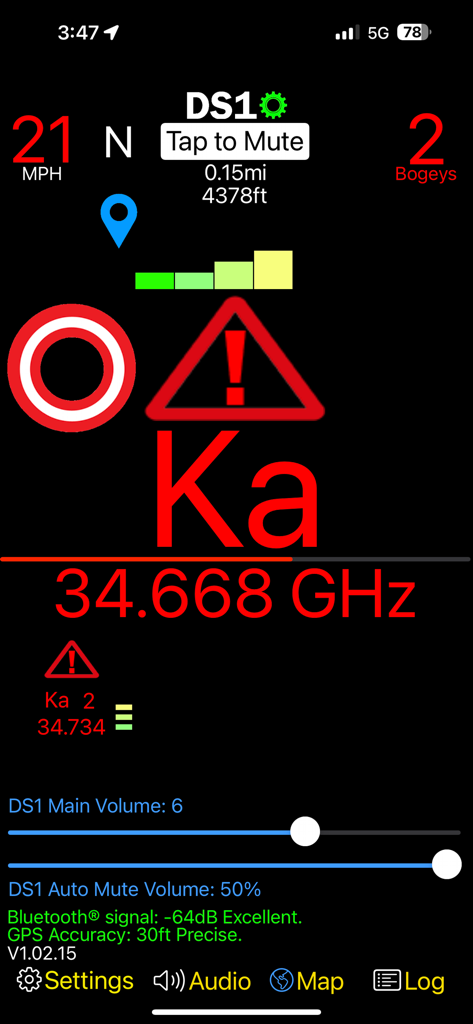
DS1 Companion - DS1 Companion App Dashboard, das eine Ka-Band-Radarwarnung mit Frequenz, Signalstärke und Fahrzeuggeschwindigkeit anzeigt
DS1 Companion App Dashboard, das eine Ka-Band-Radarwarnung mit Frequenz, Signalstärke und Fahrzeuggeschwindigkeit anzeigt

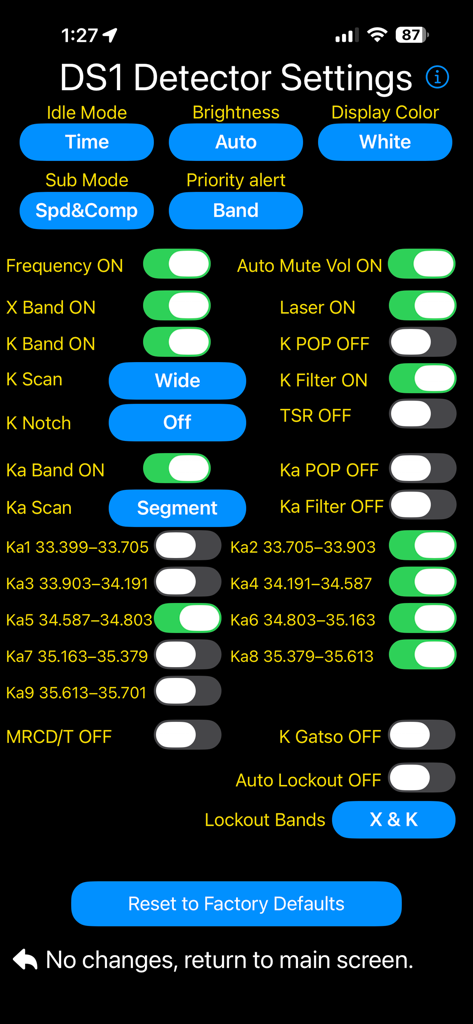
DS1 Companion - Detaillierter Einstellungsbildschirm für die DS1 Companion Radarwarner-App mit verschiedenen Konfigurationsschaltern.
Detaillierter Einstellungsbildschirm für die DS1 Companion Radarwarner-App mit verschiedenen Konfigurationsschaltern.

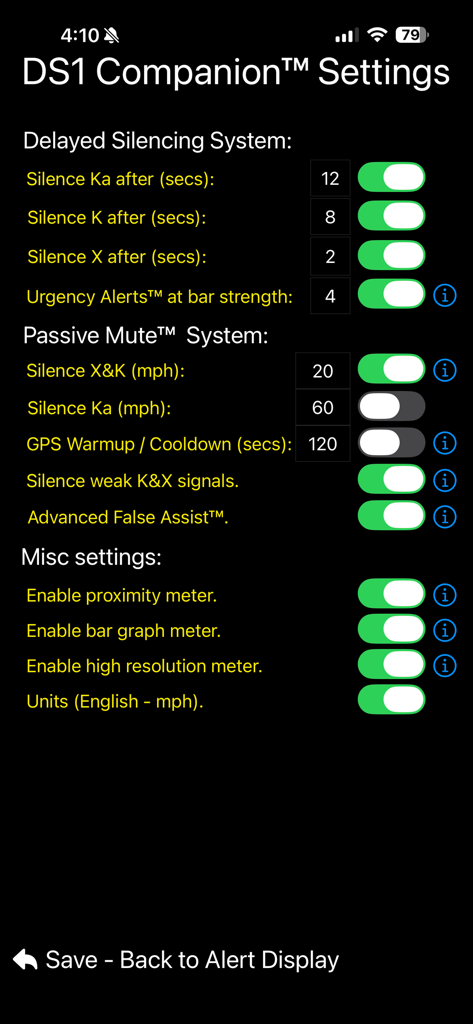
DS1 Companion - Einstellungsbildschirm der DS1 Companion App, der Stummschaltungssysteme und passive Stummschaltungsoptionen für Radarwarner zeigt
Einstellungsbildschirm der DS1 Companion App, der Stummschaltungssysteme und passive Stummschaltungsoptionen für Radarwarner zeigt

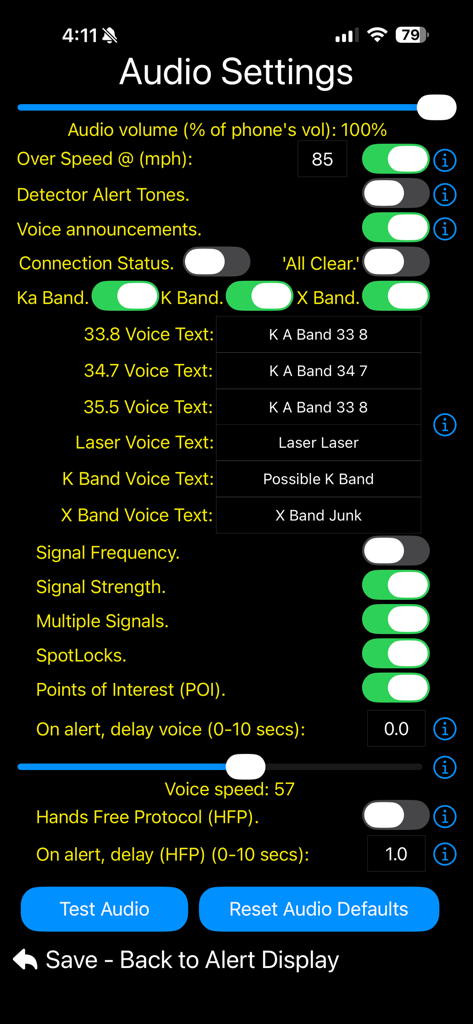
DS1 Companion - DS1 Companion App Audioeinstellungen-Bildschirm mit Konfigurationen für Sprachwarnungen und Lautstärke
DS1 Companion App Audioeinstellungen-Bildschirm mit Konfigurationen für Sprachwarnungen und Lautstärke

DS1 Companion - DS1 Companion App Heads-up-Display mit einer Radarwarnung und Frequenz.
DS1 Companion App Heads-up-Display mit einer Radarwarnung und Frequenz.

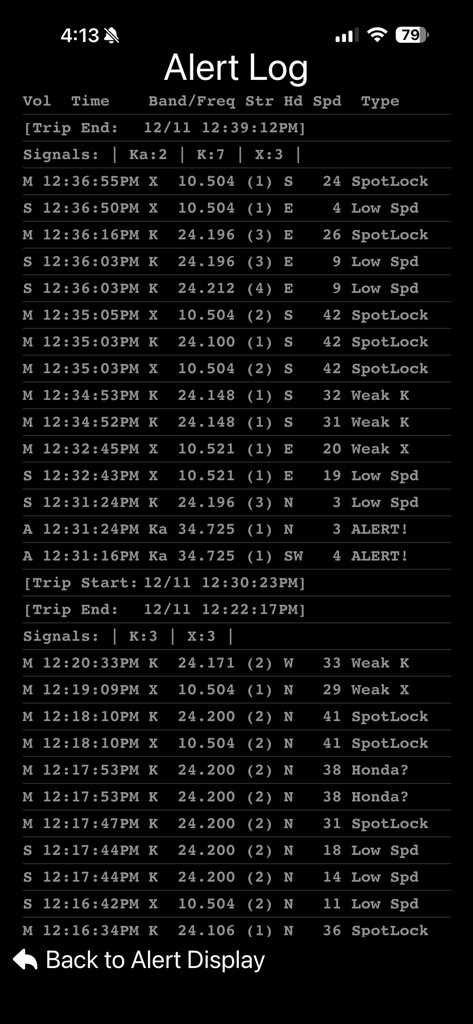
DS1 Companion - DS1 Companion App Bildschirm, der ein detailliertes Warnprotokoll mit Radarband, Frequenz, Signalstärke und Fahrzeuggeschwindigkeit zeigt
DS1 Companion App Bildschirm, der ein detailliertes Warnprotokoll mit Radarband, Frequenz, Signalstärke und Fahrzeuggeschwindigkeit zeigt

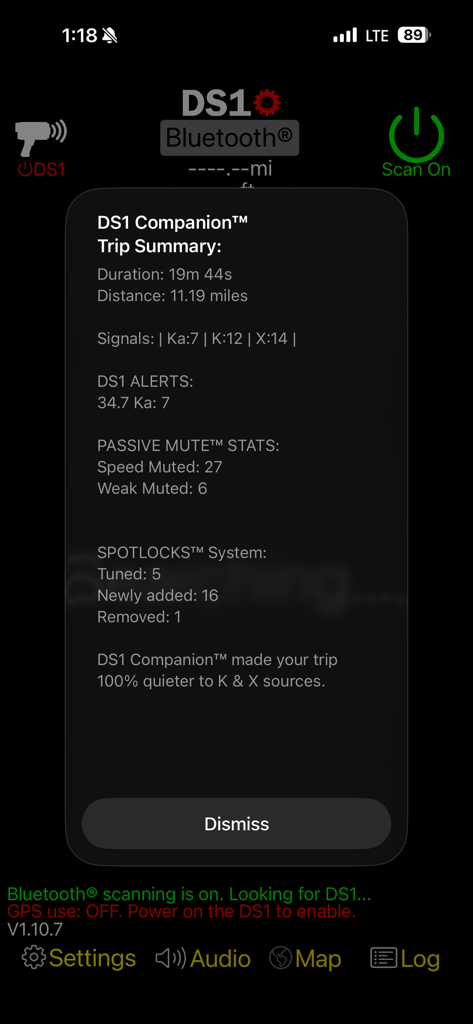
DS1 Companion - Ein Trip-Zusammenfassungsbildschirm der DS1 Companion App mit Fahrstatistiken und Radarerkennungswarnungen
Ein Trip-Zusammenfassungsbildschirm der DS1 Companion App mit Fahrstatistiken und Radarerkennungswarnungen

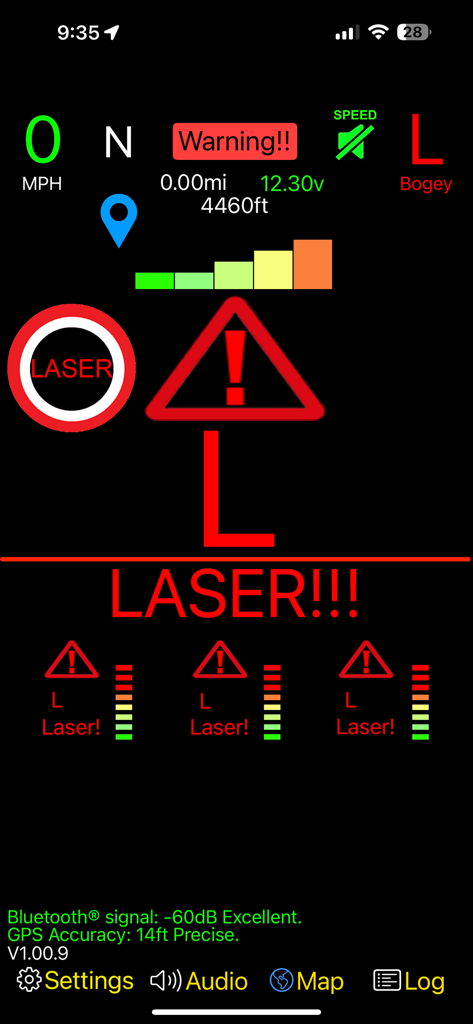
DS1 Companion - DS1 Companion App Oberfläche, die ein hochauflösendes Heads-up-Display mit einer prominenten roten Laserwarnung und Signalstärkemessern anzeigt

DS1 Companion App Oberfläche, die ein hochauflösendes Heads-up-Display mit einer prominenten roten Laserwarnung und Signalstärkemessern anzeigt

Beschreibung

DS1 Companion™ is a feature rich app, designed to give you the most out of your DS1 radar detector, while enhancing your driving experience along the way. Featuring intelligent alerts and advanced muting! DS1 Companion™ is the COMPLETE solution to enjoying your DS1. **** NOTE *** Make sure to upgrade your DS1's firmware to version 1.21. Previous versions prior to 1.15 will not keep the detector muted after you mute it. The DS1 Companion™ app leverages years of optimizations and features from V1 Companion™ (Available separately on the app store for owners of the Valentine One radar locator). Building on this legacy, the DS1 companion app adds new systems to support Radenso's detector's unique abilities and features. Enhanced GPS location based 'false muting' via SpotLocks™ - All future updates to this app are free to purchasers of DS1 Companion™ DS1 Companion™'s alerting and muting systems are fully optimized for the DS1 platform. Intelligent voice announcements and on-screen visuals will always keep you informed and aware of the situation around you. NOTE: DS1 Companion™ requires a Radenso DS1 radar detector with firmware 121 to function correctly. DS1 Companion™ full feature list: • SpotLocks™ - Location based false silencing has never been this good or easy. Turn on the intelligent location-based learning and let DS1 Companion™ do the rest. Or you can manually 'lock' or 'unlock' locations with ease from the main alert screen. • Works seamlessly with the DS1's auto mute memory, manual mute memory, k-block, and K X Low Speed built in muting. • Ability to set the DS1’s internal detector settings (more coming in free future upgrades). *Req US Version 1.21 firmware. Frequency K Notch Idle Display Sub Display Laser X Band K Band K Pop K Filter K Scans TSR Ka Band Ka Pop Ka Filter Ka Scans Ka 1-9 Segs Auto Mute Volume Display Color Display Brightness Priority Band Auto Lockout Auto Lockout Bands • SpotLocks™ works seamlessly with your DS1’s built in 'auto mute memory' locations. • 'Proximity' meter - leverages the high resolution signal strength information provided by the detector to show you a better representation of the signal's source. • 'K & X falses in area' meter shows you how many possible false alerts exist in the area you are traveling based on the accumulated SpotLock data™. • 'Custom Phrases' for a given threat's audio announcements. • High resolution meters for the priority alert (Not limited to the # of bars on the DS1 display). • Customizable heads-up display. • HUD displays the priority alert's band, signal strength, frequency. The HUD is color coded between real threats & false signals. • HUD of the secondary alerts' bands, signal strengths, frequencies, & bogey counts. • Advanced BSM/CAS/Ka False Muting (Optimized for the DS1 platform). • 'Ghost' muting quiets false alerts when you are stuck traveling near a false emitting vehicle. • "Passive Mute™"- Quiets the DS1 below user set speeds & during weak K & X signals. • Bogey count display showing total number of threats. • Vehicle speed (MPH or KMH) display. Speed is color coded for each alert type. • Mute status with the ability to manually mute/unmute alerts as you need. • Detailed & intelligent voice announcements of band, frequency, strength, number of alerts, occurrences of mixed signals and more. • Automatic muting of Ka, K, and X bands ('Time before mute' set for each band). • 'Reduce Speed' notification for user set speed. • ‘Urgency Alerts™’ - Unmutes growing threats & announces these alerts via voice & notifications. • ‘Alert History’ - View your past alerts with detailed information about each encounter. • Compass heading. • Imperial/metric units (mph/kmh). • Detailed trip summary at the end of your ride including duration, distance, alerts, muting stats and more. • Automatic and seamless connection via Bluetooth even while the app is in the background. • iPhone & Apple Watch notifications of band, & frequency of each alert. • Help system.

Download

Herunterladen auf App Store

Diese Seite ist keine offizielle Seite der App oder ihres Entwicklers, sondern eine unabhängige redaktionelle Veröffentlichung, die zu Informations- und Kommentarzwecken erstellt wurde. Sofern nicht ausdrücklich anders angegeben, sind weder die App noch ihr Entwickler mit MWM, Apple, Google Play, dem App-Herausgeber oder dem Entwickler der App verbunden, von ihnen unterstützt, gesponsert, autorisiert oder anderweitig offiziell verbunden, und nichts auf dieser Seite impliziert, dass die App unter Verwendung der Dienste von MWM entwickelt wurde. Alle Marken, Logos, Screenshots und andere Inhalte bleiben Eigentum ihrer jeweiligen Inhaber.








