
Diese Seite ist keine offizielle Seite der App oder ihres Entwicklers, sondern eine unabhängige redaktionelle Veröffentlichung, die zu Informations- und Kommentarzwecken erstellt wurde. Sofern nicht ausdrücklich anders angegeben, sind weder die App noch ihr Entwickler mit MWM, Apple, Google Play, dem App-Herausgeber oder dem Entwickler der App verbunden, von ihnen unterstützt, gesponsert, autorisiert oder anderweitig offiziell verbunden, und nichts auf dieser Seite impliziert, dass die App unter Verwendung der Dienste von MWM entwickelt wurde. Alle Marken, Logos, Screenshots und andere Inhalte bleiben Eigentum ihrer jeweiligen Inhaber.

DWG FastView-CAD Viewer&Editor
Die CAD-Workstation schrumpft auf Taschenformat. Diese Software entfesselt Ihre Konstruktionen, egal wo Sie sind.
Downloads
25M+Bewertung
Bewertungen gesamt
65.7KHerausgeber
Kategorie
ProductivitySprachen
23Neueste Version
5.18.8Größe
368.5 MBErstveröffentlichung
18. Aug. 2011Funktionsbewertung: DWG FastView-CAD Viewer&Editor
Eine tiefgehende Analyse der Kernfunktionen für technische Fachkräfte und Designexperten.
Umfassende 3D-Modellunterstützung und -werkzeuge
Die App bietet umfassende Unterstützung für eine Vielzahl von 3D-Modellformaten, einschließlich BIM, Revit, Solidworks und über 40 weiteren, sowie leistungsstarke Werkzeuge zur 3D-Modellmanipulation wie Skalierung, Rotation, Schnitte und Messungen.
Volle AutoCAD-Kompatibilität (DWG, DXF)
Dieses Tool gewährleistet volle Kompatibilität mit AutoCAD-Formaten (DWG, DXF), was einen nahtlosen Austausch und die Bearbeitung von Zeichnungen ohne Konvertierungsprobleme ermöglicht.
Nahtloses Umschalten zwischen 2D- und 3D-Modus
Es ermöglicht ein einfaches Umschalten zwischen 2D- und 3D-Modi, einschließlich 3D-Drahtmodell, realistischer und verdeckter 3D-Ansicht, mit Unterstützung für verschiedene Perspektiven.
Umfassende 2D-Bearbeitungs- und Messwerkzeuge
Es ermöglicht Nutzern, unterwegs präzise 2D-CAD-Arbeiten durchzuführen, inklusive Verschieben, Kopieren, Drehen, Skalieren, Bemaßen, Trimmen, Offset und Textsuche.
Präzise Zeichenwerkzeuge und Koordinatenunterstützung
Die App verfügt über präzise Zeichenwerkzeuge, die die Verwendung von 2D-Absolut-, Relativ- und Polarkoordinaten sowie 3D-Kugel- und Zylinderkoordinaten zur exakten Punktverschiebung und -platzierung unterstützen.
Plattformübergreifende Verfügbarkeit und Cloud-Integration
Die App ist als plattformübergreifende CAD-Software konzipiert und unterstützt das Öffnen, Anzeigen, Bearbeiten und Teilen von Zeichnungen aus Cloud-Diensten wie Dropbox, OneDrive und Google Drive.
Flexible Export- und Freigabefunktionen
Dieses Tool bietet die Möglichkeit, CAD-Zeichnungen in verschiedene Formate wie PDF, BMP, JPG und PNG zu exportieren und einfach zu teilen, mit Anpassungsoptionen für PDF-Exporte.
Offline-Nutzung und keine Registrierung
Es ermöglicht Nutzern, Zeichnungen offline zu speichern und zu bearbeiten, ohne dass eine vorherige Registrierung erforderlich ist, was den sofortigen Einsatz und die Nutzung auch ohne Internetverbindung erleichtert.
Häufig gestellte Fragen
Alles, was Sie über wissen müssen DWG FastView-CAD Viewer&Editor
What is DWG FastView?
DWG FastView is a cross-platform CAD software fully compatible with AutoCAD (DWG, DXF). It allows users to view, edit, measure, and dimension CAD drawings, and supports over 40 formats of 3D designs.
Is registration required to use DWG FastView?
No, registration is not required to use DWG FastView. Users can download and immediately use the app without needing to create an account.
What 3D modeling file formats does DWG FastView support?
DWG FastView supports over 40 3D design software models including BIM, Revit, Solidworks, NX, CATIA, Inventor, SolidEdge, ACIS, and Pro/E, with file types such as .rvt, .sldprt, .stp, and .step.
Can DWG FastView export CAD drawings to other formats?
Yes, DWG FastView supports exporting CAD drawings to PDF, BMP, JPG, and PNG formats. Users can also convert PDF files back to DWG format within the app.
Does DWG FastView work offline?
Yes, DWG FastView allows users to save their work in a local workspace for offline access. Drawings can also be opened, viewed, and edited from cloud services when an internet connection is available.
What is the subscription model for DWG FastView?
DWG FastView offers auto-renewing subscriptions, billed either monthly or annually. Payment is charged to the user's iTunes/App Store account upon confirmation of purchase.
How do I cancel my DWG FastView auto-renewing subscription?
Users can cancel their auto-renewing subscription by turning off the feature in their iTunes/App Store account settings. This must be done at least 24 hours before the current subscription period ends to avoid being billed.
What 3D features are available in DWG FastView?
DWG FastView offers 3D model assembly part preview, scaling, rotation, sectioning, and explosion. It also includes 3D measurement, annotation, PMI display/hiding, color matching, and multiple views.
Can DWG FastView access files from cloud storage?
Yes, DWG FastView can open, view, edit, and share drawings from various cloud services including Dropbox, OneDrive, Google Drive, Box, and WebDAV, provided there is an internet connection.
Does DWG FastView allow users to create new layers in CAD drawings?
Yes, DWG FastView allows users to create new layers within CAD drawings. This functionality is part of its comprehensive tools for real CAD work on mobile devices.
Die folgenden Screenshots und die Beschreibung stammen direkt aus dem offiziellen Store-Eintrag der App und sind Eigentum des Entwicklers.
App Store
Screenshots

Präzises 2D-Editing
Die App präsentiert eine detailreiche 2D-CAD-Zeichnung mit klar erkennbaren Dimensionen und bietet eine intuitive Messwerkzeugleiste am unteren Bildschirmrand.

Explodierte 3D-Modelle
Dieses Bild zeigt eine detailreiche, explodierte Ansicht eines komplexen 3D-Modells, während die untere Symbolleiste fortgeschrittene Optionen wie "Explode" und "Section" für die präzise Analyse bietet.

Umfassende 3D-Visualisierung
Nutzer können ein komplexes 3D-Architekturmodell betrachten und von der Unterstützung von über 30 verschiedenen Dateiformaten profitieren, die im Titel hervorgehoben wird.

Export in diverse Formate
Dieses Tool ermöglicht den Export von CAD-Zeichnungen und bietet dabei eine Vielzahl an Ausgabeformaten wie PDF, BMP, JPG und PNG zur einfachen Weitergabe und Archivierung.

Intuitive Bearbeitungstools
Die App präsentiert eine 2D-Zeichnung, bei der die "Move"-Funktion über eine intuitive Geste aktiviert wird, und zeigt gleichzeitig ein umfangreiches Bearbeitungsmenü mit Optionen wie "Delete" und "Copy".
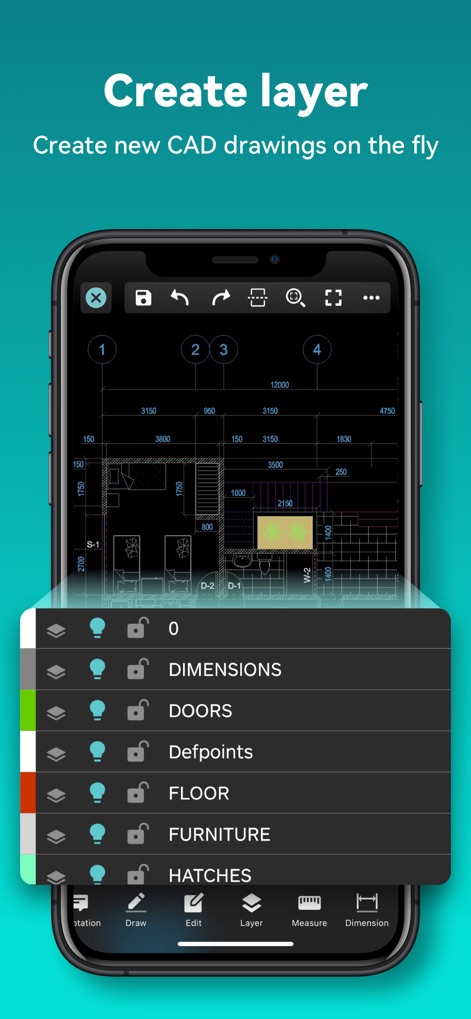
Effizientes Layer-Management
Die Abbildung verdeutlicht das effiziente Layer-Management mit einer übersichtlichen Liste von Layernamen wie "DIMENSIONS" und "DOORS", ergänzt durch intuitive Symbole zur Steuerung der Sichtbarkeit und Sperrung.

Nahtlose Cloud-Integration
Dieses Bild visualisiert die nahtlose Cloud-Integration der App, die den Zugriff und die Verwaltung von DWG-, PDF- und JPG-Dateien direkt aus der Cloud ermöglicht.
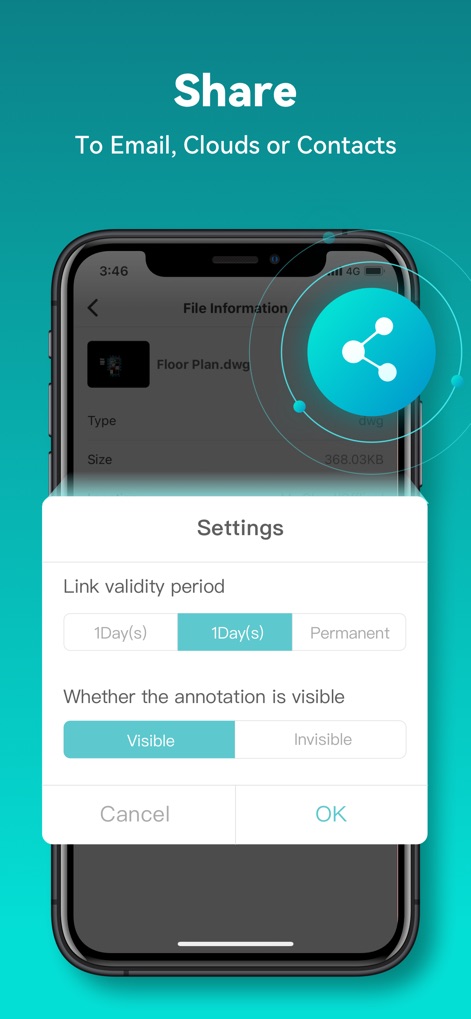
Unkompliziertes Teilen von Projekten
Die App ermöglicht das unkomplizierte Teilen von Projekten über das prominente Share-Symbol und bietet erweiterte Optionen wie die Einstellung der Link-Gültigkeit und der Sichtbarkeit von Anmerkungen.
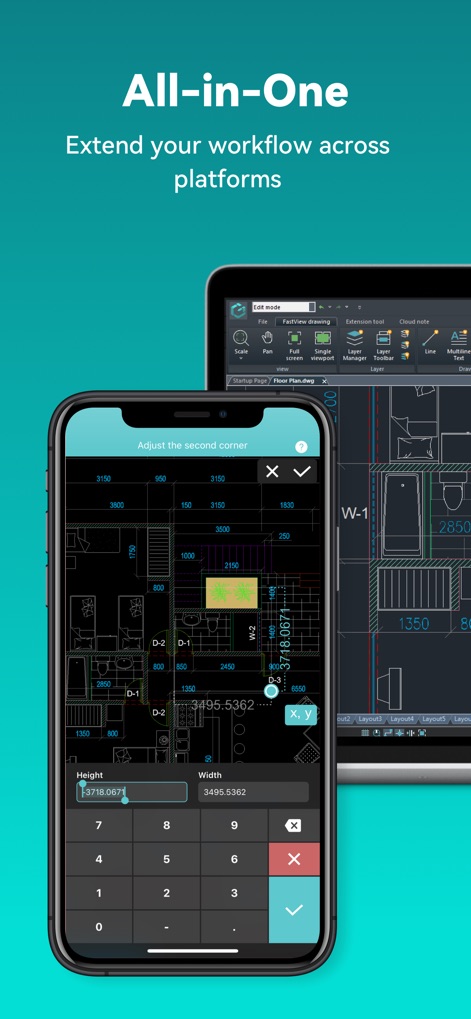
Plattformübergreifende Produktivität
Die App demonstriert ihre plattformübergreifende Kompatibilität durch die gleichzeitige Darstellung auf einem Smartphone und einem Tablet und bietet dabei präzise numerische Eingabefelder zur genauen Dimensionierung.
Beschreibung
Download
Ähnliche Apps
Apps mit ähnlichen Funktionen und Nutzererfahrung

Shapr 3D CAD modeling
Shapr 3D Zartkoruen Mukodo Reszvenytarsasag

CAD快速看图-dwg手机快速看图,设计图纸工程建筑
Shanghai Tantian Network Technology Co.,Ltd.

CAD快速看图-CAD手机看图软件
存旺 姜

ZWCAD Mobile - Mobile CAD
ZWCAD Software Co.,Ltd.

CAD快速看图- 手机快速查看cad图纸
嘉欣 朱

Draft Paper
Giles Goddard

CAD FastView King: DWG Viewer
镇源 余

AutoCAD
Autodesk

CAD Reader-View & Measure DWG
Beijing Honghu Yuntu Technology Co., Ltd.
Diese Seite ist keine offizielle Seite der App oder ihres Entwicklers, sondern eine unabhängige redaktionelle Veröffentlichung, die zu Informations- und Kommentarzwecken erstellt wurde. Sofern nicht ausdrücklich anders angegeben, sind weder die App noch ihr Entwickler mit MWM, Apple, Google Play, dem App-Herausgeber oder dem Entwickler der App verbunden, von ihnen unterstützt, gesponsert, autorisiert oder anderweitig offiziell verbunden, und nichts auf dieser Seite impliziert, dass die App unter Verwendung der Dienste von MWM entwickelt wurde. Alle Marken, Logos, Screenshots und andere Inhalte bleiben Eigentum ihrer jeweiligen Inhaber.