
Diese Seite ist keine offizielle Seite der App oder ihres Entwicklers, sondern eine unabhängige redaktionelle Veröffentlichung, die zu Informations- und Kommentarzwecken erstellt wurde. Sofern nicht ausdrücklich anders angegeben, sind weder die App noch ihr Entwickler mit MWM, Apple, Google Play, dem App-Herausgeber oder dem Entwickler der App verbunden, von ihnen unterstützt, gesponsert, autorisiert oder anderweitig offiziell verbunden, und nichts auf dieser Seite impliziert, dass die App unter Verwendung der Dienste von MWM entwickelt wurde. Alle Marken, Logos, Screenshots und andere Inhalte bleiben Eigentum ihrer jeweiligen Inhaber.


Entrust Identity
Schluss mit dem Token-Wirrwarr. Diese App macht dein Handy zum Sicherheitstresor, und das Chaos in der IT-Abteilung gleich mit.
Downloads
2.5M+Bewertung
Bewertungen gesamt
459Herausgeber
Kategorie
BusinessSprachen
9Neueste Version
26.1.0Größe
58.0 MBErstveröffentlichung
5. Aug. 2010Eine Bewertung der Kernfunktionen für sichere Identitäts- und Zugriffsverwaltung.
Analyse der Entrust Identity App
Starke Authentifizierung
Die App bietet eine robuste Zwei-Faktor-Authentifizierung (2FA) oder Multi-Faktor-Authentifizierung (MFA), die die Notwendigkeit physischer Hardware-Token überflüssig macht und den Zugang zu geschützten Ressourcen sichert.
Transaktionsverifikation
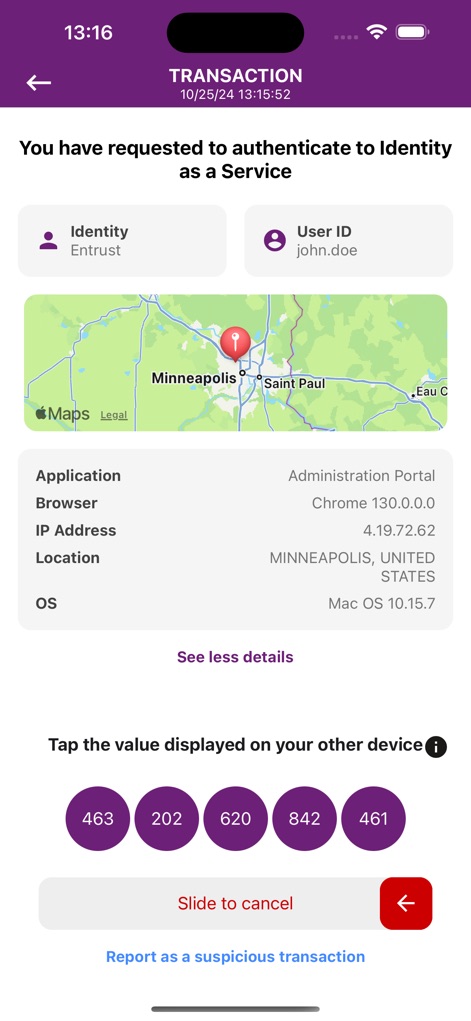
Es ermöglicht Nutzern, Online-Transaktionen wie Logins oder Finanztransaktionen direkt in der App zu bestätigen und mit einem einmaligen Passcode zu autorisieren, was vor unbefugtem Zugriff schützt.
Passwortverwaltung für Mitarbeiter
Dieses Tool verfügt über erweiterte Funktionen zum Zurücksetzen und Entsperren von Passwörtern, die es Mitarbeitern ermöglichen, ihre Unternehmenskennwörter direkt in der App zu verwalten, was die IT-Abteilung entlastet.
Unterstützung mehrerer Identitäten
Die App ermöglicht es, verschiedene Identitäten zu erstellen und Soft-Token-Anwendungen für die Nutzung mit unterschiedlichen Organisationen zu aktivieren, die Entrust IAM-Plattformen verwenden.
Häufig gestellte Fragen
Alles, was Sie über wissen müssen Entrust Identity
What is the Entrust Identity mobile application?
The Entrust Identity mobile application is a platform providing strong identity credentials for employee and consumer users. It offers authentication, transaction verification, and advanced password reset capabilities.
Does the Entrust Identity app replace hardware tokens?
Yes, the Entrust Identity mobile application provides authentication and transaction verification capabilities that replace traditional hardware tokens for users.
Can I manage multiple identities within the Entrust Identity app?
Yes, the Entrust Identity application allows users to create and activate unique one-time passcode soft token applications for use with different organizations.
How does the Entrust Identity app help with transaction verification?
The Entrust Identity app protects online transactions by receiving confirmation directly to the mobile application. Users confirm details and enter a secure, one-time passcode to complete the transaction.
What details does Entrust Identity display during transaction verification?
During transaction verification, the Entrust Identity app displays details such as Identity, User ID, application, browser, IP address, location, and operating system.
Can employees reset their passwords using the Entrust Identity application?
Yes, the Entrust Identity application includes advanced password reset capabilities, enabling employees to manage and reset their passwords directly from the mobile app.
What are the password requirements for resetting an employee password in Entrust Identity?
Password requirements include being at least 15 characters long, containing uppercase, lowercase, and digits, and not matching user ID, alias, name, or previous passwords from a blocklist.
Does the Entrust Identity app display one-time passcodes?
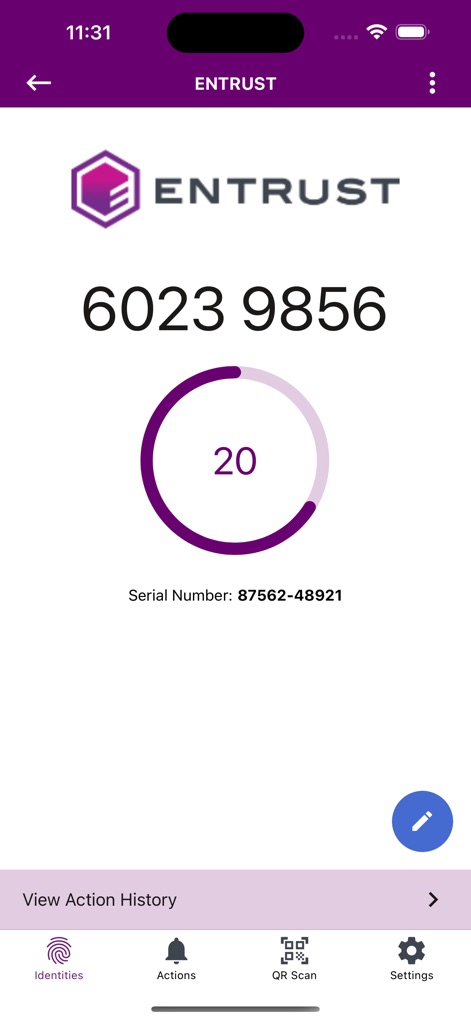
Yes, the Entrust Identity app displays unique one-time passcodes (soft tokens) for various identities, such as "Entrust" and "VPN" tokens.
Is there a timer for the one-time passcodes in the Entrust Identity app?
Yes, the Entrust Identity app displays a countdown timer for each one-time passcode, indicating its validity period. For example, a 20-second timer is visible.
Die folgenden Screenshots und die Beschreibung stammen direkt aus dem offiziellen Store-Eintrag der App und sind Eigentum des Entwicklers.
App Store
Screenshots


Beschreibung
Download
Ähnliche Apps
Apps mit ähnlichen Funktionen und Nutzererfahrung

WatchGuard AuthPoint
WatchGuard Technologies Inc.

Multifactor
MULTIFAKTOR, OOO

Smart Log On
Acceptto Corporation

Kavach Authentication
Tirender Wig

Aladdin 2FA
Aladdin R.D. ZAO

RSA Authenticator (SecurID)
RSA Security

Google Smart Lock
Google LLC

FortiToken Mobile
Fortinet, Inc

X5 Ключ
Closed Joint Stock Company"Trade House"Perekrestok
Diese Seite ist keine offizielle Seite der App oder ihres Entwicklers, sondern eine unabhängige redaktionelle Veröffentlichung, die zu Informations- und Kommentarzwecken erstellt wurde. Sofern nicht ausdrücklich anders angegeben, sind weder die App noch ihr Entwickler mit MWM, Apple, Google Play, dem App-Herausgeber oder dem Entwickler der App verbunden, von ihnen unterstützt, gesponsert, autorisiert oder anderweitig offiziell verbunden, und nichts auf dieser Seite impliziert, dass die App unter Verwendung der Dienste von MWM entwickelt wurde. Alle Marken, Logos, Screenshots und andere Inhalte bleiben Eigentum ihrer jeweiligen Inhaber.