File Viewer for All

File Viewer for All

Herunterladen auf App Store
Logo von File Viewer for All

File Viewer for All: Der leistungsstarke All-in-One-Dateimanager und Transfer-Hub

Zeigen Sie jedes Format von Office-Dokumenten bis hin zu WebP-Animationen an und übertragen Sie nahtlos Dateien zwischen Ihrem PC und iPhone. Der ultimative sichere, cloudfreie Arbeitsbereich für technisch versierte Profis.

Herunterladen auf App Store

Herausgeber

刚刚 孔

Kategorie

Utilities

Downloads

300

Bewertung

4.8/5

Bewertungen gesamt

0

Sprachen

2

Volle Kontrolle, visualisiert

Entdecken Sie die Oberfläche, die von 300 Nutzern verwendet wird.

Wasserfall-Galerieansicht von Naturfotos in der App File Viewer for All

Wasserfall-Galerieansicht von Naturfotos in der App File Viewer for All

Ganzseitiges Landschaftsfoto, angezeigt in der Benutzeroberfläche der App File Viewer for All
Ganzseitiges Landschaftsfoto, angezeigt in der Benutzeroberfläche der App File Viewer for All

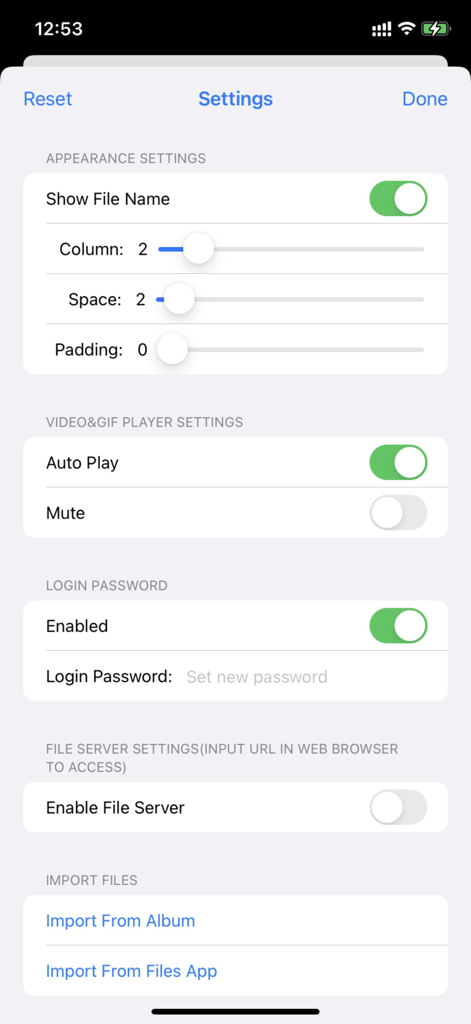
Einstellungen-Bildschirm der App File Viewer for All mit Anpassungsoptionen für Layout, Sicherheitspasswörter und Aktivierung des Dateiservers.

Einstellungen-Bildschirm der App File Viewer for All mit Anpassungsoptionen für Layout, Sicherheitspasswörter und Aktivierung des Dateiservers.

Begrüßungsbildschirm der App File Viewer for All mit Passwortschutz und Anmeldeschaltfläche

Begrüßungsbildschirm der App File Viewer for All mit Passwortschutz und Anmeldeschaltfläche

Meistern Sie Ihren digitalen Workflow

Die Tools, die diese App auszeichnen, gewählt von 300 Nutzern.

Hochgeschwindigkeits-Drahtlosübertragung

Schließen Sie die Lücke zwischen Windows und iPhone. Verwandeln Sie Ihr Gerät in eine mobile Festplatte und verschieben Sie Dateien sofort über HTTP oder WebDAV ohne Kabel.

📂

Universeller Format-Viewer

Hören Sie auf, zwischen Apps zu wechseln. Öffnen Sie alles von PDFs und Office-Dokumenten bis hin zu GIFs und WebP in einem atemberaubenden, flüssigen Wasserfall-Layout, das auf Effizienz ausgelegt ist.

🛡️

Datenschutzorientierte Sicherheit

Bewahren Sie sensible Dokumente sicher und offline auf. Sperren Sie Ihren lokalen Speicher mit FaceID, TouchID oder verschlüsselten Passwörtern für absolute Sicherheit.

Über die App

Alles, was Sie über wissen müssen File Viewer for All.

Beschreibung

Meet 2 major requirements: * View almost all types of files with waterfall layout just in a SINGLE app, including image, video, gif/WebP/Apng, pdf, Microsoft word/excel/ppt, iWorks pages/numbers and etc * Transfer files between phones/pads/PCs/Apps freely and easily by embedded http&WebDav server, iTunes, airdrop, Files App, Album and third-party apps. [How to use] Step1: Enable file server in app from setting page, the file server's address will appear beside(such as http://192.168.3.5:5156) Step2: Enter or copy&paste server URL in any web browser, drag files or folders to the displayed webpage to upload files Step3: After upload complete, close the setting page, tap the folder list in toolbar of the app, all the folder will be list, you can choose any one to browse. [Key Features] 1. It supports browsing pictures and videos in a waterfall layout, which is very smooth and fluent, and the visual effect is stunning. 2. It supports viewing almost all file formats, including pictures, videos, texts, PDFs, gif / webp / apng animations, office word / excel / ppt, iWorks pages / number, etc. 3. With built - in HTTP and WebDav servers, files and folders can be uploaded, downloaded and managed remotely through a browser. It is also possible to mount an iPhone remotely on a computer and operate it just like a local hard disk, making it very suitable for using an iPhone as a mobile hard disk. 4. It supports the built - in "Files" app in iOS to manage files and folders with its powerful functions. 5. It supports uploading, downloading and managing files and folders through iTunes. 6. There are abundant file - sharing functions, and files can be conveniently shared via email and various third - party apps. 7. It supports login protection, facial recognition, fingerprint authentication and password - based login. 8. It supports file management functions such as file sorting and file deletion. [Contact] Email: DummyApps@163.com [FAQ] 1. Why new files and folder won't list? A: you should tap "Refresh" button on navigation bar to list newly uploaded files and folders 3. How to transfer files between phone/pad/PC? A: 1) Enable file server from setting page, the file server's url will list beside, (such as http://192.168.1.12:13653), you can use web browser to access file server by url (such as http://192.168.1.12:13653), you can upload files, create subfolders, download files from it 2) upload&download by iTunes 3) Import&export files by Files app 4) Import&export files by album 5) Import &export files from third-party app 5. what's the default password? A: M12345678 6. How to show context menu? A: long press any of file, the context menu will display 8. What gesture are support in full view? A: 1) tap gesture. when zoomed out, tap gesture can resize images&videos to its original size. when videos are in original size, tap gesture can play/pause video 2) drag gesture. horizontal drag gesture can adjust the progress of video play 3) pinch gesture. to zoom in/out images and videos 9. How to hide toolbar? A: 1) In file list view, user can long press any file, from the context menu, user can show/hide toolbar, if file list is empty, user can always tap the blank space to show toolbar 2) In full view, user can tap or zoom to hide/show toolbar when view image and videos 11. where modified images, video snapshot and video cuts are saved? A: 1) All modified images ,video snapshot, video cuts are saved to the folder named "Filename + _Edit" in root folder 2) All images import from system album are saved to "Import from Album" folder in root folder 3) All files import from file app are saved to "Import from Files App" in root folder

Neueste Version

5.9

Größe

38.9 MB

Erstveröffentlichung

8. Juni 2022

Übernehmen Sie die volle Kontrolle über Ihren digitalen Workflow

Schließen Sie sich Power-Usern an, die die Lücke zwischen Geräten schließen. Zeigen Sie jedes Format an, übertragen Sie Dateien drahtlos ohne Cloud und sichern Sie Ihre Daten mit FaceID.

Herunterladen auf App Store

App information, icons, screenshots, and descriptions displayed on this page are sourced from the Apple App Store and are the property of their respective developers. Download estimates and rankings are based on MWM's proprietary models and may not reflect actual figures. This page is provided for informational and analytical purposes only.

Believe this page infringes your intellectual property? File a dispute