Files Go - media player

Files Go - media player

Herunterladen auf App Store
Logo von Files Go - media player

Files Go: Das ultimative Power-Utility für professionelles Dateimanagement und Medien

Befreien Sie sich von den Einschränkungen von iOS mit Kontrolle auf Desktop-Niveau. Verwalten Sie Cloud-Server, entpacken Sie über 80 Formate, spielen Sie jede Mediendatei ab und sichern Sie Ihre Daten mit dem vielseitigsten All-in-One-Tool für Power-User.

Herunterladen auf App Store

Herausgeber

美荣 缪

Kategorie

Utilities

Downloads

112K+

Bewertung

4.4/5

Bewertungen gesamt

600

Sprachen

3

Ihr digitales Kommandozentrum

Entdecken Sie die Oberfläche, die von 112K+ Nutzern verwendet wird.

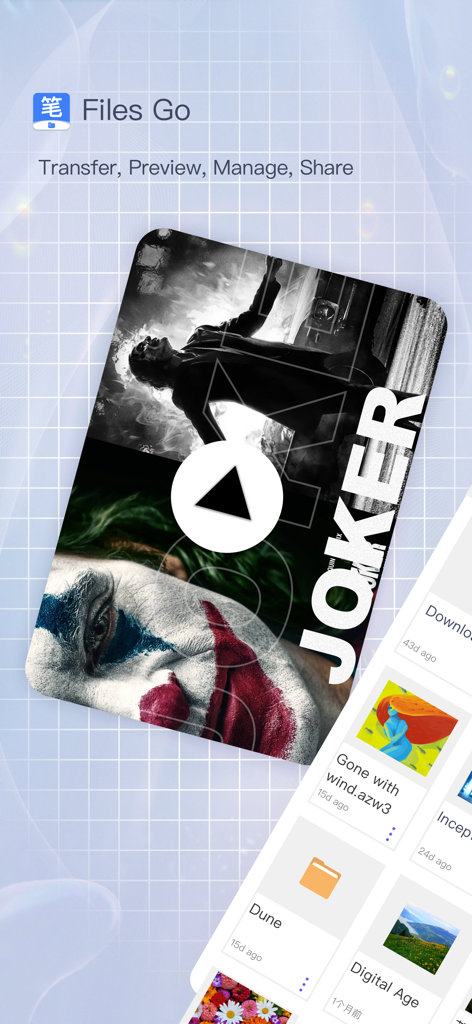
Files Go App-Oberfläche, die Videowiedergabe und Dateiverwaltungsfunktionen anzeigt
Files Go App-Oberfläche, die Videowiedergabe und Dateiverwaltungsfunktionen anzeigt

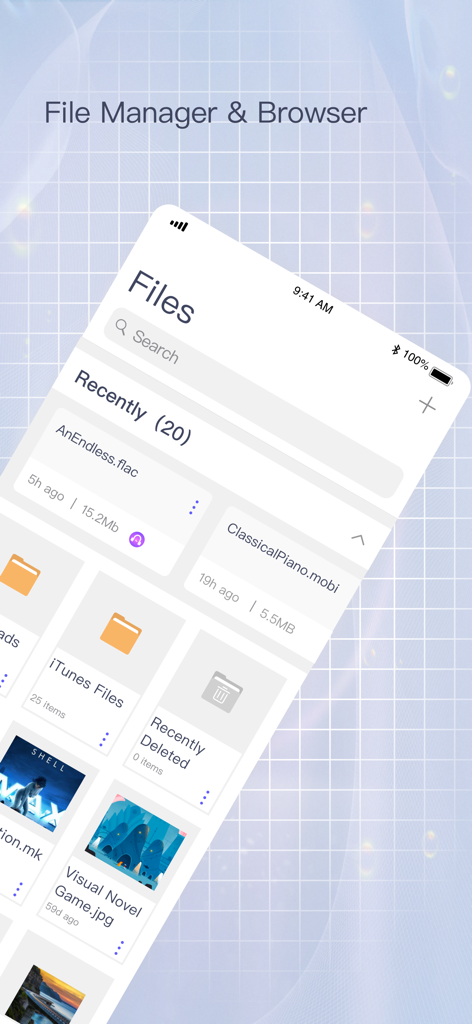
Screenshot der Files Go App, die ein Raster aus kürzlich zugegriffenen Ordnern und Mediendateien auf einem iPhone zeigt
Screenshot der Files Go App, die ein Raster aus kürzlich zugegriffenen Ordnern und Mediendateien auf einem iPhone zeigt

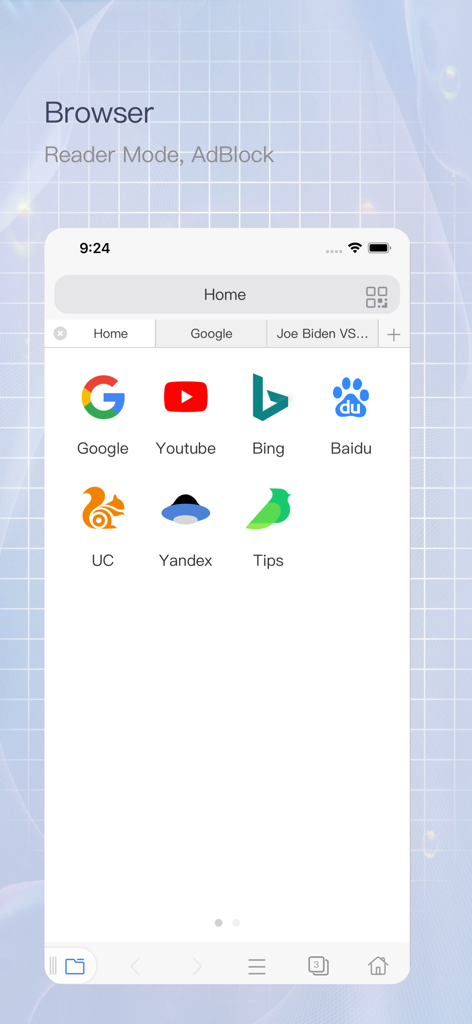
Integrierter Webbrowser in der Files Go App mit Adblocker und Website-Verknüpfungen
Integrierter Webbrowser in der Files Go App mit Adblocker und Website-Verknüpfungen

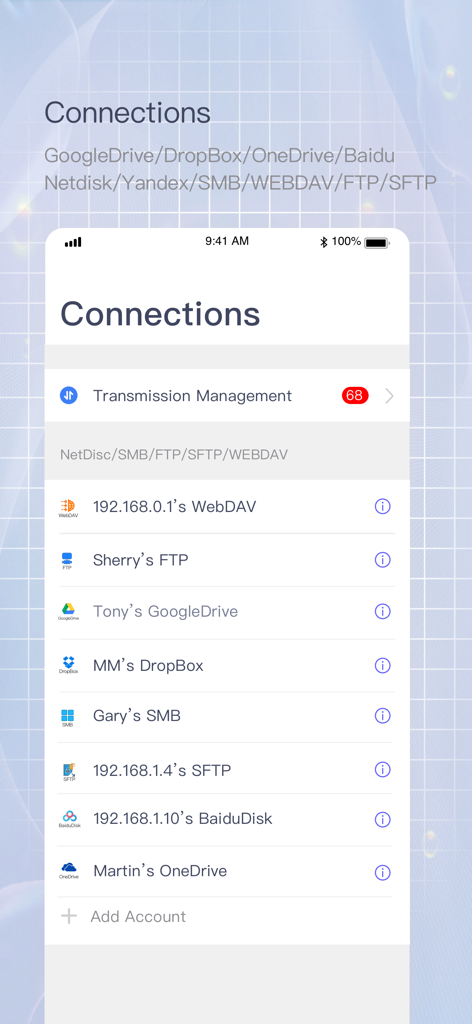
Verbindungsbildschirm in der Files Go App, der integrierte Cloud-Dienste und Netzwerkspeicher wie FTP und SMB anzeigt

Verbindungsbildschirm in der Files Go App, der integrierte Cloud-Dienste und Netzwerkspeicher wie FTP und SMB anzeigt

Files Go App Video-Player-Oberfläche mit Steuerelementen für die Wiedergabegeschwindigkeit
Files Go App Video-Player-Oberfläche mit Steuerelementen für die Wiedergabegeschwindigkeit

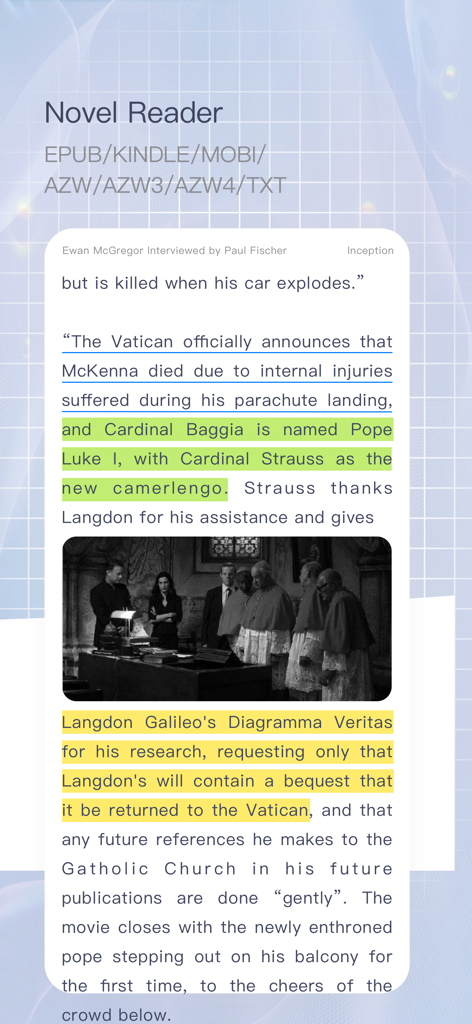
Ein Screenshot der Novel Reader-Funktion in der Files Go App, der hervorgehobenen Text und Unterstützung für mehrere E-Book-Formate anzeigt
Ein Screenshot der Novel Reader-Funktion in der Files Go App, der hervorgehobenen Text und Unterstützung für mehrere E-Book-Formate anzeigt

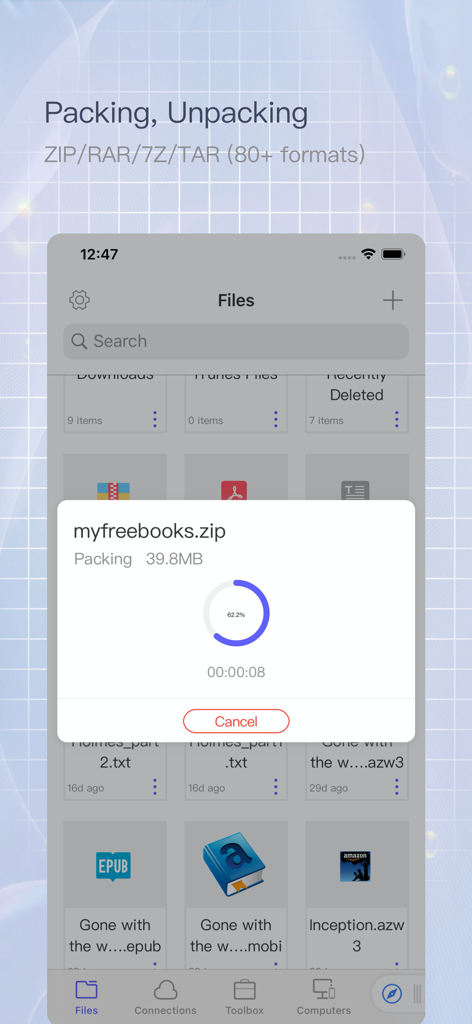
Oberfläche der Files Go App, die den Fortschritt der Komprimierung einer Datei namens myfreebooks in ein Zip-Archiv zeigt
Oberfläche der Files Go App, die den Fortschritt der Komprimierung einer Datei namens myfreebooks in ein Zip-Archiv zeigt

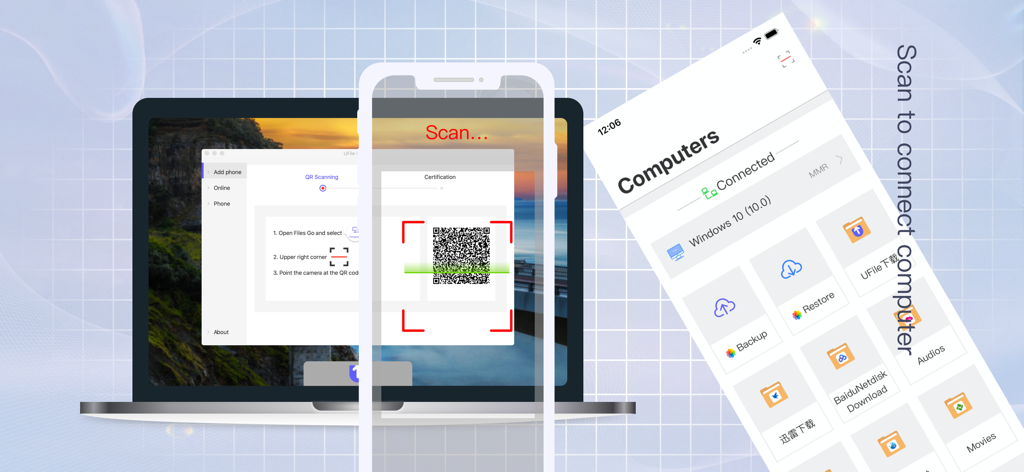
Smartphone scannt einen QR-Code auf einem Laptop-Bildschirm, um die Files Go App drahtlos mit einem Computer zu verbinden.
Smartphone scannt einen QR-Code auf einem Laptop-Bildschirm, um die Files Go App drahtlos mit einem Computer zu verbinden.

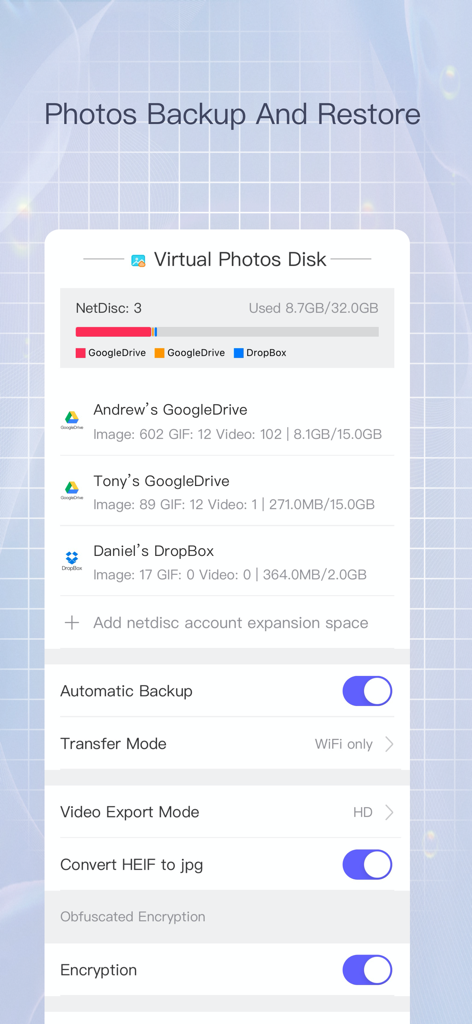
Oberfläche der Files Go App, die Einstellungen für die Foto-Sicherung und Speicherverwaltung für Google Drive und Dropbox-Konten anzeigt

Oberfläche der Files Go App, die Einstellungen für die Foto-Sicherung und Speicherverwaltung für Google Drive und Dropbox-Konten anzeigt

Desktop-Power auf Ihrem iPhone

Die Tools, die diese App auszeichnen, gewählt von 112K+ Nutzern.

📦

Uneingeschränktes Dateimanagement

Verwalten Sie Ihren Speicher wie ein Profi mit Unterstützung für über 80 Kompressionsformate, Stapelumbenennung und lokaler Dateiverschlüsselung für absolute Privatsphäre.

📺

Universeller Media- & Reader

Streamen Sie jedes Videoformat über die integrierte VLC-Engine oder tauchen Sie ein in Ihre E-Book-Sammlung mit Unterstützung für EPUB, MOBI und 191 Programmiersprachen.

🚀

Nahtlose Netzwerksynchronisierung

Schließen Sie die Lücke zwischen Ihrem Mobilgerät und PC/Mac/Linux mit sofortigen Verbindungen zu SMB, FTP und WebDav für blitzschnelles Dateisharing.

Über die App

Alles, was Sie über wissen müssen Files Go - media player.

Beschreibung

Files Go is a powerful local and network file management tool, focusing on file transfer, preview, management and iCloud file sharing group. Files Go focuses on all management of iOS files, and become the best assistant for mobile phone management. 【The main function】 ⊙1: File Explorer ⊙ Basic operations: drag&drop/batch rename/delete/copy/move/new/recycle/compression and decompression/encryption and decryption/upload and download/file sharing/document scan/edit/details, etc. File import and export: Support import and export files from computer, iCloud, WebDav, FTP, SMB, and other mainstream cloud service providers ⊙2: Powerful Browser⊙ Reader mode/Video floating/Adblock Plus/Multi-tab/Privacy Mode/Incognito Browsing/Long Webpage Clipping/No Image Mode/Search in Page/Generate QR Code/Custom UA/Save PDF/URL Association/Quickly Open and Copy URL/View image mode/Save images in batches/Custom search engine/Multilingual translation/Bookmarks/History/Developer tools, view web source code, Eruda and vConsole ⊙3: Novel Reader⊙ Fully support TXT/EPUB/MOBI/AZW/AZW3/AZW4 and other formats, complete reading configuration and options, take you into a broad reading world ⊙4: Video Player⊙ Built-in VLC video playback engine, supports almost all audio and video formats, supports up to 4 times speed playback, rich audio and video configuration and minimal playback interface, help high-quality entertainment, Support live broadcast of global network TV stations: M3U, M3UA, RSTP, HTTP, HLS, MMS ⊙5: Decompressing And Compressing ⊙ Support more than 80 compression formats such as ZIP, RAR, 7Z, TAR, LZH, XZ, ISO, CAB, WIM, ZIPX, JAR,AAR,LZFSE, etc. Support password, support file name encoding automatic error correction function, no garbled phenomenon Support deconpression online Support sub-volume compression and decompression ⊙6: Privacy protection⊙ Protect important and private files, support file encryption and decryption, the file extension after encryption is sec ⊙7: UFile Desktop Assistant⊙ A fool-like computer sharing artifact is specially customized for non-professional users. You can connect to the computer with only a scan of the mobile phone. The management is clear, the traffic data is intuitive, the multiple encryption technology is safe, the resource usage is very small, and it supports Window, Mac os, Ubuntu Three platforms have been updated to V1.2 version ⊙8: Netdisk And Network Service⊙ Support SMB, FTP, SFTP, WebDav, Yandex, Goole Drive, DropBox, OneDrive,iCloud, Baidu Cloud Disk,Alibaba Cloud,Nutstore, support encoding automatic error correction capability, Support batch renaming, support encoding automatic error correction capability, support online compression and decompression, image batch optimization and format conversion, and automatic synchronization Support clipboard sharing with other iOS devices Support QR code transmission, unlimited speed, up to 5Gb large file temporary transmission service ⊙9: Photo Backup And Restore⊙ Back up a large number of photos to a network disk or computer, and support album restoration ⊙10: READ ⊙ Support mainstream office documents: OFFICE (DOC/DOCX/PPT/PPTX/XLS/XLSX), IWORK (PAGES/KEY/NUMBERS), PDF Support book reading EPUB, KINDLE, MOBI, AZW, AZW3, AZW4
Support text format TXT, RTF, MARKDOWN, HTML, JSON, XML Support mainstream image formats HEIC, BMP, JPG, PNG, TIF, GIF, PCX, TGA, EXIF, FPX, SVG, PDF, WEBP Supports code highlighting and editing in 191 programming languages ⊙11: Disk Management⊙ Document size, cache size, index size,large file list, clear at a glance, it is more convenient to clean the disk ⊙12: Font Installation And Download⊙ Support font preview, installation and download, you can install any third-party font to the system for use by other apps (13+) ⊙13: System Certificate Installation⊙ Support .pem/PKCS1(.cer)/PKCS12(.p12) and other certificate installation Contact us ufileapp@hotmail.com https://www.ufile.app

Neueste Version

3.9

Größe

121.8 MB

Erstveröffentlichung

1. Apr. 2020

Bereit, das volle Potenzial Ihres Geräts freizuschalten?

Schließen Sie sich über 112.000 Power-Usern an und bringen Sie Dateimanagement auf Desktop-Niveau, hochleistungsfähige Medienwiedergabe und ultimative Cloud-Kontrolle auf Ihr iPhone und iPad.

Herunterladen auf App Store

App information, icons, screenshots, and descriptions displayed on this page are sourced from the Apple App Store and are the property of their respective developers. Download estimates and rankings are based on MWM's proprietary models and may not reflect actual figures. This page is provided for informational and analytical purposes only.

Believe this page infringes your intellectual property? File a dispute