
Diese Seite ist keine offizielle Seite der App oder ihres Entwicklers, sondern eine unabhängige redaktionelle Veröffentlichung, die zu Informations- und Kommentarzwecken erstellt wurde. Sofern nicht ausdrücklich anders angegeben, sind weder die App noch ihr Entwickler mit MWM, Apple, Google Play, dem App-Herausgeber oder dem Entwickler der App verbunden, von ihnen unterstützt, gesponsert, autorisiert oder anderweitig offiziell verbunden, und nichts auf dieser Seite impliziert, dass die App unter Verwendung der Dienste von MWM entwickelt wurde. Alle Marken, Logos, Screenshots und andere Inhalte bleiben Eigentum ihrer jeweiligen Inhaber.


Forms for Google Drive
Dein Google Forms ist eine Fessel? Diese App reißt sie dir vom iPhone.
Downloads
750k+Bewertung
Bewertungen gesamt
790Herausgeber
Kategorie
ProductivitySprachen
25Neueste Version
1.8.5Größe
96.1 MBErstveröffentlichung
4. Dez. 2023Eine Bewertung der wesentlichen Merkmale, die den mobilen Workflow für Google Forms-Nutzer optimieren.
Analyse der Kernfunktionen von 'Forms for Google Drive' auf dem iPhone
Nahtlose Google Workspace Integration
Die App synchronisiert sich umgehend mit Google Drive, Google Sheets und Google Docs, wodurch bestehende Formulare bearbeitet und Änderungen automatisch im gesamten Google-Ökosystem widergespiegelt werden.
Umfassende mobile Formularerstellung
Die App ermöglicht es Nutzern, komplett neue Formulare direkt vom iPhone aus zu erstellen, Fragen zu bearbeiten, Abschnitte neu anzuordnen, Bilder hinzuzufügen und Designs anzupassen, ohne einen Browser öffnen zu müssen.
Echtzeit-Analyse und visuelle Einblicke
Es ermöglicht Nutzern, Antworten sofort in übersichtlichen Diagrammen und Grafiken zu visualisieren, nach Fragen, Individuen oder als Zusammenfassung zu filtern und so schnell Erkenntnisse zu gewinnen.
Spezialisierte Bildungsfunktionen
Für Lehrkräfte bietet das Tool die Möglichkeit, Multiple-Choice-Tests zu erstellen, Punktwerte zuzuweisen, korrekte Antworten festzulegen und Schülerantworten direkt vom Telefon aus zu überprüfen.
Echtzeit-Benachrichtigungen bei Antworten
Die App benachrichtigt Nutzer sofort über jede neue Übermittlung mittels Push-Benachrichtigungen, was eine zeitnahe Reaktion und Überwachung ermöglicht.
Flexible Datenexportoptionen
Nutzer können Antworten zur fortgeschrittenen Analyse direkt nach Google Sheets exportieren oder als CSV oder Excel herunterladen, um sie in anderen Tabellenkalkulationsprogrammen zu verwenden.
Erweiterte Kollaborationsfunktionen
Dieses Tool unterstützt die Zuweisung von Kollaboratoren und die Verfolgung von Antworten, was die Zusammenarbeit in Teams und Unternehmen vereinfacht.
Vielseitige Freigabeoptionen
Die App erlaubt das Teilen von Formularen über E-Mail, soziale Medien und Messaging-Dienste sowie die Generierung eines benutzerdefinierten QR-Codes für einfachen Zugriff.
Häufig gestellte Fragen
Alles, was Sie über wissen müssen Forms for Google Drive
What is Forms for Google Drive?
Forms for Google Drive is a third-party mobile app for managing Google Forms on your phone. It allows users to create, edit, delete, and modify forms, and syncs content instantly with Google Forms.
Can I create new Google Forms using the Forms for Google Drive app?
Yes, the Forms for Google Drive app enables creation of new Google Forms directly. It provides over 80 form templates, including blank forms, quizzes, and various event registrations, to facilitate this process.
Does Forms for Google Drive offer real-time notifications?
Yes, Forms for Google Drive provides real-time iOS notifications for form submissions on your mobile. Users can enable or disable these notifications for individual forms as required, ensuring timely updates.
How do I share forms from Forms for Google Drive?
You can share forms created with Forms for Google Drive directly from your mobile. Options include generating QR codes and links, or sharing to social platforms like WhatsApp, Facebook, LinkedIn, Twitter, and via email.
What are the subscription costs for Forms for Google Drive Pro features?
Forms for Google Drive Pro features are available for $5.99/week, $49.99/year, or a one-time payment of $69.99 for lifetime access. All payments are processed through your iTunes account.
Can Forms for Google Drive export collected data?
Yes, Forms for Google Drive allows users to collect and manage data. It supports exporting this collected data in both CSV and Excel formats directly from the app for further analysis.
Is Forms for Google Drive an official Google application?
No, Forms for Google Drive is a third-party application. It is explicitly stated not to be affiliated with Google. All trademarks belong to their respective owners.
How do I cancel an auto-renewing Forms for Google Drive Pro subscription?
To cancel automatic renewal for your Forms Pro subscription, go to iOS device "Settings" > "iTunes Store and App Store" > "Apple ID" > "Subscription" and cancel at least 24 hours before the current cycle ends.
Does Forms for Google Drive allow team collaboration?
Yes, Forms for Google Drive supports team collaboration. Users can assign forms to specific team members for editing or collaborative input, and take actions based on their collective responses.
What question formats does Forms for Google Drive support?
Forms for Google Drive supports various question formats for Google Forms. These include single-choice questions, multiple-choice questions, and text box inputs, offering comprehensive form creation capabilities.
Die folgenden Screenshots und die Beschreibung stammen direkt aus dem offiziellen Store-Eintrag der App und sind Eigentum des Entwicklers.
App Store
Screenshots
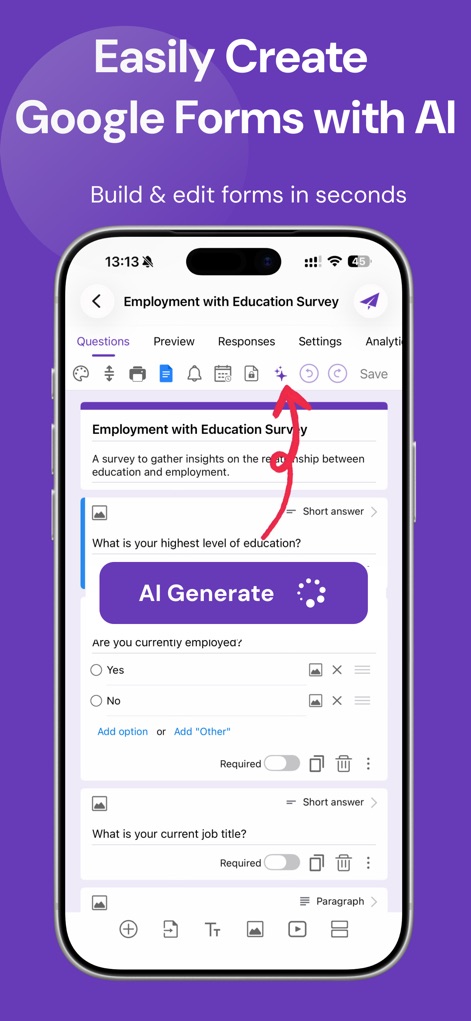
Die App ermöglicht Nutzern, Formulare mit der „AI Generate“-Funktion schnell zu erstellen und Fragen direkt über die intuitive Bearbeitungsoberfläche anzupassen.
KI-gestützte Formulare
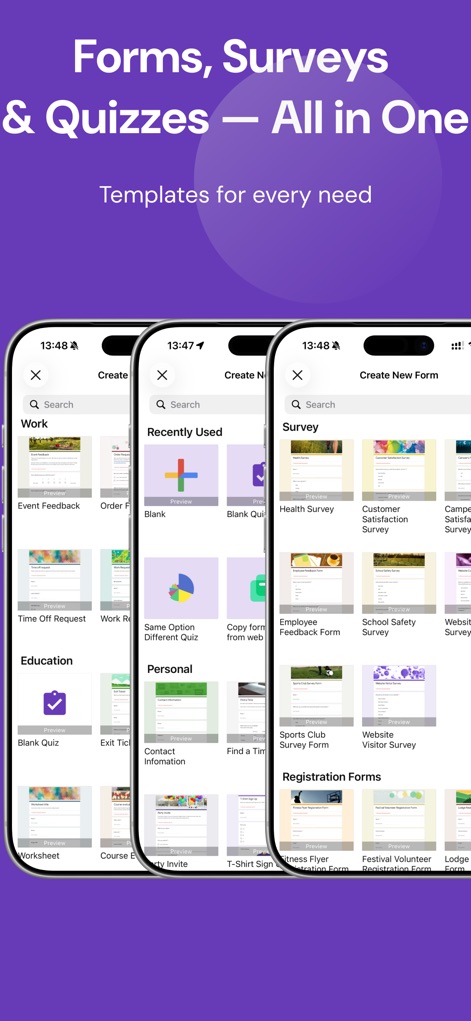
Dieses Tool bietet eine umfangreiche Auswahl an Vorlagen, die nach Kategorien wie „Work“ und „Survey“ organisiert sind und spezifische Optionen wie „Health Survey“ oder „Employee Feedback Form“ umfassen.
Vielfältige Vorlagenbibliothek
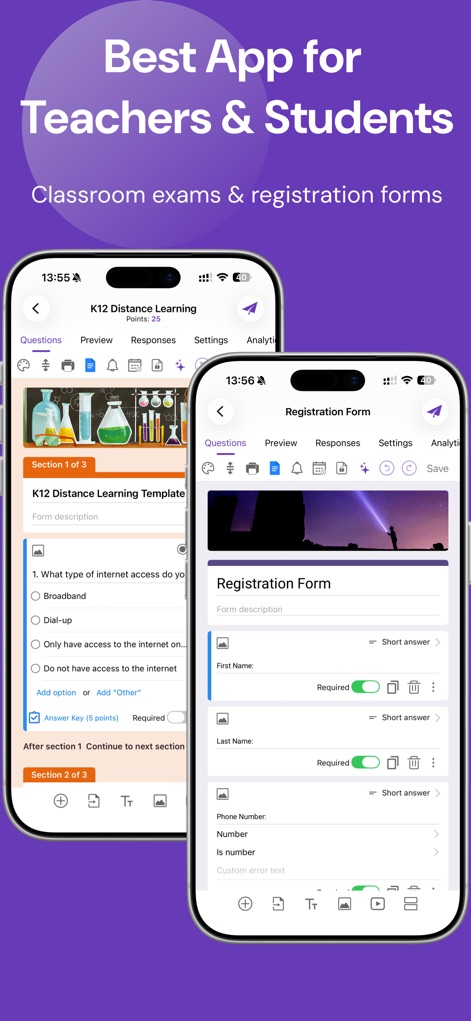
Die Anwendung unterstützt Lehrkräfte und Schüler mit Funktionen zur Erstellung von Quizzes mit Punktvergabe wie im „K12 Distance Learning“-Beispiel und der einfachen Gestaltung von „Registration Forms“.
Für Bildung Optimiert
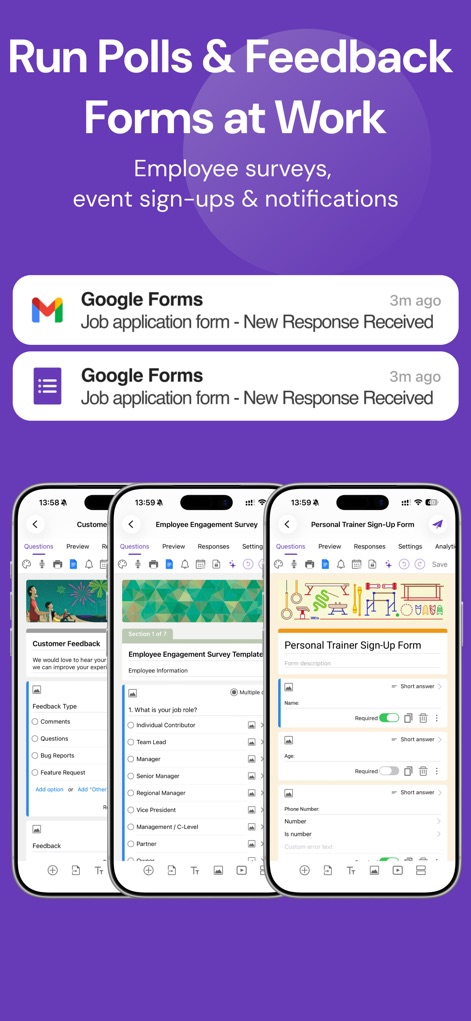
Nutzer können geschäftliche Formulare wie eine „Employee Engagement Survey“ erstellen und erhalten sofortige Benachrichtigungen über „New Response Received“, was eine effiziente Datenverwaltung gewährleistet.
Geschäftsprozesse Optimieren
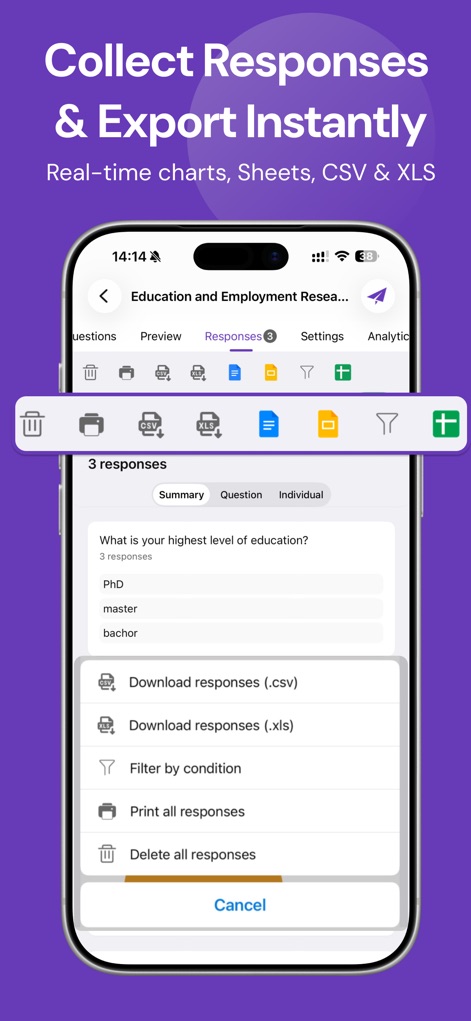
Die App bietet eine klare Übersicht über eingegangene „3 responses“ und ermöglicht den Nutzern, Daten direkt als „.csv“ oder „.xls“ für weitere Analysen zu exportieren.
Antworten Analysieren Exportieren
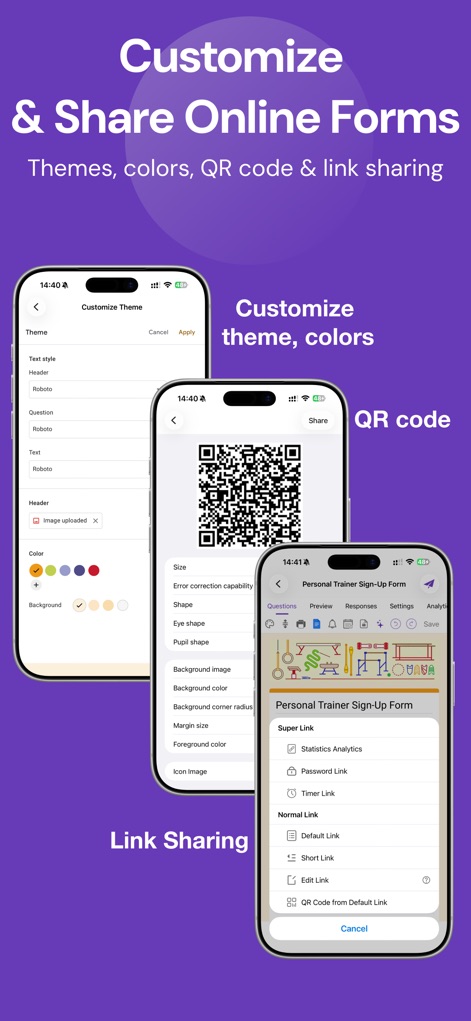
Nutzer können das Formular-Design mit „Customize Theme“-Optionen anpassen und es anschließend flexibel über „QR Code“ oder „Link Sharing“ verteilen.
Design Teilen Flexibel
Beschreibung
Download
Ähnliche Apps
Apps mit ähnlichen Funktionen und Nutzererfahrung

Form for Google Forms
Amad Marwat

Forms for Google Docs
Aurora Innovation Limited

Forms fоr Google Form
Sanpeliano LTD

Form For Google Forms & Docs
Seven Mile Apps LLC
Forms ®
SMM service, s.r.o.
Forms for Google Fоrms
LightApps OU

Forms for Google Forms App
AppTraining Limited

Forms for Google Drive ™
Mariia Tereshkova

Forms for Google Forms & Quiz
Niharika Jindal
Diese Seite ist keine offizielle Seite der App oder ihres Entwicklers, sondern eine unabhängige redaktionelle Veröffentlichung, die zu Informations- und Kommentarzwecken erstellt wurde. Sofern nicht ausdrücklich anders angegeben, sind weder die App noch ihr Entwickler mit MWM, Apple, Google Play, dem App-Herausgeber oder dem Entwickler der App verbunden, von ihnen unterstützt, gesponsert, autorisiert oder anderweitig offiziell verbunden, und nichts auf dieser Seite impliziert, dass die App unter Verwendung der Dienste von MWM entwickelt wurde. Alle Marken, Logos, Screenshots und andere Inhalte bleiben Eigentum ihrer jeweiligen Inhaber.