
Diese Seite ist keine offizielle Seite der App oder ihres Entwicklers, sondern eine unabhängige redaktionelle Veröffentlichung, die zu Informations- und Kommentarzwecken erstellt wurde. Sofern nicht ausdrücklich anders angegeben, sind weder die App noch ihr Entwickler mit MWM, Apple, Google Play, dem App-Herausgeber oder dem Entwickler der App verbunden, von ihnen unterstützt, gesponsert, autorisiert oder anderweitig offiziell verbunden, und nichts auf dieser Seite impliziert, dass die App unter Verwendung der Dienste von MWM entwickelt wurde. Alle Marken, Logos, Screenshots und andere Inhalte bleiben Eigentum ihrer jeweiligen Inhaber.


GIF Keyboard
Die digitale Gestik: Tenors Kreation liefert Nutzern die Macht, jede Nachricht mit unmissverständlicher Geste aufzuladen.
Downloads
12.5M+Bewertung
Bewertungen gesamt
1.6MHerausgeber
Kategorie
UtilitiesSprachen
23Neueste Version
4.23Größe
239.9 MBErstveröffentlichung
23. Sept. 2014Analyse der Schlüsselmerkmale von Tenor GIF Keyboard
Eine Bewertung der Kernfunktionen, die Nutzern visuelle Kommunikation und persönlichen Ausdruck ermöglichen.
Erweiterte GIF- und Videosuche direkt über die Tastatur
Es ermöglicht Nutzern, Millionen von GIFs und Videos zu durchsuchen und direkt in ihre Nachrichten einzufügen, um präzise und visuell ansprechend zu kommunizieren.
Eigene GIFs erstellen und personalisieren
Die App bietet die Möglichkeit, eigene GIFs mit der Kamera aufzunehmen und diese mit Text, handschriftlichen Notizen oder Zeichnungen individuell zu gestalten.
Nahtlose Synchronisierung und plattformübergreifende Nutzung
Dieses Tool gewährleistet, dass favorisierte GIFs und Sticker über alle unterstützten Messenger und sozialen Netzwerke hinweg synchronisiert und verfügbar sind.
Personalisierte GIF-Sammlung durch Favoriten
Es erlaubt Nutzern, Lieblings-GIFs zu markieren und so eine persönliche Sammlung für schnellen Zugriff und eine maßgeschneiderte Tastatur zu erstellen.
GIF-Packs zum Organisieren und Teilen
Die App bietet die Funktion, thematische Pakete aus eigenen oder favorisierten GIFs und Stickern zu erstellen und diese mühelos mit Freunden und Familie zu teilen.
Sticker-Erstellung aus GIFs für iMessage
In iMessage können Nutzer aus jedem GIF Sticker erstellen und diese auf Texte, Bilder oder andere GIFs ziehen, um ihre Nachrichten kreativ zu erweitern.
Kategorisiertes Browsing für Inspiration
Es unterstützt Nutzer dabei, GIFs anhand von Kategorien wie Reaktionen oder Trendthemen zu entdecken und sich inspirieren zu lassen.
Direkte Speicherung von Web-GIFs
Die App ermöglicht es, GIFs, die Nutzer im Web (z.B. über Safari) finden, direkt in die GIF Keyboard zu speichern, ohne den Umweg über die Kamerarolle.
Häufig gestellte Fragen
Alles, was Sie über wissen müssen GIF Keyboard
What is GIF Keyboard by Tenor?
GIF Keyboard by Tenor is an application for iPhone, iPad, and iMessage that enables users to discover, create, and share GIFs and videos directly from their keyboard to express emotions and communicate.
Does GIF Keyboard by Tenor allow users to create custom GIFs?
Yes, GIF Keyboard by Tenor allows users to create their own GIFs using their device's front or back camera. Users can personalize these GIFs with text, handwritten notes, or drawings.
Which messaging platforms support GIF Keyboard by Tenor?
Yes, the GIF Keyboard by Tenor is compatible with various messaging apps and social networks. These include iMessage, Facebook Messenger, WhatsApp, Facebook, and email for sharing content.
Does GIF Keyboard by Tenor require full access on iOS devices?
Yes, Tenor's GIF Keyboard requires 'full access' in your iPhone settings. This is necessary for the keyboard to access the internet, enabling GIF searches and keeping its library updated with content.
Does GIF Keyboard by Tenor record user keystrokes?
No, GIF Keyboard by Tenor does not log keystrokes or send them to its servers. The only exception is using key terms to search for GIFs, which is essential for its functionality.
Can I upload my own GIFs to Tenor GIF Keyboard?
Yes, users can upload their own GIFs to the Tenor GIF Keyboard platform. This feature enables users to share their creations and gain exposure within the app's community.
How do I create stickers using GIF Keyboard by Tenor?
Users can create stickers within GIF Keyboard by Tenor by pressing and holding on any GIF. These custom stickers can then be dragged and dropped into texts, images, or GIFs in iMessage conversations.
Die folgenden Screenshots und die Beschreibung stammen direkt aus dem offiziellen Store-Eintrag der App und sind Eigentum des Entwicklers.
App Store
Screenshots
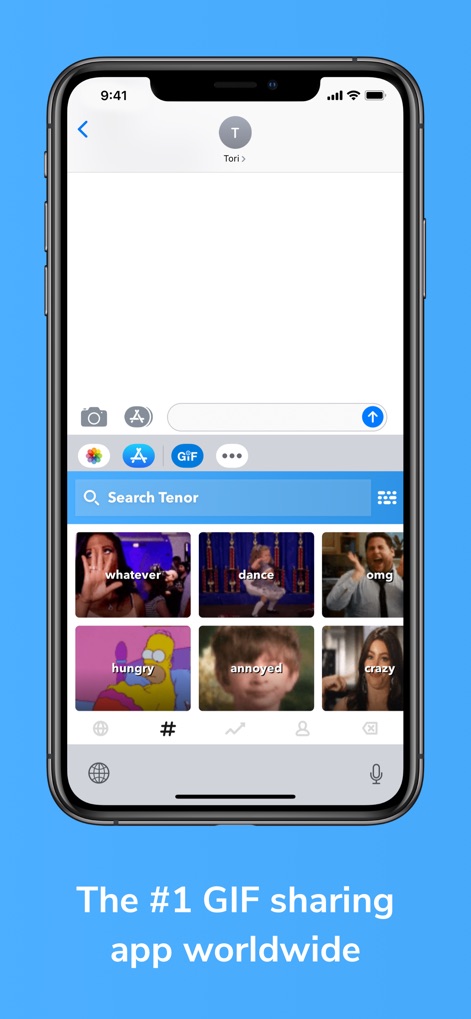
Umfassende GIF-Suche
Die App ermöglicht Nutzern, über die integrierte Suchleiste nach passenden GIFs zu suchen und diese direkt aus einer Vielzahl von emotionalen und thematischen Kategorien auszuwählen.
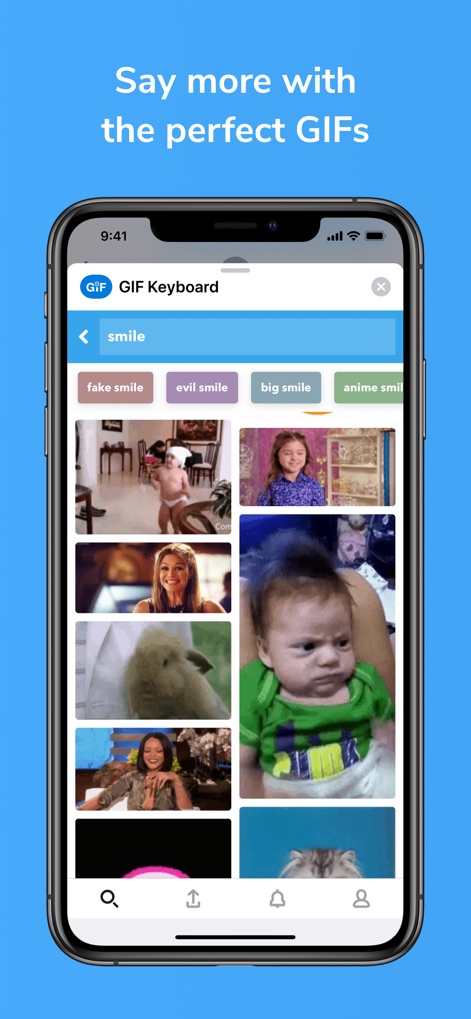
Gezielte GIF-Ergebnisse
Nutzer können spezifische Suchbegriffe wie 'smile' eingeben, um passende GIFs zu finden, wobei die Vorschläge eine breite Palette von Emotionen und Stilen abdecken.
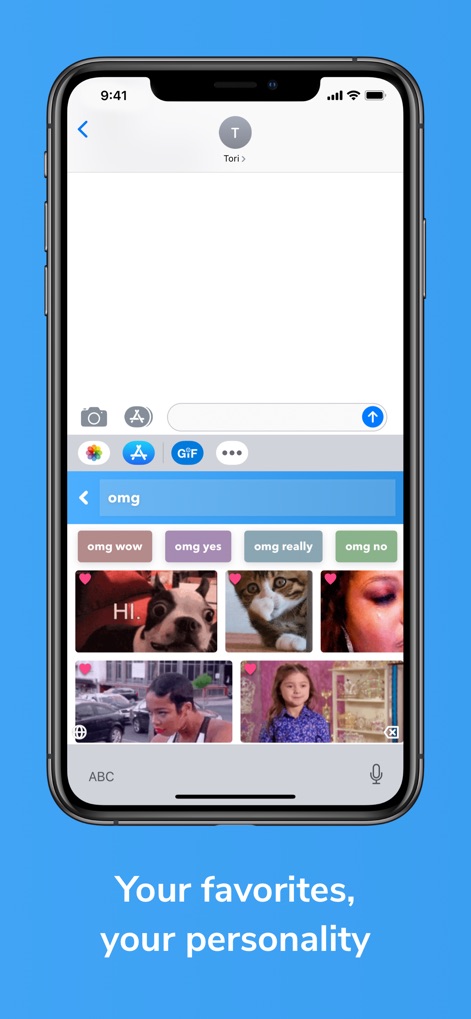
Stimmige GIF-Reaktionen
Die App präsentiert relevante Suchvorschläge wie 'omg wow' für schnelle Auswahlmöglichkeiten und ermöglicht es Nutzern, ihre Lieblings-GIFs für wiederkehrende, ausdrucksstarke Reaktionen zu speichern.
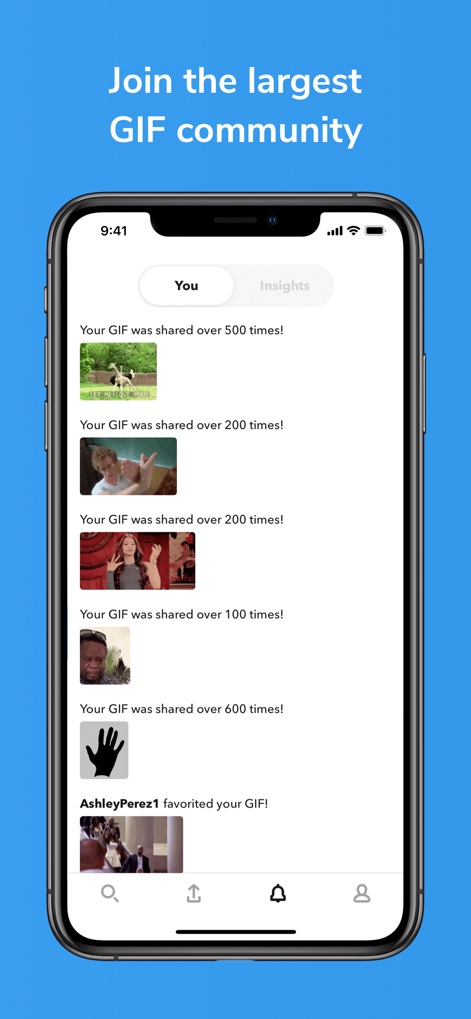
Einblicke in die Nutzung
Dieses Tool zeigt detaillierte Statistiken über die Nutzung der eigenen GIFs an, einschließlich der Häufigkeit des Teilens und Markierungen als Favorit von anderen Nutzern.
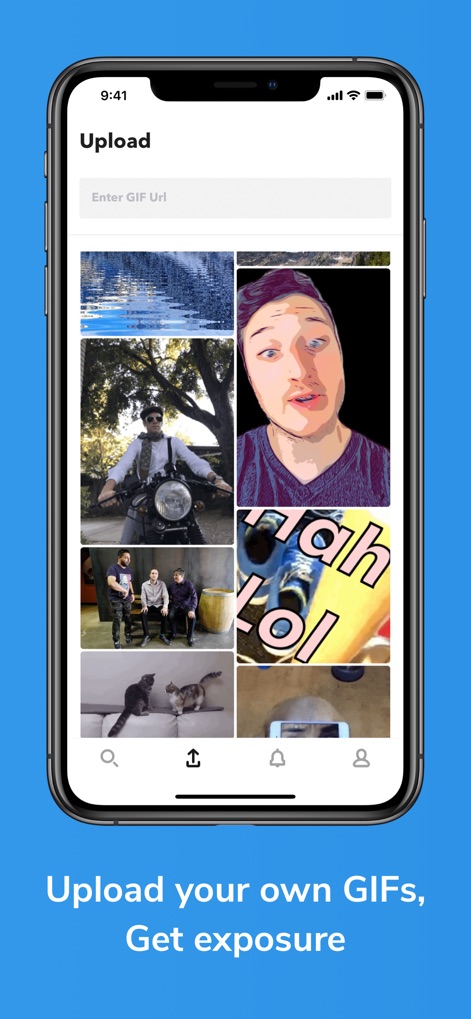
Eigene GIFs hochladen
Nutzer können ihre eigenen GIFs über eine einfache Upload-Funktion hinzufügen und diese dann in einer persönlichen Bibliothek verwalten, um sie mit der Community zu teilen.
Beschreibung
Download
Ähnliche Apps
Apps mit ähnlichen Funktionen und Nutzererfahrung

KK键盘-语音变声字体美化表情包输入法
Beijing iShion Tech Co., Ltd.

GIPHY: The GIF Search Engine
Giphy, Inc.
Facemoji AI Emoji Keyboard
NEXILEAP PRIVATE LIMITED
Fonts Art: Keyboard for iPhone
AIBY Incorporated
Kika Keyboard: Custom Themes
Beijing Xinmeihutong Technology Co., Ltd.

Litstick - Best Stickers App
Sociaaal LLC

Keyboard Fonts++ | Kibik
Cosmic Taps SL
Fonts for iPhones
Inner Grow Limited

Font Keyboard - Auto Paste
Pro App Company Limited
Diese Seite ist keine offizielle Seite der App oder ihres Entwicklers, sondern eine unabhängige redaktionelle Veröffentlichung, die zu Informations- und Kommentarzwecken erstellt wurde. Sofern nicht ausdrücklich anders angegeben, sind weder die App noch ihr Entwickler mit MWM, Apple, Google Play, dem App-Herausgeber oder dem Entwickler der App verbunden, von ihnen unterstützt, gesponsert, autorisiert oder anderweitig offiziell verbunden, und nichts auf dieser Seite impliziert, dass die App unter Verwendung der Dienste von MWM entwickelt wurde. Alle Marken, Logos, Screenshots und andere Inhalte bleiben Eigentum ihrer jeweiligen Inhaber.