Golfboy:Launch Monitor
Herunterladen auf App Store

Diese Seite ist keine offizielle Seite der App oder ihres Entwicklers, sondern eine unabhängige redaktionelle Veröffentlichung, die zu Informations- und Kommentarzwecken erstellt wurde. Sofern nicht ausdrücklich anders angegeben, sind weder die App noch ihr Entwickler mit MWM, Apple, Google Play, dem App-Herausgeber oder dem Entwickler der App verbunden, von ihnen unterstützt, gesponsert, autorisiert oder anderweitig offiziell verbunden, und nichts auf dieser Seite impliziert, dass die App unter Verwendung der Dienste von MWM entwickelt wurde. Alle Marken, Logos, Screenshots und andere Inhalte bleiben Eigentum ihrer jeweiligen Inhaber.


Logo von Golfboy:Launch Monitor
Herunterladen auf App Store

Golfboy:Launch Monitor

Hören Sie auf zu raten und fangen Sie an zu messen. Erhalten Sie professionelle Daten zu Ballgeschwindigkeit, Distanz und Abflugwinkel nur mit der Kamera Ihres iPhones. Verzichten Sie auf teure Hardware und meistern Sie Ihren Schwung mit Echtzeit-Feedback und automatischer Videoanalyse.

Kennzahlen

Downloads

219K+

Bewertung

4.6/5

Bewertungen gesamt

2K+

Herausgeber

Qoncept, Inc.

Kategorie

Sports

Sprachen

2

Neueste Version

19.4.5

Größe

169.2 MB

Erstveröffentlichung

21. Jan. 2022
Funktionen

Meistern Sie Ihr Spiel mit präzisen Daten

Verwandeln Sie Ihr iPhone in einen professionellen Launch Monitor. Verfolgen Sie jeden Drive, analysieren Sie Ihren Schwung und spielen Sie virtuelle Runden, um Ihr Handicap schneller zu senken.

Echtzeit-Schlagverfolgung

Erhalten Sie sofortiges Feedback zu Ballgeschwindigkeit, Abflugwinkel und Schlagweite, nur mit Ihrem iPhone – keine teure Hardware erforderlich.

Intelligente Schwunganalyse

Analysieren Sie Ihre Form mit automatischer Videoaufnahme und Datenüberlagerungen, um Ihr Gefühl mit der realen Leistung zu synchronisieren.

Die folgenden Screenshots und die Beschreibung stammen direkt aus dem offiziellen Store-Eintrag der App und sind Eigentum des Entwicklers.

App Store

Screenshots
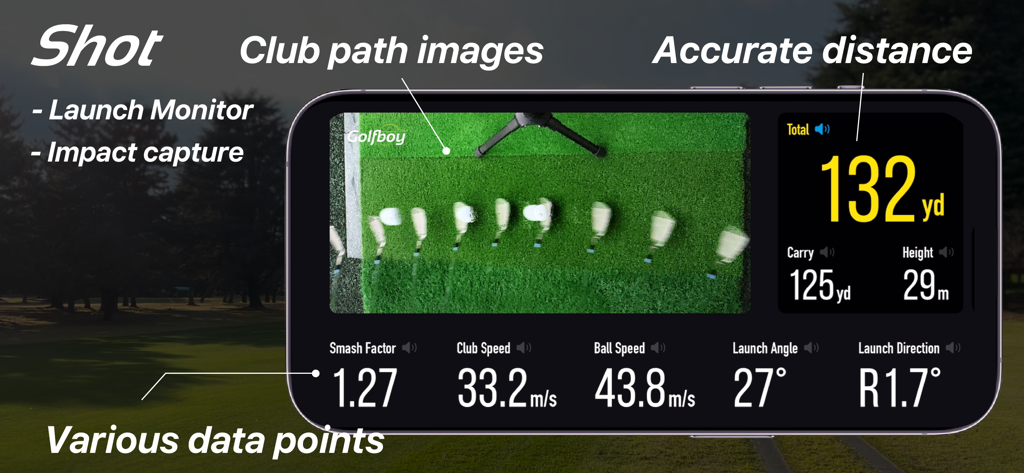
Golfboy:Launch Monitor - Golfboy App Launch Monitor Oberfläche mit Schlagpfad-Analyse und Schlagmetriken wie Distanz und Ballgeschwindigkeit
Golfboy App Launch Monitor Oberfläche mit Schlagpfad-Analyse und Schlagmetriken wie Distanz und Ballgeschwindigkeit

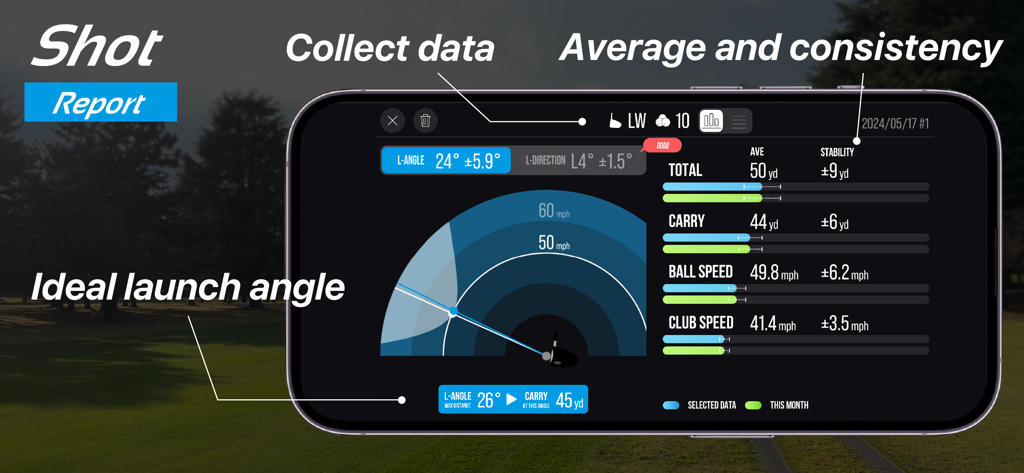
Golfboy:Launch Monitor - Golfboy App Schlagbericht mit Abflugwinkel, Ballgeschwindigkeit und Distanzmetriken auf einem Smartphone.
Golfboy App Schlagbericht mit Abflugwinkel, Ballgeschwindigkeit und Distanzmetriken auf einem Smartphone.

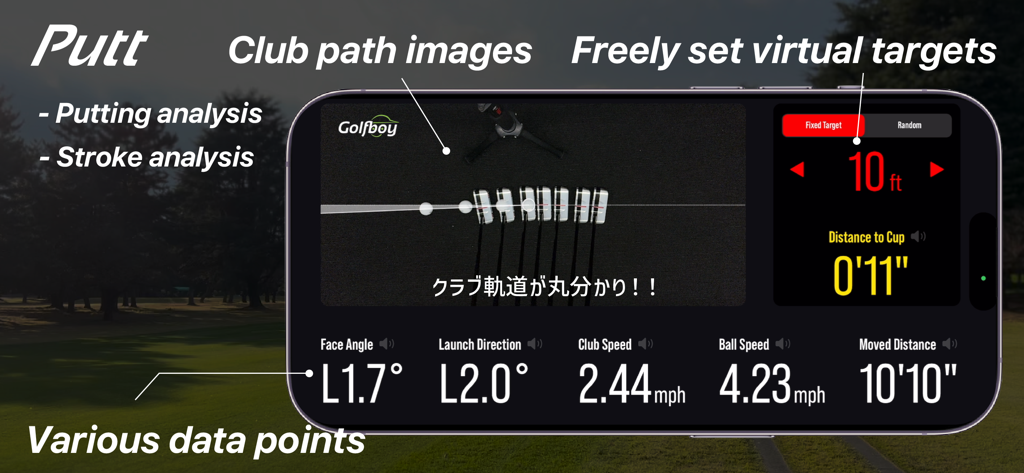
Golfboy:Launch Monitor - Golfboy App Screenshot, der eine Putt-Schwunganalyse mit Schlagpfad-Bildern und Schlagdaten zeigt

Golfboy App Screenshot, der eine Putt-Schwunganalyse mit Schlagpfad-Bildern und Schlagdaten zeigt
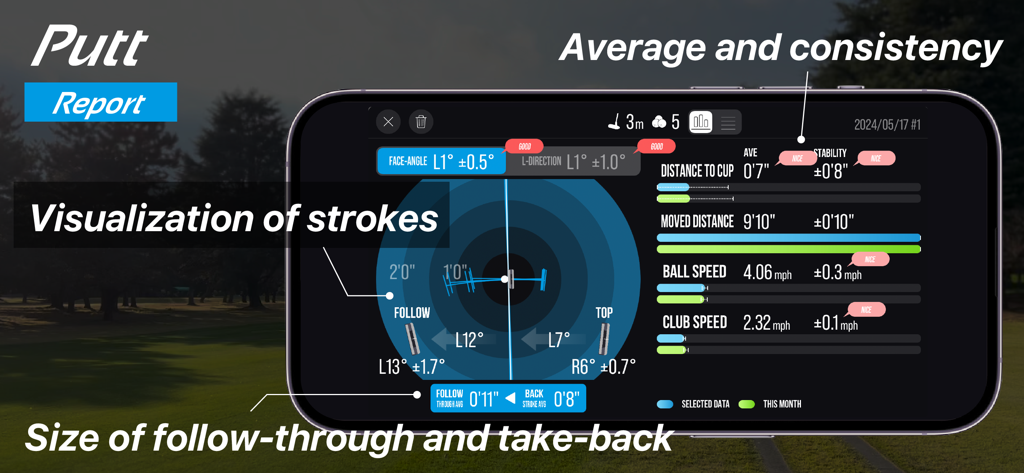
Golfboy:Launch Monitor - Golfboy App Bildschirm, der einen detaillierten Puttbericht mit Putt-Daten und Schwungvisualisierung zeigt.
Golfboy App Bildschirm, der einen detaillierten Puttbericht mit Putt-Daten und Schwungvisualisierung zeigt.

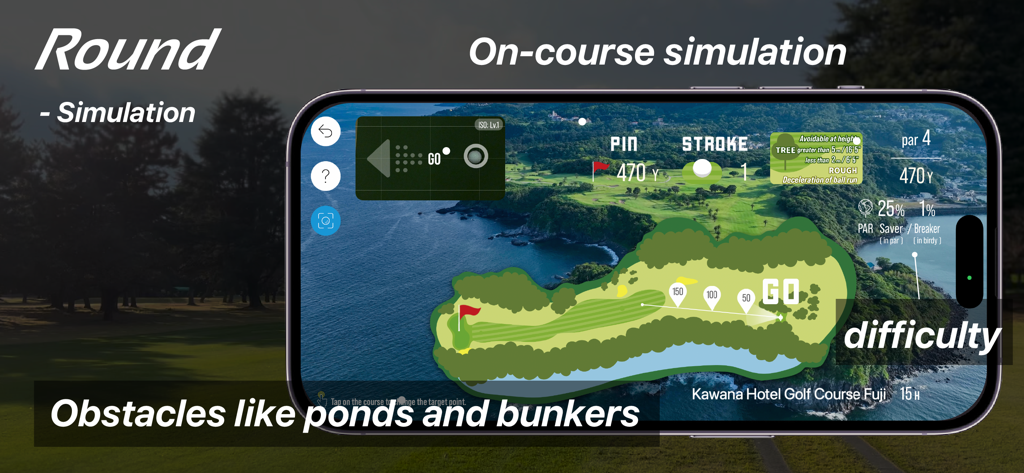
Golfboy:Launch Monitor - Golfboy App Rundenmodus-Oberfläche, die eine Platzsimulation mit einer virtuellen Karte eines Golfplatzes einschließlich Teichen und Bunkern zeigt.
Golfboy App Rundenmodus-Oberfläche, die eine Platzsimulation mit einer virtuellen Karte eines Golfplatzes einschließlich Teichen und Bunkern zeigt.

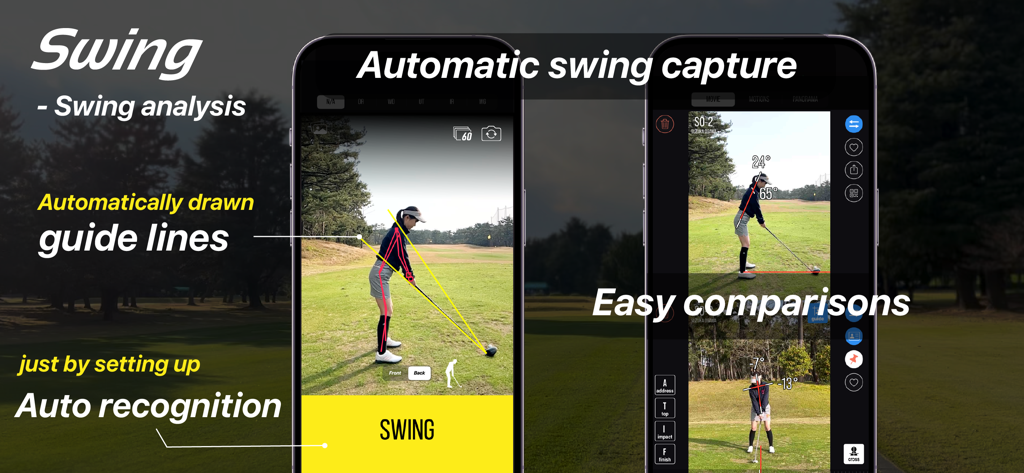
Golfboy:Launch Monitor - Golfboy App Oberfläche für automatische Schwunganalyse mit Hilfslinien und Seitenvergleich
Golfboy App Oberfläche für automatische Schwunganalyse mit Hilfslinien und Seitenvergleich

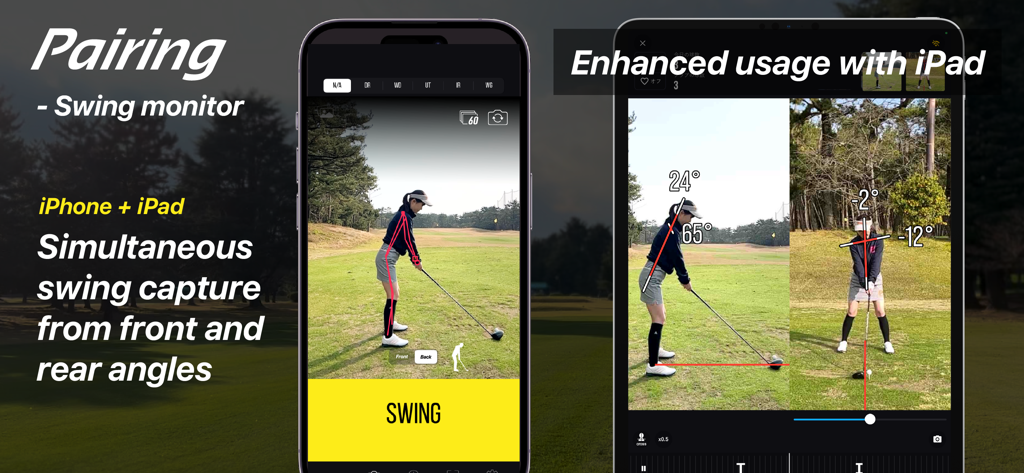
Golfboy:Launch Monitor - Golfboy App demonstriert gleichzeitige Aufnahme von Golfschwüngen aus Vorder- und Rückansicht mit gekoppeltem iPhone und iPad
Golfboy App demonstriert gleichzeitige Aufnahme von Golfschwüngen aus Vorder- und Rückansicht mit gekoppeltem iPhone und iPad

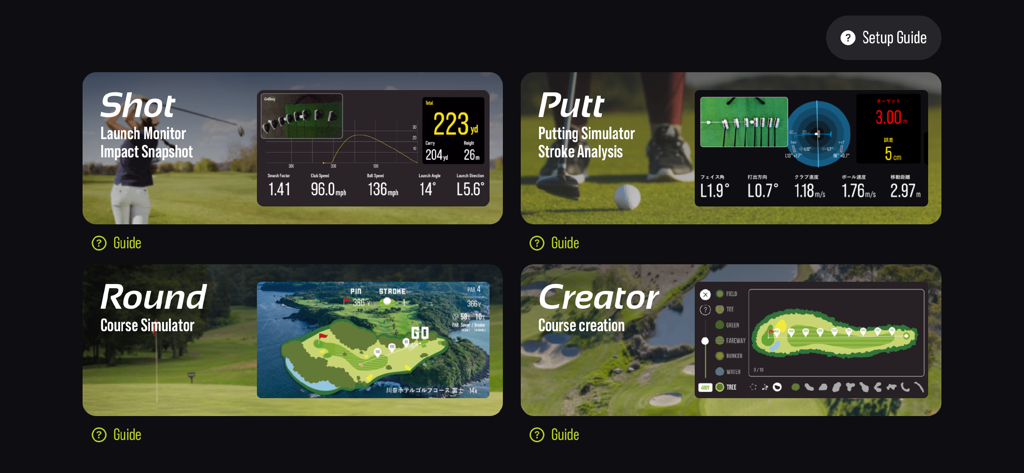
Golfboy:Launch Monitor - Golfboy App Oberfläche, die die Modi Schlag, Putt, Runde und Creator mit Datenanalyse zeigt

Golfboy App Oberfläche, die die Modi Schlag, Putt, Runde und Creator mit Datenanalyse zeigt

Beschreibung

Golfboy is a golf shot measurement app designed for iPhone users. Since it works with just an iPhone, anyone can use it easily with a simple tripod setup. Using advanced image analysis technology, the app provides real-time measurements for distance, ball speed, launch angle, and club speed. It also features a course simulation function, allowing users to practice in realistic scenarios. Additional features include a putting mode and automatic swing video recording, offering comprehensive support for various golf training needs. Leveraging our expertise in professional sports analysis, we developed Golfboy to make golf practice easier, more enjoyable, and more efficient for everyone. We’ve conducted numerous accuracy comparison tests against existing laser-based distance measuring devices, refining the app’s precision to meet real-world demands. Use Golfboy to take your game to the next level! ■ Key Features: + Real-time feedback on shot data allows for precise adjustments after every swing. + Practice while visualizing the distance and trajectory of your ideal shot. + Usable both indoors and outdoors, including at golf courses. + If you have a second iPhone, pair it to automatically record swing videos with shot data when practicing with friends. + In Round Mode, experience simulated practice on original Golfboy courses for more realistic training. + Putter Mode lets you specify target distances and quantify your putting shots. ■ Supported Devices: iPhone 8, iPhone SE (2nd generation) or later Note: Form analysis features are available on iPhone SE2, iPhone 11, and later models. ■ Measurable Distances: The maximum measurable distance varies depending on your iPhone’s lens: - iPhones with ultra-wide lenses (using a tripod at 1.2m height): Up to 280 yards - iPhones without ultra-wide lenses (using a tripod at 1.2m height): Up to 220 yards Raising the tripod height can extend the measurement range. Measurements may be inaccurate in low-light environments or when the ball blends into the background. Please test the app in your environment during the free trial period. ■ Subscription Plans: Golfboy is free to download, but a subscription is required to access measurement features. Start with a free trial, then continue with a subscription based on rates set for your country. Subscriptions automatically renew unless canceled at least 24 hours before the current period ends. Charges for the next period will be billed 24 hours before the current subscription expires. ・Available Plans: 1)Basic Plan (Monthly) Unlocks shot, putting, swing functions, and device-pairing features. 2)Premium Plan (Monthly/Yearly) Includes all Basic Plan features plus access to all in-app purchases during the subscription period. 3)Business [Commercial] Plan (Monthly) Grants a commercial license for business use (e.g., lessons, rentals). Includes the Basic Plan features, as well as operational support tools like Data Auto-Deletion and Settings Lock. *Commercial use refers to using the app for profit-driven purposes such as lessons, rentals, or business operations. ■ Free Features Without Subscription: Trial versions of Round Mode, Creator Mode, and Swing Mode are available for free. ■ One-Time Paid Features: These are available for purchase alongside the Basic or Business plans: - Shot Cast – Displays measurement results in various modes on a external display. - Putter Cast – Displays putting results on a external display. - Swing Cast – Displays camera and swing videos in various modes. - Round Cast - Play 3D courses on a external display or on a iPad display. - Customization Skins – Personalize the app’s appearance. ■ Terms of Use & Privacy Policy: You can review both directly within the app. ■ Contact & Support golfboy@qoncept.co.jp

Download

Herunterladen auf App Store

Diese Seite ist keine offizielle Seite der App oder ihres Entwicklers, sondern eine unabhängige redaktionelle Veröffentlichung, die zu Informations- und Kommentarzwecken erstellt wurde. Sofern nicht ausdrücklich anders angegeben, sind weder die App noch ihr Entwickler mit MWM, Apple, Google Play, dem App-Herausgeber oder dem Entwickler der App verbunden, von ihnen unterstützt, gesponsert, autorisiert oder anderweitig offiziell verbunden, und nichts auf dieser Seite impliziert, dass die App unter Verwendung der Dienste von MWM entwickelt wurde. Alle Marken, Logos, Screenshots und andere Inhalte bleiben Eigentum ihrer jeweiligen Inhaber.