GPS Tracker - Mobile Tracking
Herunterladen auf App Store

Diese Seite ist keine offizielle Seite der App oder ihres Entwicklers, sondern eine unabhängige redaktionelle Veröffentlichung, die zu Informations- und Kommentarzwecken erstellt wurde. Sofern nicht ausdrücklich anders angegeben, sind weder die App noch ihr Entwickler mit MWM, Apple, Google Play, dem App-Herausgeber oder dem Entwickler der App verbunden, von ihnen unterstützt, gesponsert, autorisiert oder anderweitig offiziell verbunden, und nichts auf dieser Seite impliziert, dass die App unter Verwendung der Dienste von MWM entwickelt wurde. Alle Marken, Logos, Screenshots und andere Inhalte bleiben Eigentum ihrer jeweiligen Inhaber.


Logo von GPS Tracker - Mobile Tracking
Herunterladen auf App Store

GPS Tracker - Mobile Tracking

Verwandeln Sie Ihr Mobilgerät in eine hochpräzise Ortungszentrale. Überwachen Sie Ihre Kleinflotte, automatisieren Sie Geschäftsberichte und sorgen Sie für absolute Sorgenfreiheit mit Echtzeit-Standortdaten und fortschrittlichem Geofencing.

Kennzahlen

Downloads

195K+

Bewertung

3.4/5

Bewertungen gesamt

0

Herausgeber

Edvin Zacharevic

Kategorie

Navigation

Sprachen

1

Neueste Version

2.11

Größe

64.4 MB

Erstveröffentlichung

26. Sept. 2015
Funktionen

Professionelles Flottenmanagement in Ihrer Tasche

Verwandeln Sie jedes iOS-Gerät in ein leistungsstarkes GPS-Ortungswerkzeug. Überwachen Sie die Leistung, automatisieren Sie Berichte und optimieren Sie Ihre Geschäftsabläufe ohne Kosten für spezialisierte Hardware.

Echtzeit-Flottensichtbarkeit

Verfolgen Sie Ihr Team mit Live-Updates alle 10 Sekunden. Überwachen Sie Geschwindigkeit, Standort und Status, um sicherzustellen, dass jede Minute des Arbeitstages erfasst und optimiert wird.

Automatisierte Berichte & Compliance

Erstellen Sie detaillierte XLS- oder PDF-Berichte für Kilometerstand, Kraftstoffverbrauch und Fahrverhalten. Vereinfachen Sie Ihre Steuererklärungen und verwalten Sie Gemeinkosten mit Daten auf Unternehmensniveau.

Die folgenden Screenshots und die Beschreibung stammen direkt aus dem offiziellen Store-Eintrag der App und sind Eigentum des Entwicklers.

App Store

Screenshots
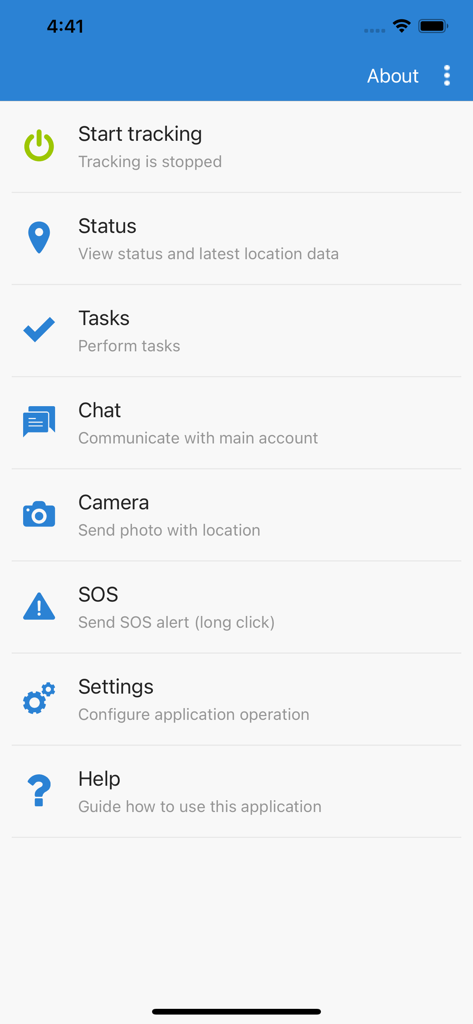
GPS Tracker - Mobile Tracking - Hauptmenü der GPS Tracker Mobil-App mit Tracking-, Aufgaben- und Chat-Funktionen
Hauptmenü der GPS Tracker Mobil-App mit Tracking-, Aufgaben- und Chat-Funktionen

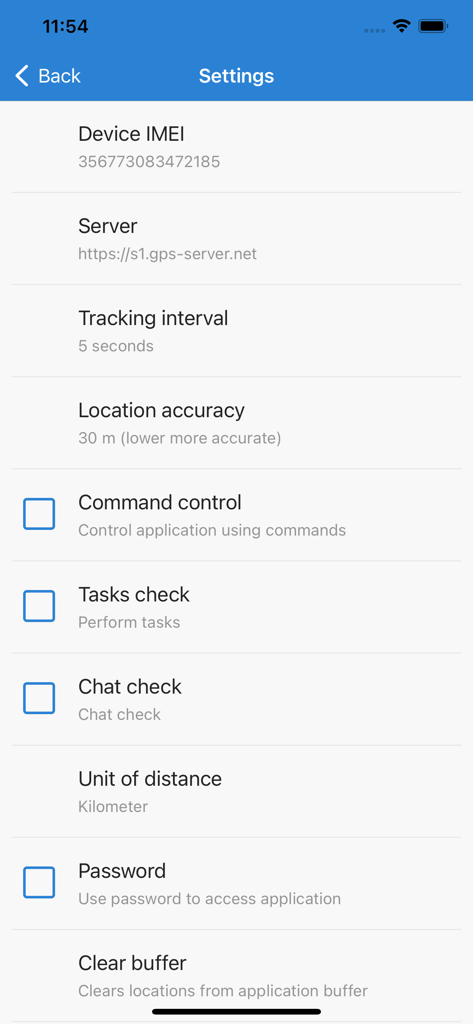
GPS Tracker - Mobile Tracking - Einstellungsmenü der GPS Tracker App mit Optionen für Gerätekonfiguration, Tracking-Intervall und Standortgenauigkeit

Einstellungsmenü der GPS Tracker App mit Optionen für Gerätekonfiguration, Tracking-Intervall und Standortgenauigkeit

Beschreibung

With GPS Tracker application you can transform your iOS mobile device to GPS tracker (GPS tracking device) and use all GPS-server.net features. In order to use this application, you must have personal account or hosted software. NOTE: Continued use of GPS Tracker running in the background can dramatically decrease battery life. If you want better battery life, set tracking interval to at least 60-120 seconds. GPS Tracker features: - Track your device online in real time; - Record and review tracks, generate reports; - Configure various kinds of events and notifications; - Assign or schedule various tasks and delivery times; - Communicate with the person at the other end using built-in chat function; - Make photos and upload to user account with current location; - Possibility to change tracking interval; - Phone battery level is sent together with every location; - If Internet is lost, application will save locations and upload them later; - Possibility to control application via web browser using commands; - Password protection; - Application runs in background. GPS-server.net features: - Real time tracking mode represents live data of tracked objects. Information is updated every ten seconds without need to refresh page or relogin to account. Monitored data contains vehicle status, latitude, longitude, altitude, address, speed, connection time, ignition status, fuel consumption, sensor data, nearest geozone and much more. - Widgets display recent object information which is updated every ten seconds without need to refresh web page. Send commands to control device, view recent events and mileage graph. - Events is one of the most important feature which our software offers. Events are used to trigger actions by important or disruptive activities. Customer will get instant SMS/E-mail/Push notifications triggered by different event types. - History shows all stored data which server has collected from connected devices for chosen period of time. Software stores information received from GPS tracking devices, such as speed, time, location, stops, reports, events, etc. History is displayed in different ways: visually on the map, in a graph or HTML/XLS format. - POI (Points of Interest) allow you to put markers at the locations that might be interesting or useful. You can also name the place, add short description, attach an image or even video to it. - Routes feature is a helpful tool to mark an important section of the road by drawing virtual path on the map. Additionally, get notifications if vehicle is within or out of route. This feature is useful to analyze vehicle dependency to the road. - With geofences you are able to make a virtual perimeter on geographic areas that have specific interest for you. The main reason to have geofences is to control whether the unit stays within it or not, so that when the geofencing unit enters or exits the area a notification is generated. - Get detailed reports about trips, mileage, driving behavior, fuel usage and thefts, activity in particular zone or route. Reports are used for data analysis of particular vehicle or entire group. Reports can be exported or sent instantly to E-mail addresses in HTML/PDF/XLS format. - Tasks make it easy to create and manage entries related to upcoming work which should be accomplished. Set start and end address, priority, task status. - The Maintenance schedule reminds you when you should have your vehicle serviced, such as an oil change or technical inspection. It can also serve as a reminder to take out insurance. - Use the Expenses function to track the amount spent on an object maintenance. Evaluate the economic benefit of vehicle usage with the Expenditure report on a daily, weekly, or monthly basis.

Download

Herunterladen auf App Store

Diese Seite ist keine offizielle Seite der App oder ihres Entwicklers, sondern eine unabhängige redaktionelle Veröffentlichung, die zu Informations- und Kommentarzwecken erstellt wurde. Sofern nicht ausdrücklich anders angegeben, sind weder die App noch ihr Entwickler mit MWM, Apple, Google Play, dem App-Herausgeber oder dem Entwickler der App verbunden, von ihnen unterstützt, gesponsert, autorisiert oder anderweitig offiziell verbunden, und nichts auf dieser Seite impliziert, dass die App unter Verwendung der Dienste von MWM entwickelt wurde. Alle Marken, Logos, Screenshots und andere Inhalte bleiben Eigentum ihrer jeweiligen Inhaber.








