Home Theater SPL
Home Theater SPL
Herunterladen auf App Store

Diese Seite ist keine offizielle Seite der App oder ihres Entwicklers, sondern eine unabhängige redaktionelle Veröffentlichung, die zu Informations- und Kommentarzwecken erstellt wurde. Sofern nicht ausdrücklich anders angegeben, sind weder die App noch ihr Entwickler mit MWM, Apple, Google Play, dem App-Herausgeber oder dem Entwickler der App verbunden, von ihnen unterstützt, gesponsert, autorisiert oder anderweitig offiziell verbunden, und nichts auf dieser Seite impliziert, dass die App unter Verwendung der Dienste von MWM entwickelt wurde. Alle Marken, Logos, Screenshots und andere Inhalte bleiben Eigentum ihrer jeweiligen Inhaber.

Logo von Home Theater SPL
Herunterladen auf App Store

Home Theater SPL

Erzielen Sie die perfekte Klangbühne und kristallklare Dialoge mit dem präzisen Dezibel-Messgerät, das für anspruchsvolle Heimkino-Enthusiasten und DIY-Kalibrierer entwickelt wurde.

Kennzahlen

Downloads

3K+

Bewertung

1.0/5

Bewertungen gesamt

0

Herausgeber

J.S. Technology Ltd.

Kategorie

Utilities

Sprachen

1

Neueste Version

1.26

Größe

9.2 MB

Erstveröffentlichung

24. Juni 2015
Funktionen

Perfektionieren Sie Ihr Heimkino-Audio

Hören Sie auf, Ihre Pegel zu raten. Kalibrieren Sie Ihre Lautsprecher wie ein Profi mit hochpräziser SPL-Messung, entwickelt für 5.1- und 7.1-Surround-Systeme.

Präzises Sound-Balancing

Erreichen Sie die ultimative 'zentrierte Klangbühne', indem Sie die Pegel der einzelnen Lautsprecher mit professioneller Dezibel-Genauigkeit anpassen.

7.1 System-Optimierung

Kalibrieren Sie mühelos komplexe Layouts, einschließlich Center-, Surround- und LFE-Kanälen, über eine spezielle, für Heimkinos entwickelte Benutzeroberfläche.

Die folgenden Screenshots und die Beschreibung stammen direkt aus dem offiziellen Store-Eintrag der App und sind Eigentum des Entwicklers.

App Store

Screenshots
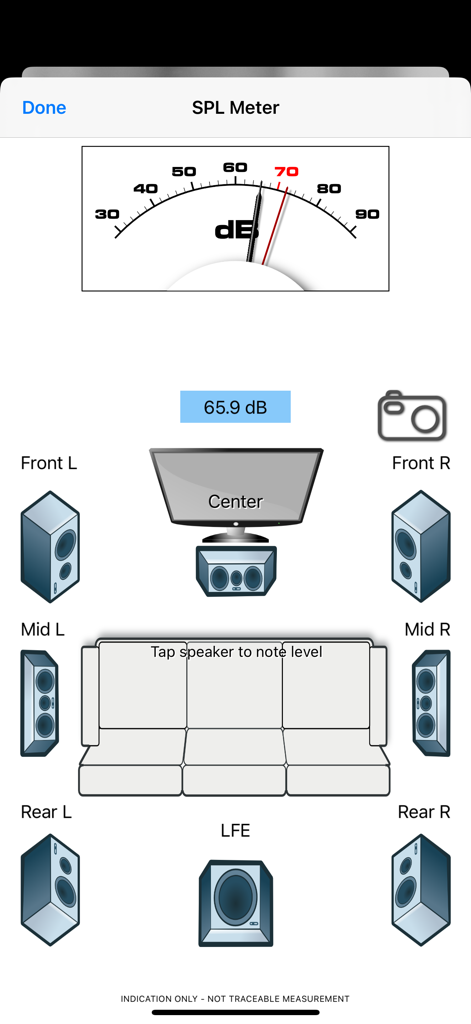
Home Theater SPL - Benutzeroberfläche der Home Theater SPL App mit einem Dezibel-Messgerät und einem 7.1-Surround-Sound-Lautsprecher-Layout für die Audiokalibrierung.
Benutzeroberfläche der Home Theater SPL App mit einem Dezibel-Messgerät und einem 7.1-Surround-Sound-Lautsprecher-Layout für die Audiokalibrierung.

Home Theater SPL - Begrüßungsbildschirm der Home Theater SPL App mit einer Vintage-Vakuumröhre und Navigationstasten

Begrüßungsbildschirm der Home Theater SPL App mit einer Vintage-Vakuumröhre und Navigationstasten
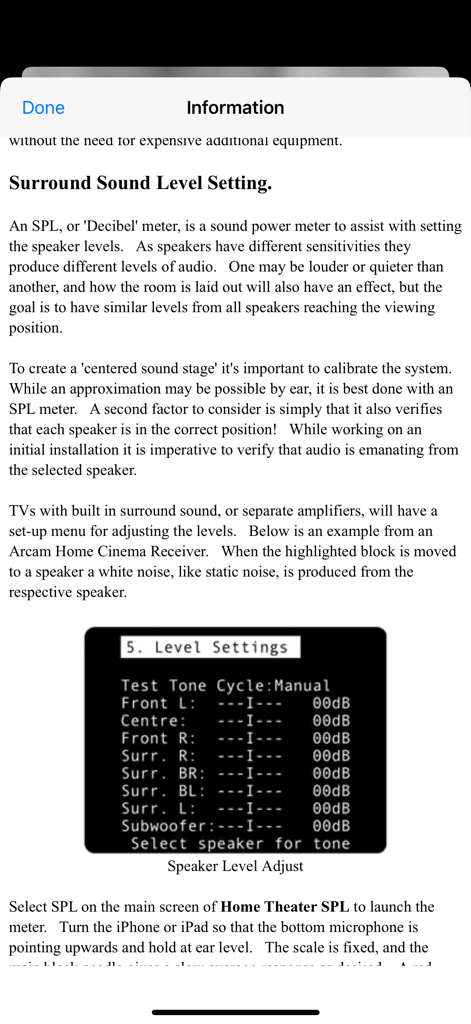
Home Theater SPL - Informationsbildschirm zur Erläuterung der Surround-Sound-Lautsprecherpegel-Kalibrierung mit einem Beispiel-Receiver-Menü.
Informationsbildschirm zur Erläuterung der Surround-Sound-Lautsprecherpegel-Kalibrierung mit einem Beispiel-Receiver-Menü.

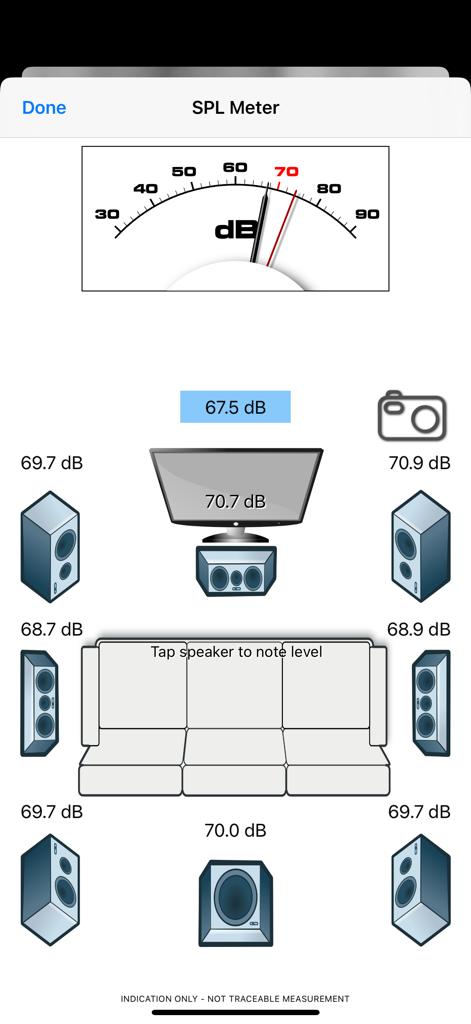
Home Theater SPL - Benutzeroberfläche der Home Theater SPL App zeigt die Kalibrierung eines 7.1-Surround-Sound-Systems mit Dezibel-Messgerät und Lautsprecherpegel-Anzeigen

Benutzeroberfläche der Home Theater SPL App zeigt die Kalibrierung eines 7.1-Surround-Sound-Systems mit Dezibel-Messgerät und Lautsprecherpegel-Anzeigen

Beschreibung

Home Theater SPL Information   Professionals use SPL meters to calibrate audio reproduction systems in cinemas, so why shouldn’t Home Theaters or Home Cinemas owners use them too? Now the very same SPL meter that’s in our TestCard ProHD app is available separately.   An SPL or “decibel” meter is an essential tool when setting up surround sound systems.   Home Theater SPL a solution for calibrating the audio level of surround sound systems within the home without the need for additional equipment. Our app TestCard ProHD is the innovative means to calibrating your screen and audio to ensure a consistent and correct representation of display media and surround sound and includes an SPL meter. If you wish to calibrate both audio and visual aspects of your Home Theater then please consider TestCard ProHD.   Surround Sound Level Setting.   An SPL, or “Decibel” meter, is a sound power meter to assist with setting the speaker levels.   As speakers have different sensitivities they produce different levels of audio.   One may be louder or quieter than another, and how the room is laid out will also have an effect, but the goal is to have similar levels from all speakers reaching the viewing position.   To create that “centered sound stage” it’s important to calibrate the system.   While an approximation may be possible by ear, it is best done with an SPL meter.   A second factor to consider is simply that it also verifies that each speaker is in the correct position!   While working on an initial installation it is imperative to verify that audio is emanating from the selected speaker.   Select SPL on the main screen of Home Theater SPL to launch the meter.   Turn the iPhone or iPad so that the bottom microphone is pointing upwards and hold at ear level.   The scale is fixed, and the main black needle gives a slow average response as desired.   A red needle is provided for peak noise level information and is not required during calibration. Start with the front left speaker and allow it to set the benchmark level; the target for all other speakers to be set to.   Typically the audio will be in the 70-80dB range and as a guide 70dB is marked in red on dial.   With Home Theater SPL it is possible to note the current sound level by tapping on respective speaker, making it easier to recall where individual speakers were.   Move to the center speaker and adjust its level to closely match the first.   It is normal for amplifiers to increase or decrease sound levels by 1dB increments and it may not be possible to get an exact match.   Move to the next speaker in the list and repeat.   Variance of 1 or 2dB during calibration is normal, but it will settle around a value.   Some systems will have 5 speakers and some will also have the LFE, or bass effects, speaker to give the “0.1” to make 5.1 audio.   With the SPL meter there are 7 main speakers shown with one LFE to make 7.1.   With a 5.1 system the Mid speakers will not be present and therefore can be skipped. To check it’s always advisable to run round checking the speaker levels again, perhaps even adjusting the initial left speaker if it was not possible to set others within the range allowed by the amplifier.   When complete ensure that you save the settings within the amplifier if they’re not automatically saved.   For reference a screen shot of the SPL meter on Home Theater SPL can be taken to record any stored audio level by pressing the camera button.

Download

Herunterladen auf App Store

Diese Seite ist keine offizielle Seite der App oder ihres Entwicklers, sondern eine unabhängige redaktionelle Veröffentlichung, die zu Informations- und Kommentarzwecken erstellt wurde. Sofern nicht ausdrücklich anders angegeben, sind weder die App noch ihr Entwickler mit MWM, Apple, Google Play, dem App-Herausgeber oder dem Entwickler der App verbunden, von ihnen unterstützt, gesponsert, autorisiert oder anderweitig offiziell verbunden, und nichts auf dieser Seite impliziert, dass die App unter Verwendung der Dienste von MWM entwickelt wurde. Alle Marken, Logos, Screenshots und andere Inhalte bleiben Eigentum ihrer jeweiligen Inhaber.








