
Diese Seite ist keine offizielle Seite der App oder ihres Entwicklers, sondern eine unabhängige redaktionelle Veröffentlichung, die zu Informations- und Kommentarzwecken erstellt wurde. Sofern nicht ausdrücklich anders angegeben, sind weder die App noch ihr Entwickler mit MWM, Apple, Google Play, dem App-Herausgeber oder dem Entwickler der App verbunden, von ihnen unterstützt, gesponsert, autorisiert oder anderweitig offiziell verbunden, und nichts auf dieser Seite impliziert, dass die App unter Verwendung der Dienste von MWM entwickelt wurde. Alle Marken, Logos, Screenshots und andere Inhalte bleiben Eigentum ihrer jeweiligen Inhaber.


iFont: find, install any font
Die iOS-Tyrannei der Standard-Fonts endet hier. iFont befreit Ihre Kreativität und liefert die Waffen für konsistentes Design. MWMs Kreation macht aus Ihrem iPhone ein mobiles Typografie-Labor.
Downloads
10M+Bewertung
Bewertungen gesamt
47.1KHerausgeber
Kategorie
UtilitiesSprachen
1Neueste Version
11.8.1Größe
121.6 MBErstveröffentlichung
7. Nov. 2016Eine detaillierte Betrachtung der Schlüsselmerkmale für kreative Profis auf iOS-Geräten.
Analyse der Kernfunktionen von 'iFont: find, install any font'
Installation eigener Schriftarten
Es ermöglicht Nutzern, ihre eigenen Schriftarten (.ttf, .ttc, .otf sowie komprimierte .zip-Dateien) einfach zu installieren und in unterstützten Apps wie Pages, Keynote und Numbers zu verwenden. Dies ist unerlässlich für die Aufrechterhaltung der Markenkonsistenz und die Umsetzung spezifischer Designvorgaben in professionellen Projekten.
Schriftarten aus Online-Bibliotheken herunterladen
Die App bietet direkten Zugang zu umfangreichen Schriftartenbibliotheken wie Google Fonts und Dafont sowie zu benutzerdefinierten Quellen. Dies erweitert die gestalterischen Möglichkeiten erheblich und beschleunigt den Workflow, indem sofort eine passende Typografie für jedes Projekt gefunden werden kann.
Umfassender Schriftartenvergleich
Dieses Tool verfügt über eine Vergleichsfunktion, die es Anwendern erlaubt, verschiedene Schriftarten direkt nebeneinander zu betrachten. Dies ist entscheidend, um fundierte typografische Entscheidungen zu treffen und die visuell ansprechendste Option für ein Design zu finden.
Batch-Installation von Schriftarten
Es ermöglicht die Installation mehrerer Schriftarten gleichzeitig aus Archiven. Diese Funktion ist ein erheblicher Effizienzgewinn für die Verwaltung großer Schriftsammlungen und ganzer Schriftfamilien, was den Arbeitsaufwand für professionelle Nutzer minimiert.
Interaktiver Schriftartentestbereich
Die App beinhaltet ein integriertes Notizblock-Tool, mit dem Nutzer jede Schriftart mit eigenem Text testen und das Ergebnis als Bild exportieren können. Dies hilft bei der visuellen Beurteilung der Schriftart im Kontext, bevor sie final angewendet wird.
Anzeige technischer Schriftartendetails
Es zeigt detaillierte Informationen zu jeder Schriftart an, darunter Designer, Markeninformationen und metrische Details wie Auf- und Abstiegsabstände. Dies ist besonders wertvoll für Designer, die präzise Typografie und Compliance-Anforderungen erfüllen müssen.
Waterfall-Ansicht für Größenprüfung
Die Waterfall-Ansicht visualisiert, wie eine Schriftart bei sehr kleinen oder sehr großen Punktgrößen aussieht. Dies ist nützlich für die Auswahl der optimalen Größe und die Sicherstellung der Lesbarkeit in verschiedenen Medien und Formaten.
Feingranulare Zoom-Funktion
Dieses Tool ermöglicht ein detailliertes Heranzoomen an eine Schriftart bis zu 500%. Diese Funktion ist wichtig, um die feinsten Details jedes Zeichens zu überprüfen und die Qualität der Typografie genau zu beurteilen.
Häufig gestellte Fragen
Alles, was Sie über wissen müssen iFont: find, install any font
Can iFont install new fonts for use in other apps?
Yes, iFont allows users to install new fonts on their iOS devices. These fonts are compatible with content creation apps such as Pages, Keynote, and Numbers, enabling custom typeface use within those applications.
Does iFont change the system font on an iPhone or iPad?
No, iFont cannot change the system font on your device. Its functionality focuses on installing fonts for specific apps and does not extend to modifying the device's overall system typography or keyboard fonts.
What font file formats does iFont support for installation?
iFont supports custom font files in .ttf, .ttc, and .otf formats. It also accommodates these formats when they are compressed within a .zip archive, allowing for easy import and installation.
Can I download new fonts directly within the iFont app?
Yes, iFont lets users download and install a range of fonts directly from popular libraries like Google Fonts and Dafont within the app. It also supports integrating fonts from custom online sources.
Does iFont offer a feature to compare different fonts?
Yes, iFont includes a 'Compare' feature. This tool allows users to analyze and contrast multiple typefaces to determine which one best suits their design or content creation needs.
Can I preview how a font looks with custom text using iFont?
Yes, iFont provides a 'Notepad' feature under each font's details. Users can type and test messages with the selected font, then export the result as an image for sharing in other applications.
Does iFont display technical information about fonts?
iFont provides comprehensive technical details for each font. This includes information about the designer, trademark data, and spacing specifics like ascents and descents, aiding in informed font selection.
Can iFont import font files downloaded from the internet?
Yes, iFont supports importing font files directly from the web. Users can download a font in a web browser, open it in iFont, and follow simple instructions to install it on their device.
Does iFont display individual font glyphs and offer customization?
Yes, iFont allows users to view all individual glyphs within a font. It also offers customization options, including changing glyph and background colors, and is compatible with Dark Mode settings.
Is the iFont app optimized for use on an iPad?
Yes, iFont is fully optimized for iPad. It features a split-view experience for enhanced multitasking and supports a range of keyboard shortcuts, ensuring a productive workflow on the device.
What font file types are not supported by iFont?
iFont does not currently support .suit or .dfont files. Users must ensure their font files are in compatible formats like .ttf, .ttc, or .otf for successful installation within the application.
Die folgenden Screenshots und die Beschreibung stammen direkt aus dem offiziellen Store-Eintrag der App und sind Eigentum des Entwicklers.
App Store
Screenshots
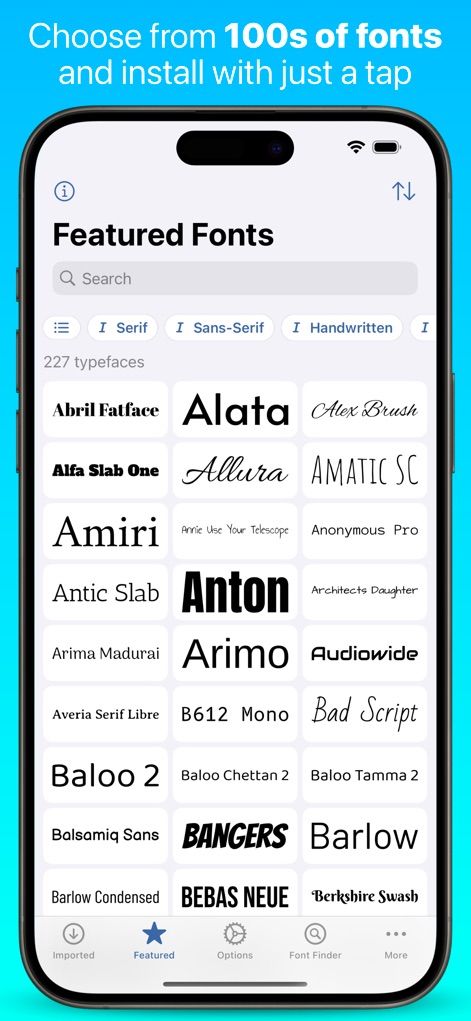
Die App präsentiert eine umfangreiche Liste von Hunderten von Schriftarten in der Kategorie „Featured Fonts“, die Nutzer nach Stilen wie Serif und Sans-Serif filtern können.
Schriftarten entdecken
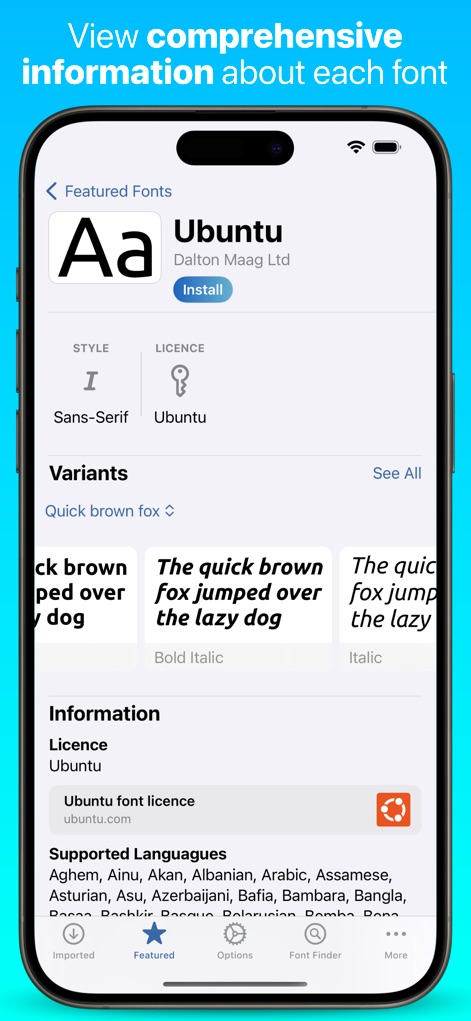
Dieses Tool bietet umfassende Informationen zu jeder Schriftart, einschließlich Lizenzdetails und einer Vorschau der Varianten, um die Auswahl zu erleichtern.
Schriftart Details

Nutzer können Schriftarten direkt aus ZIP-Archiven importieren, wobei die App den Hauptfont und zugehörige Dateien wie die „README, PLEASE.txt“ erkennt und anzeigt.
Eigene Schriftarten importieren
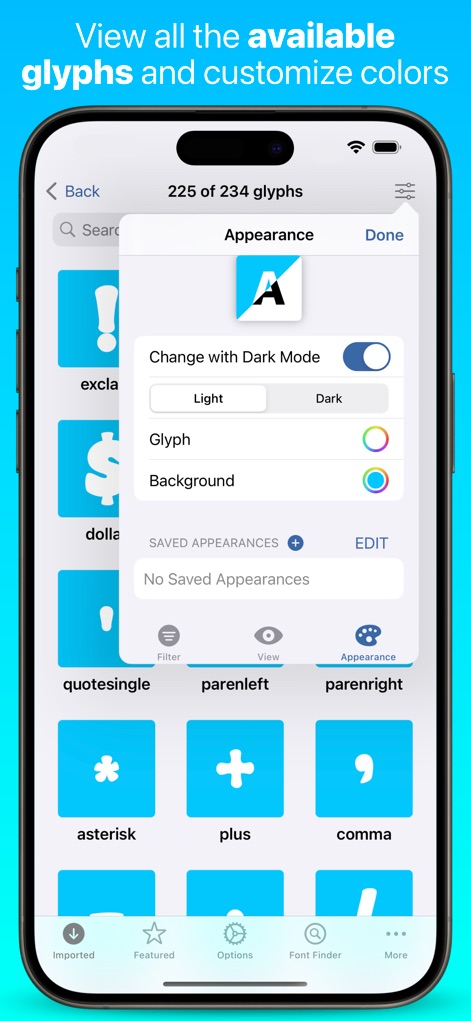
Die App ermöglicht die detaillierte Ansicht aller verfügbaren Glyphen und bietet Anpassungsoptionen für die Farbe des Glyphen sowie einen Dark Mode.
Glyphen anpassen

Nutzer erhalten eine Übersicht über installierte Schriftarten mit einer Testanzeige des Alphabets und Zugriff auf Funktionen wie den Notepad und eine detaillierte Glyphenansicht.
Installierte Schriftarten verwalten
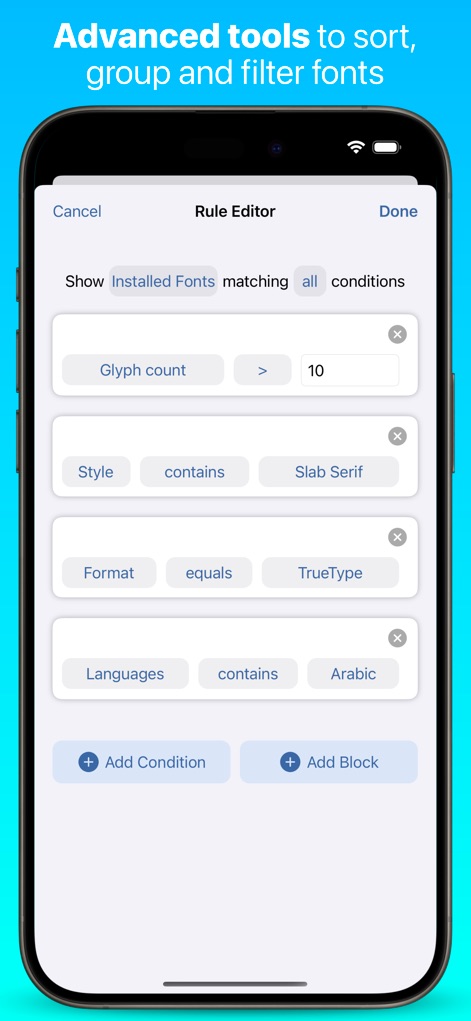
Dieses Tool bietet erweiterte Filteroptionen im „Rule Editor“, mit denen Schriftarten nach Kriterien wie der Glyphenanzahl und dem Schriftstil wie „Slab Serif“ organisiert werden können.
Erweiterte Filteroptionen
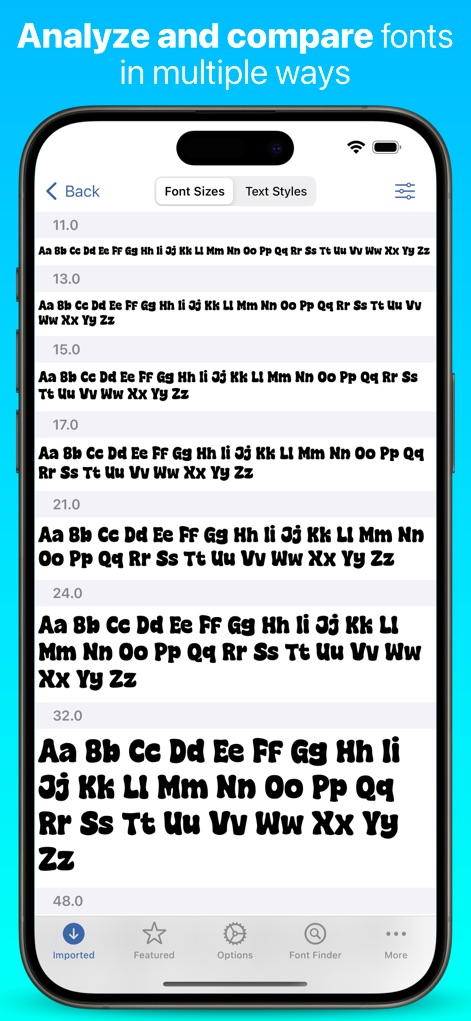
Die App ermöglicht den Vergleich von Schriftarten in verschiedenen Punktgrößen und bietet Registerkarten für die Ansicht von „Font Sizes“ und „Text Styles“, um die Lesbarkeit zu beurteilen.
Schriftgrößen vergleichen
Beschreibung
Download
Ähnliche Apps
Apps mit ähnlichen Funktionen und Nutzererfahrung

Bakey: fonts market
Sandoll Inc.

Fonts - Install Font
OneCutOne Technology Co. Ltd.
Fonts –
璞 王

AnyFont
Pepperbit Online GmbH

Fonts for DIY Space
Country Road App Software LLC
Fonts - Fonts Aesthetic
梓峰 戴
خطوط - خطوط عربية · خط عربي
雨双 柯

手机字体大全-主题字体美化大师&下载安装管家
晖 孟

Fontcase - Manage Your Type
manolo Sanudo
Diese Seite ist keine offizielle Seite der App oder ihres Entwicklers, sondern eine unabhängige redaktionelle Veröffentlichung, die zu Informations- und Kommentarzwecken erstellt wurde. Sofern nicht ausdrücklich anders angegeben, sind weder die App noch ihr Entwickler mit MWM, Apple, Google Play, dem App-Herausgeber oder dem Entwickler der App verbunden, von ihnen unterstützt, gesponsert, autorisiert oder anderweitig offiziell verbunden, und nichts auf dieser Seite impliziert, dass die App unter Verwendung der Dienste von MWM entwickelt wurde. Alle Marken, Logos, Screenshots und andere Inhalte bleiben Eigentum ihrer jeweiligen Inhaber.