
Diese Seite ist keine offizielle Seite der App oder ihres Entwicklers, sondern eine unabhängige redaktionelle Veröffentlichung, die zu Informations- und Kommentarzwecken erstellt wurde. Sofern nicht ausdrücklich anders angegeben, sind weder die App noch ihr Entwickler mit MWM, Apple, Google Play, dem App-Herausgeber oder dem Entwickler der App verbunden, von ihnen unterstützt, gesponsert, autorisiert oder anderweitig offiziell verbunden, und nichts auf dieser Seite impliziert, dass die App unter Verwendung der Dienste von MWM entwickelt wurde. Alle Marken, Logos, Screenshots und andere Inhalte bleiben Eigentum ihrer jeweiligen Inhaber.


ImgPlay: GIF Maker & Meme
Keine Ausreden mehr: Mit dieser App wird jeder zum GIF-Meister, selbst wenn er nur ein Video hat.
Downloads
7.5M+Bewertung
Bewertungen gesamt
193.0KHerausgeber
Kategorie
Photo & VideoSprachen
15Neueste Version
6.5.3Größe
244.6 MBErstveröffentlichung
23. Juni 2015Eine Bewertung der Schlüsselmerkmale, die ImgPlay zu einem unverzichtbaren Werkzeug für Social-Media-Nutzer und Content-Ersteller machen.
Analyse der Kernfunktionen von ImgPlay: GIF Maker & Meme
Vielseitige GIF-Erstellung aus Medienquellen
Die App ermöglicht es Nutzern, hochauflösende GIFs aus einer Vielzahl von Quellen wie Videos, Live Photos, Serienaufnahmen, Standbildern und sogar Bildschirmaufnahmen schnell und unkompliziert zu erstellen. Dies ist die Kernfunktion für jeden, der animierte Inhalte generieren möchte und bietet höchste Flexibilität bei der Materialauswahl.
Social-Media-optimierte Export- und Teilen-Funktionen
Dieses Tool gewährleistet den Export von GIFs in hoher Qualität mit optimierten Dateigrößen für schnelleres Laden und Teilen. Es bietet mehrere Exportformate (GIF, MP4, APNG, WebP) und ermöglicht das direkte Teilen auf wichtigen Plattformen wie Instagram, TikTok, X und WhatsApp, was für die Zielgruppe entscheidend ist, um ihre Inhalte effizient zu verbreiten.
Umfassende Bearbeitung und KI-Verbesserungen
Die App bietet fortschrittliche Bearbeitungsoptionen, darunter KI-gestützte Hintergrundentfernung, anpassbare Leinwandverhältnisse für soziale Medien, präzise Anpassungen von Wiedergabegeschwindigkeit und Schleifeneinstellungen. Dies ermöglicht Nutzern, ihre Kreationen professionell zu verfeinern und für verschiedene Plattformen zu optimieren.
Integrierter Meme- und Personalisierungs-Creator
Es verfügt über einen erweiterten Meme-Maker mit mehreren Textbereichen und bietet die Möglichkeit, eigene Schriftarten, benutzerdefinierte Sticker aus Bildern oder GIFs sowie eine Vielzahl von Filtern und visuellen Anpassungen hinzuzufügen. Dies ist ideal für Meme-Enthusiasten und Content-Ersteller, die ihre Inhalte personalisieren möchten.
Frame-Level-Bearbeitung für präzise Kontrolle
Dieses Tool bietet die Möglichkeit, jeden Frame einzeln anzuzeigen und zu bearbeiten, Frames neu anzuordnen, unerwünschte Frames zu entfernen und verschiedene Medientypen innerhalb eines Projekts zu kombinieren. Dies gibt Nutzern maximale Kontrolle über ihre Animationen und ermöglicht eine präzise Feinabstimmung.
Kreative Overlays und Styling-Optionen
Die App ermöglicht das Hinzufügen eigener Logos für Branding, die Verwendung farbiger oder gemusterter Hintergründe, verschiedene Rahmen und Freihandzeichnungen. Dies verbessert die visuelle Ästhetik und Personalisierung der GIFs, was für Content-Ersteller wichtig ist.
Häufig gestellte Fragen
Alles, was Sie über wissen müssen ImgPlay: GIF Maker & Meme
What is ImgPlay?
ImgPlay is a GIF Maker app that converts videos, Live Photos, burst shots, still images, and screen recordings into high-quality GIFs. It provides tools for creating animations and memes.
Can ImgPlay convert videos to GIFs?
Yes, ImgPlay can convert videos to GIFs with precise trimming. It also transforms Live Photos, burst shots, and screen recordings into seamless animations.
Does ImgPlay offer AI features for editing GIFs?
Yes, ImgPlay includes cutting-edge AI technology for GIF editing. It features AI background removal to instantly remove backgrounds from your creations.
Can I create memes using the ImgPlay app?
Yes, ImgPlay includes an Advanced Meme Maker with multiple text areas and an auto-text canvas. You can also use custom stickers and import fonts.
What export formats does ImgPlay support for GIFs?
ImgPlay supports exporting creations as GIF, MP4, APNG, or WebP formats. It also offers customized resolutions and file size optimization.
Is ImgPlay free to use or does it have a subscription?
ImgPlay offers ImgPlay Premium to unlock all GIF editing features and remove watermarks. Subscription options include weekly, monthly, or yearly plans.
Can I share my GIFs directly to social media from ImgPlay?
Yes, ImgPlay provides one-tap sharing to major platforms like Instagram, TikTok, Reels, X, and Facebook. It also allows quick sharing via iMessage.
Does ImgPlay allow frame-level editing for animations?
Yes, ImgPlay provides frame-level editing. Users can view, edit, reorder, and remove individual frames, or combine different media types within a single project.
What camera modes does ImgPlay offer for content creation?
ImgPlay offers four camera modes for capturing new content. These modes are hands-free, normal, stop-motion, and boomerang, providing versatile creation options.
Can I customize backgrounds in ImgPlay?
Yes, ImgPlay provides tools for background customization. You can add colored or patterned backgrounds and apply various borders to frame your GIF perfectly.
Die folgenden Screenshots und die Beschreibung stammen direkt aus dem offiziellen Store-Eintrag der App und sind Eigentum des Entwicklers.
App Store
Screenshots
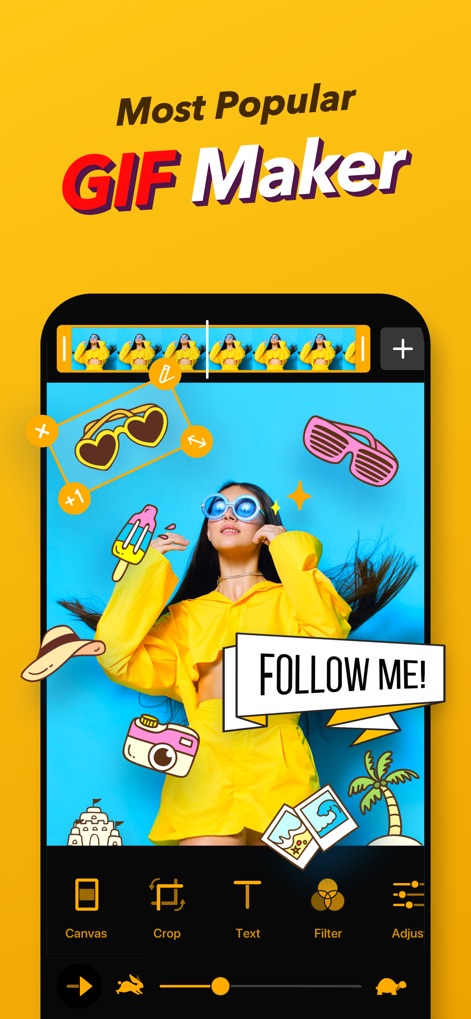
Diese Ansicht zeigt die intuitive Benutzeroberfläche für die GIF-Bearbeitung, inklusive der Möglichkeit, Text-Overlays hinzuzufügen und die Frames mittels Zeitleiste zu steuern.
Kreative GIF-Gestaltung
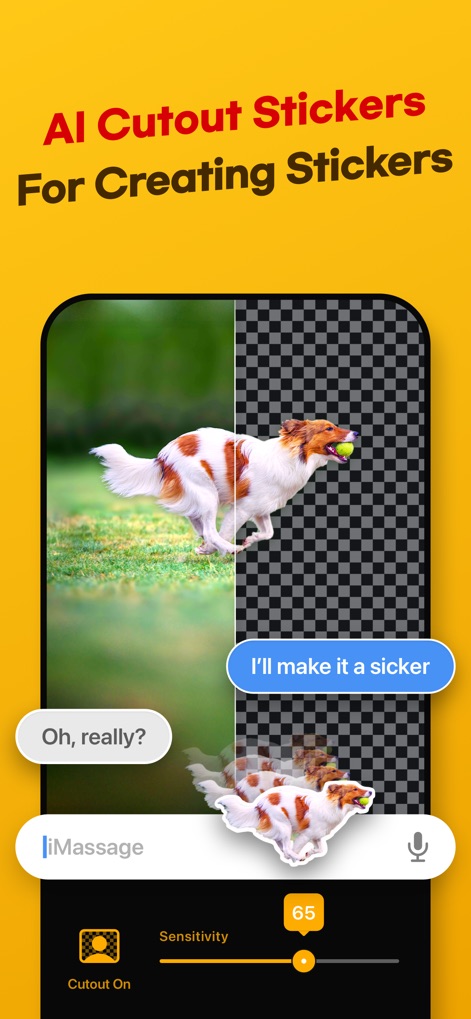
Nutzer können mithilfe der KI-Technologie Objekte präzise ausschneiden, was sich am freigestellten Hund und dem Sensitivitätsregler zur Anpassung der Erkennung demonstriert.
KI-Ausschnitt-Sticker

Die App ermöglicht die einfache Erstellung individueller Memes, wobei das Beispiel der grummeligen Katze die Integration von Text und die Auswahl spezifischer Meme-Canvas-Optionen illustriert.
Personalisierte Meme-Erstellung

Dieses Tool unterstützt die Kreation von Stop-Motion-Animationen, sichtbar am animierten Raketenmotiv und der Anzeige der aktuell aufgenommenen Frames.
Stop-Motion-Animation

Die Anwendung optimiert GIFs für soziale Medien, wie der Schieberegler zur Dateigrößenanpassung und die Logos beliebter Plattformen veranschaulichen.
Teilen & Optimieren

Eine integrierte Suchfunktion erlaubt das schnelle Auffinden und Teilen von Trend-GIFs, erkennbar an der Suchleiste und den kategorisierten Schlagwörtern.
Trend-GIFs entdecken

Die Anwendung bietet flexible Bearbeitungswerkzeuge, wie die Platzierung mehrerer Textelemente und die freie Positionierung von Stickern im Bearbeitungsbereich zeigen.
Flexible Bearbeitung
Beschreibung
Download
Ähnliche Apps
Apps mit ähnlichen Funktionen und Nutzererfahrung

quickLive-Video2Live Wallpaper
Changshu Chuang Shi Media Technology Co., Ltd.

Live - LivePhoto maker
Beyond Trading

Patternator Video Wallpapers
Bazaart Ltd.
GIF Maker & Editor Pro
Chengdu Siwen Culture Media Co., Ltd.
Gif Maker-meme & video to gifs
姿凤 陈

Mematic - The Meme Maker
Trilliarden Entertainment GmbH

Video to Live ◦
Anish Modan

Boomerang - Video Maker
Video Bakery Ltd.

Easy Video Speed Editor
Osawa Shunsuke
Diese Seite ist keine offizielle Seite der App oder ihres Entwicklers, sondern eine unabhängige redaktionelle Veröffentlichung, die zu Informations- und Kommentarzwecken erstellt wurde. Sofern nicht ausdrücklich anders angegeben, sind weder die App noch ihr Entwickler mit MWM, Apple, Google Play, dem App-Herausgeber oder dem Entwickler der App verbunden, von ihnen unterstützt, gesponsert, autorisiert oder anderweitig offiziell verbunden, und nichts auf dieser Seite impliziert, dass die App unter Verwendung der Dienste von MWM entwickelt wurde. Alle Marken, Logos, Screenshots und andere Inhalte bleiben Eigentum ihrer jeweiligen Inhaber.