Infocar - OBD2 ELM Scanner
Herunterladen auf App Store

Diese Seite ist keine offizielle Seite der App oder ihres Entwicklers, sondern eine unabhängige redaktionelle Veröffentlichung, die zu Informations- und Kommentarzwecken erstellt wurde. Sofern nicht ausdrücklich anders angegeben, sind weder die App noch ihr Entwickler mit MWM, Apple, Google Play, dem App-Herausgeber oder dem Entwickler der App verbunden, von ihnen unterstützt, gesponsert, autorisiert oder anderweitig offiziell verbunden, und nichts auf dieser Seite impliziert, dass die App unter Verwendung der Dienste von MWM entwickelt wurde. Alle Marken, Logos, Screenshots und andere Inhalte bleiben Eigentum ihrer jeweiligen Inhaber.


Logo von Infocar - OBD2 ELM Scanner
Herunterladen auf App Store

Infocar - OBD2 ELM Scanner

Raten Sie nicht mehr wegen der Motorkontrollleuchte. Erhalten Sie diagnoses auf Händlerebene, überwachen Sie über 800 Sensoren in Echtzeit und sparen Sie Hunderte von Reparaturkosten mit dem ultimativen Fahrzeugmanagement-Tool.

Kennzahlen

Downloads

820K+

Bewertung

4.6/5

Bewertungen gesamt

1K+

Herausgeber

Infocar Co., Ltd.

Kategorie

Utilities

Sprachen

21

Neueste Version

2.9.17

Größe

217.1 MB

Erstveröffentlichung

24. Jan. 2019
Funktionen

Übernehmen Sie die volle Kontrolle über die Gesundheit Ihres Fahrzeugs

Verwandeln Sie Ihr Smartphone in ein professionelles Diagnosegerät, um Reparaturkosten zu sparen, die Kraftstoffeffizienz zu optimieren und jeden Tag sicherer zu fahren.

Professionelle Diagnostik

Identifizieren Sie Probleme mit der "Motorkontrollleuchte" sofort und löschen Sie Fehlercodes selbst, um teure und unnötige Werkstattbesuche zu vermeiden.

Intelligentes Echtzeit-HUD

Verwandeln Sie Ihr Armaturenbrett mit einem futuristischen Head-Up-Display, das Geschwindigkeit und Drehzahl auf Ihre Windschutzscheibe projiziert, für sichereres, ablenkungsfreies Fahren.

Die folgenden Screenshots und die Beschreibung stammen direkt aus dem offiziellen Store-Eintrag der App und sind Eigentum des Entwicklers.

App Store

Screenshots
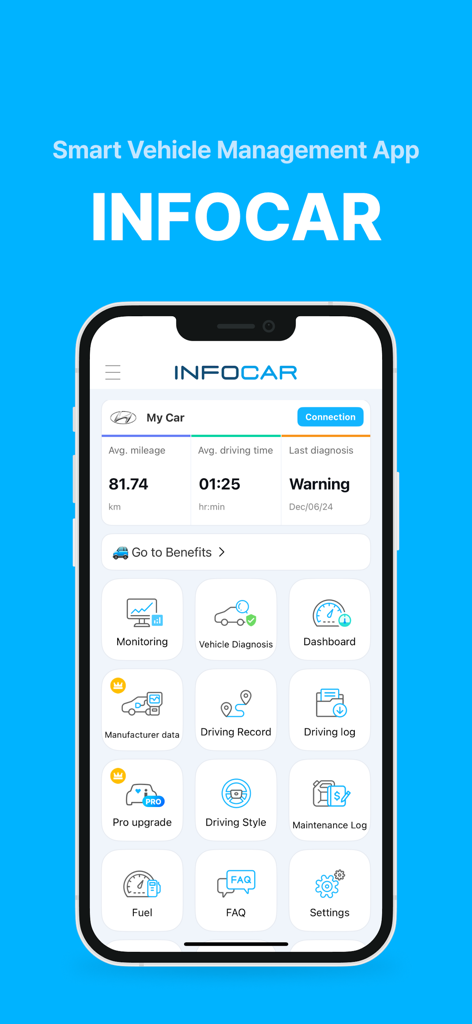
Infocar - OBD2 ELM Scanner - Armaturenbrett der Infocar OBD2-Scanner-App, die Fahrzeuggesundheits- und Diagnose-Symbole anzeigt

Armaturenbrett der Infocar OBD2-Scanner-App, die Fahrzeuggesundheits- und Diagnose-Symbole anzeigt
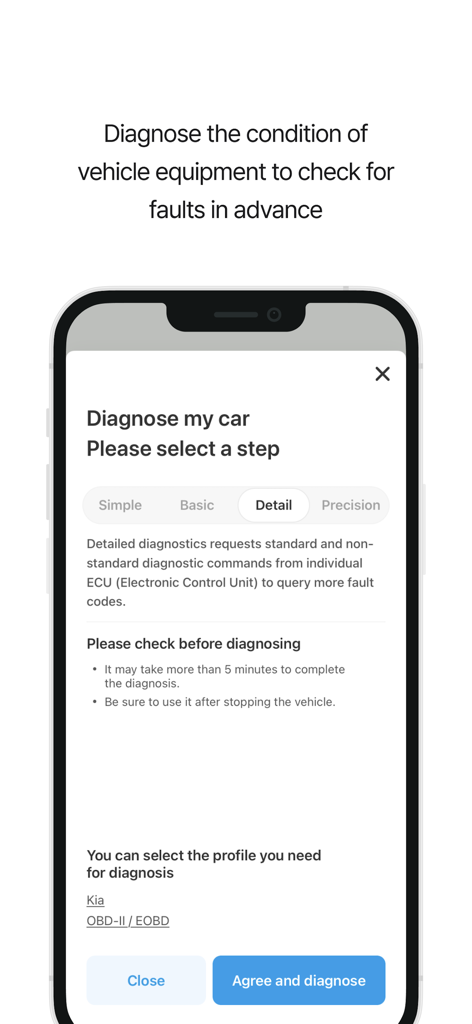
Infocar - OBD2 ELM Scanner - Infocar App-Bildschirm, der die Kfz-Diagnoseeinrichtung mit Optionen für detaillierte ECU-Fehlercode-Scans für ein Kia-Fahrzeug zeigt
Infocar App-Bildschirm, der die Kfz-Diagnoseeinrichtung mit Optionen für detaillierte ECU-Fehlercode-Scans für ein Kia-Fahrzeug zeigt

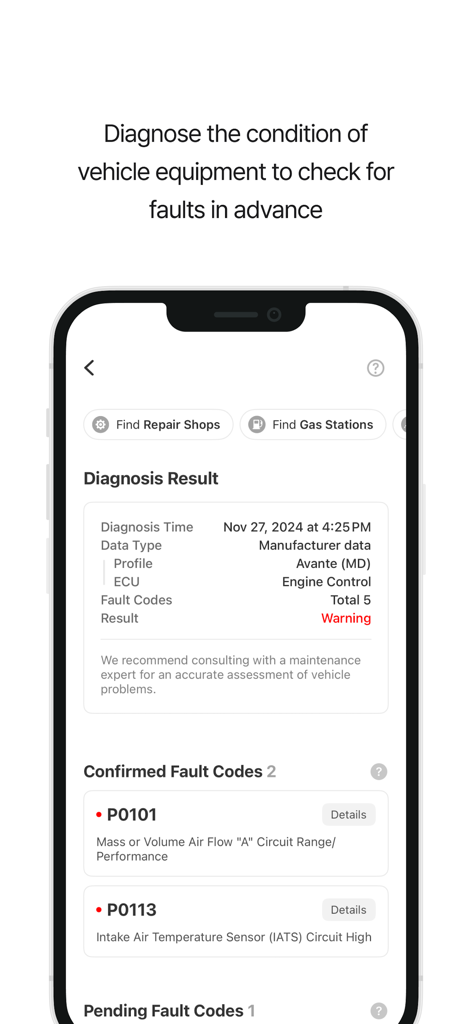
Infocar - OBD2 ELM Scanner - Smartphone-Bildschirm, der Fahrzeugdiagnoseergebnisse und Motorfehlercodes in der Infocar-App zeigt.
Smartphone-Bildschirm, der Fahrzeugdiagnoseergebnisse und Motorfehlercodes in der Infocar-App zeigt.

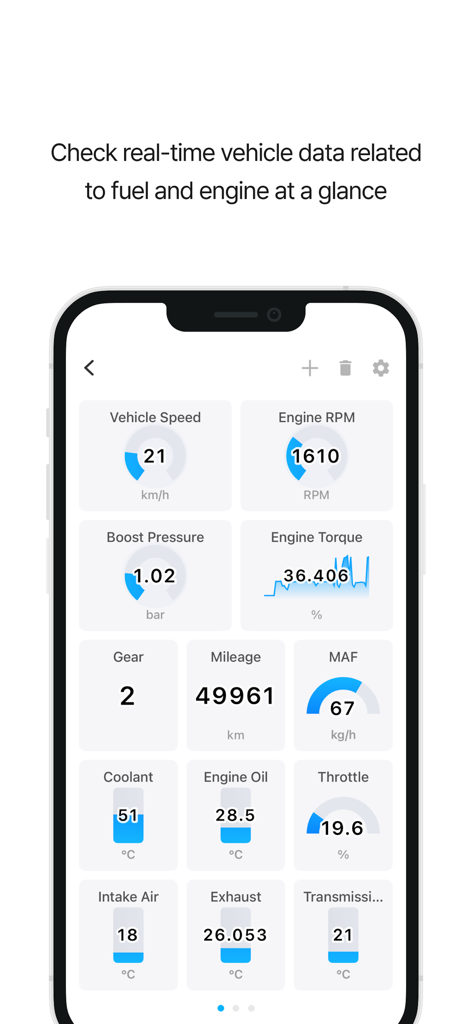
Infocar - OBD2 ELM Scanner - Infocar App-Dashboard mit Echtzeit-Fahrzeugsensoren, einschließlich Motordrehzahl und Geschwindigkeit
Infocar App-Dashboard mit Echtzeit-Fahrzeugsensoren, einschließlich Motordrehzahl und Geschwindigkeit

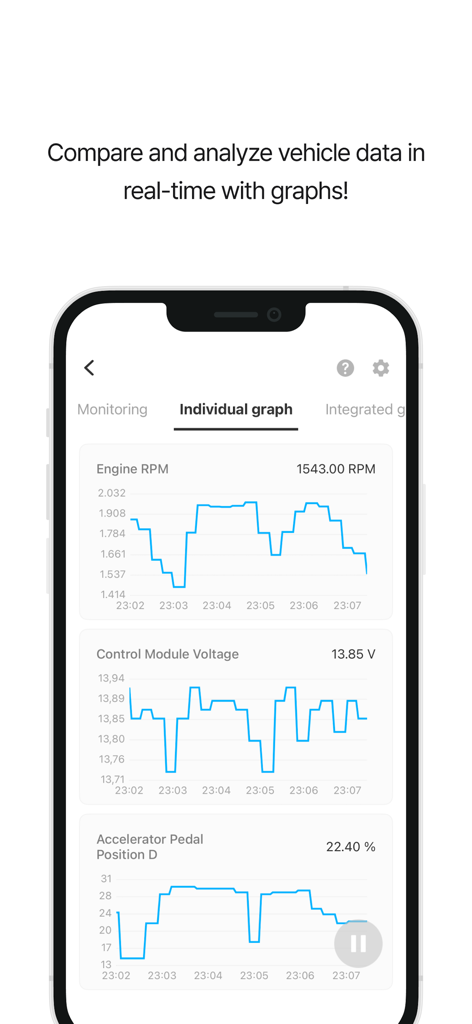
Infocar - OBD2 ELM Scanner - Infocar App zeigt Echtzeit-Fahrzeugdiagnosegraphen für Motordrehzahl und Steuermodulspannung.
Infocar App zeigt Echtzeit-Fahrzeugdiagnosegraphen für Motordrehzahl und Steuermodulspannung.

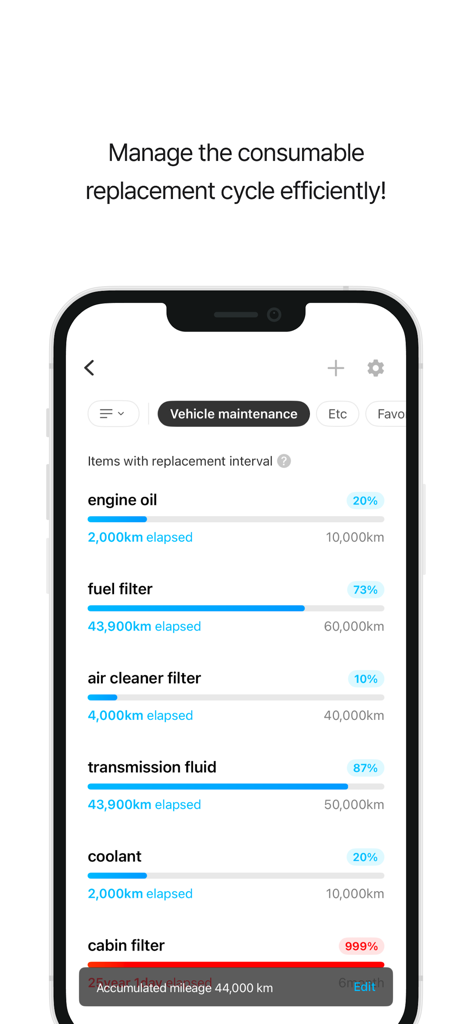
Infocar - OBD2 ELM Scanner - Infocar App-Dashboard mit Wartungsintervallen für Öl und Filter
Infocar App-Dashboard mit Wartungsintervallen für Öl und Filter

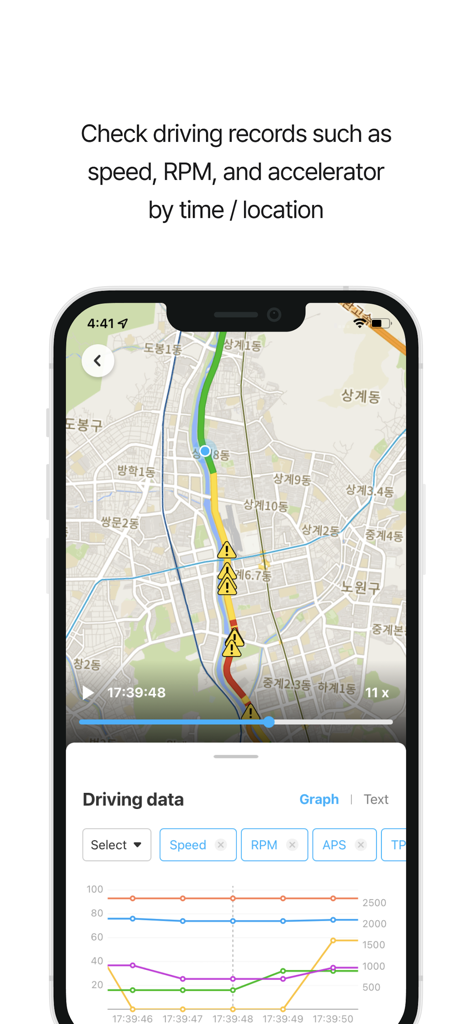
Infocar - OBD2 ELM Scanner - Infocar App-Oberfläche, die Fahrprotokolle auf einer Karte und ein Leistungsmetrik-Diagramm anzeigt.
Infocar App-Oberfläche, die Fahrprotokolle auf einer Karte und ein Leistungsmetrik-Diagramm anzeigt.

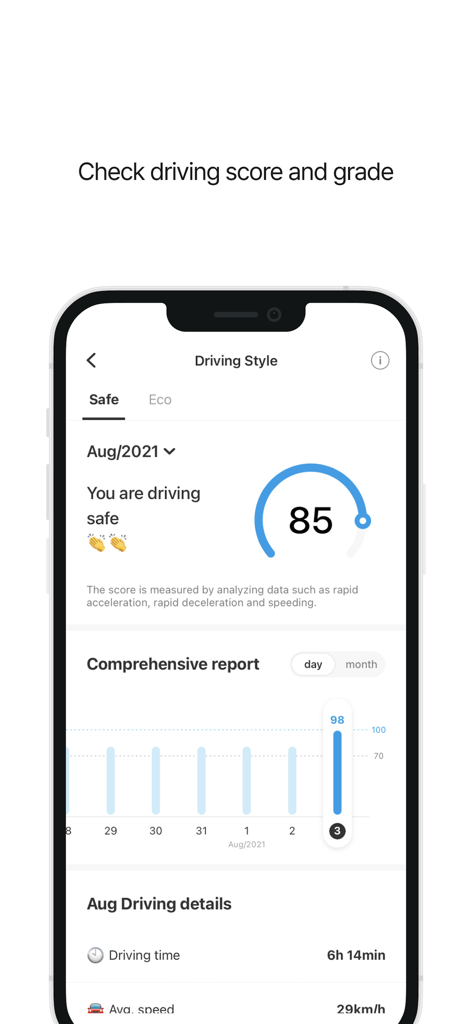
Infocar - OBD2 ELM Scanner - Infocar App-Bildschirm, der die Analyse des Fahrstils mit einer Sicherheitsbewertung und umfassenden Fahrberichten anzeigt.

Infocar App-Bildschirm, der die Analyse des Fahrstils mit einer Sicherheitsbewertung und umfassenden Fahrberichten anzeigt.

Beschreibung

Smart Vehicle Management App, Infocar Manage your vehicle smarter with Infocar, from vehicle diagnostics to driving style analysis! ■ Vehicle Diagnostics * Check your vehicle's condition yourself! Inspect ignition systems, exhaust systems, electronic circuits, and more to detect any faults. * Fault Code Descriptions Understand problems easily with fault codes categorized into three levels. Use the deletion feature to clear fault codes stored in the ECU effortlessly. ■ Manufacturer Data * Experience diagnostic results 99% identical to those from repair shops. * Manage your vehicle more accurately with over 2,000 manufacturer-specific sensor data points tailored to each vehicle model. * View detailed diagnostic results by control unit (ECU). ■ Real-Time Monitoring * Access real-time data from over 800 OBD2 sensors! * Visualize data with graphs to understand your vehicle’s status at a glance. ■ Dashboard * View all the essential data you need while driving in one place! * Optimized for convenience Customize the display to your preferences and easily monitor real-time fuel efficiency and remaining fuel levels. * HUD (Head-Up Display) Stay informed about speed, RPM, mileage, and more while driving, with data reflected onto your windshield for safer driving. ■ Driving Style Analysis * Check your safety and eco-driving scores Analyze your driving habits with Infocar’s algorithm and discover your unique driving style. * Continuously improve with statistical graphs and driving records. ■ Driving Records * Track every drive! Record your driving distance, time, average speed, fuel efficiency, and more. View warnings for overspeeding, rapid acceleration, sudden braking, and sharp turns on a map. * Driving Replay Review speed, RPM, and acceleration data by time and location. * Download your driving logs as an Excel file for detailed analysis. ■ Vehicle Management * Manage maintenance schedules effortlessly Keep track of recommended replacement intervals and maintenance schedules based on your vehicle's mileage. * Expense Tracker Organize your expenses and review them by category or date to plan your budget effectively. ■ Compatible OBD2 Devices * Infocar supports various devices based on the international OBD2 protocol. However, it is optimized for Infocar devices, and some features may be limited when using third-party products. ■ Required and Optional Permissions * Location: For driving records and parking location tracking. * Bluetooth: For connecting to the scanner. * Microphone: For voice recording with the dashcam feature. * Camera: For capturing videos with the dashcam feature. *Note: You can use the app’s main features without granting optional permissions.* ■ Support and Inquiries * Having trouble with Bluetooth or vehicle registration? Go to Settings > FAQ > 1:1 Inquiry in the Infocar app to send us an email, and we’ll assist you promptly. * [Terms and Conditions](https://infocarmobility.com/sub/service_lang/en) ■ Subscription and In-App Purchases Infocar is free to use, but some features require a subscription or in-app purchase. * Subscriptions are billed to your Apple account and automatically renew unless auto-renewal is disabled at least 24 hours before the end of the current period. * You can manage or cancel your subscription anytime through your account settings. * Deleting the app does not automatically cancel your subscription, so please cancel it manually if needed. Start your journey to smarter vehicle management with Infocar!

Download

Herunterladen auf App Store

Diese Seite ist keine offizielle Seite der App oder ihres Entwicklers, sondern eine unabhängige redaktionelle Veröffentlichung, die zu Informations- und Kommentarzwecken erstellt wurde. Sofern nicht ausdrücklich anders angegeben, sind weder die App noch ihr Entwickler mit MWM, Apple, Google Play, dem App-Herausgeber oder dem Entwickler der App verbunden, von ihnen unterstützt, gesponsert, autorisiert oder anderweitig offiziell verbunden, und nichts auf dieser Seite impliziert, dass die App unter Verwendung der Dienste von MWM entwickelt wurde. Alle Marken, Logos, Screenshots und andere Inhalte bleiben Eigentum ihrer jeweiligen Inhaber.