
Diese Seite ist keine offizielle Seite der App oder ihres Entwicklers, sondern eine unabhängige redaktionelle Veröffentlichung, die zu Informations- und Kommentarzwecken erstellt wurde. Sofern nicht ausdrücklich anders angegeben, sind weder die App noch ihr Entwickler mit MWM, Apple, Google Play, dem App-Herausgeber oder dem Entwickler der App verbunden, von ihnen unterstützt, gesponsert, autorisiert oder anderweitig offiziell verbunden, und nichts auf dieser Seite impliziert, dass die App unter Verwendung der Dienste von MWM entwickelt wurde. Alle Marken, Logos, Screenshots und andere Inhalte bleiben Eigentum ihrer jeweiligen Inhaber.


Intuit QuickBooks for Business
Schluss mit Zettelwirtschaft: Intuit QuickBooks for Business verwandelt Belege in digitale Akten und spart Kleinunternehmern Ärger mit dem Finanzamt.
Downloads
10M+Bewertung
Bewertungen gesamt
334.5KHerausgeber
Kategorie
BusinessSprachen
4Neueste Version
26.04.0Größe
558.6 MBErstveröffentlichung
14. Feb. 2013Eine Bewertung der Kernfunktionen für Kleinunternehmer und Selbstständige
Analyse der Intuit QuickBooks for Business App
Automatisierte Transaktionsverwaltung mit KI
Die App automatisiert die Kategorisierung und Abstimmung von Transaktionen mithilfe von Intuit AI, was Zeit spart und die Fehlerquote minimiert. Es werden Inkonsistenzen erkannt und nächste Schritte proaktiv empfohlen.
Automatische Fahrtenbuchführung
Das Tool erfasst automatisch Fahrten über GPS, was eine präzise Kilometerabrechnung ermöglicht und hilft, Steuervorteile zu maximieren.
Mobile Zahlungsabwicklung und Rechnungsstellung
Die App bietet Funktionen zur mobilen Annahme kontaktloser Zahlungen (z.B. Tap to Pay auf dem iPhone) und ermöglicht das schnelle Erstellen und Versenden von Rechnungen sowie das Verfolgen von Zahlungseingängen in Echtzeit.
Effizientes Belegmanagement per Foto
Es ermöglicht Nutzern, Belege einfach per Foto zu erfassen, die dann automatisch gespeichert und den entsprechenden Transaktionen zugeordnet werden, was die Spesenverwaltung erheblich vereinfacht.
Integration von mobiler App und Online-Konto
Die App synchronisiert sich nahtlos mit dem QuickBooks Online-Konto, sodass Finanzdaten stets aktuell sind und fundierte Entscheidungen von überall getroffen werden können.
KI-gestützte Lead-Generierung und Angebotsverwaltung
Der Customer Hub und Intuit AI arbeiten zusammen, um qualifizierte Leads aus E-Mails zu identifizieren. Es ermöglicht die Generierung und den Versand von Kostenvoranschlägen auf Basis von Sprach- und Textnotizen direkt vom Mobilgerät.
Häufig gestellte Fragen
Alles, was Sie über wissen müssen Intuit QuickBooks for Business
What is Intuit QuickBooks for Business?
Intuit QuickBooks for Business is an app designed to help businesses manage accounting, payments, and customers on the go. It integrates Intuit AI in Essentials and Plus plans.
Can I accept contactless payments using the Intuit QuickBooks app?
Yes, the Intuit QuickBooks app supports Tap to Pay on iPhone for in-person contactless payments. It also allows sending invoices that customers can pay with a tap.
How does Intuit QuickBooks for Business help with invoicing?
The Intuit QuickBooks app enables users to create and send invoices and estimates. It supports adding customer details and generating documents from photos of handwritten notes.
Does the Intuit QuickBooks app track business mileage automatically?
Yes, Intuit QuickBooks for Business automatically tracks mileage via GPS for accurate tax deductions. Users can categorize trips by swiping within the app to stay organized.
Can I capture and manage leads with Intuit QuickBooks for Business?
Yes, the Intuit QuickBooks app features a Customer Hub [Beta] that works with Intuit AI to surface qualified leads from emails. It also incorporates voice notes into auto-generated estimates.
How does Intuit QuickBooks automate accounting tasks?
Intuit QuickBooks AI automates categorizing and reconciling transactions. It also combines data, spots inconsistencies for review, and proactively recommends next steps for users.
Is the Intuit QuickBooks mobile app compatible with QuickBooks Desktop?
No, the Intuit QuickBooks mobile app is not compatible with QuickBooks Desktop for Windows or Mac. It syncs with your QuickBooks Online account instead.
How do I manage my Intuit QuickBooks app subscription?
Users manage their Intuit QuickBooks app subscription through their Apple account settings after purchase. Auto-renewal can be turned off there at least 24 hours before the current period ends.
Does Intuit QuickBooks for Business help manage expenses?
Yes, the Intuit QuickBooks app's Accounting AI matches transactions and expenses. It can also prompt users to upload receipts for credit card transactions requiring them, ensuring accurate expense tracking.
Can I digitize receipts using the Intuit QuickBooks app?
Yes, the Intuit QuickBooks app allows users to take photos of receipts. These digital receipts are then stored and automatically matched to relevant transactions, simplifying expense management.
Die folgenden Screenshots und die Beschreibung stammen direkt aus dem offiziellen Store-Eintrag der App und sind Eigentum des Entwicklers.
App Store
Screenshots
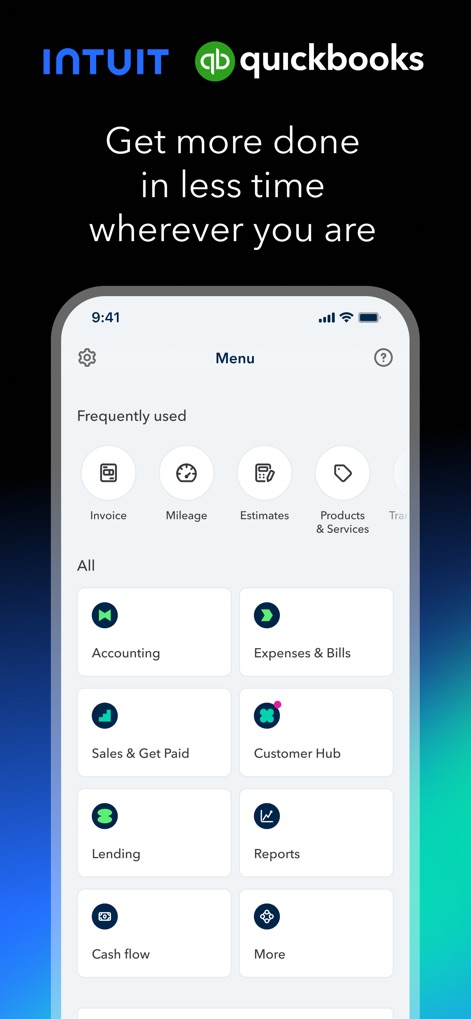
Die App bietet ein übersichtliches Menü mit Schnellzugriff auf häufig genutzte Funktionen und zeigt alle weiteren Kernfunktionen für die Geschäftsverwaltung.
Hauptmenü im Überblick

Nutzer können detaillierte Rechnungen direkt in der App erstellen, indem sie spezifische Kundendaten und verschiedene Produkt- oder Dienstleistungsposten hinzufügen.
Rechnungen erstellen
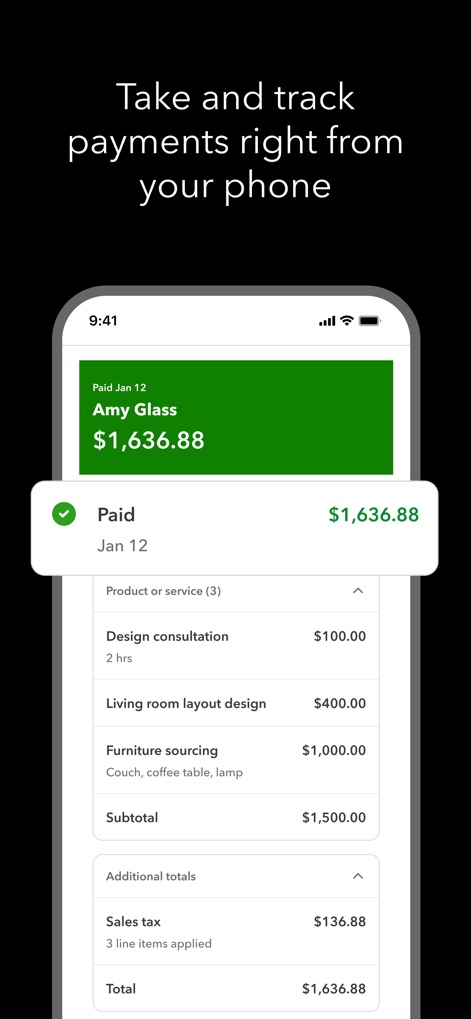
Dieses Tool ermöglicht die Verfolgung von Zahlungen, indem es den Status 'Bezahlt' deutlich anzeigt und eine detaillierte Übersicht der abgerechneten Dienstleistungen inklusive Steuern liefert.
Zahlungen verfolgen
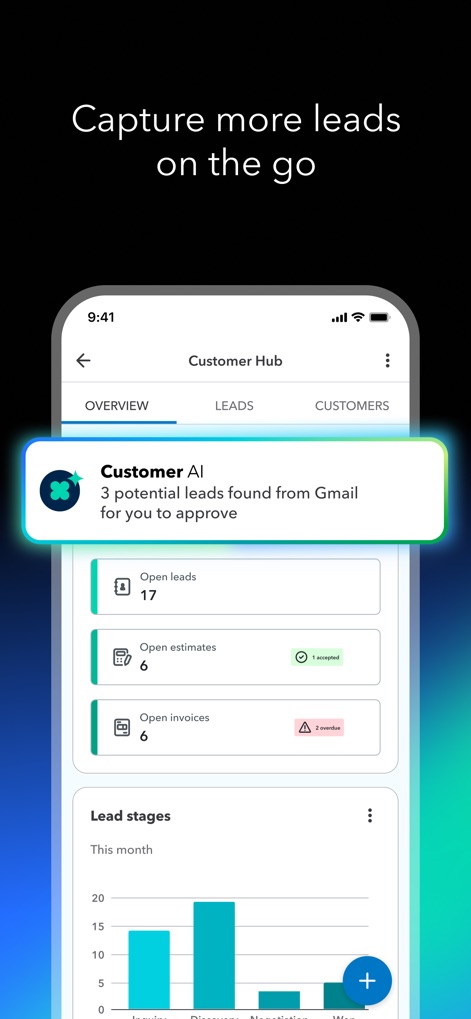
Der integrierte Customer Hub nutzt Intuit AI, um potenzielle Leads aus E-Mails zu identifizieren, und bietet eine übersichtliche Darstellung der offenen Leads und Abschätzungen.
Leads erfassen

Die App demonstriert fortschrittliche Automatisierung durch Intuit AI, die Transaktionen zur Buchung vorschlägt, und erinnert den Nutzer proaktiv an überfällige Rechnungen.
Automatisierungsprozesse

Accounting AI kategorisiert Transaktionen automatisch, wie bei einem Bankeinzahlung und verschiedenen Ausgaben, um dem Nutzer einen sofortigen Überblick über seine Finanzen zu ermöglichen.
Ausgaben verwalten

Nutzer können Belege einfach per Kamera erfassen, wobei die App den Erfassungsprozess visualisiert und den Gesamtbetrag sofort anzeigt.
Belege scannen

Die App erfasst Fahrten automatisch via GPS, zeigt die zurückgelegte Strecke auf einer Karte und listet detaillierte Informationen zu jeder Fahrt für genaue Steuerabzüge auf.
Fahrten aufzeichnen
Beschreibung
Download
Ähnliche Apps
Apps mit ähnlichen Funktionen und Nutzererfahrung

Invoice Maker - PDF Creator
Decodation LLC
Invoice Maker + Estimate App
Daniel Bitton

Invoice Maker - Invoice Fly
Labhouse Mobile SL
Invoice Maker ▸ Estimate App
GetPaid Inc.

Invoice Simple: Invoice Maker
Zenvoice Inc.
Zoho Invoice Maker App
Zoho Corporation

Accounting App - Zoho Books
Zoho Corporation

Invoice2go: Easy Invoice Maker
Invoice2go.com

Invoice Maker & Estimate App
Bookipi Pty Ltd
Diese Seite ist keine offizielle Seite der App oder ihres Entwicklers, sondern eine unabhängige redaktionelle Veröffentlichung, die zu Informations- und Kommentarzwecken erstellt wurde. Sofern nicht ausdrücklich anders angegeben, sind weder die App noch ihr Entwickler mit MWM, Apple, Google Play, dem App-Herausgeber oder dem Entwickler der App verbunden, von ihnen unterstützt, gesponsert, autorisiert oder anderweitig offiziell verbunden, und nichts auf dieser Seite impliziert, dass die App unter Verwendung der Dienste von MWM entwickelt wurde. Alle Marken, Logos, Screenshots und andere Inhalte bleiben Eigentum ihrer jeweiligen Inhaber.