iPGMail
iPGMail
Herunterladen auf App Store

Diese Seite ist keine offizielle Seite der App oder ihres Entwicklers, sondern eine unabhängige redaktionelle Veröffentlichung, die zu Informations- und Kommentarzwecken erstellt wurde. Sofern nicht ausdrücklich anders angegeben, sind weder die App noch ihr Entwickler mit MWM, Apple, Google Play, dem App-Herausgeber oder dem Entwickler der App verbunden, von ihnen unterstützt, gesponsert, autorisiert oder anderweitig offiziell verbunden, und nichts auf dieser Seite impliziert, dass die App unter Verwendung der Dienste von MWM entwickelt wurde. Alle Marken, Logos, Screenshots und andere Inhalte bleiben Eigentum ihrer jeweiligen Inhaber.


Logo von iPGMail
Herunterladen auf App Store

iPGMail

Schützen Sie Ihre digitale Souveränität mit professioneller Verschlüsselung. Signieren Sie Nachrichten sicher, verwalten Sie private Schlüssel und schützen Sie Ihre Dateien auf Ihrem iPhone und iPad.

Kennzahlen

Downloads

314K+

Bewertung

4.2/5

Bewertungen gesamt

1K+

Herausgeber

Wyllys Ingersoll

Kategorie

Utilities

Sprachen

3

Neueste Version

2025.52.1

Größe

22.7 MB

Erstveröffentlichung

15. Apr. 2011
Funktionen

Stärken Sie Ihre mobile Kommunikation

iPGMail bringt professionelle OpenPGP-Verschlüsselung auf Ihr iPhone und iPad. Verwalten Sie Ihre Schlüssel, sichern Sie Ihre E-Mails und schützen Sie Ihre Dateien mit dem Industriestandard für digitale Privatsphäre.

Universelle Schlüsselverwaltung

Bewahren Sie Ihre digitale Souveränität, indem Sie neue Schlüssel generieren oder Ihren bestehenden Desktop-Schlüsselbund über AirDrop, Finder oder Keybase.io importieren.

Integrierte sichere E-Mail

Verarbeiten Sie PGP-Anhänge nahtlos aus der iOS Mail App. Lesen und beantworten Sie verschlüsselte Threads ohne umständlichen Copy-Paste-Workflow.

Die folgenden Screenshots und die Beschreibung stammen direkt aus dem offiziellen Store-Eintrag der App und sind Eigentum des Entwicklers.

App Store

Screenshots
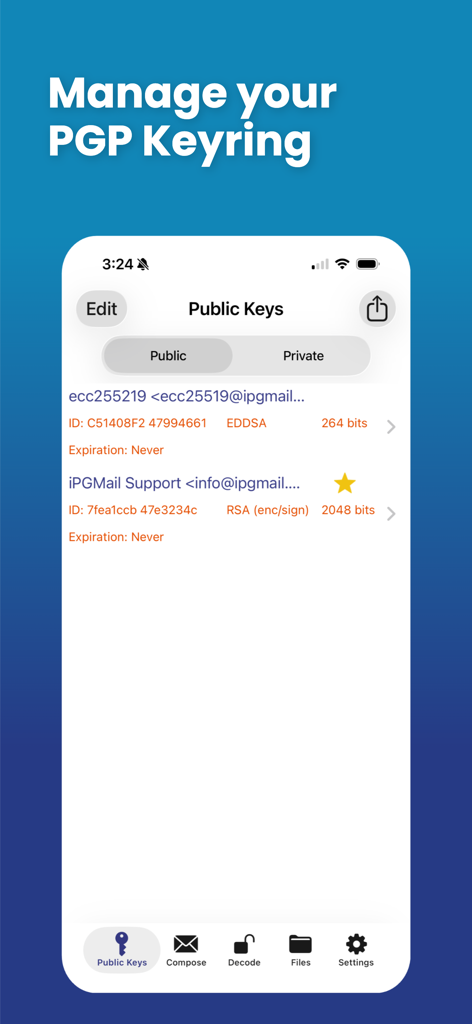
iPGMail - Oberfläche von iPGMail zeigt die PGP-Schlüsselbundverwaltungsanzeige mit einer Liste öffentlicher Schlüssel.
Oberfläche von iPGMail zeigt die PGP-Schlüsselbundverwaltungsanzeige mit einer Liste öffentlicher Schlüssel.

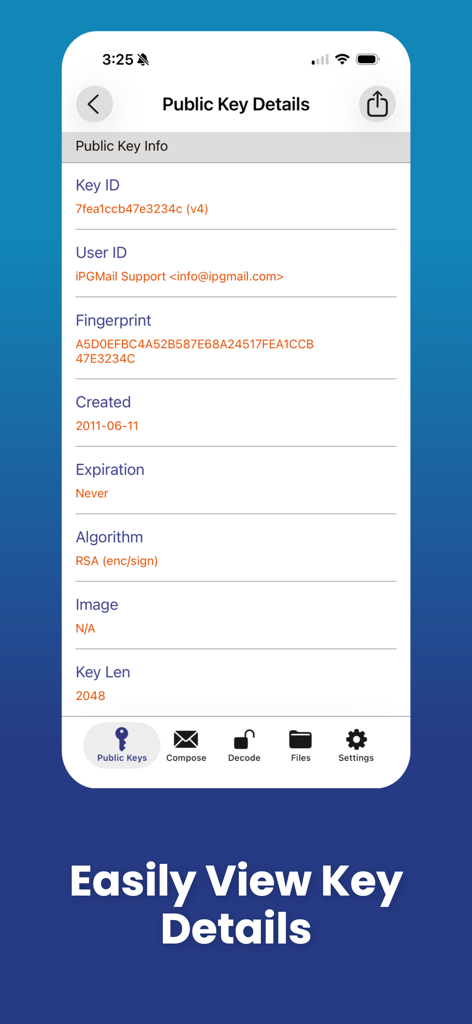
iPGMail - iPGMail Mobile App-Bildschirm zeigt Informationen zum öffentlichen Schlüssel, einschließlich Schlüssel-ID, Fingerabdruck und RSA-Algorithmusdetails
iPGMail Mobile App-Bildschirm zeigt Informationen zum öffentlichen Schlüssel, einschließlich Schlüssel-ID, Fingerabdruck und RSA-Algorithmusdetails

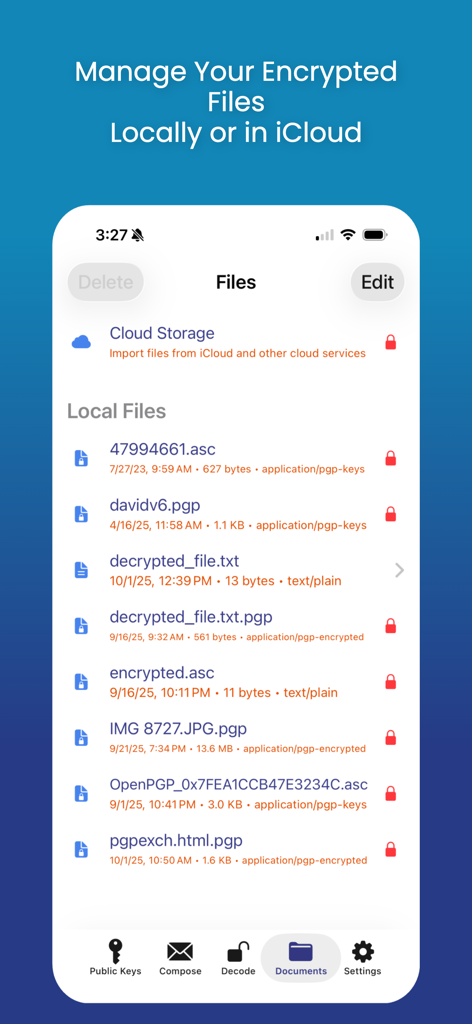
iPGMail - iPGMail-Oberfläche zeigt die Dateiverwaltung für verschlüsselte PGP-Dateien für lokalen und Cloud-Speicher
iPGMail-Oberfläche zeigt die Dateiverwaltung für verschlüsselte PGP-Dateien für lokalen und Cloud-Speicher

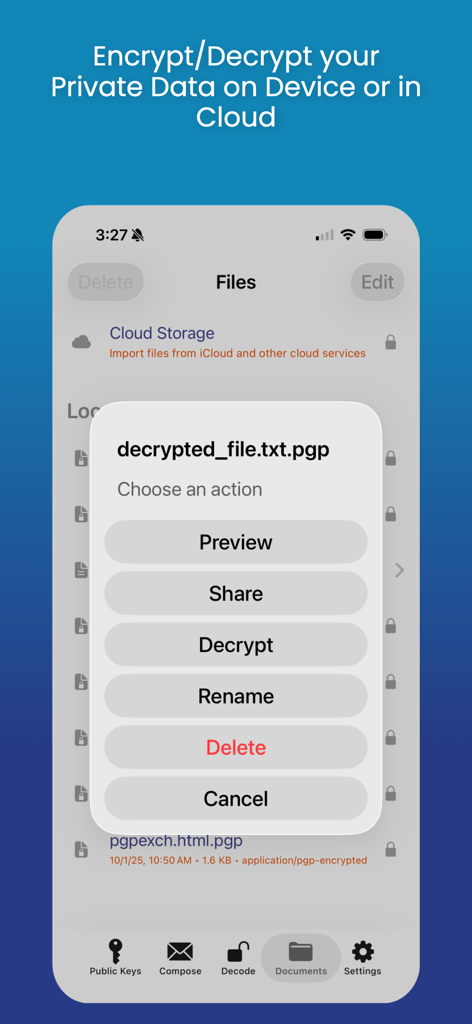
iPGMail - Die iPGMail App-Oberfläche zeigt ein Aktionsmenü mit Optionen zum Entschlüsseln, Teilen und Verwalten von PGP-verschlüsselten Dateien auf einem mobilen Gerät.
Die iPGMail App-Oberfläche zeigt ein Aktionsmenü mit Optionen zum Entschlüsseln, Teilen und Verwalten von PGP-verschlüsselten Dateien auf einem mobilen Gerät.

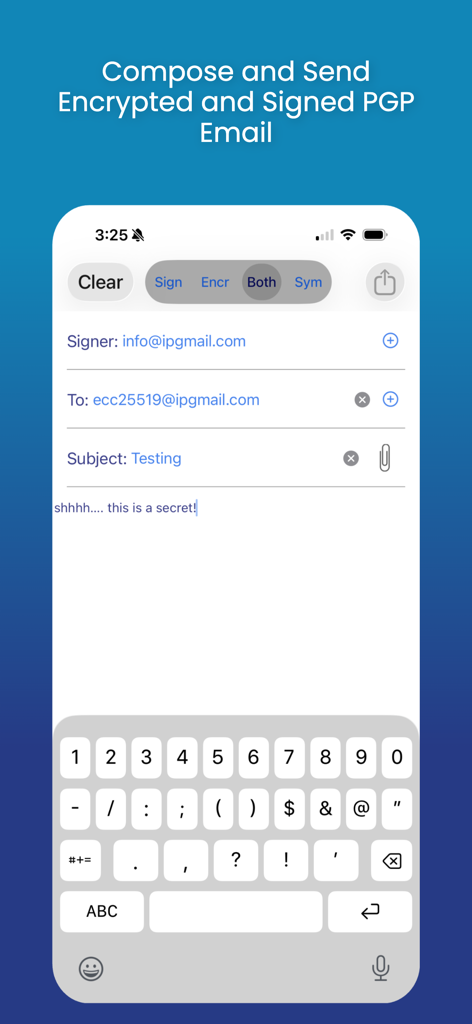
iPGMail - Oberfläche zum Verfassen und Senden von verschlüsselten und signierten PGP-E-Mails in iPGMail
Oberfläche zum Verfassen und Senden von verschlüsselten und signierten PGP-E-Mails in iPGMail

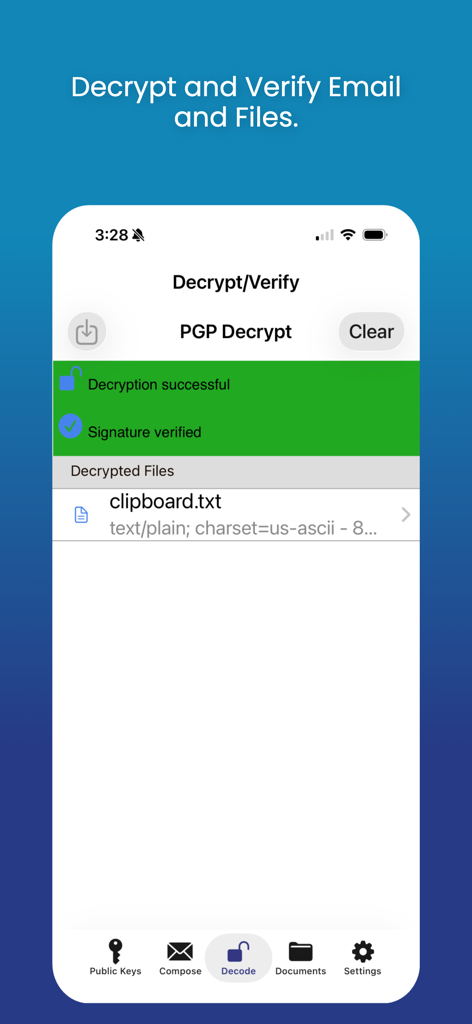
iPGMail - Die iPGMail App-Oberfläche zeigt eine erfolgreiche PGP-Entschlüsselungs- und digitale Signaturverifizierungsnachricht für eine Datei
Die iPGMail App-Oberfläche zeigt eine erfolgreiche PGP-Entschlüsselungs- und digitale Signaturverifizierungsnachricht für eine Datei

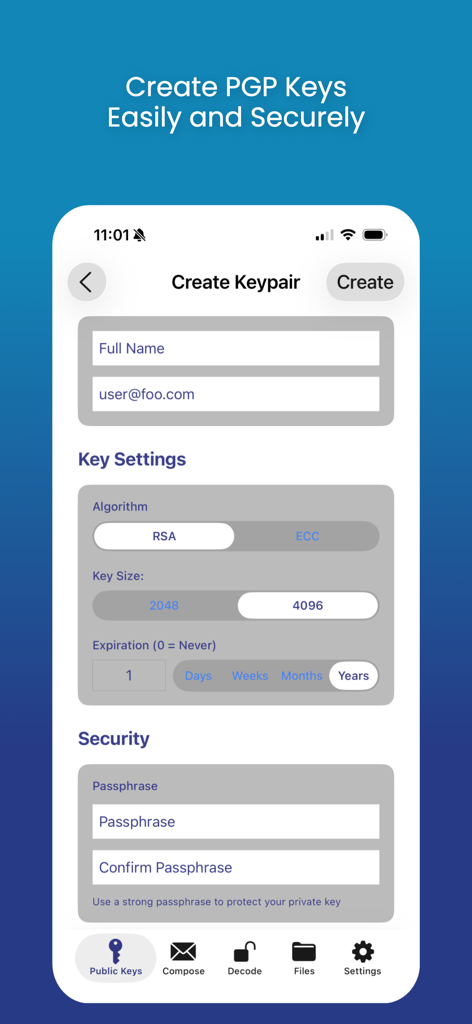
iPGMail - Screenshot der iPGMail App, der die Oberfläche zur Erstellung eines neuen PGP-Schlüsselpaars mit Einstellungen für Algorithmus, Schlüssellänge und Passphrase zeigt
Screenshot der iPGMail App, der die Oberfläche zur Erstellung eines neuen PGP-Schlüsselpaars mit Einstellungen für Algorithmus, Schlüssellänge und Passphrase zeigt

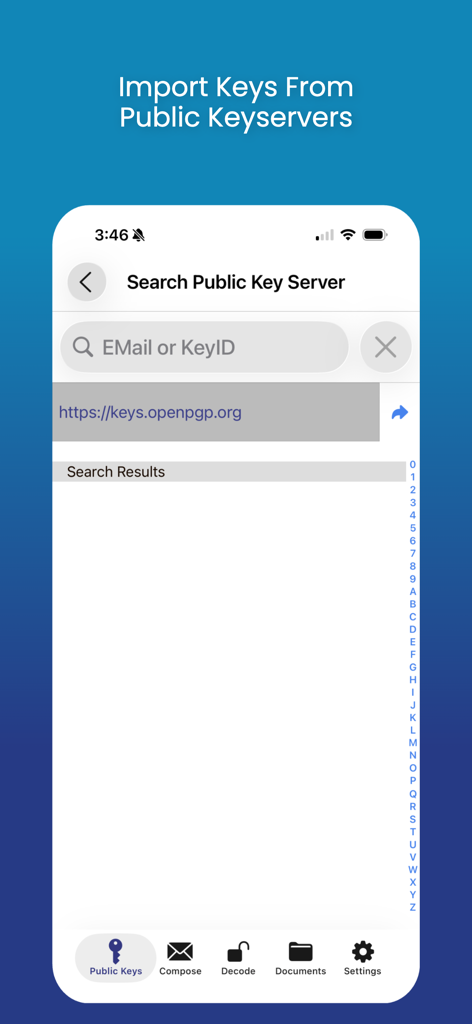
iPGMail - Oberfläche der iPGMail App, die den Suchbildschirm zum Importieren von PGP-Schlüsseln von öffentlichen Schlüsselsereignissen zeigt.

Oberfläche der iPGMail App, die den Suchbildschirm zum Importieren von PGP-Schlüsseln von öffentlichen Schlüsselsereignissen zeigt.

Beschreibung

iPGMail makes PGP encryption easy for iOS users. It offers an intuitive interface that enables users to easily send and receive private PGP encrypted messages via email. The app also allows you to encrypt and decrypt files both locally or cloud based. It supports the OpenPGP standard (RFC 9580, RFC 6637) and allows the user to create and manage both public and private (RSA, DSA, ECDSA, EDDSA, ECDH) PGP keys and send and receive PGP encrypted messages. PGP Keys and Messages can be passed to iPGMail several ways: * From the iOS Mail.app - The iOS mail application will pass PGP attachments to iPGMail directly, eliminating the need to do an awkward copy-and-paste. NOTE: PGP messages that are part of the main body of an email will still have to be copy-and-pasted, only properly tagged attachments can be passed automatically. * Directly from the system clipboard. Copy-and-paste the PGP message text from any file, webpage, or message, and it can be imported and decrypted by the app. * Finder App - Connect your device to a Mac and open up the standard Finder app. Select the device on the left and then you can copy files to and from the app using standard Finder actions. * AirDrop - Transfer key files from your Mac OS/X system (10.10 or later) to your iPhone/iPad (iOS 7+) using AirDrop feature. * DropBox - You can link iPGMail to a dropbox account and transfer files to and from your dropbox file space. This means you can encrypt and protect your dropbox files or share files with others through your existing dropbox Public interface. * Keybase.IO - You can import public keys from http://keybase.io by using the "+" button on the public key listing and then searching for users registered in keybase.io. iPGMail now allows you to easily reply to encrypted text-based messages and includes the original text with "> " prefixed to the lines. This allows for more email like conversational exchanges, all with strong OpenPGP cryptographic protection. iPGMail supports PGP key generation or import. The key database is secured using the highest level of iOS file protection and are only accessible when in use by the app. Using your own private PGP keys, you can encrypt and/or digitally sign any messages. Optionally, your public key can be attached to any message you send from the app so that the recipient can then import it into their own keychain, either on the phone or on any computer with PGP support. iPGMail will import your private keys so you can reuse your existing PGP identity and keys on your iPhone or iPad. Both public and private keys can be imported through the interfaces listed above. iPGMail allows the user to search public SKS PGP keyservers to find registered public keys for other people with whom the user can then send email that is digitally signed and/or encrypted encoded in OpenPGP ASCII Armor. This app is ideal for securing your files or for sending secure email messages to specific parties without worrying about it being viewed by anyone other than the designated recipient. The OpenPGP standard is described here: http://en.wikipedia.org/wiki/Pretty_Good_Privacy

Download

Herunterladen auf App Store

Diese Seite ist keine offizielle Seite der App oder ihres Entwicklers, sondern eine unabhängige redaktionelle Veröffentlichung, die zu Informations- und Kommentarzwecken erstellt wurde. Sofern nicht ausdrücklich anders angegeben, sind weder die App noch ihr Entwickler mit MWM, Apple, Google Play, dem App-Herausgeber oder dem Entwickler der App verbunden, von ihnen unterstützt, gesponsert, autorisiert oder anderweitig offiziell verbunden, und nichts auf dieser Seite impliziert, dass die App unter Verwendung der Dienste von MWM entwickelt wurde. Alle Marken, Logos, Screenshots und andere Inhalte bleiben Eigentum ihrer jeweiligen Inhaber.








