KANTAN Chord
KANTAN Chord
Herunterladen auf App Store

Diese Seite ist keine offizielle Seite der App oder ihres Entwicklers, sondern eine unabhängige redaktionelle Veröffentlichung, die zu Informations- und Kommentarzwecken erstellt wurde. Sofern nicht ausdrücklich anders angegeben, sind weder die App noch ihr Entwickler mit MWM, Apple, Google Play, dem App-Herausgeber oder dem Entwickler der App verbunden, von ihnen unterstützt, gesponsert, autorisiert oder anderweitig offiziell verbunden, und nichts auf dieser Seite impliziert, dass die App unter Verwendung der Dienste von MWM entwickelt wurde. Alle Marken, Logos, Screenshots und andere Inhalte bleiben Eigentum ihrer jeweiligen Inhaber.


Logo von KANTAN Chord
Herunterladen auf App Store

KANTAN Chord

Die ultimative Safari-Erweiterung für Songwriter und Worship-Leiter. Konvertiere webbasierte Akkorde in Stufen, analysiere Tonarten automatisch und vereinfache komplexe Tabs, um sie mit einem Klick an deinen Stimmumfang und dein Können anzupassen.

Kennzahlen

Downloads

1K+

Bewertung

3.9/5

Bewertungen gesamt

0

Herausgeber

InstaChord Corp.

Kategorie

Music

Sprachen

2

Neueste Version

2025.3.6

Größe

1.1 MB

Erstveröffentlichung

23. März 2022
Funktionen

Meistere deine Musiktheorie in Sekunden

Hör auf, dich mit komplexen Tonarten herumzuschlagen. KANTAN Chord konvertiert jedes Akkordblatt in ein Format, das du tatsächlich spielen kannst, direkt in deinem Safari-Browser.

Sofortige Tonartenerkennung

Finde automatisch die "Grundtonart" jedes Songs und transponiere sie mit einem Fingertipp, um sie perfekt an deinen Stimmumfang oder dein Instrument anzupassen.

Spiele wie ein Nashville-Profi

Konvertiere Standardakkorde in Nashville-Zahlen oder römische Ziffern, um die Theorie und Logik hinter deinen Lieblingstracks zu meistern.

Die folgenden Screenshots und die Beschreibung stammen direkt aus dem offiziellen Store-Eintrag der App und sind Eigentum des Entwicklers.

App Store

Screenshots
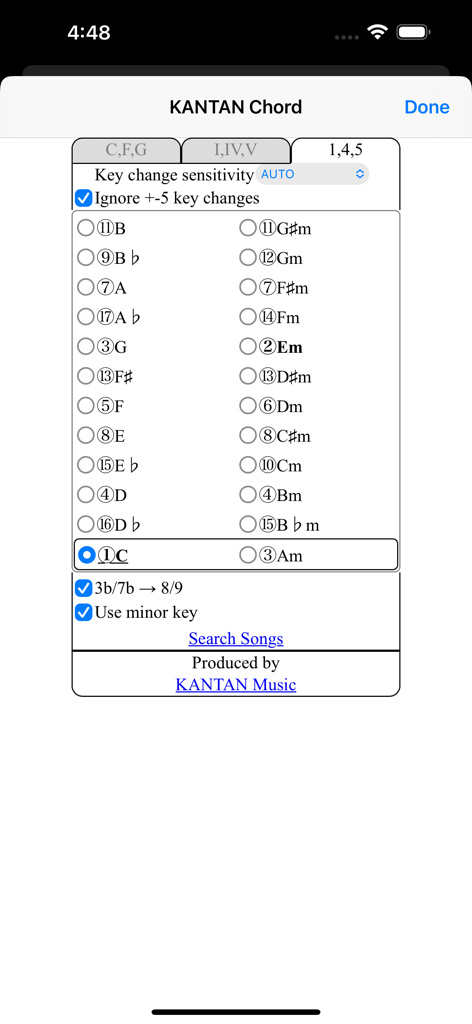
KANTAN Chord - KANTAN Chord App-Oberfläche mit Auswahl der Tonart und Einstellungen für das Nashville-Zahlensystem für Musiker.
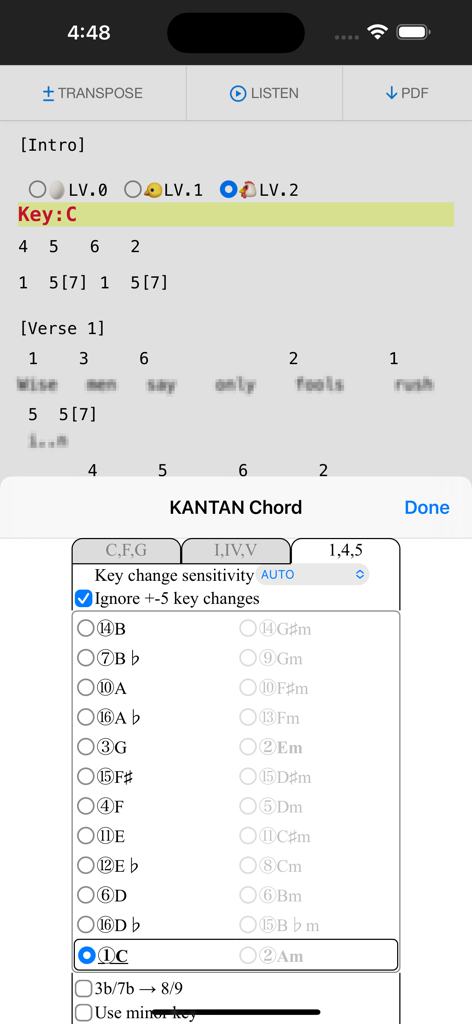
KANTAN Chord App-Oberfläche mit Auswahl der Tonart und Einstellungen für das Nashville-Zahlensystem für Musiker.

KANTAN Chord - KANTAN Chord-Erweiterung konvertiert Song-Akkorde in Nashville-Zahlen in einem Browser
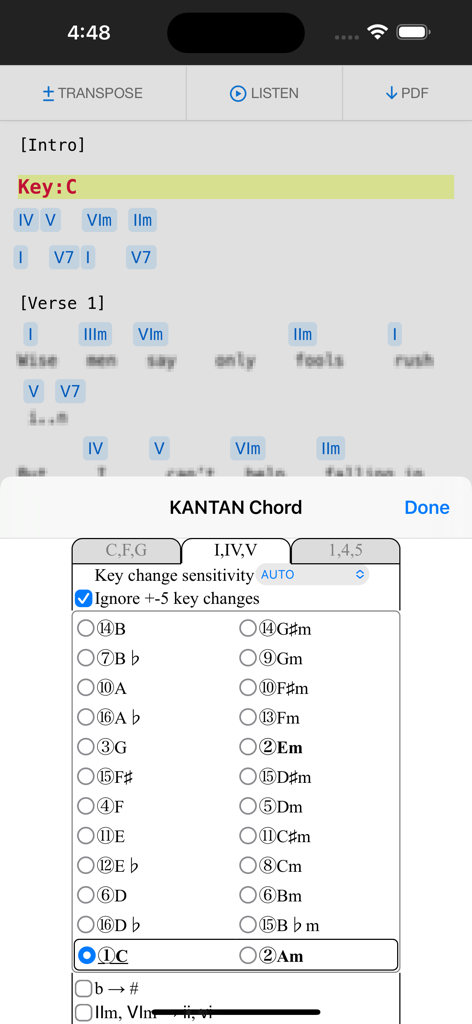
KANTAN Chord-Erweiterung konvertiert Song-Akkorde in Nashville-Zahlen in einem Browser

KANTAN Chord - KANTAN Chord Safari-Erweiterung konvertiert Song-Akkorde in römische Ziffern auf einem iPhone.
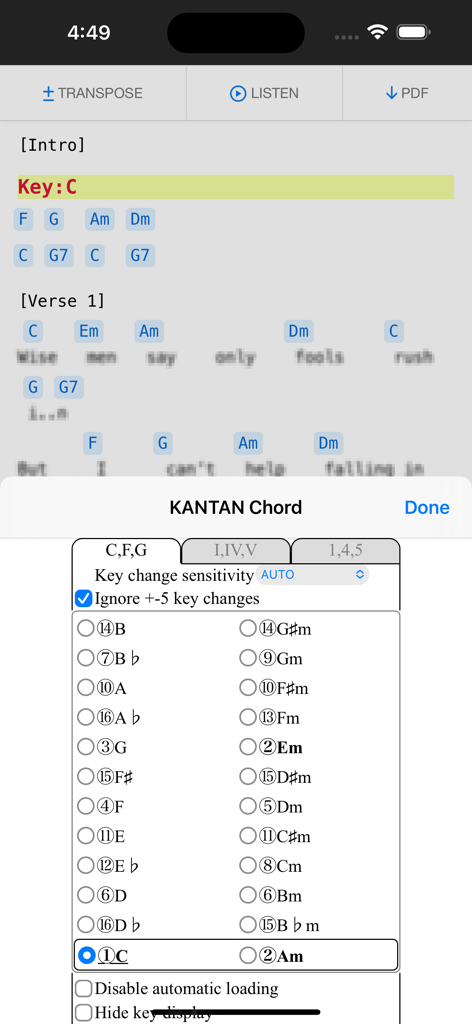
KANTAN Chord Safari-Erweiterung konvertiert Song-Akkorde in römische Ziffern auf einem iPhone.

KANTAN Chord - KANTAN Chord Browser-Erweiterung zeigt Tonartauswahl und Transpositionseinstellungen auf einem mobilen Gerät an
KANTAN Chord Browser-Erweiterung zeigt Tonartauswahl und Transpositionseinstellungen auf einem mobilen Gerät an

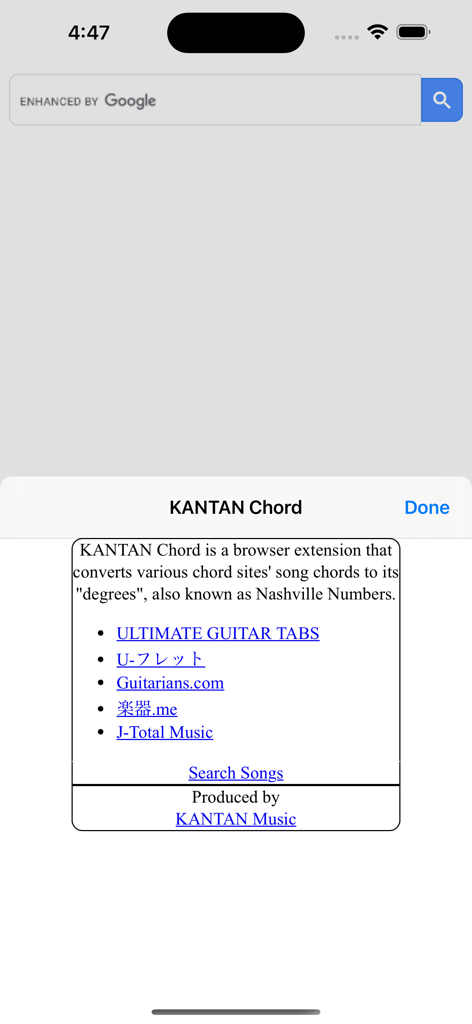
KANTAN Chord - Einführungsbildschirm der KANTAN Chord-Erweiterung mit einer Liste kompatibler Musikseiten wie Ultimate Guitar und Informationen zur Konvertierung von Nashville-Zahlen
Einführungsbildschirm der KANTAN Chord-Erweiterung mit einer Liste kompatibler Musikseiten wie Ultimate Guitar und Informationen zur Konvertierung von Nashville-Zahlen

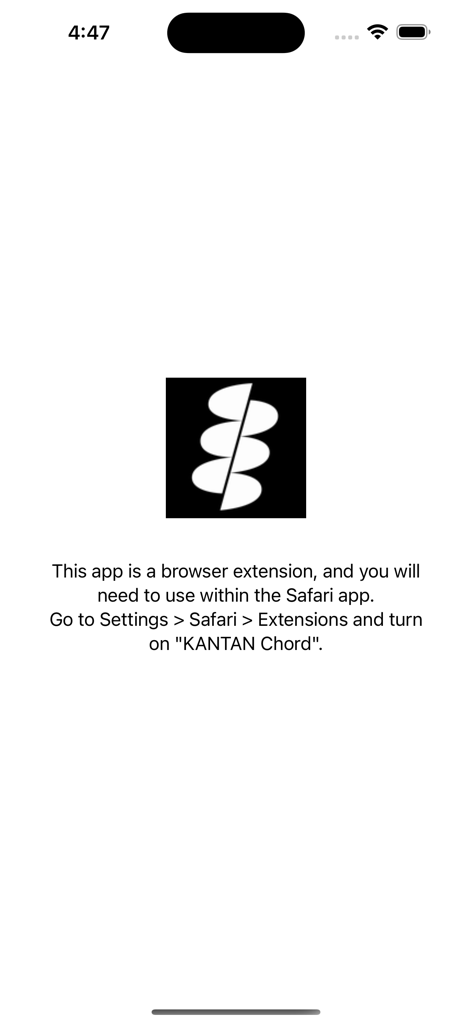
KANTAN Chord - Einrichtungsbildschirm mit Anweisungen zum Aktivieren der KANTAN Chord Safari-Erweiterung in den iOS-Einstellungen.

Einrichtungsbildschirm mit Anweisungen zum Aktivieren der KANTAN Chord Safari-Erweiterung in den iOS-Einstellungen.

Beschreibung

• Overview KANTAN Chord is a browser extension that converts various chord sites' song chords to its "degrees", also known as Nashville Numbers. (Former name: InstaChordizer) • Compatible sites - ULTIMATE GUITAR TABS(https://www.ultimate-guitar.com/) - U-フレット(https://www.ufret.jp/) - 楽器.me(https://gakufu.gakki.me/) - J-Total Music(https://music.j-total.net/) - Guitarians.com(https://guitarians.com/) - 91譜(https://www.91pu.com.tw/) • How to use Open the chord web page. From the browser extensions, choose KANTAN Chord icon and it opens a pop-up window. Choose from tabs "C,F,G" (original) , "I,IV,V" (roman numerals), or "1,4,5" (degrees). - "C,F,G" (original) Displays the chords in its original form. Select radio buttons change keys. - "I,IV,V" (roman numerals) Displays the chords' degrees, in standard roman numerals format. - "1,4,5" (degrees) Displays the chords' degrees, in numbers. Different symbols follow the "KANTAN Chord" system, based on the Nashville Number System. For more details, please visit this page: https://instachord.com/instruction/icn/ • Key analyzation KANTAN Chord automatically analyzes the song's key and displays it in red text with a yellow background banner. When the key changes during a song, it will be displayed with additional banners. E.g. "Key:E(-3)" or "Key:Ab(+1)" Numbers such as (-3) and (+1) represent half steps. If your instrument can transpose, try adjusting to these numbers. If the key analyzation is wrong or is difficult to play, try adjusting the analyzation sensitivity. - Ignore +-5 key changes When changing to a dominant (+5 half steps) or subdominant key (-5 half steps) , chords used will be very similar to its original key. When this option is turned on, KANTAN Chord will ignore +-5 key changes and stay in its original key. • Displayed keys You can choose keys outside of the auto-analyzed key. - Song's analyzed key The song's auto-analyzed most likely key is outlined in a box. - Difficulty rank The numbers in front of the key (Eg. ①, ②, ③...) are difficulty ranks when playing on the InstaChord, from easiest to most difficult. Please use as reference, when the analyzed key if wrong or when the original key is difficult to play. ① and ② are in bold, and ① is underlined. - Changing they key (in C,F,G tab) When in the C,F,G tab, you can pick different keys to transpose to. - Changing they key (in I,IV,V or 1,4,5 tab) In I,IV,V or 1,4,5 tab, you can change the base key. Apply when the analyzed key is wrong, or when the original key is difficult to play. If other keys are greyed-out, turn off analyzation sensitivity. • Options for C,F,G tab - Disable automatic loading KANTAN Chord will not take effect until the icon is pressed. Use this option if there are compatibility issues with the site's features or other extensions. This option is only effective in the C,F,G tab. - Hide key display KANTAN Chord displays the song's key and displays it in red text with a yellow background banner. Use this option to hide the key display. This option is only effective in the C,F,G tab. • Options for I,IV,V tab - b → # All half tones are represented with # - IIm, VIm → ii, vi Minor chords are represented with lower case roman numerals. • Options for 1,4,5 tab - 3b/7b → 8/9 (5b/2b → 8/9 for minor key) For the InstaChord, commonly used chords are allocated on the 8 and 9 buttons. Using this option will make use of these buttons. - Use minor key Allows the use of minor key • Beginner mode By selecting LV.0 / LV.1 / LV.2 shown on the first line, you can adjust the difficulty of the chords. In LV.0 / LV.1 mode, chords will be simplified. In LV.2 mode, all chords will be in their original form. This mode isl not available when minor key is selected.

Download

Herunterladen auf App Store

Diese Seite ist keine offizielle Seite der App oder ihres Entwicklers, sondern eine unabhängige redaktionelle Veröffentlichung, die zu Informations- und Kommentarzwecken erstellt wurde. Sofern nicht ausdrücklich anders angegeben, sind weder die App noch ihr Entwickler mit MWM, Apple, Google Play, dem App-Herausgeber oder dem Entwickler der App verbunden, von ihnen unterstützt, gesponsert, autorisiert oder anderweitig offiziell verbunden, und nichts auf dieser Seite impliziert, dass die App unter Verwendung der Dienste von MWM entwickelt wurde. Alle Marken, Logos, Screenshots und andere Inhalte bleiben Eigentum ihrer jeweiligen Inhaber.







