
Diese Seite ist keine offizielle Seite der App oder ihres Entwicklers, sondern eine unabhängige redaktionelle Veröffentlichung, die zu Informations- und Kommentarzwecken erstellt wurde. Sofern nicht ausdrücklich anders angegeben, sind weder die App noch ihr Entwickler mit MWM, Apple, Google Play, dem App-Herausgeber oder dem Entwickler der App verbunden, von ihnen unterstützt, gesponsert, autorisiert oder anderweitig offiziell verbunden, und nichts auf dieser Seite impliziert, dass die App unter Verwendung der Dienste von MWM entwickelt wurde. Alle Marken, Logos, Screenshots und andere Inhalte bleiben Eigentum ihrer jeweiligen Inhaber.


蓝狐盒子-极简本地漫画图片阅读器
Übernehmen Sie die volle Kontrolle über Ihre digitale Bibliothek. Unterstützung für CBZ, CBR, PDF und EPUB mit nahtloser WLAN-Übertragung und optimierten Lesemodi für das ultimative Offline-Erlebnis.
Downloads
1M+Bewertung
Bewertungen gesamt
5K+Herausgeber
Kategorie
UtilitiesSprachen
3Neueste Version
3.3.5Größe
119.8 MBErstveröffentlichung
6. Juli 2022Der ultimative Hub für Ihre digitale Sammlung
Verabschieden Sie sich vom Durcheinander und genießen Sie einen schnellen, minimalistischen Reader, der speziell für Ihre Offline-Manga, Graphic Novels und digitalen Artbooks entwickelt wurde.
Universelle Formatunterstützung
Keine Konvertierungsprobleme mehr. Öffnen Sie CBR-, CBZ-, RAR-, PDF- und EPUB-Dateien nahtlos direkt auf Ihrem Gerät.
Kabellose Sofortübertragung
Überspringen Sie Kabel und iTunes. Übertragen Sie Ihre gesamte Comicsammlung in Sekundenschnelle drahtlos von Ihrem Computer auf Ihr iPhone.
Häufig gestellte Fragen
Alles, was Sie über wissen müssen 蓝狐盒子-极简本地漫画图片阅读器
Welche Comic-Formate unterstützt 蓝狐盒子?
蓝狐盒子 unterstützt umfangreiche Comic-Formate, darunter ZIP (CBZ), RAR (CBR), MOBI, EPUB und PDF. Es unterstützt auch die Offline-Bildanzeige für PNG- und JPG-Dateien.
Wie können Benutzer Comics in die 蓝狐盒子-App importieren?
Benutzer können Comics auf verschiedene Arten in 蓝狐盒子 importieren: über WiFi-Übertragung/Upload, direkten Import von lokalen Comic-Dateien oder über benutzerdefinierte RSS-Feed-Abonnements.
Welche Lese-Modi bietet 蓝狐盒子 für Comics?
蓝狐盒子 bietet vielseitige Seitenumblätter-Modi. Dazu gehören das Scrollen von oben nach unten (Normalmodus) und das Umblättern von links nach rechts, das speziell für das Lesen japanischer Manga angepasst ist.
Können Benutzer ihr Leseerlebnis in 蓝狐盒子 anpassen?
Ja, 蓝狐盒子 ermöglicht es Benutzern, ihr Leseerlebnis anzupassen. Benutzer können sofort zwischen Hoch- und Querformat wechseln und die Helligkeit beim Lesen für optimalen Komfort einstellen.
Wie hilft 蓝狐盒子 bei der Organisation einer Comic-Bibliothek?
蓝狐盒子 bietet eine intuitive Verwaltung für das Comic-Regal. Benutzer können ihre Bibliothek mit Ansichts-/Listenmodus-Sortierung organisieren, Dateinamen anpassen und mit einem einzigen Fingertipp Favoriten zu ihrer Sammlung hinzufügen.
Ist 蓝狐盒子 ein Abonnement-basierter Dienst?
Ja, 蓝狐盒子 fungiert als automatischer Abonnement-Dienst. Die Mitgliedschaft wird monatlich erneuert und die Benutzer verwalten Abonnements über ihr iTunes-Konto.
Wie kann ich mein monatliches 蓝狐盒子-Abonnement kündigen?
Um zu kündigen, gehen Sie zu Ihrer Apple-ID in den Geräteeinstellungen, dann zu "iTunes Store und App Store", wählen Sie "Apple-ID anzeigen", gehen Sie zu "Account-Einstellungen", klicken Sie auf "Abonnement" und wählen Sie "Blue Fox Box to Advertise Monthly" zum Kündigen.
Unterstützt 蓝狐盒子 die Offline-Anzeige von Comics?
Ja, 蓝狐盒子 bietet eine nahtlose und schnelle Durchsicht von bildbasierten Offline-Comic-Ressourcen. Nach dem Import können Comics und Bilder ohne Internetverbindung angezeigt werden.
Wo finde ich die Datenschutzrichtlinie für 蓝狐盒子?
Die Datenschutzrichtlinie für 蓝狐盒子 ist unter http://wordpress.m1book.com/kbmh-ysxy verfügbar. Dieser Link enthält Details darüber, wie die App Benutzerdaten verarbeitet.
Die folgenden Screenshots und die Beschreibung stammen direkt aus dem offiziellen Store-Eintrag der App und sind Eigentum des Entwicklers.
App Store
Screenshots
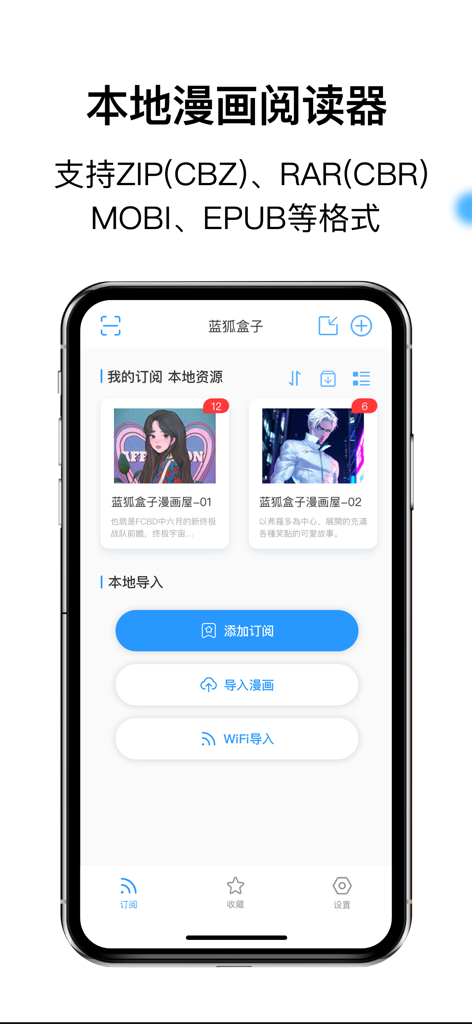
Blue Fox Box App-Oberfläche, die eine lokale Comic-Bibliothek und Optionen zum Importieren von Dateien auf einem iPhone zeigt
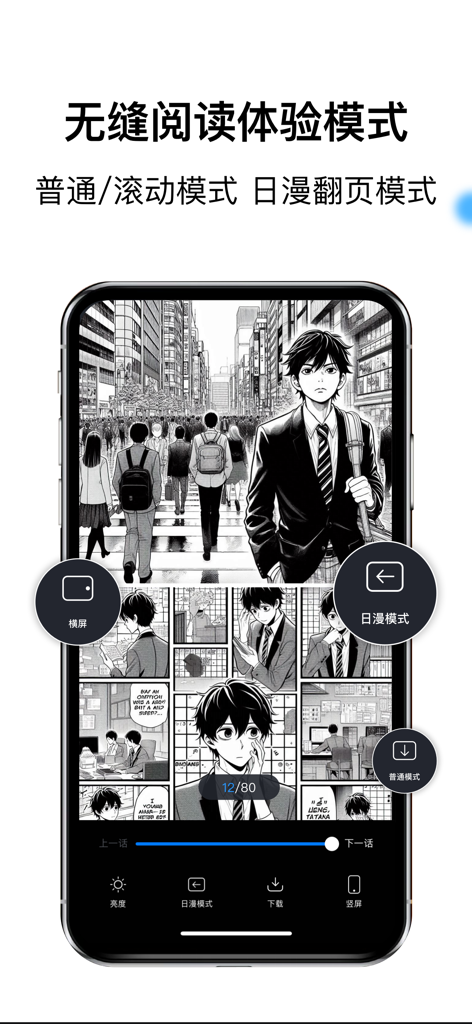
Ein Smartphone zeigt eine Manga-Seite in der Blue Fox Box App mit verschiedenen Lese- und Seitenwechselmodi.
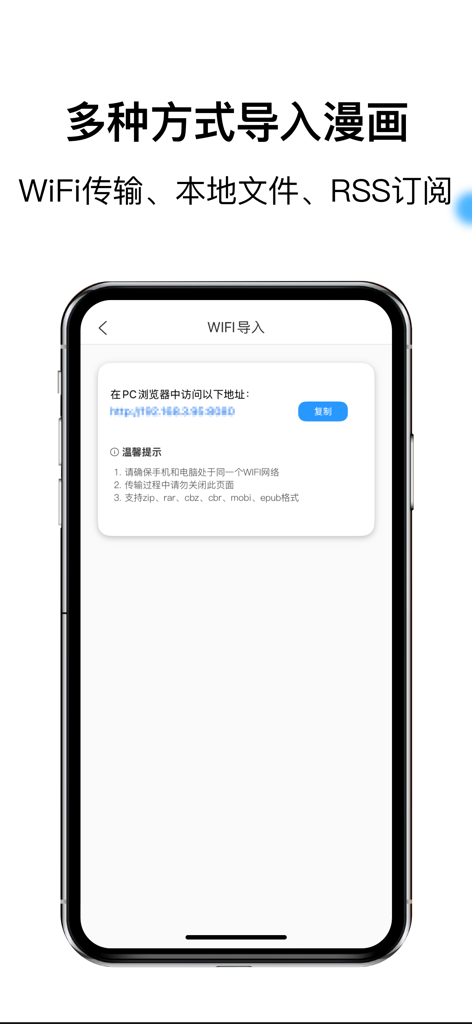
Blue Fox Box App-Oberfläche, die den WLAN-Übertragungsbildschirm zum Importieren von Comic-Dateien von einem PC-Browser zeigt
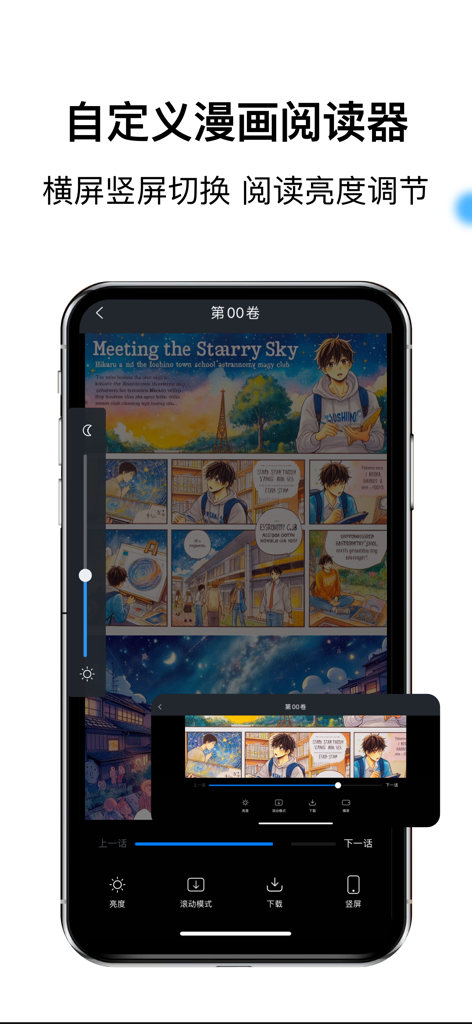
Blue Fox Box App-Oberfläche, die einen Manga-Reader mit Helligkeits- und Orientierungsanpassungssteuerungen zeigt
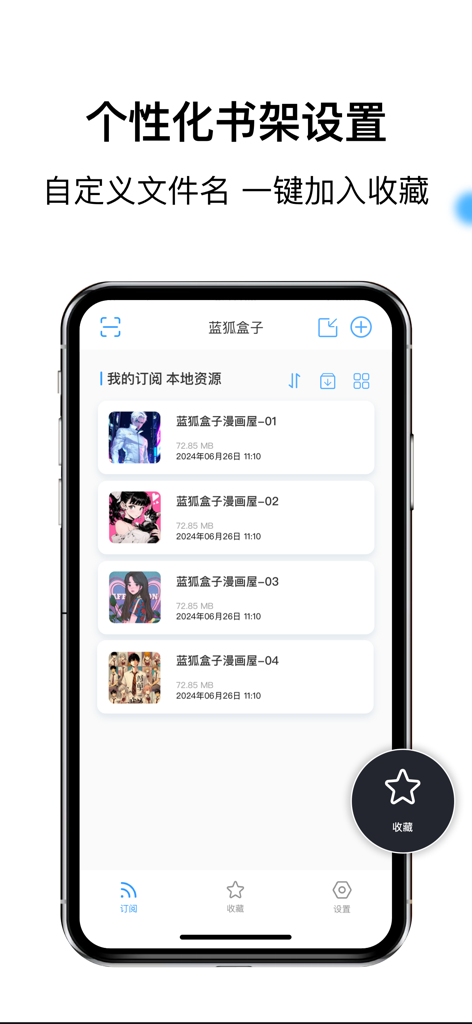
Personalisierte Regaloberfläche des Blue Fox Box lokalen Manga-Readers, die eine Liste digitaler Comics anzeigt
Beschreibung
Download
Ähnliche Apps
Apps mit ähnlichen Funktionen und Nutzererfahrung

WEBTOON: Manga, Comics, Manhwa
NAVER WEBTOON Ltd.

快看漫画
Kuaikan World (Beijing) Technology CO., LTD.

Tachimanga
继超 吴

WebComics - Webtoon, Manga
WEBCOMICS HOLDINGS HK LIMITED

GlobalComix: The Comics App
Global Publishing Interactive, Inc

Panels - Comic Reader
Produkt Software Engineering S.L.

漫画人极速版-看动漫画大全平台
中营 谢

百度阅读-电子书看书阅读神器
Beijing Baidu Netcom Science & Technology Co.,Ltd

Lovella: Novels & Audiobooks
FMPROJECT LIMITED
Diese Seite ist keine offizielle Seite der App oder ihres Entwicklers, sondern eine unabhängige redaktionelle Veröffentlichung, die zu Informations- und Kommentarzwecken erstellt wurde. Sofern nicht ausdrücklich anders angegeben, sind weder die App noch ihr Entwickler mit MWM, Apple, Google Play, dem App-Herausgeber oder dem Entwickler der App verbunden, von ihnen unterstützt, gesponsert, autorisiert oder anderweitig offiziell verbunden, und nichts auf dieser Seite impliziert, dass die App unter Verwendung der Dienste von MWM entwickelt wurde. Alle Marken, Logos, Screenshots und andere Inhalte bleiben Eigentum ihrer jeweiligen Inhaber.