
Diese Seite ist keine offizielle Seite der App oder ihres Entwicklers, sondern eine unabhängige redaktionelle Veröffentlichung, die zu Informations- und Kommentarzwecken erstellt wurde. Sofern nicht ausdrücklich anders angegeben, sind weder die App noch ihr Entwickler mit MWM, Apple, Google Play, dem App-Herausgeber oder dem Entwickler der App verbunden, von ihnen unterstützt, gesponsert, autorisiert oder anderweitig offiziell verbunden, und nichts auf dieser Seite impliziert, dass die App unter Verwendung der Dienste von MWM entwickelt wurde. Alle Marken, Logos, Screenshots und andere Inhalte bleiben Eigentum ihrer jeweiligen Inhaber.

Link to Windows
Der ständige Blick aufs Smartphone ist ein Relikt von gestern. Die App erweist sich als Ihr digitaler Schatten, der Ihnen das iPhone bedingungslos auf den Windows-Desktop projiziert. Nutzer finden hier die Macht, ihr Telefon zu führen, ohne es je physisch zu berühren.
Downloads
25M+Bewertung
Bewertungen gesamt
37.5KHerausgeber
Kategorie
ProductivitySprachen
33Neueste Version
1.26031.21Größe
98.9 MBErstveröffentlichung
28. Feb. 2023Analyse: Link to Windows für iPhone-Nutzer
Eine Bewertung der Schlüsselmerkmale und deren Mehrwert für die Produktivitätssteigerung zwischen iOS und Windows.
Benachrichtigungsverwaltung
Das Tool ermöglicht die Verwaltung von Telefonbenachrichtigungen direkt auf dem PC, was Ablenkungen reduziert und die Konzentration fördert, indem wichtige Informationen auf einen Blick erfasst werden können.
Anrufmanagement
Die App bietet die Möglichkeit, Anrufe direkt vom PC aus zu tätigen und entgegenzunehmen, was den Workflow nicht unterbricht und die Notwendigkeit minimiert, das Telefon in die Hand zu nehmen.
Nachrichtenübertragung und -antwort
Es ermöglicht Nutzern, Textnachrichten vom PC aus zu lesen und direkt zu beantworten, was eine effiziente Kommunikation ohne Gerätewechsel gewährleistet und die Produktivität steigert.
Dateifreigabe
Die App ermöglicht den nahtlosen Austausch von Dateien zwischen dem iPhone und dem Windows-PC, was die Zusammenarbeit an Dokumenten und Medien vereinfacht und den Workflow beschleunigt.
Häufig gestellte Fragen
Alles, was Sie über wissen müssen Link to Windows
Can I make calls from my PC using "Link to Windows"?
Yes, the "Link to Windows" app enables you to make and receive calls directly from your Windows PC when your iPhone is connected via the Phone Link feature.
Does "Link to Windows" show iPhone notifications on my PC?
Yes, "Link to Windows" allows you to manage and view your iPhone's notifications directly on your connected Windows PC through the Phone Link feature.
Can I send text messages from my PC with "Link to Windows"?
Yes, the "Link to Windows" app enables users to read and reply to text messages from their iPhone directly through their connected Windows PC.
Does "Link to Windows" display my iPhone contacts on the PC?
Yes, the "Link to Windows" app provides the ability to view your iPhone contacts directly on your connected Windows PC.
How do I share files between my iPhone and PC using "Link to Windows"?
"Link to Windows" facilitates file sharing between your iPhone and PC. The app displays received files and offers a file share option to another paired device.
What iOS version is required for "Link to Windows"?
"Link to Windows" requires an iPhone running iOS 16 or higher to support the Phone Link feature connection with a Windows PC.
What are the PC requirements for the Phone Link feature with "Link to Windows"?
The Phone Link feature requires a PC with Bluetooth Low Energy (BLE) support running Windows 10 (May 2019 Update or later) or Windows 11.
Is "Link to Windows" available for iPad or Mac?
No, "Link to Windows" is not available for iPad (iPadOS) or MacOS. It exclusively supports iPhone and Windows PC integration.
How do I connect my iPhone to my PC using the "Link to Windows" app?
To connect, open the Phone Link app on your PC and follow the instructions. You can scan a QR code from your PC or proceed without one to link your device.
How does the "Link to Windows" app maintain connection with my PC?
The "Link to Windows" app automatically connects your iPhone to a paired PC when it is within range. Ensure your PC is nearby and Bluetooth is activated.
Where can I find the Microsoft Terms of Use for the "Link to Windows" app?
The Microsoft Terms of Use for the "Link to Windows" app are located at the provided link: https://go.microsoft.com/fwlink/?LinkID=246338.
Does the "Link to Windows" app have a privacy statement?
Yes, the "Link to Windows" app adheres to a Privacy Statement, which users can access via the link: https://go.microsoft.com/fwlink/?LinkID=248686.
What is "Link to Windows"?
"Link to Windows" is an app that connects your iPhone to the Phone Link feature on your Windows PC. It provides instant access to phone content directly from your computer.
Die folgenden Screenshots und die Beschreibung stammen direkt aus dem offiziellen Store-Eintrag der App und sind Eigentum des Entwicklers.
App Store
Screenshots

Anrufe am PC
Nutzer können Anrufe direkt über ihren Windows-PC tätigen und empfangen, wobei das Anruf-Interface klar auf dem PC und dem iPhone synchronisiert dargestellt wird.
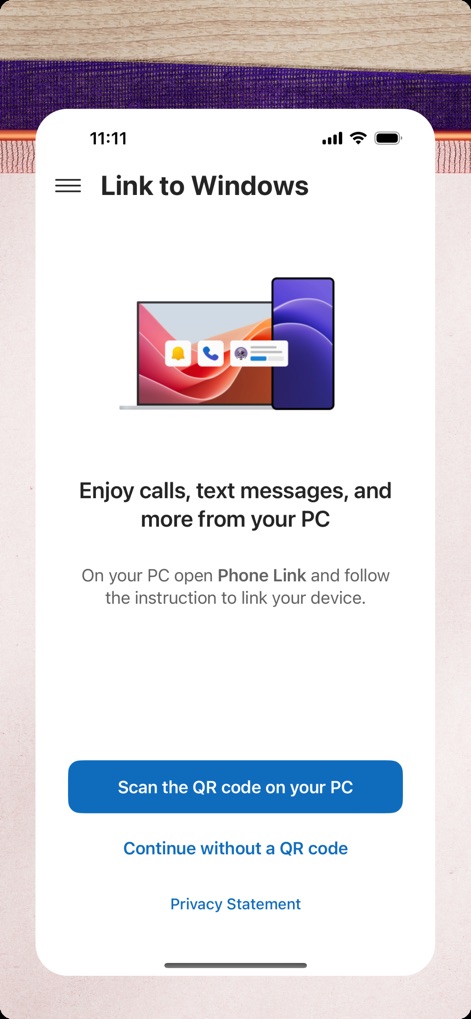
Einfache Verbindung
Dieses Bild zeigt die unkomplizierte Erstverbindung der App, illustriert durch eine Grafik, die PC und Telefon symbolisiert, und den prominenten Button zum Scannen des QR-Codes.
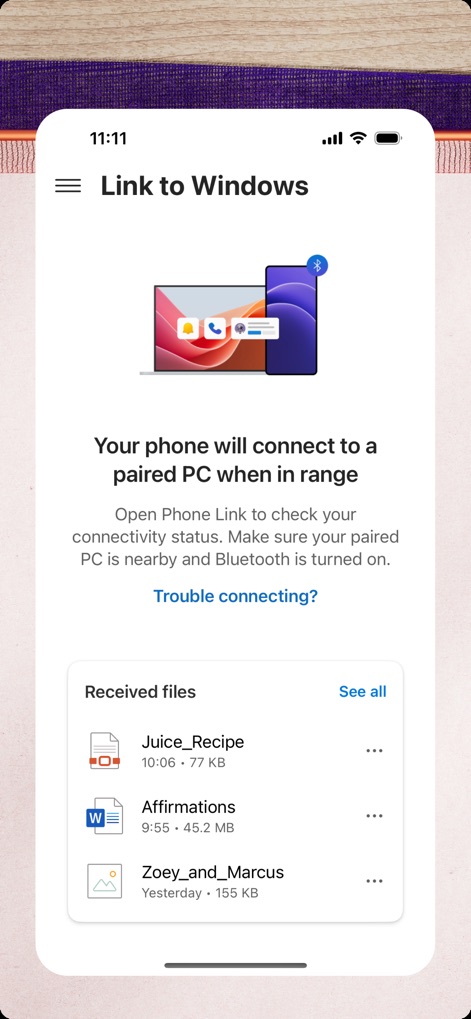
Dateien synchronisieren
Die App demonstriert die nahtlose Geräteverbindung durch ein Bluetooth-Symbol und zeigt eine Liste empfangener Dateien, was den einfachen Dateiaustausch hervorhebt.
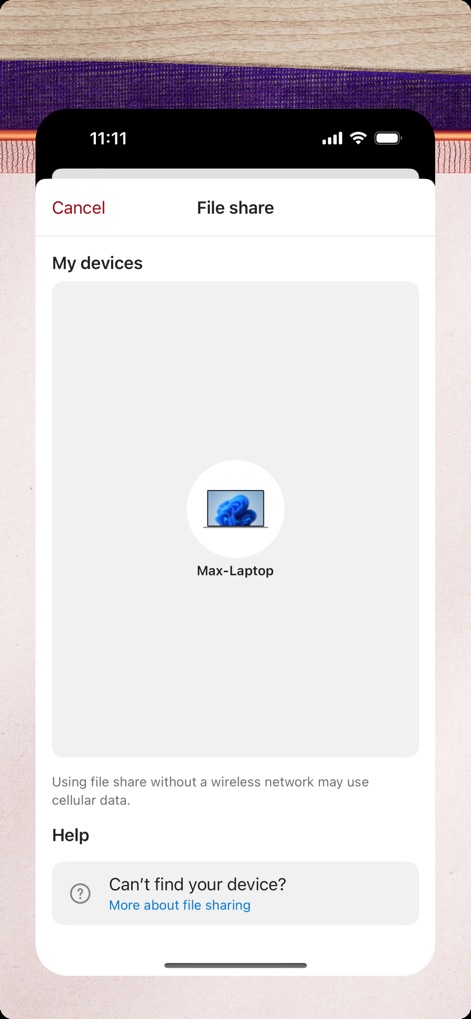
Sicherer Datenaustausch
Dieses Interface ermöglicht den schnellen Dateiaustausch und zeigt die Auswahl des verbundenen Laptops als Zielgerät an, während oben rechts deutlich "File share" vermerkt ist.
Beschreibung
Download
Ähnliche Apps
Apps mit ähnlichen Funktionen und Nutzererfahrung





Diese Seite ist keine offizielle Seite der App oder ihres Entwicklers, sondern eine unabhängige redaktionelle Veröffentlichung, die zu Informations- und Kommentarzwecken erstellt wurde. Sofern nicht ausdrücklich anders angegeben, sind weder die App noch ihr Entwickler mit MWM, Apple, Google Play, dem App-Herausgeber oder dem Entwickler der App verbunden, von ihnen unterstützt, gesponsert, autorisiert oder anderweitig offiziell verbunden, und nichts auf dieser Seite impliziert, dass die App unter Verwendung der Dienste von MWM entwickelt wurde. Alle Marken, Logos, Screenshots und andere Inhalte bleiben Eigentum ihrer jeweiligen Inhaber.