
Diese Seite ist keine offizielle Seite der App oder ihres Entwicklers, sondern eine unabhängige redaktionelle Veröffentlichung, die zu Informations- und Kommentarzwecken erstellt wurde. Sofern nicht ausdrücklich anders angegeben, sind weder die App noch ihr Entwickler mit MWM, Apple, Google Play, dem App-Herausgeber oder dem Entwickler der App verbunden, von ihnen unterstützt, gesponsert, autorisiert oder anderweitig offiziell verbunden, und nichts auf dieser Seite impliziert, dass die App unter Verwendung der Dienste von MWM entwickelt wurde. Alle Marken, Logos, Screenshots und andere Inhalte bleiben Eigentum ihrer jeweiligen Inhaber.

Microsoft OneNote
Nie wieder eine gute Idee verloren: Sie macht dein Gedächtnis omnipräsent.
Downloads
50M+Bewertung
Bewertungen gesamt
4.5MHerausgeber
Kategorie
ProductivitySprachen
33Neueste Version
16.107.3Größe
350.1 MBErstveröffentlichung
18. Jan. 2011Analyse der Kernfunktionen von Microsoft OneNote
Eine Bewertung der wesentlichen Merkmale für produktives Notizenmanagement und Kollaboration.
Vielseitige Notizerfassung
Die App ermöglicht es Nutzern, Gedanken, Entdeckungen und Ideen in einem digitalen Notizbuch festzuhalten, das verschiedene Inhaltstypen aufnehmen kann.
Kollaborative Arbeitsbereiche
Dieses Tool erlaubt das Teilen von Notizbüchern und die gemeinsame Bearbeitung in Echtzeit, was die Zusammenarbeit in Teams und Lerngruppen erheblich vereinfacht.
Geräteübergreifende Synchronisation
Notizen werden automatisch über OneDrive synchronisiert, wodurch sie jederzeit und von jedem Gerät aus zugänglich sind.
Robuste Organisations- und Suchfunktionen
Es bietet leistungsstarke Tools zur effizienten Strukturierung von Notizen und schnelle Suchmöglichkeiten, um Informationen leicht wiederzufinden.
Erweiterte Medienaufnahme
Die App ermöglicht das einfache Einfügen von Bildern, Fotos und gescannten Dokumenten (z.B. Whiteboards via Office Lens) direkt in Notizen.
Handschriftliche Notizen und Zeichnungen
Dieses Tool unterstützt detailreiche handschriftliche Eingaben und Zeichnungen mit verschiedenen Stiftoptionen, ideal für Tablets und Touchscreens.
Sicherheitsfunktionen
Die App schützt sensible Notizen durch Passwortsicherung und ermöglicht schnellen Zugriff mittels Touch ID.
Integration von Kurznotizen (Sticky Notes)
Es ermöglicht das schnelle Erfassen flüchtiger Gedanken und Ideen mittels farbiger Kurznotizen, die geräteübergreifend synchronisiert werden.
Häufig gestellte Fragen
Alles, was Sie über wissen müssen Microsoft OneNote
Is Microsoft OneNote available for free?
Yes, Microsoft OneNote is free on iPhone and many other devices. Users can get started by downloading the app and signing in with a Microsoft or work/school account.
How does Microsoft OneNote allow me to access notes across devices?
Microsoft OneNote syncs your notes via OneDrive, allowing access to them anytime, anywhere, and across all your devices. This ensures your notes are always available whether at home or on the go.
Can I secure my notes in Microsoft OneNote with a password?
Yes, Microsoft OneNote allows users to secure their notes with a password. Additionally, it supports using Touch ID for quick and secure access to protected notes.
What organizational features does Microsoft OneNote offer for my notes?
Microsoft OneNote provides powerful organizational tools, allowing users to quickly arrange notes in a personalized way. It also helps find recent notes fast and pin frequently used pages.
Does Microsoft OneNote support drawing and handwriting?
Yes, Microsoft OneNote supports drawing and handwriting, particularly on iPad. It offers various pen colors and settings, and a 'Convert to Shapes' mode for automatically perfecting hand-drawn shapes.
Can I use sticky notes with Microsoft OneNote?
Yes, Microsoft OneNote allows users to quickly save thoughts and ideas using colorful sticky notes. These sticky notes sync across devices, providing access from anywhere, anytime.
How can I collaborate with others using Microsoft OneNote?
Microsoft OneNote facilitates collaboration by allowing users to work together in a shared notepad. Notes are saved to the cloud (OneDrive, SharePoint) and can be accessed and shared on any device.
Does Microsoft OneNote allow capturing images from documents or whiteboards?
Yes, Microsoft OneNote integrates with Office Lens. This feature enables users to save pictures of whiteboards, photos, or printed documents directly into their notes, with automatic cropping.
Are there subscriptions available within the Microsoft OneNote app?
Yes, monthly Microsoft 365 subscriptions are available for purchase within the Microsoft OneNote app. These are charged to your App Store account and renew automatically.
What is the data privacy policy for Microsoft OneNote?
Microsoft OneNote is subject to a separate privacy statement and terms. Data used with the app may be accessible to Microsoft or third-party publishers, and processed in the United States or other countries.
Die folgenden Screenshots und die Beschreibung stammen direkt aus dem offiziellen Store-Eintrag der App und sind Eigentum des Entwicklers.
App Store
Screenshots
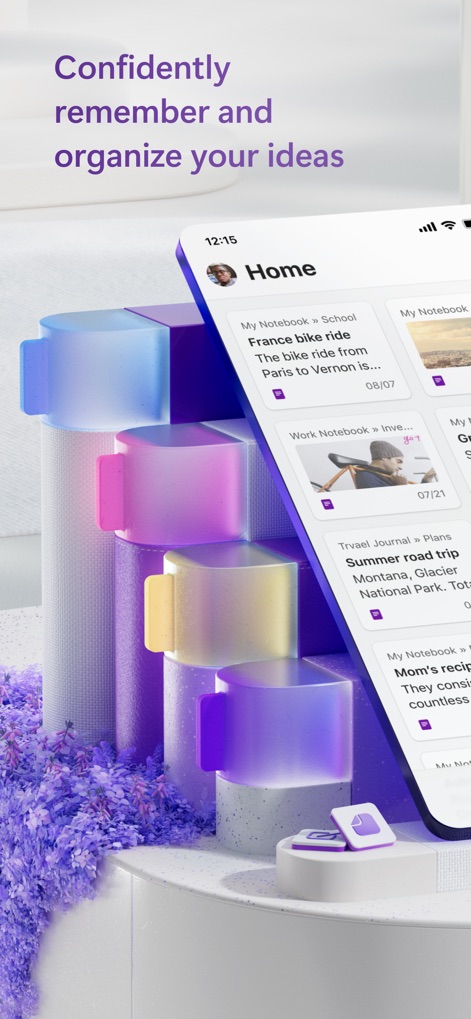
Ideen übersichtlich organisiert
Die App präsentiert eine aufgeräumte Startseite mit aktuellen Notizen und wird durch ansprechende, farbige Hintergrundelemente visuell unterstützt.

Notizen sofort erstellen
Die intuitive Startansicht ermöglicht Nutzern einen schnellen Überblick über ihre Notizen und bietet mittels des schwebenden Plus-Buttons eine sofortige Erstellung neuer Einträge.

Überblick unterwegs
Nutzer finden eine klare Anordnung ihrer Notizkarten mit Titeln und Bildern vor, unterstützt durch eine leicht zugängliche untere Navigationsleiste für „Home“, „Search“ und „Notebooks“.

Plattformübergreifende Synchronisierung
Dieses Tool demonstriert eine nahtlose Synchronisation von Notizen über verschiedene Geräte hinweg, erkennbar an der simultanen Desktop- und mobilen Ansicht desselben Inhalts.

Strukturierte Organisation
Die App ermöglicht eine übersichtliche Strukturierung von Inhalten in farbkodierten Abschnitten, die Nutzern eine schnelle Orientierung innerhalb ihrer Notizbücher bietet.

Visuelle Notizen
Nutzer können umfassende Notizen mit integrierten Bildern erstellen, wie bei dieser detaillierten Reiseplanung, die visuelle Informationen mit beschreibendem Text kombiniert.

Ziele im Fokus
Dieses Tool hilft Nutzern, ihre Fortschritte durch interaktive Checkboxen zu verfolgen, die eine übersichtliche Darstellung ihrer persönlichen Ziele und To-Do-Listen ermöglichen.

Reiseplanung leicht gemacht
Nutzer profitieren von einer integrierten Karte mit handgezeichneten Anmerkungen und einer praktischen Packliste, um ihre Reisepläne detailliert und übersichtlich zu gestalten.
Beschreibung
Download
Ähnliche Apps
Apps mit ähnlichen Funktionen und Nutzererfahrung

Notion: Notes, Tasks, AI
Notion Labs, Incorporated

Freenotes®: AI Notes Taking
Hangzhou Free Notes Technology Co., Ltd

Structured - Daily Planner
unorderly GmbH

Google Tasks: Get Things Done
Google LLC

TickTick:To-Do List & Calendar
Appest Limited

Noteful: Notes & PDF Markup
Noteful Technologies Ltd

Todoist: To Do List & Calendar
Doist Inc.

To do list MinimaList & Widget
Inner Grow Limited

monday.com - Work Platform
monday.com Ltd.
Diese Seite ist keine offizielle Seite der App oder ihres Entwicklers, sondern eine unabhängige redaktionelle Veröffentlichung, die zu Informations- und Kommentarzwecken erstellt wurde. Sofern nicht ausdrücklich anders angegeben, sind weder die App noch ihr Entwickler mit MWM, Apple, Google Play, dem App-Herausgeber oder dem Entwickler der App verbunden, von ihnen unterstützt, gesponsert, autorisiert oder anderweitig offiziell verbunden, und nichts auf dieser Seite impliziert, dass die App unter Verwendung der Dienste von MWM entwickelt wurde. Alle Marken, Logos, Screenshots und andere Inhalte bleiben Eigentum ihrer jeweiligen Inhaber.