
Diese Seite ist keine offizielle Seite der App oder ihres Entwicklers, sondern eine unabhängige redaktionelle Veröffentlichung, die zu Informations- und Kommentarzwecken erstellt wurde. Sofern nicht ausdrücklich anders angegeben, sind weder die App noch ihr Entwickler mit MWM, Apple, Google Play, dem App-Herausgeber oder dem Entwickler der App verbunden, von ihnen unterstützt, gesponsert, autorisiert oder anderweitig offiziell verbunden, und nichts auf dieser Seite impliziert, dass die App unter Verwendung der Dienste von MWM entwickelt wurde. Alle Marken, Logos, Screenshots und andere Inhalte bleiben Eigentum ihrer jeweiligen Inhaber.


Mojo: AI Video & Reels Editor
Die Social-Media-Mühlen mahlen gnadenlos schnell. Mojo liefert die brutale Effizienz, um Trends nicht nur zu folgen, sondern sie zu setzen. Nutzer finden hier das Werkzeug, das den Video-Output automatisiert und die Konkurrenz abhängt, ohne je ein Schnittprogramm bedient zu haben.
Downloads
12.5M+Bewertung
Bewertungen gesamt
755.8KHerausgeber
Kategorie
Photo & VideoSprachen
35Neueste Version
1.260.0Größe
308.1 MBErstveröffentlichung
6. Nov. 2018Analytische Bewertung der Kernfunktionen von Mojo: AI Video & Reels Editor
Eine detaillierte Einschätzung der wichtigsten Leistungsmerkmale für Content Creator und Social Media Manager
Integration von Trending Sounds
Die App bietet eine Sammlung von Vorlagen, die direkt mit angesagten Sounds auf Instagram und TikTok verbunden sind, um die Reichweite zu maximieren und aktuelle Trends aufzugreifen.
Plattformübergreifendes Teilen & Format-Anpassung
Es ermöglicht Nutzern, ihre Videos mühelos auf verschiedenen Social-Media-Plattformen zu teilen, wobei die Inhalte automatisch an die jeweiligen Formate angepasst werden.
Umfassende Vorlagenauswahl
Die App verfügt über eine Bibliothek von über 1.200 einzigartigen Vorlagen, die die schnelle Erstellung professionell aussehender Videos ohne umfangreiche Designkenntnisse erleichtern.
Anpassbares Brand Kit
Dieses Tool ermöglicht es Nutzern, eigene Marken-Schriftarten, -Farben und -Logos zu hinterlegen, um eine konsistente Markenidentität über alle Inhalte hinweg zu gewährleisten.
All-in-One Video-Editor
Die App bietet eine zentrale Plattform für die umfassende Videobearbeitung, die Funktionen wie Schneiden, Übergänge, Musik und animierte Elemente integriert.
Automatische Untertitel (Auto-Captions)
Es ermöglicht Nutzern, Videos automatisch mit Untertiteln zu versehen, was die Zugänglichkeit und das Engagement erhöht und sogar Übersetzungsoptionen bietet.
KI-gestützte Vorlagen
Die App transformiert Fotos mithilfe von KI in künstlerische Werke oder Memes und bietet innovative Wege zur Generierung einzigartiger visueller Inhalte.
Lizenzfreie Musik & Eigene Uploads
Die App stellt eine Auswahl lizenzfreier Musiktitel bereit und bietet die Möglichkeit, eigene Musik hochzuladen, um Videos individuell und rechtskonform zu gestalten.
Hintergrundentfernung
Dieses Tool ermöglicht das Entfernen von Hintergründen aus Bildern mit nur einem Fingertipp, was ideal für Produktpräsentationen oder kreative visuelle Effekte ist.
Ästhetische Texteffekte
Die App bietet eine Vielzahl von Textstilen und -effekten, um Videos visuell aufzuwerten und Botschaften hervorzuheben.
Häufig gestellte Fragen
Alles, was Sie über wissen müssen Mojo: AI Video & Reels Editor
What is Mojo: AI Video & Reels Editor?
Mojo is an app designed to simplify creating trending video content for platforms like Instagram and TikTok. It offers over 1,200 unique templates and powerful editing features to create engaging social media content.
Does the Mojo app offer templates for video creation?
Yes, the Mojo app offers over 1,200 unique templates for video creation, including trending sound templates. Users select a template and customize it with various editing features.
Can Mojo add auto-captions to videos?
Yes, Mojo can add auto-captions to maximize video views. Users can select from various auto-caption styles, translate captions, and automatically remove unwanted silences or filler words.
How does the Mojo app handle background removal for images?
The Mojo app includes a background removal tool that allows users to remove the background from any image with a single tap. This feature is useful for showcasing products.
Can I use my brand's fonts and logos in Mojo?
Yes, Mojo features a Brand Kit tool. Users can upload their brand fonts, colors, and logos to maintain consistent branding across all content created within the app.
Does Mojo provide royalty-free music for commercial use?
Yes, Mojo provides a selection of royalty-free tracks that are cleared for commercial use. Users can also upload their own music to use with any template.
How do I manage my Mojo subscription?
Users can manage their Mojo subscription and auto-renewal settings by navigating to Account Settings on their iPhone after purchase. Subscriptions renew automatically unless turned off 24 hours prior to the period end.
Die folgenden Screenshots und die Beschreibung stammen direkt aus dem offiziellen Store-Eintrag der App und sind Eigentum des Entwicklers.
App Store
Screenshots
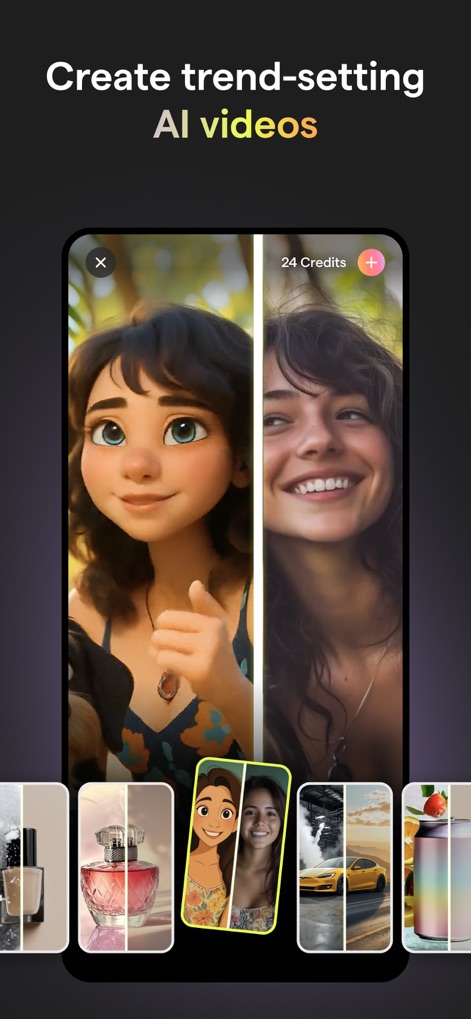
KI-Video Transformation
Nutzer können ihre Inhalte durch die transformative Darstellung von Gesichtern in einzigartige Stile verwandeln und dabei aus der Vorschaugalerie der vielfältigen Stiloptionen wählen, um trendsetzende Videos zu erstellen.
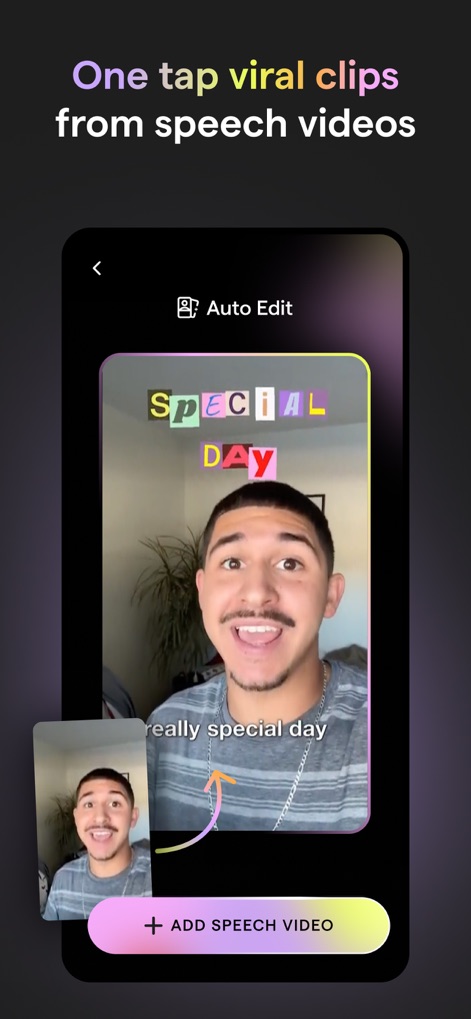
Virale Sprachvideos
Dieses Tool ermöglicht die schnelle Erstellung viraler Clips aus Sprachvideos durch die Anzeige dynamischer automatischer Untertitel und bietet ein vereinfachtes Interface zur Videoaufnahme, um Inhalte mühelos zu generieren.
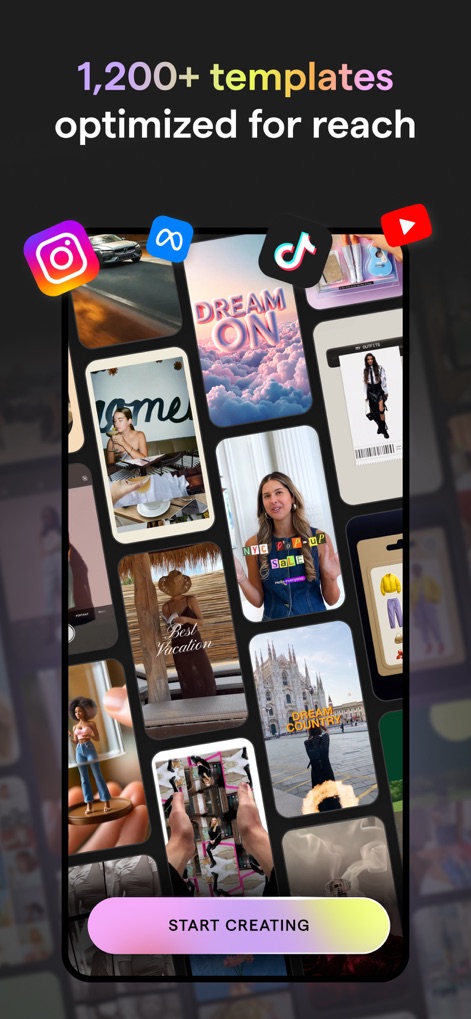
Vorlagenvielfalt für Reichweite
Die App präsentiert eine riesige Auswahl von über 1.200 Vorlagen, die speziell für maximale Reichweite optimiert sind, und zeigt deutlich die Integration der gängigen Social-Media-Plattformen für einfaches Teilen.
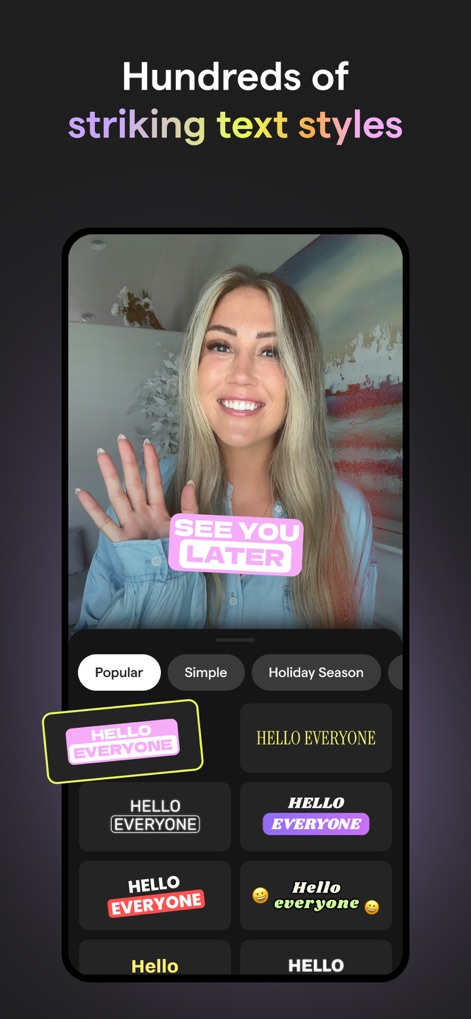
Kreative Textstile
Nutzer können aus Hunderten von auffälligen Textstilen wählen, die im Video hervorgehoben sind, und dabei die beeindruckende Auswahl an Schriftstilen sowie die praktische Kategorisierung der Textoptionen für jedes Projekt nutzen.

Einfache Videobearbeitung
Dieses Tool bietet eine leistungsstarke und dennoch einfache Videobearbeitung, sichtbar an der präzisen Videotimeline mit Bearbeitungsmarkierungen und dem intuitiven Menü zur Integration von Medien und Text.
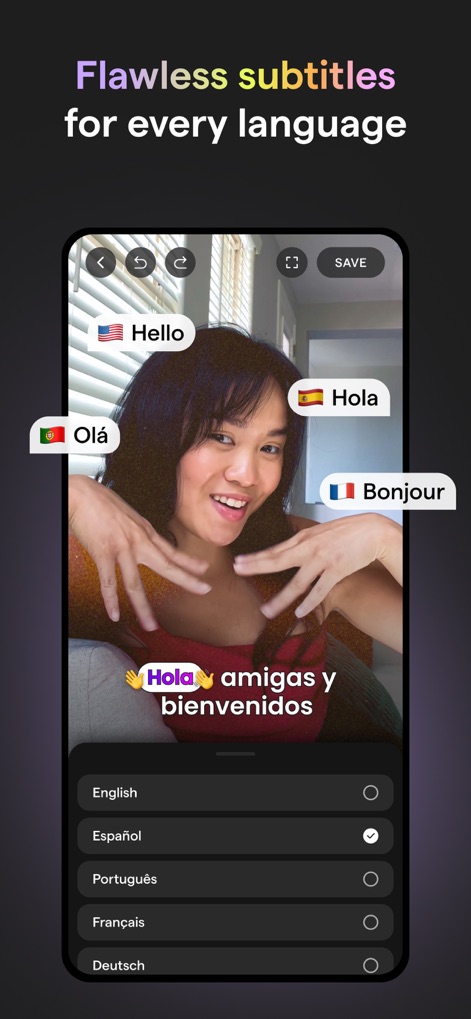
Mehrsprachige Untertitel
Die App ermöglicht makellose Untertitel für jede Sprache, was sich in der automatischen Sprachübersetzung in Echtzeit und der übersichtlichen Sprachauswahl zur Anpassung der Wiedergabesprache zeigt.
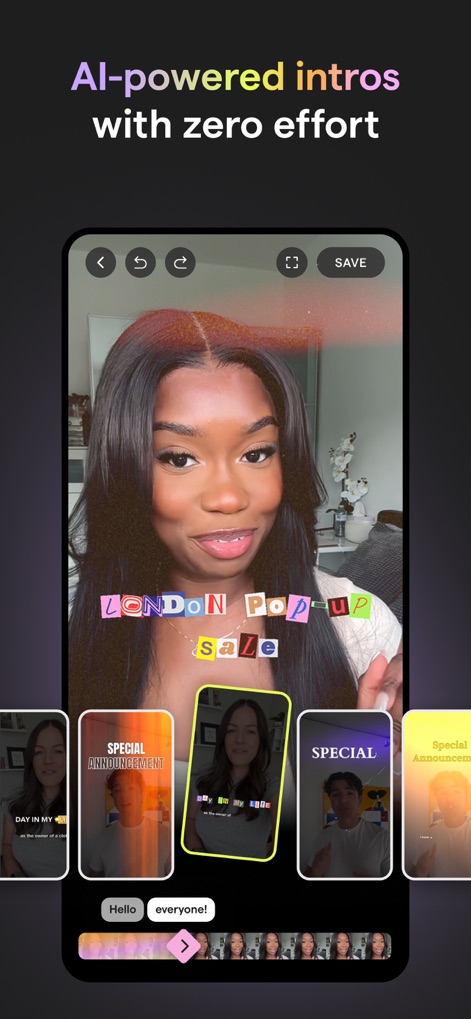
KI-Intros mühelos
Nutzer können mühelos KI-gestützte Intros erstellen, ersichtlich an den dynamischen und kreativen Texteffekten im Video und der praktischen Auswahl an vorgefertigten Intro-Vorlagen, die zur Inspiration dienen.
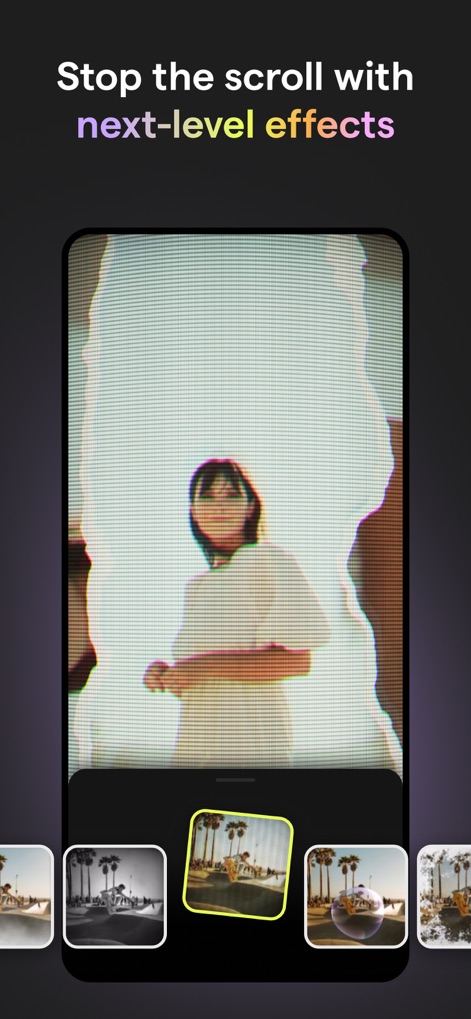
Beeindruckende Videoeffekte
Die App bietet beeindruckende Effekte, um den Scroll-Stopp-Effekt zu erzielen, wie die auffälligen visuellen Effekte und Filter, die im Video angewendet werden, und die benutzerfreundliche Vorschau der Effektoptionen unten.
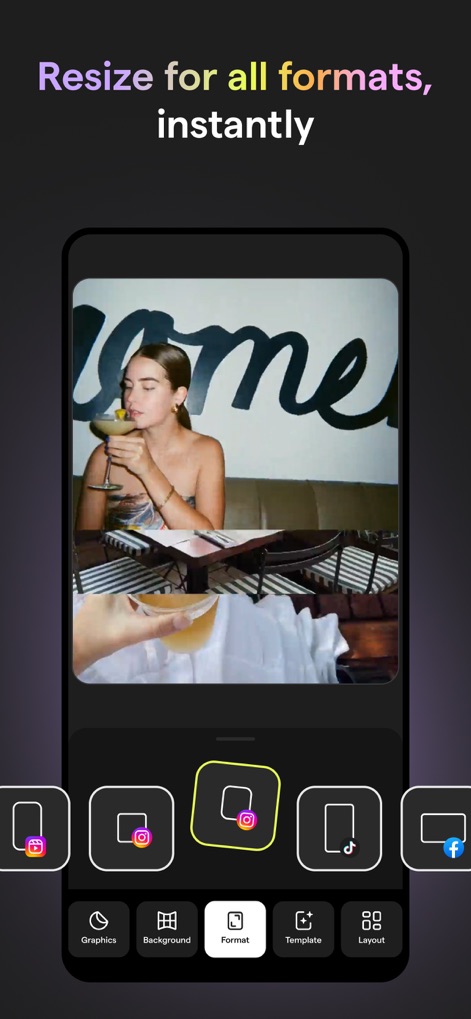
Formatoptimierung für Plattformen
Dieses Tool ermöglicht die sofortige Größenanpassung für alle Formate, sichtbar durch die Anpassungsoptionen für verschiedene Seitenverhältnisse und die direkten Freigabe-Icons für soziale Medien am unteren Rand des Bildschirms.
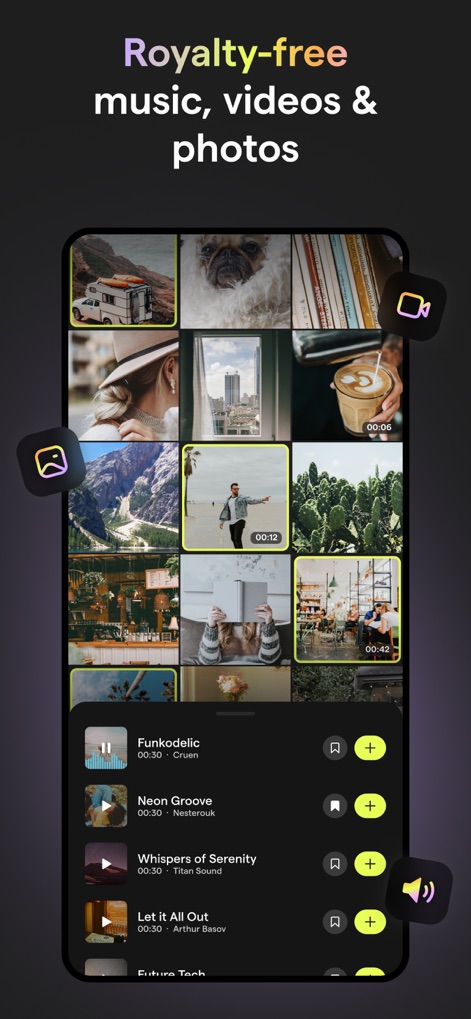
Lizenzfreie Medienbibliothek
Nutzer können auf eine umfangreiche Bibliothek lizenzfreier Musik, Videos und Fotos zugreifen, ersichtlich an der kuratierten Bibliothek lizenzfreier Medien und der integrierten Musikauswahl mit Wiedergabefunktion.
Beschreibung
Download
Ähnliche Apps
Apps mit ähnlichen Funktionen und Nutzererfahrung

Wink: Video Enhancer & Editor
Xiamen Meitu Technology Co., Ltd.

Instories: AI Photo & Video
Ylee Studio LTD

秒剪 - 视频创作 & Live 实况制作
Tencent Technology (Shenzhen) Company Limited

Vids AI - Reels Video Editor
Viral Vision Ltd

Reels Maker for Instagram BEAT
Onelight Apps CY Ltd

Unfold: Reels & Story Maker
Squarespace, Inc.
Reels Editor, AI Video: inMelo
APPBYTE PTE. LTD.

Reelsapp: reel & video editor
Rustam Achilov

500 Stories: Reels Story Maker
StoryPath Apps Ltd
Diese Seite ist keine offizielle Seite der App oder ihres Entwicklers, sondern eine unabhängige redaktionelle Veröffentlichung, die zu Informations- und Kommentarzwecken erstellt wurde. Sofern nicht ausdrücklich anders angegeben, sind weder die App noch ihr Entwickler mit MWM, Apple, Google Play, dem App-Herausgeber oder dem Entwickler der App verbunden, von ihnen unterstützt, gesponsert, autorisiert oder anderweitig offiziell verbunden, und nichts auf dieser Seite impliziert, dass die App unter Verwendung der Dienste von MWM entwickelt wurde. Alle Marken, Logos, Screenshots und andere Inhalte bleiben Eigentum ihrer jeweiligen Inhaber.