
Diese Seite ist keine offizielle Seite der App oder ihres Entwicklers, sondern eine unabhängige redaktionelle Veröffentlichung, die zu Informations- und Kommentarzwecken erstellt wurde. Sofern nicht ausdrücklich anders angegeben, sind weder die App noch ihr Entwickler mit MWM, Apple, Google Play, dem App-Herausgeber oder dem Entwickler der App verbunden, von ihnen unterstützt, gesponsert, autorisiert oder anderweitig offiziell verbunden, und nichts auf dieser Seite impliziert, dass die App unter Verwendung der Dienste von MWM entwickelt wurde. Alle Marken, Logos, Screenshots und andere Inhalte bleiben Eigentum ihrer jeweiligen Inhaber.


My Contacts Backup
Datenhoheit? Eine Illusion. Diese App gibt sie dir zurück – für deine Kontakte.
Downloads
5M+Bewertung
Bewertungen gesamt
18.3KHerausgeber
Kategorie
ProductivitySprachen
31Neueste Version
2.3.6Größe
27.0 MBErstveröffentlichung
6. Juli 2011Eine Analyse der Kernfunktionen für eine effiziente Kontaktverwaltung
Hauptmerkmale von 'My Contacts Backup'
Offline- und privates Backup
Die App bietet eine Lösung für die Kontaktsicherung, die vollständig offline funktioniert und keine Synchronisation mit externen Servern erfordert, wodurch die Privatsphäre der Nutzer gewahrt bleibt.
Direkte Kontaktwiederherstellung
Dieses Tool ermöglicht die unkomplizierte Wiederherstellung von Kontakten direkt aus der Mail-App des Geräts durch einfaches Antippen der .vcf-Datei, ohne dass eine spezielle Anwendung benötigt wird.
Geräteübergreifender Kontakttransfer
Es ermöglicht Nutzern, Kontakte mühelos zwischen verschiedenen iOS-Geräten zu übertragen, indem die Backup-Datei einfach per E-Mail versendet wird.
Automatisierte Backup-Erinnerungen
Die App verfügt über eine Funktion zum Einstellen von Erinnerungen, die Nutzer dazu anregt, regelmäßige Backups (wöchentlich oder monatlich) ihrer Kontakte zu erstellen, um Datenverlust vorzubeugen.
Kontaktexport als CSV
Dieses Tool bietet die zusätzliche Möglichkeit, Kontakte nicht nur als VCF, sondern auch als CSV-Datei zu exportieren, was Flexibilität für die Weiterverarbeitung in Tabellenkalkulationsprogrammen bietet.
Massenlöschung von Kontakten
Es ermöglicht Nutzern, alle Kontakte im Adressbuch auf einmal zu löschen, eine Funktion, die bei Bedarf eine schnelle und vollständige Bereinigung ermöglicht.
Häufig gestellte Fragen
Alles, was Sie über wissen müssen My Contacts Backup
How to backup contacts with My Contacts Backup?
My Contacts Backup allows you to back up all your contacts with a single touch. The app sends them to your email as a .vcf attachment. You then receive the backup file in your mailbox.
How to restore contacts using My Contacts Backup?
To restore contacts, open the .vcf file in your mailbox using the iOS Mail app. Tap the attachment to import all contacts directly from the file. No other app is required for restoration.
Does My Contacts Backup require an account or internet connection for backup?
No, My Contacts Backup does not require signing in, creating accounts, or internet synchronization with any server for backup. It performs offline backups directly from your phone.
What file formats does My Contacts Backup support for export?
My Contacts Backup supports exporting contacts as a VCF (vCard) file for backup. It also allows users to export contacts as a CSV (Excel) file.
Is there a limit to the number of contacts I can back up using My Contacts Backup?
Yes, the VCF backup in the free version of My Contacts Backup is limited to a maximum of 500 contacts. The PRO version offers unlimited contact backup.
Can My Contacts Backup remind me to backup my contacts regularly?
Yes, My Contacts Backup includes a feature to set reminders. Users can configure the app to prompt them for regular backups on a weekly or monthly basis.
Can I delete all contacts in my Address Book using My Contacts Backup?
Yes, My Contacts Backup provides a specific feature to delete all contacts in your Address Book. This function is available within the application.
Die folgenden Screenshots und die Beschreibung stammen direkt aus dem offiziellen Store-Eintrag der App und sind Eigentum des Entwicklers.
App Store
Screenshots
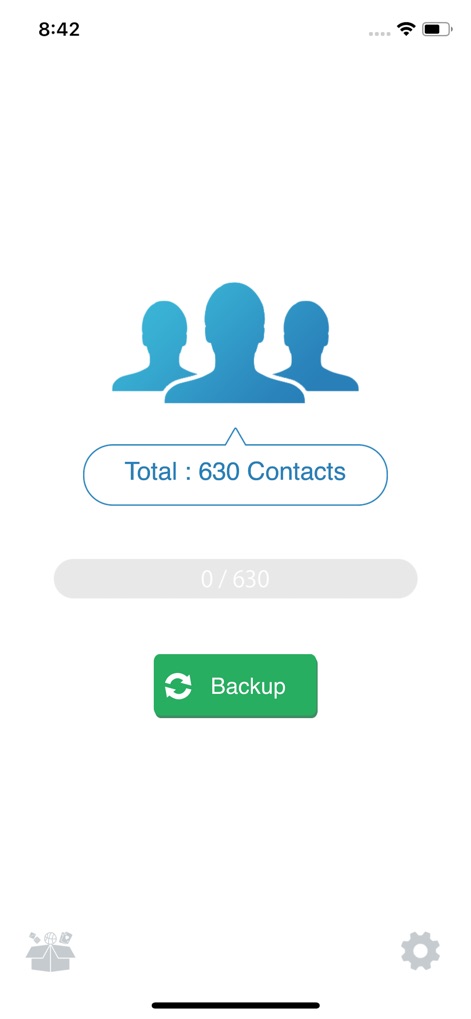
Dieses Bild zeigt die Hauptansicht der App, die die Gesamtzahl der Kontakte (X: 630) anzeigt und einen prominenten "Backup"-Button (Y) zur Initiierung des Sicherungsprozesses bietet.
Kontakte sichern

Dieser Screenshot illustriert den Wiederherstellungsprozess direkt aus der iOS Mail App, wobei Nutzer durch Tippen auf die angehängte VCF-Datei (X: MyContact...vcf) und den "Alle Kontakte hinzufügen"-Button (Y) ihre Daten zurückgewinnen können.
Wiederherstellen leicht gemacht
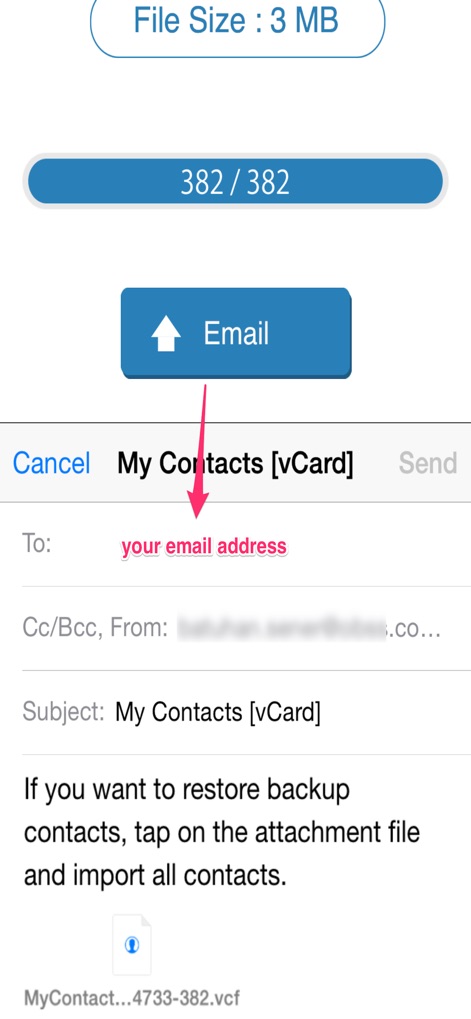
Dieser Bildschirm zeigt den E-Mail-Versand der gesicherten Kontakte, bei dem die App automatisch ein VCF-Backup (X: 3 MB Dateigröße) erstellt und den Nutzer auffordert, seine E-Mail-Adresse (Y) für den Versand einzugeben.
Sicherung versenden
Beschreibung
Download
Ähnliche Apps
Apps mit ähnlichen Funktionen und Nutzererfahrung
Delete Contacts+
Shanghai Jia Feng Software Co. Ltd.

Contacts Sync: Google & More
Playa Apps

Contact.s Back Up
Symon Johnson

Sync Contact for Google & more
Reena Williams
Contacts Backup + Transfer
One Wave AB

Contacts Backup Pro & Restore
AppRover

Export Contacts to Excel, CSV
LE NGUYEN QUANG PHUOC

Simple Backup Contacts
Giacomo Guglielmi
Contacts Backup and Transfer⁺
serkat ret
Diese Seite ist keine offizielle Seite der App oder ihres Entwicklers, sondern eine unabhängige redaktionelle Veröffentlichung, die zu Informations- und Kommentarzwecken erstellt wurde. Sofern nicht ausdrücklich anders angegeben, sind weder die App noch ihr Entwickler mit MWM, Apple, Google Play, dem App-Herausgeber oder dem Entwickler der App verbunden, von ihnen unterstützt, gesponsert, autorisiert oder anderweitig offiziell verbunden, und nichts auf dieser Seite impliziert, dass die App unter Verwendung der Dienste von MWM entwickelt wurde. Alle Marken, Logos, Screenshots und andere Inhalte bleiben Eigentum ihrer jeweiligen Inhaber.