
Diese Seite ist keine offizielle Seite der App oder ihres Entwicklers, sondern eine unabhängige redaktionelle Veröffentlichung, die zu Informations- und Kommentarzwecken erstellt wurde. Sofern nicht ausdrücklich anders angegeben, sind weder die App noch ihr Entwickler mit MWM, Apple, Google Play, dem App-Herausgeber oder dem Entwickler der App verbunden, von ihnen unterstützt, gesponsert, autorisiert oder anderweitig offiziell verbunden, und nichts auf dieser Seite impliziert, dass die App unter Verwendung der Dienste von MWM entwickelt wurde. Alle Marken, Logos, Screenshots und andere Inhalte bleiben Eigentum ihrer jeweiligen Inhaber.


MyBoyGame-All in one Emulator
Schluss mit dem Krampf: Die App befreit klassische Spiele aus dem digitalen Grab und liefert sie direkt aufs Handy.
Downloads
500k+Bewertung
Bewertungen gesamt
7.7KHerausgeber
Kategorie
UtilitiesSprachen
10Neueste Version
4.3Größe
128.9 MBErstveröffentlichung
14. Mai 2024Eine technische Bewertung der Benutzerfreundlichkeit und des Retro-Gaming-Erlebnisses für nostalgische Spieler.
Analyse der Kernfunktionen von MyBoyGame-All in one Emulator
Umfassende Plattformunterstützung
Die App bietet Unterstützung für eine breite Palette klassischer Spielformate wie GBA, GB, GBC, SFC, MD und NES, was den Nutzern den Zugriff auf eine riesige Bibliothek nostalgischer Titel ermöglicht.
Erweiterte Speicherfunktionen
Dieses Tool verfügt über eine leistungsstarke Speicherfunktion mit mehreren Speicherplätzen, die es Nutzern ermöglicht, ihren Spielfortschritt jederzeit und unbesorgt zu sichern.
Häufig gestellte Fragen
Alles, was Sie über wissen müssen MyBoyGame-All in one Emulator
What is MyBoyGame-All in one Emulator?
MyBoyGame-All in one Emulator is an iOS app designed for gaming enthusiasts. It allows users to relive classic gaming moments by emulating multiple retro game formats, providing an ultimate gaming experience.
What classic game formats does MyBoyGame-All in one Emulator support?
MyBoyGame-All in one Emulator supports multiple classic game formats. These include GBA, GB, GBC, SFC, MD, and NES. This allows users to enjoy a wide range of nostalgic games.
Does MyBoyGame-All in one Emulator include a save functionality?
Yes, MyBoyGame-All in one Emulator includes powerful save functionality. It supports multiple save slots, enabling users to save their game progress anytime without worries. Screenshot #8 also shows "快速保存" (Quick Save).
Can users fast-forward through games in MyBoyGame-All in one Emulator?
Yes, MyBoyGame-All in one Emulator features a unique fast-forward function. This allows users to skip lengthy dialogues or tedious sections, directly engaging in the exciting parts of a game.
How can I subscribe to exclusive features in MyBoyGame-All in one Emulator?
Users can unlock exclusive member features via iTunes auto-renewal subscriptions within MyBoyGame-All in one Emulator. Fees are charged to your iTunes account upon purchase confirmation.
What are the available subscription plans for MyBoyGame-All in one Emulator?
MyBoyGame-All in one Emulator offers several subscription plans. These include a "Monthly Subscription," a "Yearly Subscription," and a "Lifetime Membership" for exclusive member features.
How do I cancel my MyBoyGame-All in one Emulator subscription?
To cancel your MyBoyGame-All in one Emulator subscription, go to your iOS device's Settings, then Apple ID, and tap "Subscriptions." Select the auto-renewing VIP subscription and cancel it at least 24 hours before the billing cycle ends.
Is MyBoyGame-All in one Emulator officially affiliated with game manufacturers?
No, MyBoyGame-All in one Emulator is not affiliated with any game manufacturers. The names of gaming consoles mentioned are solely used to describe the supported game environments.
Where can I find the Privacy Policy for MyBoyGame-All in one Emulator?
The Privacy Policy for MyBoyGame-All in one Emulator is available at https://sites.google.com/view/huajiu-terms/. This link is provided within the app's description.
Does MyBoyGame-All in one Emulator support different screen orientations?
Yes, MyBoyGame-All in one Emulator supports different screen orientations. Screenshot #9 shows options for "Landscape (Small Screen)" and "Landscape (Large Screen)" under display settings.
Die folgenden Screenshots und die Beschreibung stammen direkt aus dem offiziellen Store-Eintrag der App und sind Eigentum des Entwicklers.
App Store
Screenshots
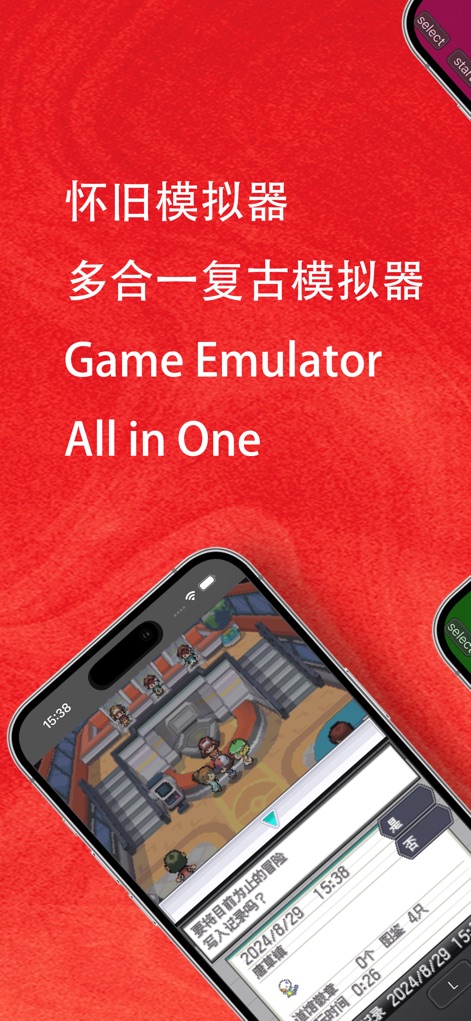
Die App ermöglicht es Nutzern, ikonische RPG-Szenen auf ihrem Mobilgerät zu genießen, während das integrierte Speichermenü jederzeit das Sichern des Fortschritts erlaubt.
Klassiker hautnah erleben

Nutzer erleben klassische Titel mit intuitiven virtuellen Bedienelementen und können dank der Fast-Forward-Funktion lange Dialoge oder Wiederholungen überspringen.
Retro-Gaming mobil
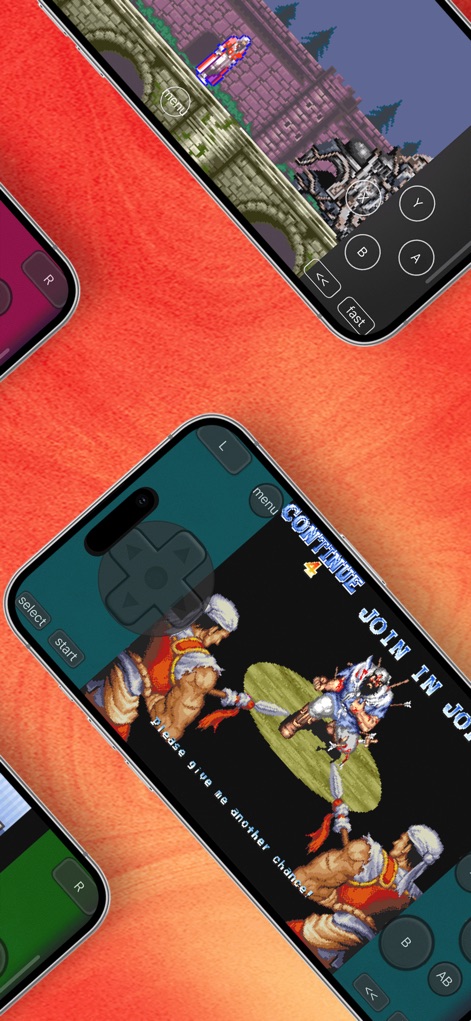
Dieses Tool präsentiert eine breite Palette klassischer Spielegenres, von detailreichen Action-Spielen bis hin zu packenden Plattformern, die alle mit virtuellen Buttons steuerbar sind.
Vielfältige Spielwelten

Nutzer tauchen in aufregende Action-Szenen ein und steuern ihre Helden präzise mit dem gut sichtbaren virtuellen Steuerkreuz und den Aktionsbuttons.
Actionreiche Abenteuer
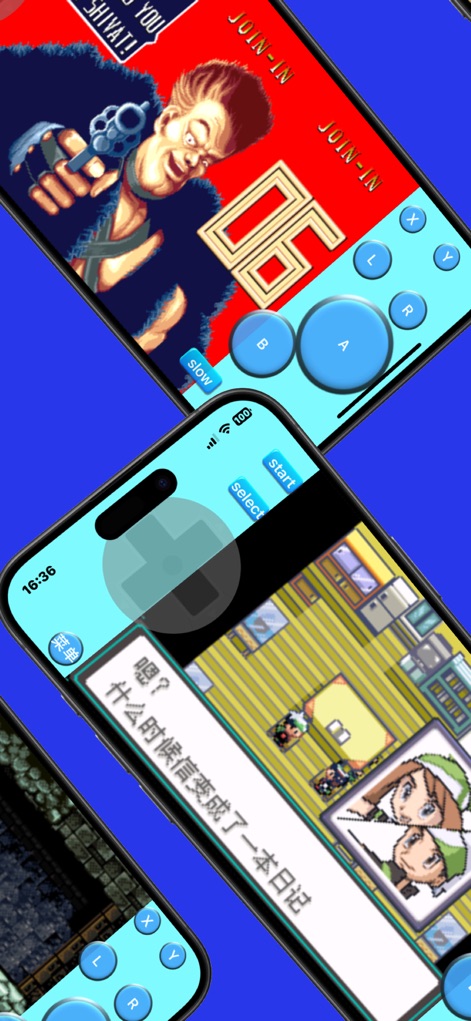
Die App belebt die einzigartige Pixelgrafik ikonischer Spiele neu und ermöglicht den Nutzern, in spannende Storylines mit interaktiven Dialogfeldern einzutauchen.
Pixel-Meisterwerke entdecken

Dieses Tool lädt Nutzer ein, farbenfrohe und weitläufige Spielwelten zu erkunden, während die präzisen virtuellen Tasten die flüssige Navigation ermöglichen.
Erkunde weite Welten

Die App bietet ein umfassendes Menü für erweiterte Einstellungen, inklusive der Möglichkeit, die Bildschirmrichtung anzupassen und den Spielfortschritt in mehreren Slots zu speichern.
Umfangreiche Optionen

Nutzer profitieren von einem intuitiven Einstellungsmenü, das die flexible Anpassung der Bildschirmansicht und die Wahl zwischen verschiedenen Display-Orientierungen ermöglicht.
Anpassbare Darstellung

Die App präsentiert ein klares und benutzerfreundliches Layout der virtuellen Bedienelemente, ergänzt durch dedizierte Tasten für die Steuerung der Spielgeschwindigkeit.
Intuitive Steuerung
Beschreibung
Download
Ähnliche Apps
Apps mit ähnlichen Funktionen und Nutzererfahrung
Retra - app console emulator
MODERN DEV LP

Manic EMU - Game Emulator
傲霜 李
Game Emulator: GamePod Emu
Aytek Sokmen

Gamuroid: All Game Emulator
UNIVERSAL TECHLAB COMPANY LIMITED

Lucky Emulator – GBA & DS
LUCKY MUSHROOM LIMITED

Game Emulator - RePlay
彩连 刘

Delta - Game Emulator
Yvette Testut
Emu — Game Consoles App
METRONOM YAZILIM LIMITED SIRKETI

Gamebyte
TE-DE GROUP doo
Diese Seite ist keine offizielle Seite der App oder ihres Entwicklers, sondern eine unabhängige redaktionelle Veröffentlichung, die zu Informations- und Kommentarzwecken erstellt wurde. Sofern nicht ausdrücklich anders angegeben, sind weder die App noch ihr Entwickler mit MWM, Apple, Google Play, dem App-Herausgeber oder dem Entwickler der App verbunden, von ihnen unterstützt, gesponsert, autorisiert oder anderweitig offiziell verbunden, und nichts auf dieser Seite impliziert, dass die App unter Verwendung der Dienste von MWM entwickelt wurde. Alle Marken, Logos, Screenshots und andere Inhalte bleiben Eigentum ihrer jeweiligen Inhaber.