
Diese Seite ist keine offizielle Seite der App oder ihres Entwicklers, sondern eine unabhängige redaktionelle Veröffentlichung, die zu Informations- und Kommentarzwecken erstellt wurde. Sofern nicht ausdrücklich anders angegeben, sind weder die App noch ihr Entwickler mit MWM, Apple, Google Play, dem App-Herausgeber oder dem Entwickler der App verbunden, von ihnen unterstützt, gesponsert, autorisiert oder anderweitig offiziell verbunden, und nichts auf dieser Seite impliziert, dass die App unter Verwendung der Dienste von MWM entwickelt wurde. Alle Marken, Logos, Screenshots und andere Inhalte bleiben Eigentum ihrer jeweiligen Inhaber.


MyHyundai with Bluelink
Fernzugriff war gestern. Diese App erteilt Befehle aus der Hosentasche – und liefert peinlich genaue Fahrzeugdaten.
Downloads
2.5M+Bewertung
Bewertungen gesamt
478.8KHerausgeber
Kategorie
ProductivitySprachen
1Neueste Version
5.3.9Größe
310.4 MBErstveröffentlichung
6. Juli 2014Eine detaillierte Bewertung der Kernfunktionen für Hyundai-Fahrzeugbesitzer.
Analyse der MyHyundai with Bluelink App
Fernsteuerung des Fahrzeugs
Diese Funktion ermöglicht es Nutzern, ihr Fahrzeug aus der Ferne zu starten, die Türen zu verriegeln oder zu entriegeln.
Laden von Elektro- und Plug-in-Hybridfahrzeugen
Die App bietet spezialisierte Tools zur Anzeige des Ladestatus und zur Verwaltung von Ladeplänen sowie -einstellungen für EV- und PHEV-Modelle.
Fahrzeugortung
Dieses Tool hilft Nutzern, ihr Fahrzeug schnell und unkompliziert zu lokalisieren, beispielsweise auf großen Parkplätzen oder in unbekannten Umgebungen.
Fahrzeugstatusprüfung
Es ermöglicht Nutzern, wichtige Informationen über den aktuellen Zustand ihres Fahrzeugs abzurufen, was zur proaktiven Wartung beiträgt.
Suche und Versand von Points of Interest (POI)
Die App gestattet es, interessante Orte zu suchen und diese direkt an das Navigationssystem des Fahrzeugs zu senden.
Online-Terminplanung für Wartung
Dieses Feature vereinfacht die Verwaltung des Fahrzeugs, indem es die Buchung von Serviceterminen direkt über die App ermöglicht.
Fernaktivierung von Hupe und Lichtern
Es bietet die Möglichkeit, die Hupe zu aktivieren und die Lichter aufleuchten zu lassen, um das Fahrzeug zu finden oder auf sich aufmerksam zu machen.
Biometrische Anmeldesicherheit
Die App unterstützt Touch ID und Face ID für eine sichere und komfortable Anmeldung und den Zugriff auf Bluelink-Funktionen.
Häufig gestellte Fragen
Alles, was Sie über wissen müssen MyHyundai with Bluelink
How do I access Bluelink features in the MyHyundai app?
You access Bluelink features in the MyHyundai app using your MyHyundai.com ID, password, and PIN. An active Bluelink subscription is mandatory. You can conveniently log in with Touch ID or Face ID.
What Bluelink features are available with the MyHyundai app?
The MyHyundai app offers Bluelink features like remote vehicle start, lock/unlock, horn/lights activation, finding your car, and checking vehicle status. It also supports charging management for EV/PHEV and POI search/send with the Guidance package.
Can I remotely start my Hyundai vehicle using the MyHyundai app?
Yes, the MyHyundai app allows you to remotely start your vehicle. This feature requires an active Bluelink Remote Package subscription and a Bluelink-enabled vehicle. Screenshot #2 shows a 'Climate Start' button for this function.
Does the MyHyundai app support electric or hybrid vehicles?
Yes, the MyHyundai app supports hybrid, EV, fuel cell, and gas vehicles. For EV and PHEV vehicles, you can view charging status and manage charging schedules and settings remotely.
How do I schedule a service appointment for my Hyundai using the MyHyundai app?
Yes, you can schedule a car care service appointment directly through the MyHyundai app. Navigate to the 'Car Care' section, where you find options for 'Service Scheduling' and selecting a preferred dealer.
What vehicle information can I view in the MyHyundai app?
The MyHyundai app displays detailed vehicle status including battery charge, remaining range, door lock states, hood/trunk/window status, location, fuel range, and odometer readings. This information is accessible from the main dashboard.
Can I set alerts for my Hyundai vehicle using the MyHyundai app?
Yes, the MyHyundai app allows you to manage Bluelink Alert Settings. You can configure Speed Alerts, Valet Alerts, Curfew Alerts, and Geo-Fence Alerts to safeguard your vehicle and passengers based on custom parameters.
Does the MyHyundai app offer remote control features for Apple Watch?
Yes, the MyHyundai app supports Apple Watch. You can use voice commands or the smartwatch app menu to remotely start your vehicle, unlock/lock doors, activate the horn and lights, and find your car.
How do I find charging stations for my EV with the MyHyundai app?
The MyHyundai app allows you to quickly find nearby charging stations for your EV. You can search by zip code and send Points of Interest (POI) to your vehicle's navigation system directly from the app.
Is a Bluelink subscription required to use the MyHyundai app?
Yes, an active Bluelink subscription is required to use Bluelink features within the MyHyundai app. You can renew or upgrade your subscription packages (Remote or Guidance) via MyHyundai.com.
Can I manage multiple drivers with the MyHyundai app?
Yes, the MyHyundai app allows you to add additional drivers. As the primary Bluelink subscriber, you can invite secondary drivers to create their own unique Bluelink preferences and manage vehicle settings.
Where can I find technical assistance for the MyHyundai app?
For technical assistance concerning the MyHyundai app, you can directly contact the support team via email at AppsTeam@hmausa.com. This ensures direct communication with app specialists.
Die folgenden Screenshots und die Beschreibung stammen direkt aus dem offiziellen Store-Eintrag der App und sind Eigentum des Entwicklers.
App Store
Screenshots

Die App ermöglicht Nutzern eine nahtlose Verbindung zum Fahrzeug über das Lenkrad und bietet eine komfortable Steuerung für ein reibungsloses Fahrerlebnis.
Direkte Fahrzeugverbindung
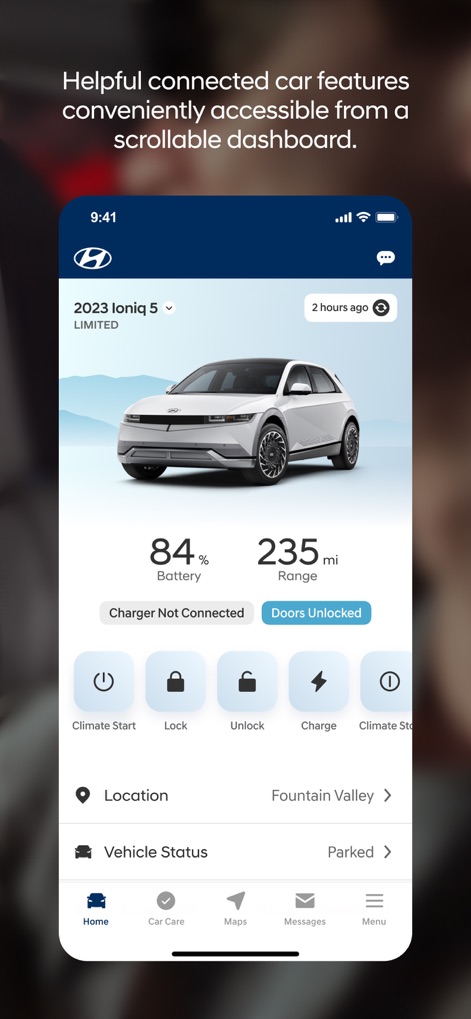
Das zentrale Dashboard präsentiert eine klare Übersicht über den aktuellen Batteriestand und ermöglicht den schnellen Zugriff auf verschiedene Fernsteuerungsoptionen.
Interaktives Dashboard

Diese Ansicht bietet eine detaillierte Fahrzeugstatusübersicht, einschließlich Informationen zu den Öffnungszuständen von Türen und Fenstern, für volle Transparenz.
Detaillierte Fahrzeugübersicht

Die App bietet Unterstützung für eine breite Modellvielfalt von Hybrid- bis Elektrofahrzeugen und begleitet Nutzer zuverlässig in jeder abenteuerlichen Umgebung.
Grenzenlose Unterstützung

Nutzer können verschiedene Sicherheitswarnungen wie Geschwindigkeits- und Valet-Benachrichtigungen anpassen und die Geo-Fence-Funktion für definierte Bereiche aktivieren.
Intelligente Sicherheitsalarme

Die App visualisiert Ladestationen auf einer interaktiven Karte und liefert eine übersichtliche Standortliste mit Adressen und Entfernungen zu den nächsten Ladepunkten.
Ladestationen finden

Dieses Tool ermöglicht die Erstellung und Verwaltung von Fahrerprofilen, inklusive der Anzeige von Profilbildern, um personalisierte Einstellungen für jeden Nutzer zu speichern.
Fahrerprofile verwalten

Die App bietet Nutzern umfassende Informationen zur Fahrzeugdiagnose und erleichtert die Wartungsplanung durch direkte Terminvereinbarungen.
Umfassende Fahrzeugpflege

Nutzer können auf einer Karte Hyundai-Händler finden und direkt über die App eine Serviceterminbuchung für ihr Fahrzeug vornehmen.
Händler & Service
Beschreibung
Download
Ähnliche Apps
Apps mit ähnlichen Funktionen und Nutzererfahrung

Toyota
Toyota Motor Sales, U.S.A., Inc.

myChevrolet
General Motors
My BMW
BMW NORTH AMERICA, LLC

Mercedes-Benz (USA/CA)
Mercedes-Benz USA LLC

LoJack
Spireon, Inc.

Tessie — For your Tesla
Tessie Technology LLC

Tesla
Tesla, Inc.

Ford™
Ford Motor Company

MyMazda
Mazda Motor Corporation
Diese Seite ist keine offizielle Seite der App oder ihres Entwicklers, sondern eine unabhängige redaktionelle Veröffentlichung, die zu Informations- und Kommentarzwecken erstellt wurde. Sofern nicht ausdrücklich anders angegeben, sind weder die App noch ihr Entwickler mit MWM, Apple, Google Play, dem App-Herausgeber oder dem Entwickler der App verbunden, von ihnen unterstützt, gesponsert, autorisiert oder anderweitig offiziell verbunden, und nichts auf dieser Seite impliziert, dass die App unter Verwendung der Dienste von MWM entwickelt wurde. Alle Marken, Logos, Screenshots und andere Inhalte bleiben Eigentum ihrer jeweiligen Inhaber.