MyQRcards
MyQRcards
Herunterladen auf App Store

Diese Seite ist keine offizielle Seite der App oder ihres Entwicklers, sondern eine unabhängige redaktionelle Veröffentlichung, die zu Informations- und Kommentarzwecken erstellt wurde. Sofern nicht ausdrücklich anders angegeben, sind weder die App noch ihr Entwickler mit MWM, Apple, Google Play, dem App-Herausgeber oder dem Entwickler der App verbunden, von ihnen unterstützt, gesponsert, autorisiert oder anderweitig offiziell verbunden, und nichts auf dieser Seite impliziert, dass die App unter Verwendung der Dienste von MWM entwickelt wurde. Alle Marken, Logos, Screenshots und andere Inhalte bleiben Eigentum ihrer jeweiligen Inhaber.

Logo von MyQRcards
Herunterladen auf App Store

MyQRcards

Teilen Sie Ihre Kontaktdaten sofort per QR, NFC oder Link. Beeindrucken Sie jede Verbindung mit umweltfreundlichem Networking, das direkt auf ihrem Handy gespeichert wird – Empfänger benötigen keine App.

Kennzahlen

Downloads

141K+

Bewertung

4.6/5

Bewertungen gesamt

900

Herausgeber

SMART-SERVIS, OOO Apps

Kategorie

Business

Sprachen

2

Neueste Version

1.13.10

Größe

105.3 MB

Erstveröffentlichung

11. Jan. 2022
Funktionen

Zukunftssicher für Ihr professionelles Netzwerk

Beeindrucken Sie Kunden und Kollegen mit einer High-Tech, umweltfreundlichen digitalen Visitenkarte, die genau dort funktioniert, wo Sie arbeiten – vom Café bis zu globalen Videokonferenzen.

Sofortiger Zugriff, Null Reibung

Teilen Sie Ihr Profil in Sekundenschnelle per QR oder NFC. Empfänger können Ihre Karte sofort in ihrem Browser anzeigen und damit interagieren, ohne Apps herunterladen zu müssen.

Kontaktsynchronisierung mit einem Klick

Beenden Sie die Ära verlorener Papierkarten. Stellen Sie sicher, dass Sie nie vergessen werden, mit einer Schaltfläche 'Zu Kontakten hinzufügen', die Ihr Foto und Ihre Details direkt in ihr Telefonbuch synchronisiert.

Die folgenden Screenshots und die Beschreibung stammen direkt aus dem offiziellen Store-Eintrag der App und sind Eigentum des Entwicklers.

App Store

Screenshots
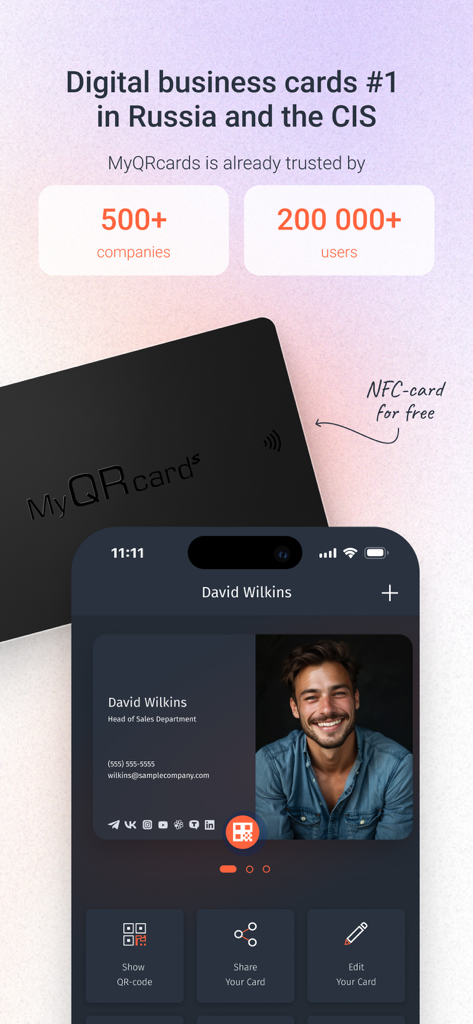
MyQRcards - Ein Smartphone-Bildschirm, der ein MyQRcards digitales Visitenkartenprofil neben einer physischen schwarzen NFC-Karte anzeigt.
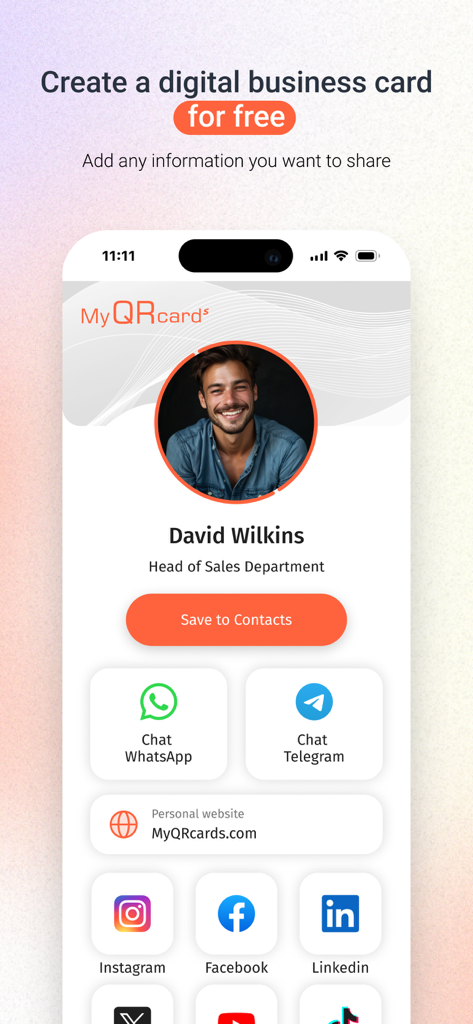
Ein Smartphone-Bildschirm, der ein MyQRcards digitales Visitenkartenprofil neben einer physischen schwarzen NFC-Karte anzeigt.

MyQRcards - Oberfläche der MyQRcards-App, die eine digitale Visitenkarte für einen Vertriebsmitarbeiter mit Social-Media- und Kontaktlinks anzeigt
Oberfläche der MyQRcards-App, die eine digitale Visitenkarte für einen Vertriebsmitarbeiter mit Social-Media- und Kontaktlinks anzeigt

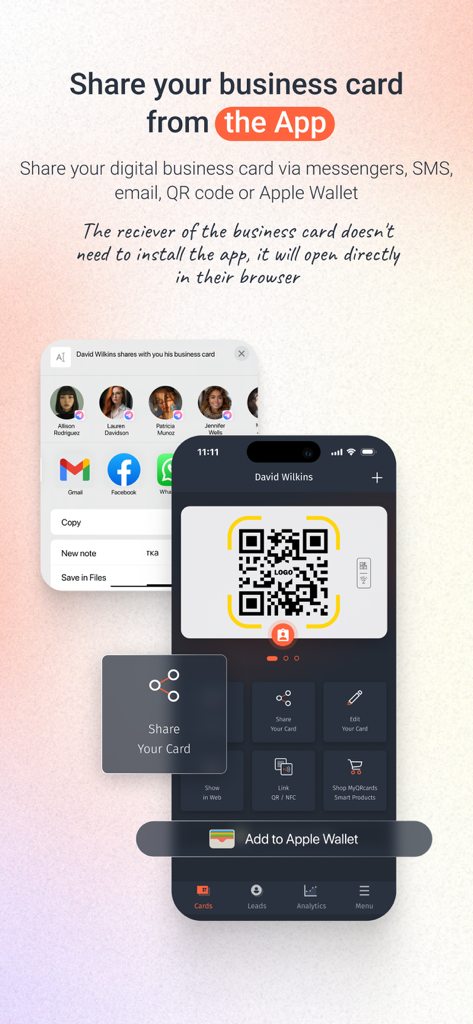
MyQRcards - MyQRcards-App-Oberfläche, die zeigt, wie eine digitale Visitenkarte über QR-Code und Apple Wallet geteilt wird.
MyQRcards-App-Oberfläche, die zeigt, wie eine digitale Visitenkarte über QR-Code und Apple Wallet geteilt wird.

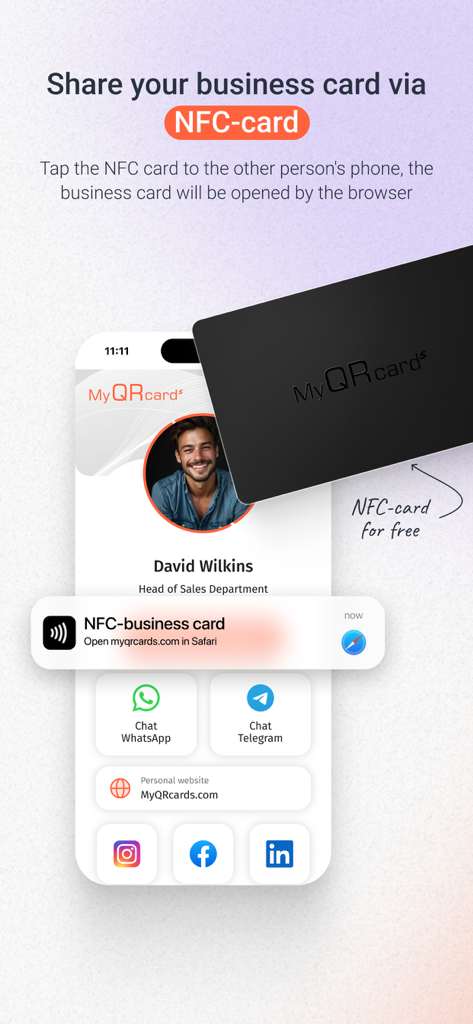
MyQRcards - Eine digitale Visitenkarte, die durch Antippen einer NFC-Karte gegen ein Smartphone geteilt wird.

Eine digitale Visitenkarte, die durch Antippen einer NFC-Karte gegen ein Smartphone geteilt wird.
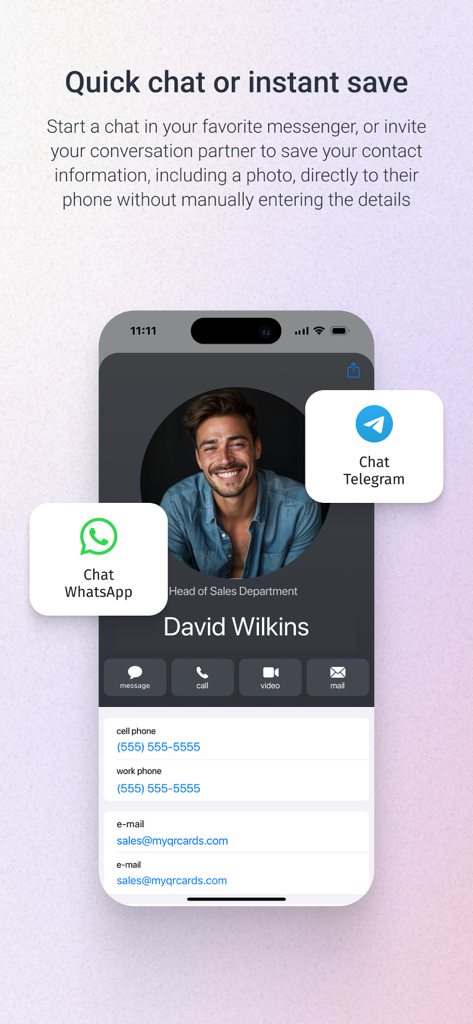
MyQRcards - Digitale Visitenkarte mit WhatsApp- und Telegramm-Chat-Optionen in MyQRcards
Digitale Visitenkarte mit WhatsApp- und Telegramm-Chat-Optionen in MyQRcards

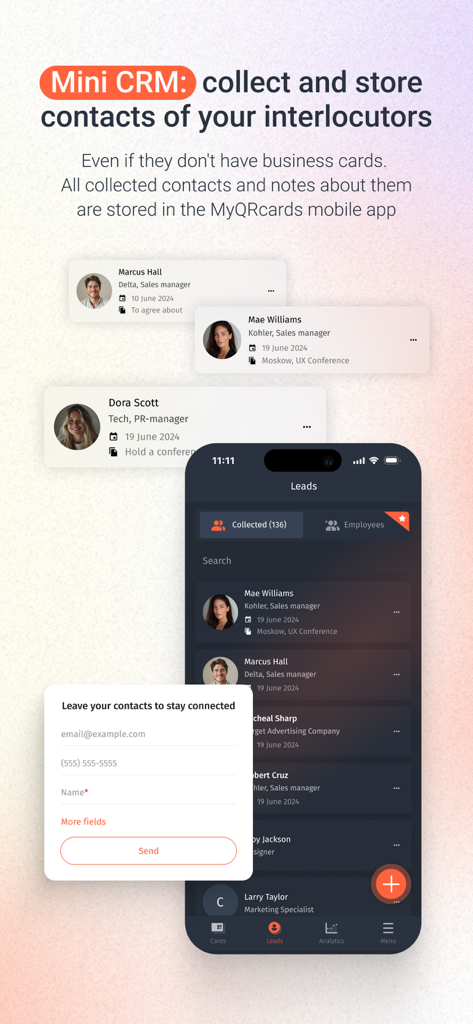
MyQRcards - MyQRcards-App-Oberfläche, die die Mini-CRM-Funktion zum Sammeln und Speichern von Kontakten anzeigt
MyQRcards-App-Oberfläche, die die Mini-CRM-Funktion zum Sammeln und Speichern von Kontakten anzeigt

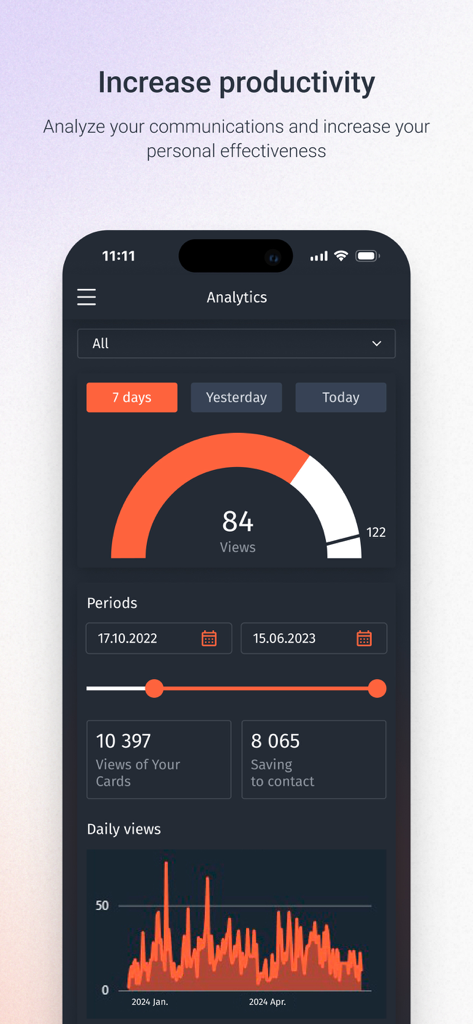
MyQRcards - Analyse-Dashboard von MyQRcards, das Statistiken zu Visitenkarten-Aufrufen und Kontaktspeicherung anzeigt
Analyse-Dashboard von MyQRcards, das Statistiken zu Visitenkarten-Aufrufen und Kontaktspeicherung anzeigt

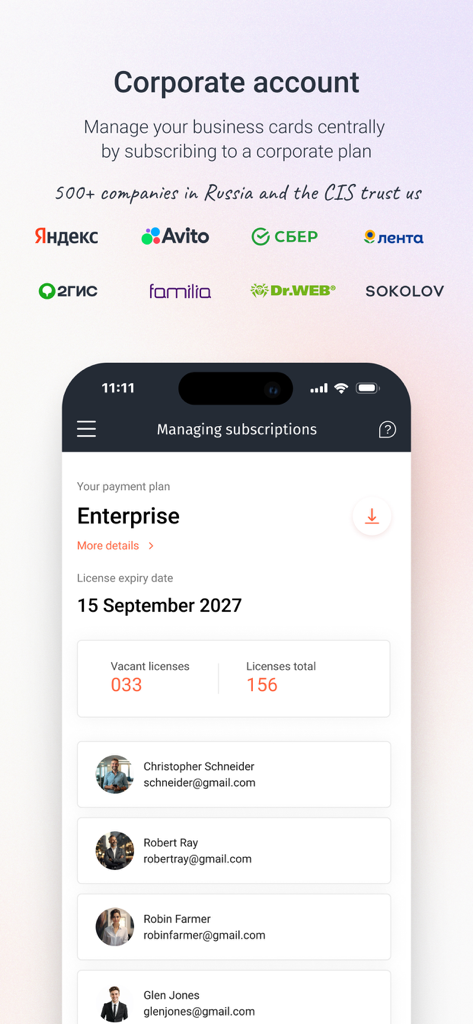
MyQRcards - Dashboard-Ansicht der MyQRcards-App, die ein Corporate-Enterprise-Konto und Benutzerlizenzen verwaltet.

Dashboard-Ansicht der MyQRcards-App, die ein Corporate-Enterprise-Konto und Benutzerlizenzen verwaltet.

Beschreibung

This is a popular application for creating electronic business cards with QR code. Impress everyone! Create electronic business cards directly in the app! Share your business card with one tap: directly in the app, or using a QR-code, or an additional smart medium (NFC-card, NFC-tag, QR/NFC-sticker, QR-badge or desktop sign with an electronic business card). Show the QR-code using the application or just click the button to send the link via SMS, WhatsApp or any other messenger. There is no need for your partner to install the app to read your electronic business card. With our application, you can create one infinite business card without any functional restrictions for personal use for free. The paid version allows you to create up to 10 electronic business cards: various business cards for projects, for business trips, etc. For businesses, we offer flexible tariff plans providing you with the opportunity not only to replace paper-based business cards with electronic ones, but also to manage your employees' business cards through a personal account. You can find more details on the website of our project: MyQRcards.com. Create business cards directly in the app within 30 seconds and share them when meeting someone or online. Add the QR-code from your business card to the conference background by taking a screenshot of the QR-code and placing it in the back in Zoom, Skype or Teams (to do this you need to use any other application where it is possible to insert a QR-code image). FAQ: >How can I share a ‘MyQRcards’ electronic business card? To share an electronic business card, just send the link from the application using any messenger or SMS-services. You can also ask your partner to point the smartphone camera at the QR-code of the business card in the app. The business card will be immediately opened in the browser, from where it’s possible to save it to the contact list by a couple of clicks. Furthermore, you can share your ‘MyQRcards’ electronic business card through an NFC-card, NFC-tag or sticker. >How can I save an electronic business card to a contact list? You can save an electronic business card to your contact list by just a couple of clicks. Each electronic business card has a ‘Save to Contacts’ button. When you click it, the business card will be immediately saved to the phone book. If you open an electronic business card using a PC, then your contact will be saved in the address book of the installed mail program. >Why do I need NFC-cards and QR/NFC-stickers for business cards? In addition to the business card created in the app, you can order a QR or NFC-card, as well as a QR or NFC-sticker made of various materials: soft-touch 3D-plastic, precious woods, metal or carbon (for more details please visit our website: MyQRcards.com). The use of an NFC-card will help you share your business card even without opening an application. Branded ‘MyQRcards’ cards can be linked to any business card an unlimited number of times directly in the app. Benefits of ‘MyQRcards’ electronic business cards - THERE IS NO NEED TO PRINT business cards - NO NEED TO INSTALL THE APPLICATION TO GET YOUR BUSINESS CARD - REDUCED COSTS - THERE IS A GUARANTEE THAT YOUR CONTACT WILL BE SAVED - WHEN YOU SHARE THE BUSINESS CARD AND CALL, A PHOTO WILL BE DISPLAYED - YOU WILL NEVER FORGET TO TAKE A BUSINESS CARD ANYMORE - YOU CAN BUSINESS CARDS JUST BY ONE TOUCH - MULTI-LANGUAGE (ENGLISH OR RUSSIAN) - AN INDIVIDUAL BUSINESS CARD FOR ANY OCCASION: FOR A PROJECT, CONFERENCE, FRIENDS, ETC. - SMART ACCESSORIES AND NFC-CARDS WHICH CAN BE USED IN THE APP - DATA STORAGE IN ACCORDANCE WITH FEDERAL LAW NO. 152: SAFE AND RELIABLE! - THE DATA IN ELECTRONIC BUSINESS CARDS ARE ALWAYS UP-TO-DATE - THE EASIEST WAY TO MAKE CONTACTS - PROTECT NATURE User Agreement and Privacy Policy:  http://www.myqrcards.com/agreement/en https://www.apple.com/legal/internet-services/itunes/dev/stdeula/

Download

Herunterladen auf App Store

Diese Seite ist keine offizielle Seite der App oder ihres Entwicklers, sondern eine unabhängige redaktionelle Veröffentlichung, die zu Informations- und Kommentarzwecken erstellt wurde. Sofern nicht ausdrücklich anders angegeben, sind weder die App noch ihr Entwickler mit MWM, Apple, Google Play, dem App-Herausgeber oder dem Entwickler der App verbunden, von ihnen unterstützt, gesponsert, autorisiert oder anderweitig offiziell verbunden, und nichts auf dieser Seite impliziert, dass die App unter Verwendung der Dienste von MWM entwickelt wurde. Alle Marken, Logos, Screenshots und andere Inhalte bleiben Eigentum ihrer jeweiligen Inhaber.








