Notate + Play = music notebook
Herunterladen auf App Store

Diese Seite ist keine offizielle Seite der App oder ihres Entwicklers, sondern eine unabhängige redaktionelle Veröffentlichung, die zu Informations- und Kommentarzwecken erstellt wurde. Sofern nicht ausdrücklich anders angegeben, sind weder die App noch ihr Entwickler mit MWM, Apple, Google Play, dem App-Herausgeber oder dem Entwickler der App verbunden, von ihnen unterstützt, gesponsert, autorisiert oder anderweitig offiziell verbunden, und nichts auf dieser Seite impliziert, dass die App unter Verwendung der Dienste von MWM entwickelt wurde. Alle Marken, Logos, Screenshots und andere Inhalte bleiben Eigentum ihrer jeweiligen Inhaber.

Logo von Notate + Play = music notebook
Herunterladen auf App Store

Notate + Play = music notebook

Hören Sie auf, zwischen Apps zu wechseln. Synchronisieren Sie Ihre Apple Music oder Aufnahmen direkt mit dem Notensystem, verlangsamen Sie die Wiedergabe und transkribieren Sie präzise mit separaten Eingaben für Rhythmus und Tonhöhe.

Kennzahlen

Downloads

3K+

Bewertung

1.0/5

Bewertungen gesamt

0

Herausgeber

Kunio Arai

Kategorie

Music

Sprachen

2

Neueste Version

3.50

Größe

12.7 MB

Erstveröffentlichung

7. Juli 2023
Funktionen

Meistern Sie Ihren Transkriptions-Workflow

Schließen Sie die Lücke zwischen Ihrem Gehör und der Seite. Notate + Play bietet einen professionellen Arbeitsbereich, um Aufnahmen zu transkribieren, Übungssitzungen aufzuzeichnen und Ihre digitale Notenbibliothek auf dem iPad zu erstellen.

Vereinigte Audio- & Notationsfunktion

Eliminieren Sie das Wechseln zwischen Apps. Sehen Sie Ihre Noten und Referenz-Audio von Apple Music oder Live-Aufnahmen auf einem einzigen, synchronisierten Bildschirm.

Theoriebasierte Eingabemethode

Geben Sie Rhythmus und Tonhöhe getrennt ein, um professionelles Konservatoriumstraining nachzuahmen, Fehler zu reduzieren und Ihnen zu helfen, komplexe Soli mühelos zu transkribieren.

Die folgenden Screenshots und die Beschreibung stammen direkt aus dem offiziellen Store-Eintrag der App und sind Eigentum des Entwicklers.

App Store

Screenshots
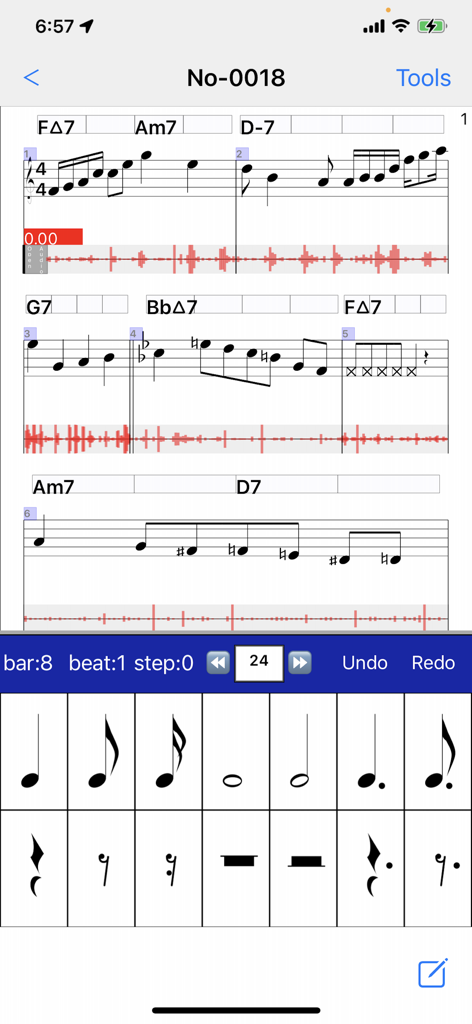
Notate + Play = music notebook - Oberfläche der Musiknotizbuch-App, die Noten zeigt, synchronisiert mit Audio-Wellenformen und einer Rhythmus-Eingabetastatur.
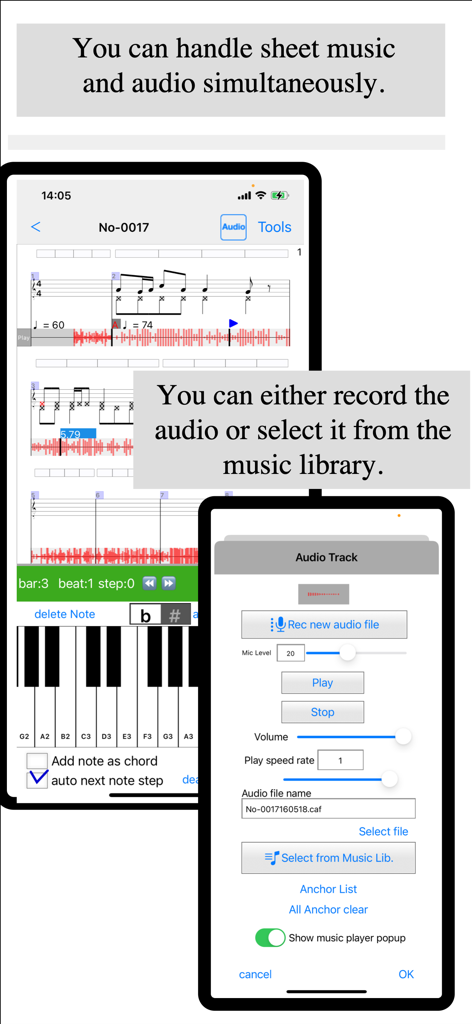
Oberfläche der Musiknotizbuch-App, die Noten zeigt, synchronisiert mit Audio-Wellenformen und einer Rhythmus-Eingabetastatur.

Notate + Play = music notebook - Musiknotations-Oberfläche, die Noten zeigt, synchronisiert mit Audio-Wellenformen und einem Track-Aufnahme-Menü
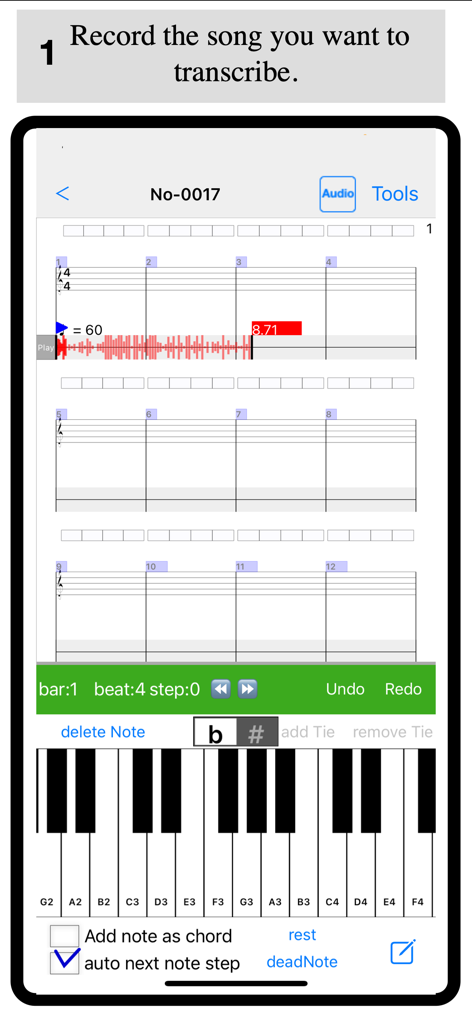
Musiknotations-Oberfläche, die Noten zeigt, synchronisiert mit Audio-Wellenformen und einem Track-Aufnahme-Menü

Notate + Play = music notebook - Eine Musiktranskriptions-Oberfläche, die eine aufgenommene Audio-Wellenform über einem leeren Notensystem und einer virtuellen Klaviertastatur zeigt.
Eine Musiktranskriptions-Oberfläche, die eine aufgenommene Audio-Wellenform über einem leeren Notensystem und einer virtuellen Klaviertastatur zeigt.

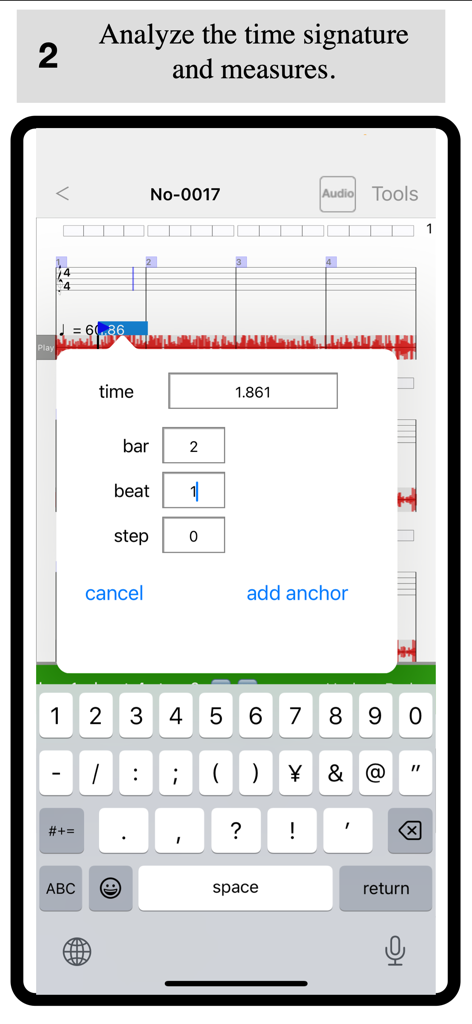
Notate + Play = music notebook - Oberfläche zum Hinzufügen eines Beat Anchors zur Synchronisierung von Audio mit Noten in der Notate Play App.
Oberfläche zum Hinzufügen eines Beat Anchors zur Synchronisierung von Audio mit Noten in der Notate Play App.

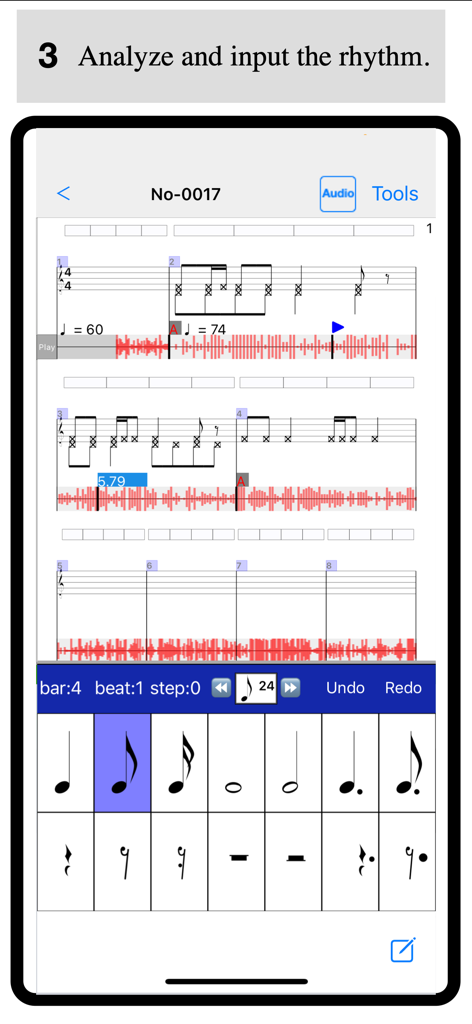
Notate + Play = music notebook - Oberfläche der Notate and Play App zur Analyse und Eingabe von Musikrhythmus mit einer Audio-Wellenform und einem Notensystem
Oberfläche der Notate and Play App zur Analyse und Eingabe von Musikrhythmus mit einer Audio-Wellenform und einem Notensystem

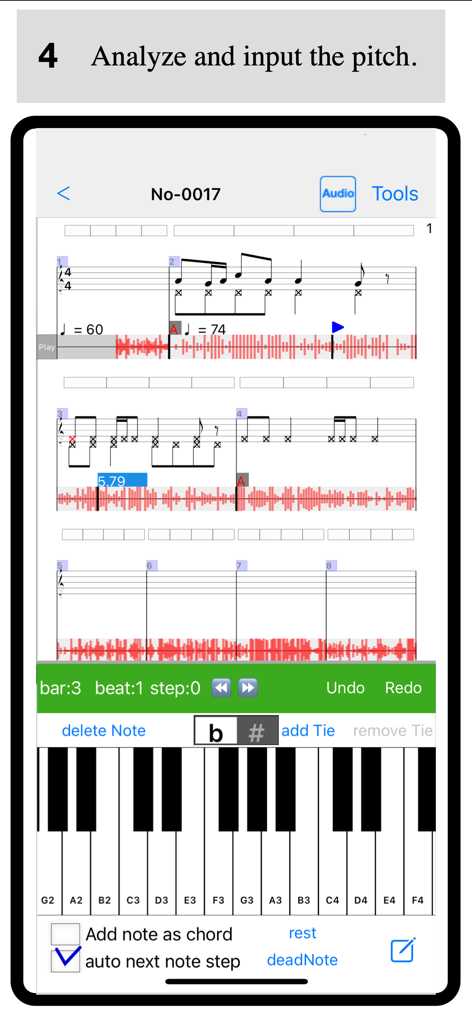
Notate + Play = music notebook - Musiktranskriptions-App-Oberfläche mit einer Klaviertastatur zur Tonhöpfen-Eingabe und Noten mit Audio-Wellenformen
Musiktranskriptions-App-Oberfläche mit einer Klaviertastatur zur Tonhöpfen-Eingabe und Noten mit Audio-Wellenformen

Notate + Play = music notebook - Oberfläche einer Notations-App, die Noten anzeigt, synchronisiert mit einer Audio-Wellenform und einer virtuellen Klaviertastatur zur Transkription
Oberfläche einer Notations-App, die Noten anzeigt, synchronisiert mit einer Audio-Wellenform und einer virtuellen Klaviertastatur zur Transkription

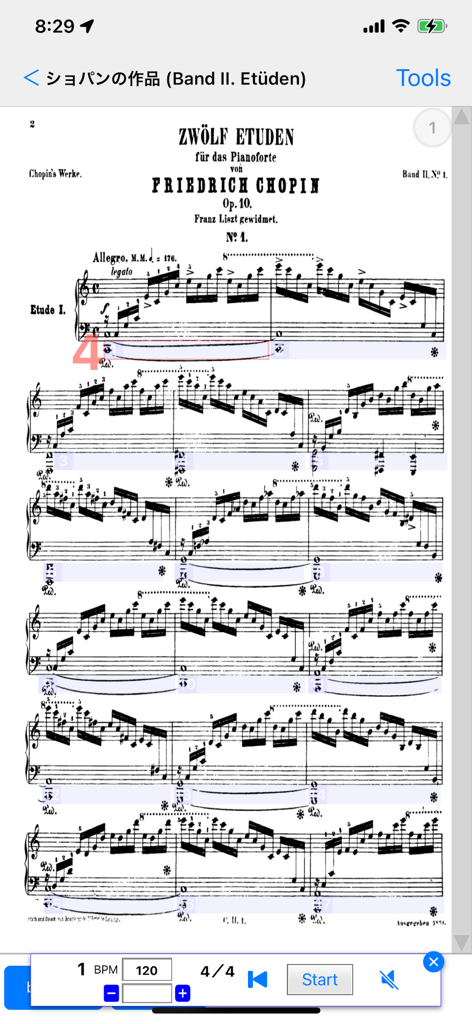
Notate + Play = music notebook - Chopin-Klaviernoten angezeigt in der Notate and Play App mit integriertem Metronom und Wiedergabeeinstellungen

Chopin-Klaviernoten angezeigt in der Notate and Play App mit integriertem Metronom und Wiedergabeeinstellungen

Beschreibung

About This App This app is designed to support musical instrument practice.
It allows you to view and listen to both a reference audio file (such as a recording or a track from your music library) and sheet music on the same screen. By listening to the reference performance while writing or reviewing sheet music, you can strengthen the connection between the music and the notation, helping you achieve a more ideal performance.
Ultimately, you may even be able to reproduce the music in your head through your instrument. Selecting Audio There are two ways to choose a reference audio file: 1 Selecting from the Music Library
You can select a song from your Apple Music library. 2 Recording with a Microphone
You can record using the microphone on your iPad or iPhone. If no audio track is selected, tapping the track will open the recording screen. Press "Rec new audio file" to start recording.
To stop recording, tap the audio track and select "Stop Recording" from the dialog. The audio track functions as a player. You can tap any position on the track to start playback from that point. The player controls appear above the sheet music input dialog at the bottom of the screen, allowing you to play, stop, and adjust playback speed. Creating Sheet Music While using pre-existing sheet music is convenient, transcribing it yourself is a great way to improve your skills. 1 Setting the Time Signature and Tempo
First, determine the time signature and tempo of the piece. Since many popular songs use a 4/4 time signature, this is set as the default. The default tempo is 60 BPM, but you can adjust it using the "Tempo Change Dialog." 2 Synchronizing Sheet Music and Audio
While playing the audio, identify the starting points of measures. If the measure positions and the audio are misaligned, use the "Beat Anchor" feature to adjust them. By adding anchors, you can link playback time with measure positions, creating a more precise score.
Adding multiple anchors will allow the app to calculate the tempo automatically. If the time signature changes during the piece, you can add a time signature mark to any measure. Main Features 1 Linking Audio and Sheet Music
You can select a song from your music library or use a recorded audio file and link it to your sheet music. Setting anchors helps streamline the transcription process. 2 Separate Input for Rhythm and Pitch
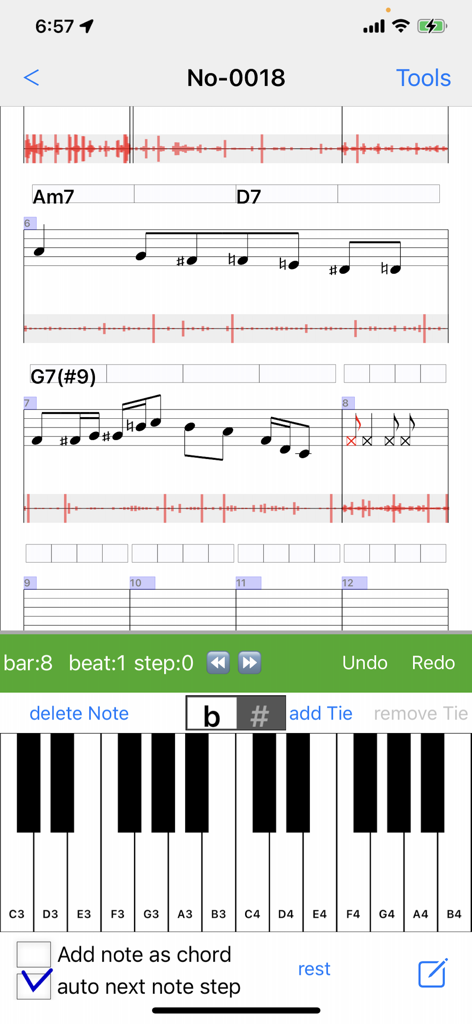
The app supports a training-based approach by allowing users to input rhythm and pitch separately. Entering rhythm first and then pitch ensures more accurate transcription. 3 Vertical Scrolling for Sheet Music
The sheet music can be scrolled vertically for easier viewing. This option can be enabled in the settings. 4 Adding and Editing Tracks
You can freely add and edit tracks, including chords, notes, text, and audio. 5 Audio Playback Speed Adjustment
Adjust the playback speed to make transcription and practice easier. 6 Sheet Music Viewer
Import sheet music from PDF or images and view them easily within the app. 7 Metronome Feature
The built-in metronome automatically scrolls the sheet music according to the tempo and time signature set in the score. 8 Second Voice Part Notation
The app now supports second voice parts in sheet music. To enable this, go to "Edit Track(s)" and select an individual Note Track, then check "Second Voice Part." This allows you to enter a second voice part for that track.
To enter second voice notes, tap the lower area of the staff. You can also prioritize second voice selection by enabling the "2nd Voice" option in the note input view. 9 Adding Slurs and Text to Sheet Music
You can now input slurs and text onto the sheet music. Simply select a range of notes and use the popup menu to add them.

Download

Herunterladen auf App Store

Diese Seite ist keine offizielle Seite der App oder ihres Entwicklers, sondern eine unabhängige redaktionelle Veröffentlichung, die zu Informations- und Kommentarzwecken erstellt wurde. Sofern nicht ausdrücklich anders angegeben, sind weder die App noch ihr Entwickler mit MWM, Apple, Google Play, dem App-Herausgeber oder dem Entwickler der App verbunden, von ihnen unterstützt, gesponsert, autorisiert oder anderweitig offiziell verbunden, und nichts auf dieser Seite impliziert, dass die App unter Verwendung der Dienste von MWM entwickelt wurde. Alle Marken, Logos, Screenshots und andere Inhalte bleiben Eigentum ihrer jeweiligen Inhaber.







