
Diese Seite ist keine offizielle Seite der App oder ihres Entwicklers, sondern eine unabhängige redaktionelle Veröffentlichung, die zu Informations- und Kommentarzwecken erstellt wurde. Sofern nicht ausdrücklich anders angegeben, sind weder die App noch ihr Entwickler mit MWM, Apple, Google Play, dem App-Herausgeber oder dem Entwickler der App verbunden, von ihnen unterstützt, gesponsert, autorisiert oder anderweitig offiziell verbunden, und nichts auf dieser Seite impliziert, dass die App unter Verwendung der Dienste von MWM entwickelt wurde. Alle Marken, Logos, Screenshots und andere Inhalte bleiben Eigentum ihrer jeweiligen Inhaber.

Noteshelf 3: AI Digital Notes
Papierkram frisst Zeit. Noteshelf 3 liefert die digitale K.o.-Runde für analoges Chaos.
Downloads
1M+Bewertung
Bewertungen gesamt
13.7KHerausgeber
Kategorie
ProductivitySprachen
9Neueste Version
6.11Größe
400.9 MBErstveröffentlichung
18. Aug. 2023Dieses Review beleuchtet die entscheidenden Merkmale, die Noteshelf 3 zu einem leistungsstarken Tool für vielfältige digitale Notizen auf Apple-Geräten machen.
Analyse der Kernfunktionen von Noteshelf 3: AI Digital Notes
AI-gestützte Notizenerstellung und Textverarbeitung
Die App ermöglicht Nutzern, handschriftliche Notizen zu jedem Thema mühelos zu generieren. Zudem bietet sie Funktionen zur Zusammenfassung ganzer Seiten, zur Übersetzung von Texten in verschiedene Sprachen und zur Erklärung komplexer Begriffe, was die Produktivität signifikant steigert.
Professionelle PDF-Annotation und Dokumentenverwaltung
Es verfügt über präzise Werkzeuge zum Importieren, Hervorheben, Unterstreichen und Annotieren von PDFs, DOCs, PPTs und Bildern. Ein integrierter Dokumentenscanner erleichtert zudem die Digitalisierung physischer Dokumente für einen papierlosen Workflow.
Umfassende plattformübergreifende Synchronisierung und Datensicherung
Dieses Tool gewährleistet den Zugriff auf Notizen über iPad, iPhone und Mac mittels iCloud-Synchronisierung. Eine automatische Sicherungsfunktion zu Cloud-Diensten wie Google Drive und Dropbox schützt wertvolle Daten.
Flexible Handschrifterkennung und digitale Schreibwerkzeuge
Die App bietet eine Reihe lebensechter Stifte und Textmarker für wunderschöne handschriftliche Notizen. Sie wandelt Handschrift in Text um und ermöglicht die Suche in handschriftlichen Notizen in über 65 Sprachen, was die Effizienz steigert.
Intuitive Notizenorganisation und Multitasking
Es ermöglicht die Organisation von Notizbüchern in Ordnern und Unterordnern, das Setzen von Lesezeichen, die Verwendung von Tags und die Erstellung intelligenter Ordner. Die Unterstützung mehrerer Fenster erlaubt zudem das gleichzeitige Arbeiten an zwei Notizbüchern.
Reichhaltige Multimedia-Integration und Bildbearbeitung
Die App unterstützt die Audioaufnahme während der Notizen, was ideal für Vorlesungen und Meetings ist. Sie integriert Emojis, Sticker, und ermöglicht den Zugriff auf Bildbibliotheken wie Unsplash und Pixabay, ergänzt durch erweiterte Bildbearbeitungsfunktionen.
Personalisierbare Benutzeroberfläche und umfangreiche Vorlagen
Nutzer können digitale Notizbücher mit eigenen Covern und eine vollständig anpassbare Werkzeugleiste gestalten. Eine Bibliothek von über 200 exklusiven Vorlagen für Planer und Notizen unterstützt vielfältige Anwendungsfälle.
Interaktiver Präsentationsmodus
Die App bietet einen Präsentationsmodus, der das Projizieren von Notizen und Folien über externe Displays ermöglicht, inklusive Laserpointer-Funktion zur Hervorhebung wichtiger Punkte in Echtzeit.
Häufig gestellte Fragen
Alles, was Sie über wissen müssen Noteshelf 3: AI Digital Notes
What is Noteshelf 3?
Noteshelf 3 is a digital note-taking app that allows users to create handwritten notes, annotate PDFs, record audio, and utilize AI features for an enhanced note-taking experience.
Does Noteshelf 3 support AI features?
Yes, Noteshelf 3 incorporates Noteshelf AI to enhance note-taking, summarizing, translating, and explaining complex terms.
Can users personalize handwriting tools in Noteshelf 3?
Yes, Noteshelf 3 offers a range of lifelike pens and highlighters, including a fountain pen, to customize handwriting and enhance the aesthetic of digital notes.
Does Noteshelf 3 offer different paper types for notes?
Yes, Noteshelf 3 provides options for lined, dotted, or grid papers, allowing users to customize color and line spacing for their notes.
Can Noteshelf 3 users customize notebook covers?
Yes, Noteshelf 3 allows users to personalize digital notebooks with multiple cover options, including classic designs or custom images and artwork.
Is the toolbar in Noteshelf 3 customizable?
Yes, Noteshelf 3 features a fully customizable toolbar where users can add, remove, or rearrange tools to match their unique workflow preferences.
Does Noteshelf 3 provide note-taking templates?
Yes, Noteshelf 3 offers a vast library of over 200 exclusive templates for various purposes, such as study planners, class notes, and bullet journals.
Does Noteshelf 3 include digital diaries and journals?
Yes, Noteshelf 3 allows users to plan and organize daily tasks with configurable digital diaries and journals.
Can Noteshelf 3 automatically convert strokes into shapes?
Yes, Noteshelf 3 can transform handwritten strokes into flawless shapes and allows users to choose geometric shapes for creating flowcharts and diagrams.
What typing and formatting options are available in Noteshelf 3?
Noteshelf 3 offers various typing styles, formatting options, bulleted/numbered lists, and checklists to enhance text-based note-taking.
Does Noteshelf 3 allow audio recording during note-taking?
Yes, Noteshelf 3 enables users to record audio simultaneously while taking notes, which is beneficial for lectures and meetings.
Does Noteshelf 3 support handwriting recognition?
Yes, Noteshelf 3 converts handwriting into text and allows searching of handwritten notes using recognition technology across 65 supported languages.
How can users organize notes in Noteshelf 3?
Noteshelf 3 allows users to organize notebooks into folders and subfolders, and sort them in their preferred order for efficient paperless management.
Does Noteshelf 3 support multi-tasking with multiple notebooks?
Yes, Noteshelf 3 supports multi-tasking, allowing users to work on two notebooks simultaneously with its multiple windows feature.
What file types can Noteshelf 3 annotate?
Noteshelf 3 allows users to import and precisely highlight, underline, or annotate PDFs, DOCs, PPTs, and images.
Does Noteshelf 3 include a document scanner?
Yes, Noteshelf 3 features a built-in document scanner to quickly digitize physical documents.
How can users export notes from Noteshelf 3?
Users can export and share their notes from Noteshelf 3 as images and PDFs.
Can Noteshelf AI generate handwritten notes?
Yes, Noteshelf AI can effortlessly generate handwritten notes on any given topic.
What capabilities does Noteshelf AI offer?
Noteshelf AI can summarize pages, translate text into various languages, and explain complex terms, among other features.
How does Noteshelf 3 secure user notes?
Noteshelf 3 secures notes using passwords, Face ID, or Touch ID to protect user information.
Does Noteshelf 3 sync notes across devices?
Yes, Noteshelf 3 syncs notes across iPad, iPhone, and Mac devices using iCloud, ensuring accessibility from anywhere.
Can Noteshelf 3 automatically back up notes to cloud storage?
Yes, Noteshelf 3 supports auto-backup of notes to popular cloud storage services including Google Drive, OneDrive, Dropbox, and WebDAV.
Does Noteshelf 3 integrate with Evernote?
Yes, Noteshelf 3 can auto-publish notes to Evernote, allowing users to access them from any location.
Does Noteshelf 3 have a presentation mode?
Yes, Noteshelf 3 includes a presentation mode that allows users to project notes and slides via an external display, utilizing a laser pointer and markers.
Is Noteshelf 3 a free app?
Yes, Noteshelf 3 is free to use with some limits. A premium subscription unlocks features like unlimited notebooks, handwriting recognition, and advanced backup options.
What features are included with Noteshelf 3 Premium?
Noteshelf 3 Premium provides unlimited notebooks, handwriting recognition and search, auto-backup to cloud services, access to templates and digital diaries, and 100 monthly AI credits.
Can Noteshelf 3 help organize daily tasks?
Yes, Noteshelf 3 allows users to create priority lists, to-do lists with checkboxes, and notes for organizing daily tasks, as shown in the interface.
Does Noteshelf 3 support checklists in notes?
Yes, Noteshelf 3 supports checklists within notes, as indicated by the "To Do" section with selectable checkboxes visible in the interface.
Can Noteshelf AI explain complex topics?
Yes, Noteshelf AI can explain complex topics, as demonstrated by its ability to generate text explaining "The Form and Function of Comets" in response to a user prompt.
How many templates are available in Noteshelf 3?
Noteshelf 3 offers over 1000 templates, planners, and diaries, categorized into sections like Goal Planners, Mind Maps, Trackers, and Lists, for diverse note-taking needs.
Are tools on the Noteshelf 3 toolbar adjustable?
Yes, the toolbar in Noteshelf 3 is fully customizable, allowing users to add, remove, or re-arrange tools to suit their workflow, as shown by the various visible icons.
Can users highlight text within PDFs in Noteshelf 3?
Yes, Noteshelf 3 allows users to highlight text within imported PDFs, as indicated by the "Highlight" option in the context menu when interacting with a document.
Does Noteshelf 3 record audio?
Yes, Noteshelf 3 supports seamless audio recordings directly within notes, as evidenced by the visible recording interface showing "REC 00:05" in the screenshot.
Is Noteshelf 3 compatible with multiple Apple devices?
Yes, Noteshelf 3 syncs across multiple Apple devices, including iPad, iPhone, and Apple Watch, as visually confirmed by the app running on all three.
Die folgenden Screenshots und die Beschreibung stammen direkt aus dem offiziellen Store-Eintrag der App und sind Eigentum des Entwicklers.
App Store
Screenshots
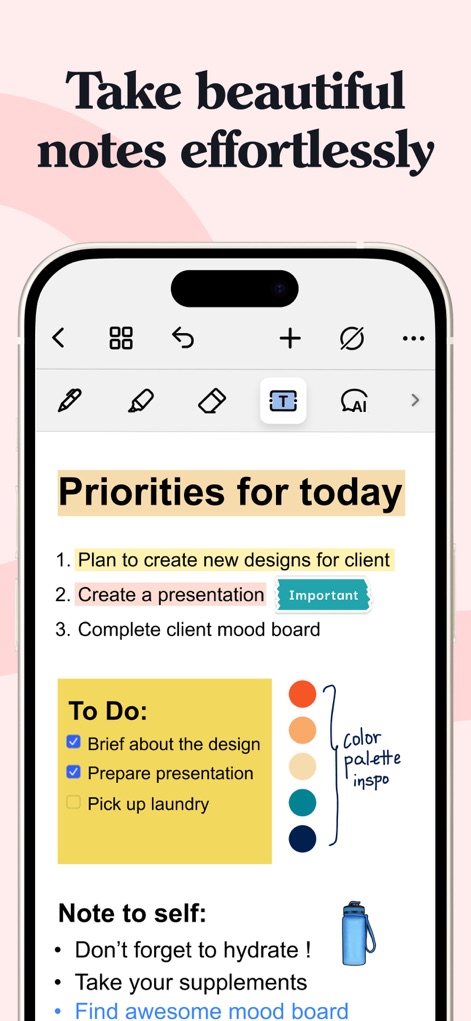
Nutzer können ihre Tagesprioritäten übersichtlich organisieren, wobei die Prioritätenliste mit interaktiven Checkboxen und einer personalisierten Farbpalette visuell ansprechend gestaltet ist.
Notizen mühelos gestalten
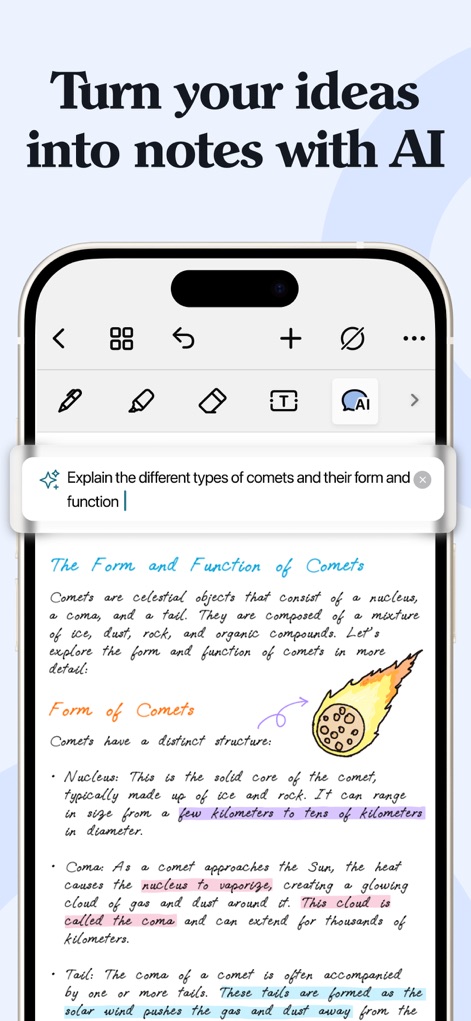
Dieses Tool verwandelt Ideen mithilfe des integrierten AI-Assistenten in strukturierte Notizen, ergänzt durch präzise handschriftliche Erklärungen und handschriftliche Illustrationen.
Ideen mit KI formen
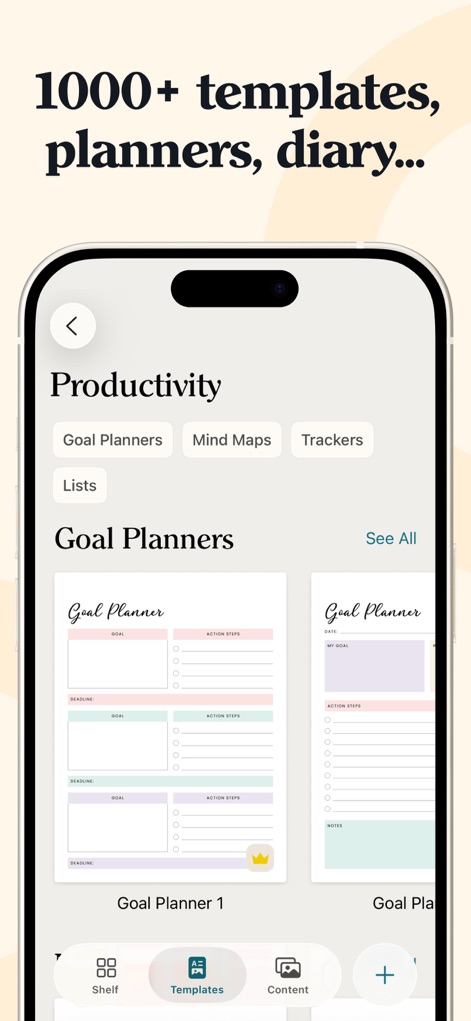
Die App bietet eine umfangreiche Vorlagenbibliothek mit über 1000 Optionen, darunter anpassbare Zielplaner und weitere Hilfsmittel zur Steigerung der Produktivität.
Vielfältige Vorlagen entdecken
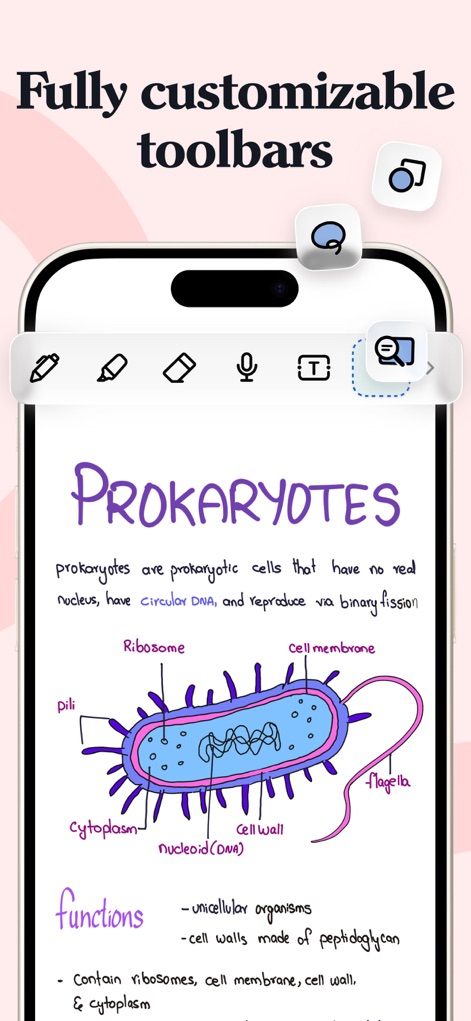
Nutzer profitieren von einer vollständig anpassbaren Symbolleiste, die ein effizientes Arbeiten ermöglicht und die Erstellung detailreicher Zeichnungen wie dieser biologischen Darstellung unterstützt.
Werkzeuge personalisieren
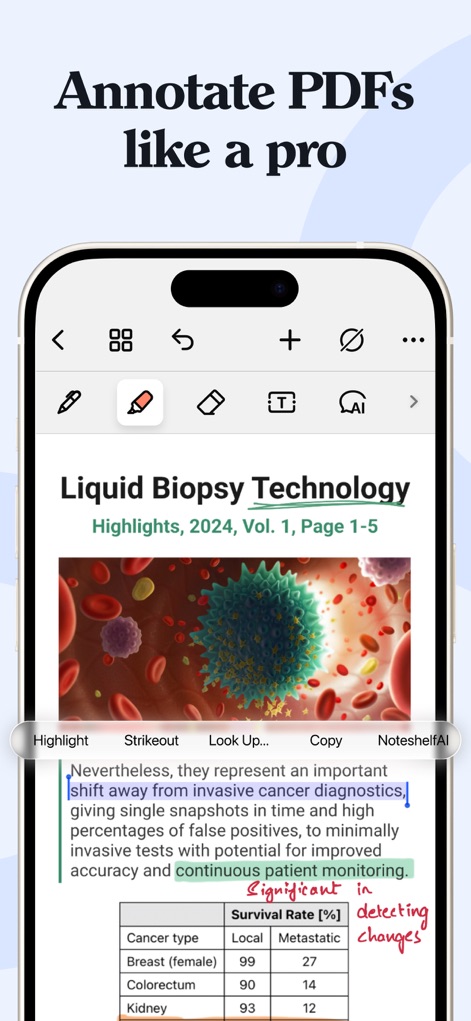
Mit diesem Tool können Nutzer PDFs professionell annotieren, indem sie Texte hervorheben, unterstreichen oder kommentieren, wobei vielfältige Hervorhebungsoptionen zur Verfügung stehen.
PDFs professionell annotieren
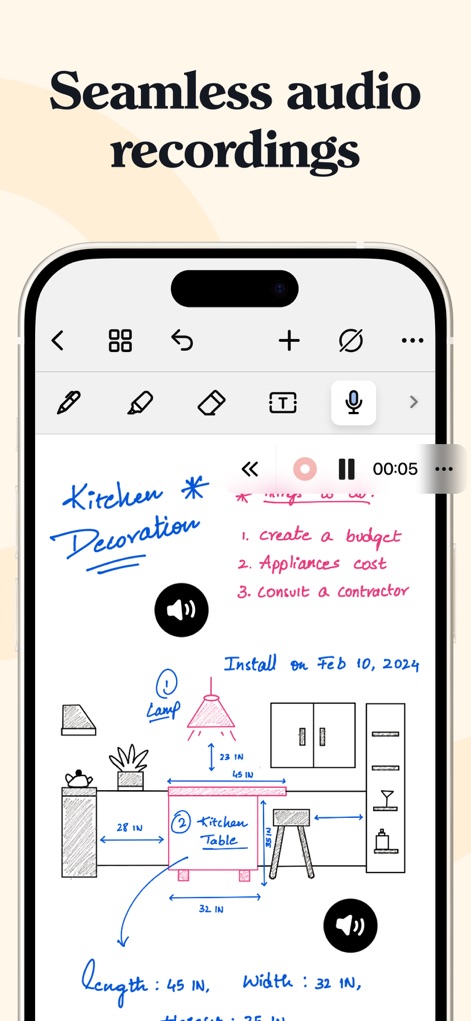
Die App ermöglicht nahtlose Audioaufnahmen parallel zu den Notizen, was ideal ist, um gesprochene Erklärungen zu handschriftlichen Skizzen und Entwürfen hinzuzufügen.
Nahtlose Audiointegration
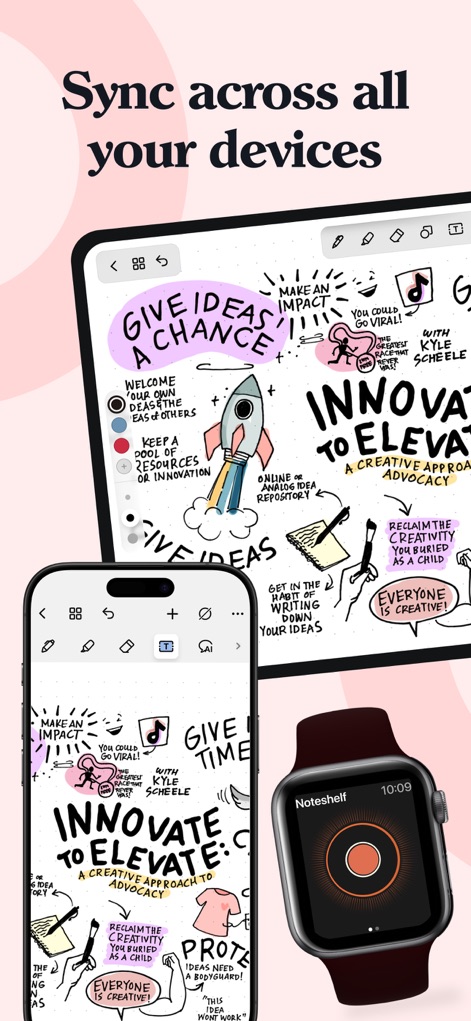
Noteshelf 3 bietet eine reibungslose geräteübergreifende Synchronisation der Notizen, sodass Nutzer ihre kreativen Visualisierungen und Informationen stets auf allen Apple-Geräten aktuell haben.
Geräteübergreifende Synchronisation
Beschreibung
Download
Ähnliche Apps
Apps mit ähnlichen Funktionen und Nutzererfahrung

Notion: Notes, Tasks, AI
Notion Labs, Incorporated

Freenotes®: AI Notes Taking
Hangzhou Free Notes Technology Co., Ltd

Structured - Daily Planner
unorderly GmbH

Google Tasks: Get Things Done
Google LLC

TickTick:To-Do List & Calendar
Appest Limited

Noteful: Notes & PDF Markup
Noteful Technologies Ltd

Todoist: To Do List & Calendar
Doist Inc.

To do list MinimaList & Widget
Inner Grow Limited

monday.com - Work Platform
monday.com Ltd.
Diese Seite ist keine offizielle Seite der App oder ihres Entwicklers, sondern eine unabhängige redaktionelle Veröffentlichung, die zu Informations- und Kommentarzwecken erstellt wurde. Sofern nicht ausdrücklich anders angegeben, sind weder die App noch ihr Entwickler mit MWM, Apple, Google Play, dem App-Herausgeber oder dem Entwickler der App verbunden, von ihnen unterstützt, gesponsert, autorisiert oder anderweitig offiziell verbunden, und nichts auf dieser Seite impliziert, dass die App unter Verwendung der Dienste von MWM entwickelt wurde. Alle Marken, Logos, Screenshots und andere Inhalte bleiben Eigentum ihrer jeweiligen Inhaber.