Off Remote Pro
Off Remote Pro
Herunterladen auf App Store

Diese Seite ist keine offizielle Seite der App oder ihres Entwicklers, sondern eine unabhängige redaktionelle Veröffentlichung, die zu Informations- und Kommentarzwecken erstellt wurde. Sofern nicht ausdrücklich anders angegeben, sind weder die App noch ihr Entwickler mit MWM, Apple, Google Play, dem App-Herausgeber oder dem Entwickler der App verbunden, von ihnen unterstützt, gesponsert, autorisiert oder anderweitig offiziell verbunden, und nichts auf dieser Seite impliziert, dass die App unter Verwendung der Dienste von MWM entwickelt wurde. Alle Marken, Logos, Screenshots und andere Inhalte bleiben Eigentum ihrer jeweiligen Inhaber.

Logo von Off Remote Pro
Herunterladen auf App Store

Off Remote Pro

Fahren Sie Computer, sperren oder starten Sie Ihre Computer direkt von Ihrem iPhone oder iPad aus neu. Sparen Sie Energie, verwalten Sie die Bildschirmzeit und genießen Sie ultimativen Komfort, ohne das Sofa verlassen zu müssen.

Kennzahlen

Downloads

328K+

Bewertung

4.0/5

Bewertungen gesamt

1K+

Herausgeber

Hobbyist Software Limited

Kategorie

Lifestyle

Sprachen

32

Neueste Version

5.07

Größe

28.6 MB

Erstveröffentlichung

22. Apr. 2009
Funktionen

Vollständige Kontrolle auf Knopfdruck

Verwalten Sie die Stromversorgungseinstellungen Ihres PCs und Macs von überall in Ihrem Haus aus. Sparen Sie Energie, legen Sie digitale Grenzen fest und genießen Sie ultimativen Komfort mit einem einzigen Tippen.

Intelligente elterliche Grenzen

Sperren Sie Computer per Fernzugriff oder senden Sie benutzerdefinierte „Zeit zum Zubettgehen“-Nachrichten, um die Bildschirmzeit Ihrer Kinder ohne nächtliche Konfrontation zu verwalten.

Nahtlose Sofasteuerung

Film zu Ende geschaut? Fahren Sie Ihr Mediacenter oder Ihren Office-Mac bequem von Ihrem Bett aus herunter, ohne sich bewegen zu müssen.

Die folgenden Screenshots und die Beschreibung stammen direkt aus dem offiziellen Store-Eintrag der App und sind Eigentum des Entwicklers.

App Store

Screenshots
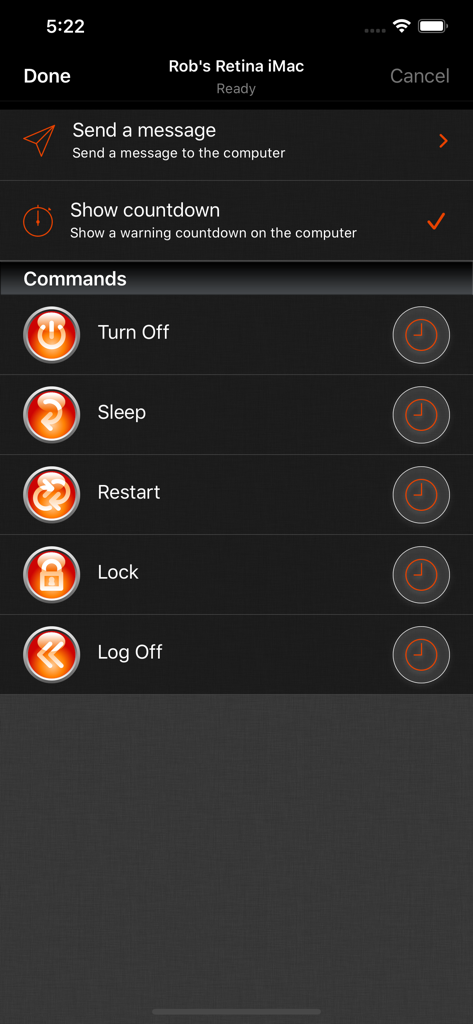
Off Remote Pro - Off Remote Pro mobile App-Bildschirm, der Optionen zur Fernsteuerung von Computern wie Ausschalten, Ruhezustand und Neustart anzeigt
Off Remote Pro mobile App-Bildschirm, der Optionen zur Fernsteuerung von Computern wie Ausschalten, Ruhezustand und Neustart anzeigt

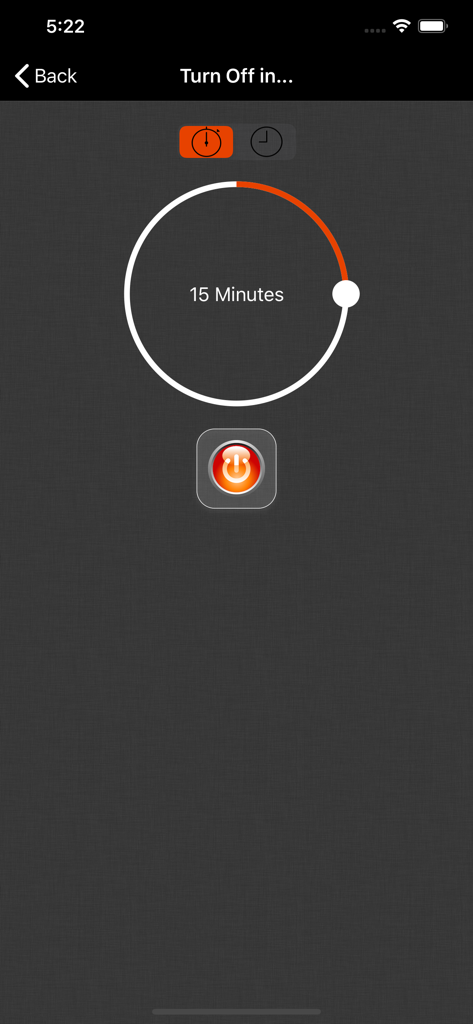
Off Remote Pro - Off Remote Pro App-Oberfläche, die einen 15-minütigen Abschalt-Timer mit einem Netzschalter anzeigt
Off Remote Pro App-Oberfläche, die einen 15-minütigen Abschalt-Timer mit einem Netzschalter anzeigt

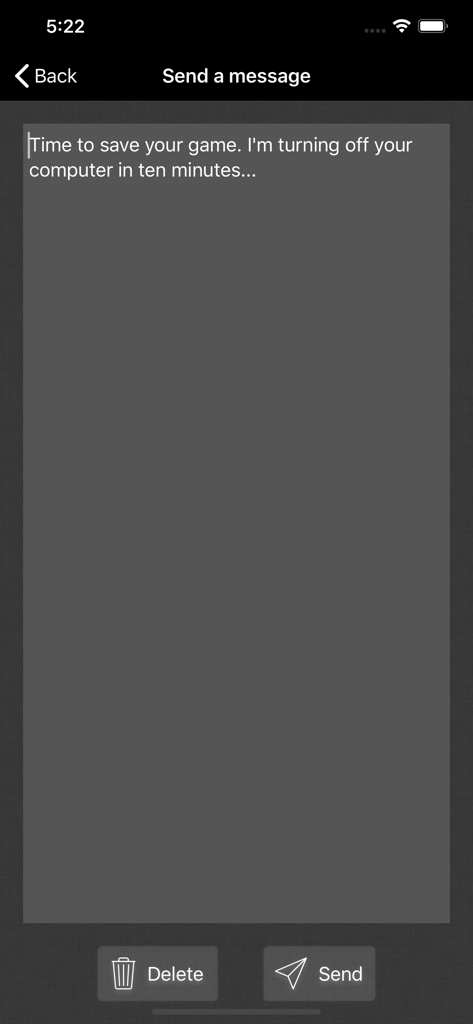
Off Remote Pro - Oberfläche zum Senden von Fernnachrichten an einen Computer über Off Remote Pro
Oberfläche zum Senden von Fernnachrichten an einen Computer über Off Remote Pro

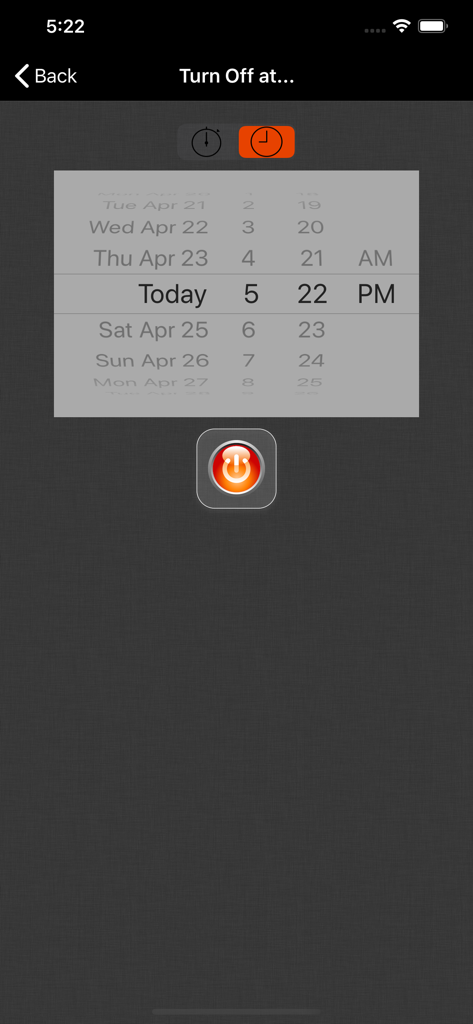
Off Remote Pro - Die Off Remote Pro-Oberfläche zum Planen eines Computer-Shutdowns mit Datum und Uhrzeitauswahl
Die Off Remote Pro-Oberfläche zum Planen eines Computer-Shutdowns mit Datum und Uhrzeitauswahl

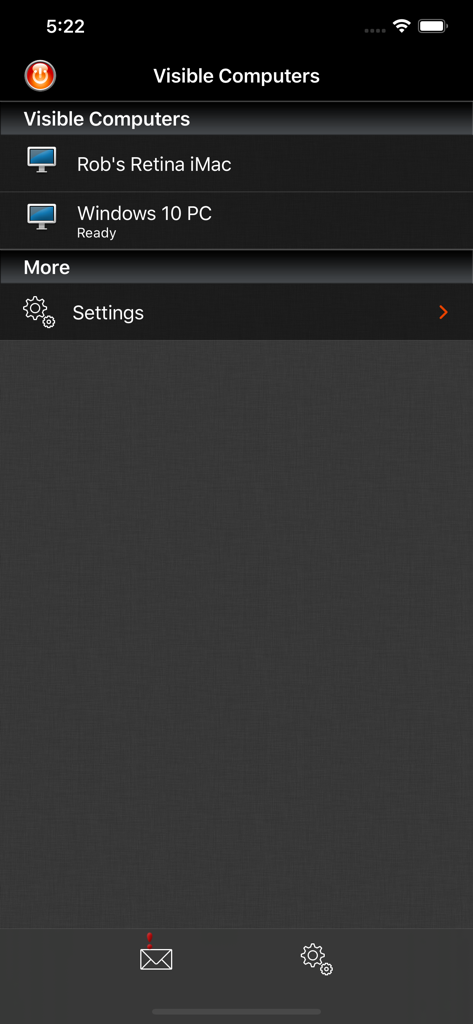
Off Remote Pro - Screenshot der Off Remote Pro App, der eine Liste verbundener Computer für die Fernverwaltung anzeigt

Screenshot der Off Remote Pro App, der eine Liste verbundener Computer für die Fernverwaltung anzeigt

Beschreibung

Off Remote lets you turn off, lock, sleep, log off and restart a PC or Mac directly from your iDevice. Forgot to turn off the office computer? No need to get up. Want to stop the kid's marathon computer sessions? Do it remotely. The timer function lets you set Off to trigger up to 24 hours in the future so you can set a computer to automatically turn off after a task such as completing a download or upload or to automatically lock at a certain time to limit a child's screen time. If you want to know whether the computers in your house are turned off - you can check from your iDevice. If you use a computer to stream videos or audio to your living room, then you can turn it off when you are finished without getting out of the sofa. If you forget to turn things off at night then you can turn them off from wherever you are in the house. It's simple to use. It's very handy. It saves you the effort of walking to your computer! • Features • - Turn Off, Lock, Restart, Log off, Sleep and Hibernate (not all computers can hibernate). - Easily turn off your computer from anywhere in your house. - Send a message before you turn the computer off 'Go to bed - it's past your bedtime!' - Control any number of computers on your home network. - Simple set up - Off Remote uses the same technology as the iTunes remote to connect over your local network to the helper on your computer. - Automatically discovers your computers in your local network. - Password protection makes sure that only you can turn off your computers! • Reviews • “Off is a brilliant yet simple app that allows me to easily control the power state of all the PCs in my house. It also lets me check to make sure that when my daughter assures me she turned her computer off, that she really did.” “Very simple and easy to setup. When I say simple I didn't have to set anything up. Just install the server and the app picked up my laptop straight away. All the buttons worked, it's amazing. No more having to get out if bed to turn the laptop off for the night.” '..it's the least you can do for the environment.' App Of My Eye. “such a simple program yet it's so handy at work and home I use It every day! and it's cool to be able to turn ur pc/mac off from your iPhone or iPod :D” “We often end up PC's being left on overnight and this app has helped us manage this ... We have several wireless music senders dotted around the house also which feed off the desktop PC in the dining room. I've added iTunes to the startup menu on that PC and can restart the PC using this app ... once restarted I can then switch to my iTunes remote and start listening to my music without having to tramp downstairs.” • System Requirements • - Supports Windows 7 to 10 - Supports Mac OS 10.7 and above • Response to feedback • -If you do have any problems using Off, then please just check the help instructions in the app. Feel free to drop me an email (my personal mail is in the app) if you need help. Enjoy! • Languages • Off Remote is currently translated to 8 languages. If you are willing to translate it to your language, or would like to improve the translations, please head over to hobbyistsoftware.com and follow the links

Download

Herunterladen auf App Store

Diese Seite ist keine offizielle Seite der App oder ihres Entwicklers, sondern eine unabhängige redaktionelle Veröffentlichung, die zu Informations- und Kommentarzwecken erstellt wurde. Sofern nicht ausdrücklich anders angegeben, sind weder die App noch ihr Entwickler mit MWM, Apple, Google Play, dem App-Herausgeber oder dem Entwickler der App verbunden, von ihnen unterstützt, gesponsert, autorisiert oder anderweitig offiziell verbunden, und nichts auf dieser Seite impliziert, dass die App unter Verwendung der Dienste von MWM entwickelt wurde. Alle Marken, Logos, Screenshots und andere Inhalte bleiben Eigentum ihrer jeweiligen Inhaber.








