PDFgear Scan: PDF Scanner App

PDFgear Scan: PDF Scanner App


Herunterladen auf App StoreHerunterladen auf Google Play
Logo von PDFgear Scan: PDF Scanner App
PDFgear Scan: Das KI-gestützte Dokumentenzentrum für Hochleistungs-Profis

Verwandeln Sie Ihr iPhone in ein portables Büro. Scannen Sie Bücher, unterschreiben Sie Verträge und nutzen Sie integrierte KI, um sofort Zusammenfassungen zu erhalten und Erkenntnisse aus jedem Dokument zu gewinnen.

Herunterladen auf App Store

Herausgeber

PDF GEAR TECH PTE. LTD.

Kategorie

Business

Downloads

93K+

Bewertung

4.9/5

Bewertungen gesamt

400

Sprachen

11

Effizienz in Aktion

Entdecken Sie die Oberfläche, die von 93K+ Nutzern verwendet wird.
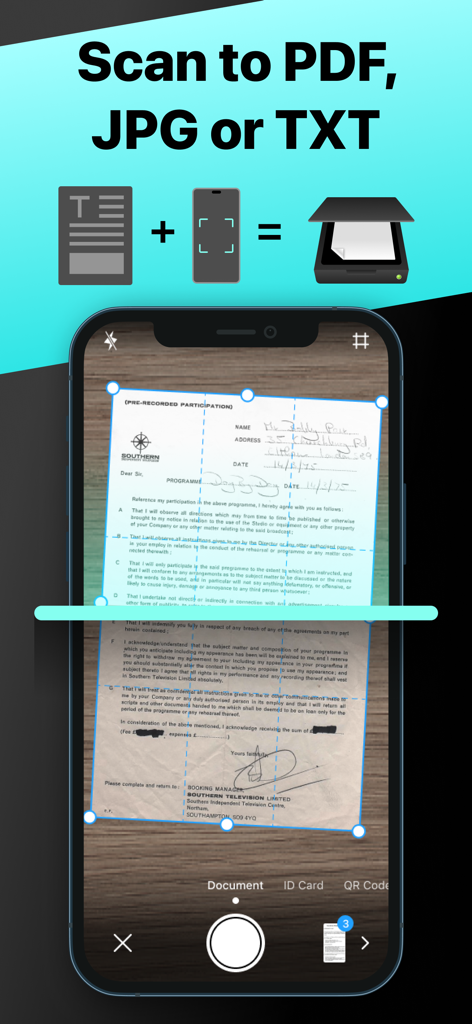
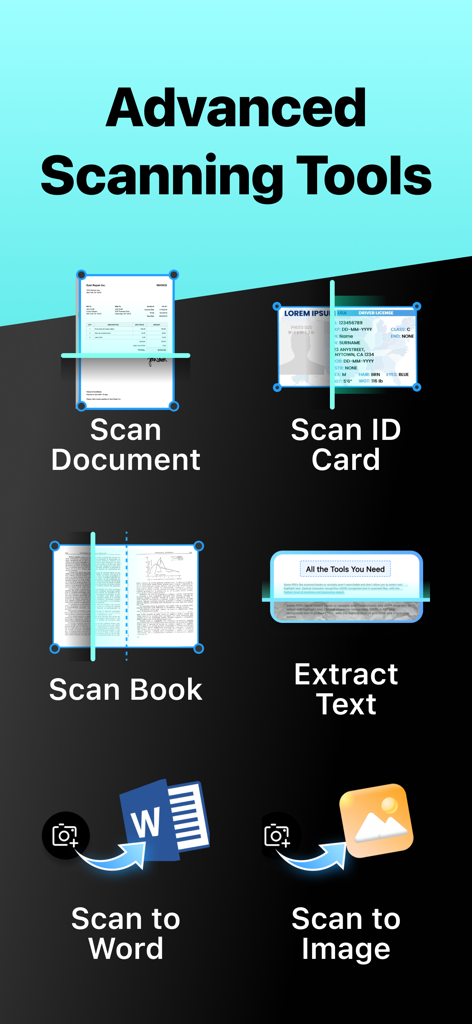
PDFgear Scan App-Oberfläche, die das Erfassen eines Dokuments zur Konvertierung in PDF-, JPG- oder TXT-Formate zeigt

PDFgear Scan App-Oberfläche, die das Erfassen eines Dokuments zur Konvertierung in PDF-, JPG- oder TXT-Formate zeigt

Ein Menü mit Funktionen von PDFgear Scan wie Dokumentenscan, Personalausweisskant, Buchscan, Textextraktion und Export nach Word oder Bild.

Ein Menü mit Funktionen von PDFgear Scan wie Dokumentenscan, Personalausweisskant, Buchscan, Textextraktion und Export nach Word oder Bild.

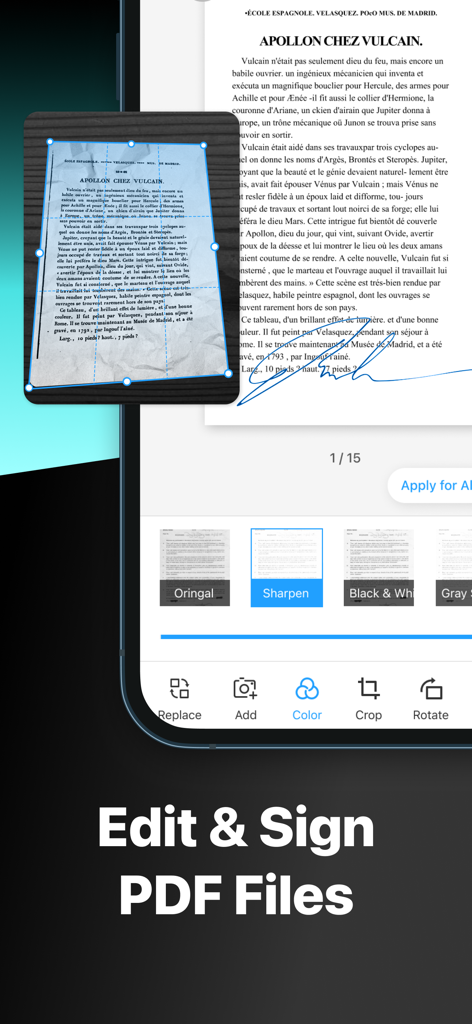
Oberfläche der PDFgear Scan App, die Werkzeuge zur Dokumentenbearbeitung und -unterschrift zeigt

Oberfläche der PDFgear Scan App, die Werkzeuge zur Dokumentenbearbeitung und -unterschrift zeigt

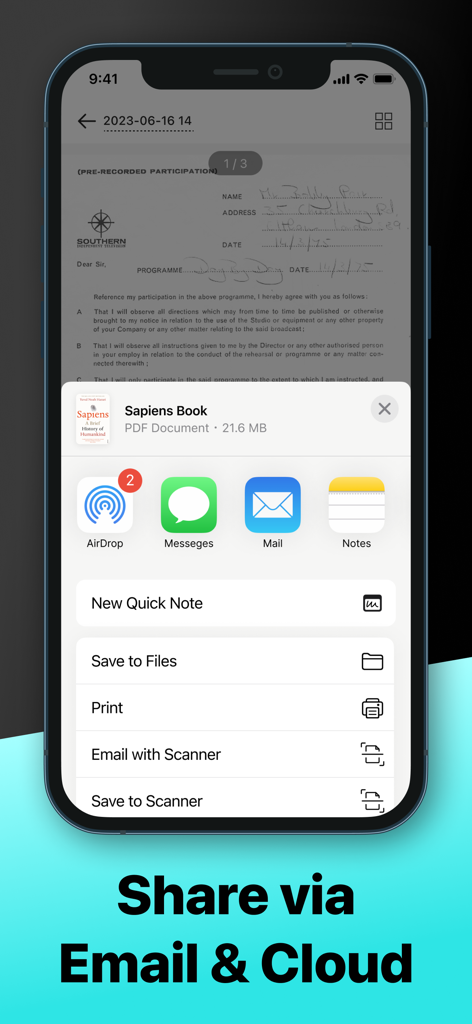
PDFgear Scan App-Oberfläche, die Optionen zum Teilen von Dokumenten über AirDrop, Nachrichten, E-Mail und Cloud-Dienste zeigt

PDFgear Scan App-Oberfläche, die Optionen zum Teilen von Dokumenten über AirDrop, Nachrichten, E-Mail und Cloud-Dienste zeigt

Ihr portables Produktivitätskraftpaket

Die Tools, die diese App auszeichnen, gewählt von 93K+ Nutzern.

🤖

KI-gestützte Dokumenteneinblicke

Extrahieren Sie Text mit hochpräziser OCR und nutzen Sie den integrierten KI-Assistenten, um komplexe Verträge zusammenzufassen oder spezifische Informationen in Sekundenschnelle zu finden.

📚

Spezialisierte Modi für jede Aufgabe

Digitalisieren Sie alles, von Reisepässen bis hin zu Lehrbüchern, mit Leichtigkeit. Unser 'Buchmodus' glättet automatisch gekrümmte Seiten für kristallklare digitale Kopien.

✍️

Profi-Bearbeitung & E-Signaturen

Unterschreiben Sie Verträge im Handumdrehen, wenden Sie Filter zur Verbesserung an und exportieren Sie Dateien als Word oder PDF, um Ihren professionellen Workflow von überall aus fortzusetzen.

Über die App

Alles, was Sie über wissen müssen PDFgear Scan: PDF Scanner App.

Beschreibung

PDFgear Scan is a feature-rich PDF Scanner App that digitizes all your documents and simplifies your life. It can transform your iPhone or iPad into a powerful and portable scanner, extract texts and data from the document with cutting-edge OCR technology and advanced editing capabilities, and share the scanned document as PDF, Word, TXT, or images effortlessly. PDFgear Scan boosts productivity and saves time for anyone who works with documents: lawyers, officers, realtors, managers, students, accountants, and more. Download PDFgear Scan now to streamline your workflow and experience the most convenient way to store, manage, and share all your paper documents. Key Features: Smart Document Scanner - Capture documents, remove cluttered backgrounds, and deskew in one step automatically - Scan multiple pages into one file easily - Scan with the device’s cameras or stored photos - Save scans as PDF, Word, or image files Multi-Scanning Modes for Every Need: – Receipts & Expense Reports: Effortlessly scan receipts, automatically categorize expenses, and generate professional reports in seconds. Simplify your bookkeeping and tax prep! – ID & Passport Scan: Securely capture and store IDs, passports, and other vital documents with a specialized, high-speed mode designed for accuracy and convenience. – Book & Magazine Scan (with Smart Flattening): Digitize entire books and magazines with ease. Our innovative "Book Mode" automatically flattens curved pages, ensuring crystal-clear, perfectly aligned scans every time. – QR & Barcode Reader: Instantly scan any QR code or barcode with your camera. Get quick access to websites, product information, and more. Powerful Editing Tools - Crop or rotate the captured images with a simple tap - Apply filters to enhance the quality of scanned documents - Create and insert signatures into documents, perfect for professionals dealing with contracts Advanced OCR Capabilities - Recognize and extract texts from documents using OCR technology - Export the OCR result to Word or TXT and share with others - Auto-split the OCR results for optimal layout Page Management & Scan Organization - Add, rotate, delete, and reorder pages with ease - Manage and rename scans in list view for quick access Flexible Sharing Options - Share scanned documents in formats like PDF, Word, Images, or a long image based on your needs - Collaborate with others by sharing files through Airdrop, Email, messaging apps, and more AI Chat for Instant Document Insights: – Ask AI Anything About Your Scans: Have questions about a scanned document? Our integrated AI chat allows you to instantly ask anything about your captured text – from summarizing key points to extracting specific information. It's like having a personal document assistant! PDFgear Scan revolutionizes the way you handle paperwork, offering a seamless scanning experience. Embrace the convenience of PDFgear Scan and elevate your document management efficiency now. Terms of service: https://www.pdfgear.com/terms-conditions/ Privacy Policy: https://www.pdfgear.com/privacy/ Contact us at https://www.pdfgear.com/contact-us/

Neueste Version

1.19

Größe

52.6 MB

Erstveröffentlichung

11. Aug. 2023

Bereit, Ihre Unterlagen mit KI zu meistern?

Schließen Sie sich über 93.000 Fachleuten an, die Zeit sparen und ihre Produktivität steigern. Laden Sie PDFgear Scan noch heute herunter und verwandeln Sie Ihr iPhone in einen intelligenten Dokumentenassistenten.

Herunterladen auf App StoreHerunterladen auf Google Play

App information, icons, screenshots, and descriptions displayed on this page are sourced from the Apple App Store and are the property of their respective developers. Download estimates and rankings are based on MWM's proprietary models and may not reflect actual figures. This page is provided for informational and analytical purposes only.

Believe this page infringes your intellectual property? File a dispute