
Diese Seite ist keine offizielle Seite der App oder ihres Entwicklers, sondern eine unabhängige redaktionelle Veröffentlichung, die zu Informations- und Kommentarzwecken erstellt wurde. Sofern nicht ausdrücklich anders angegeben, sind weder die App noch ihr Entwickler mit MWM, Apple, Google Play, dem App-Herausgeber oder dem Entwickler der App verbunden, von ihnen unterstützt, gesponsert, autorisiert oder anderweitig offiziell verbunden, und nichts auf dieser Seite impliziert, dass die App unter Verwendung der Dienste von MWM entwickelt wurde. Alle Marken, Logos, Screenshots und andere Inhalte bleiben Eigentum ihrer jeweiligen Inhaber.


Scanner App: Genius Scan
Papier ist träge. Diese App macht jedes Dokument in Sekunden zum digitalen Original, präzise und geschützt – Aktenverwaltung steckt plötzlich in Ihrer Hosentasche.
Downloads
12.5M+Bewertung
Bewertungen gesamt
2.6MHerausgeber
Kategorie
BusinessSprachen
20Neueste Version
8.9Größe
93.1 MBErstveröffentlichung
22. Juni 2010Analyse der 'Scanner App: Genius Scan'
Eine Bewertung der Kernfunktionen für produktive Dokumentenverwaltung.
Intelligente Scan-Technologie
Die App erkennt Dokumente automatisch, korrigiert Verzerrungen und optimiert die Bildqualität für klare, lesbare Scans.
Texterkennung (OCR) und durchsuchbare PDFs
Dieses Tool verfügt über eine optische Zeichenerkennung (OCR), die Text aus Scans extrahiert und durchsuchbare PDFs erstellt.
Umfassende Export- und Cloud-Integrationen
Die App bietet umfangreiche Exportoptionen zu Cloud-Diensten wie Dropbox, Google Drive und OneDrive sowie per E-Mail.
Stapel-Scanning
Es ermöglicht das schnelle und effiziente Scannen mehrerer Seiten hintereinander, ideal für umfangreiche Dokumente.
Erweiterte Dokumentenorganisation
Es erleichtert die Organisation von Dokumenten durch Schlagwörter, Metadatensuche und intelligente Benennungsvorlagen.
Sicherheitsfunktionen
Die App bietet Sicherheitsmerkmale wie die Face ID-Sperre und die PDF-Passwortverschlüsselung zum Schutz vertraulicher Daten.
Mehrseitige PDF-Erstellung und -Bearbeitung
Es ermöglicht das Erstellen mehrseitiger PDF-Dateien und bietet Funktionen zum Zusammenführen oder Teilen von Dokumenten.
Geräteübergreifende Synchronisierung (Genius Cloud)
Dieses Tool bietet eine optionale Synchronisierung über Genius Cloud, um Dokumente auf mehreren Geräten zugänglich zu machen.
Häufig gestellte Fragen
Alles, was Sie über wissen müssen Scanner App: Genius Scan
What is Scanner App: Genius Scan?
Genius Scan is a mobile document scanner app that quickly scans paper documents on the go. It exports them as multi-page PDF files and provides powerful tools for organizing, sharing, and archiving documents directly from your device.
Does Genius Scan offer smart scanning features?
Yes, Genius Scan offers smart scanning features. These include automatic document detection, background removal, distortion correction, shadow removal, and defect cleanup. It also applies various filters such as black & white or photo to the scans.
Can Genius Scan create multi-page PDF documents?
Yes, Genius Scan creates multi-page PDF documents. Users can also merge and split existing documents, as well as import photos and other PDF files directly into the app for editing and organization.
Is Genius Scan free to use?
Yes, Genius Scan is free to use for an unlimited duration. Users can optionally subscribe to the Genius Scan Plus plan for additional premium features or Genius Cloud for backup and synchronization services.
What are the security features of Genius Scan?
Genius Scan ensures security and privacy through on-device document processing, Face ID locking for app access, and PDF password encryption. Documents are processed locally on the user's device.
Does Genius Scan support OCR (Optical Character Recognition)?
Yes, Genius Scan supports OCR (Optical Character Recognition) functionality. It provides text extraction from scans, the creation of searchable PDF documents, and business card scanning to generate new contacts. OCR is a premium feature.
Can I export scanned documents from Genius Scan to cloud services?
Yes, Genius Scan supports exporting scanned documents to various cloud services. These include Box, Dropbox, Evernote, Google Drive, iCloud Drive, OneDrive, OneNote, FTP, SugarSync, and any WebDAV compatible service.
How does Genius Scan help organize documents?
Genius Scan helps organize documents through tagging, metadata and content search. It also features smart document renaming with custom templates and offers backup and multi-device synchronization via Genius Cloud.
Does Genius Scan automatically detect documents for scanning?
Yes, Genius Scan automatically detects paper documents in front of the device’s camera. It then intelligently crops the document, cleans up the scan, and corrects distortion to produce crisp, legible results.
Are there any subscription plans for Scanner App: Genius Scan?
Yes, Genius Scan offers subscription plans. The Genius Scan Plus plan unlocks premium features, and Genius Cloud provides backup and multi-device synchronization. Both subscriptions are optional and auto-renewable.
Die folgenden Screenshots und die Beschreibung stammen direkt aus dem offiziellen Store-Eintrag der App und sind Eigentum des Entwicklers.
App Store
Screenshots
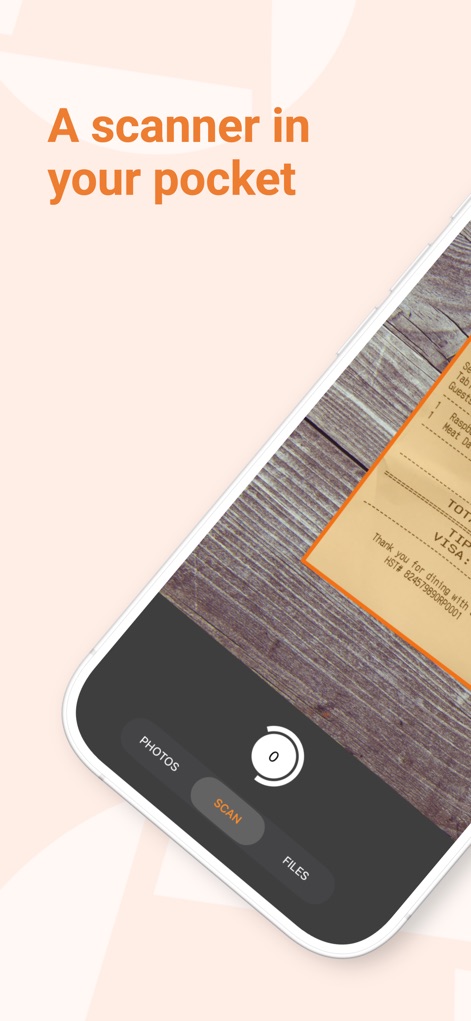
Scannen überall
Die App zeigt den Scan-Modus auf dem Smartphone-Bildschirm und hebt den zentralen "SCAN"-Button hervor, um die Nutzung zu vereinfachen.
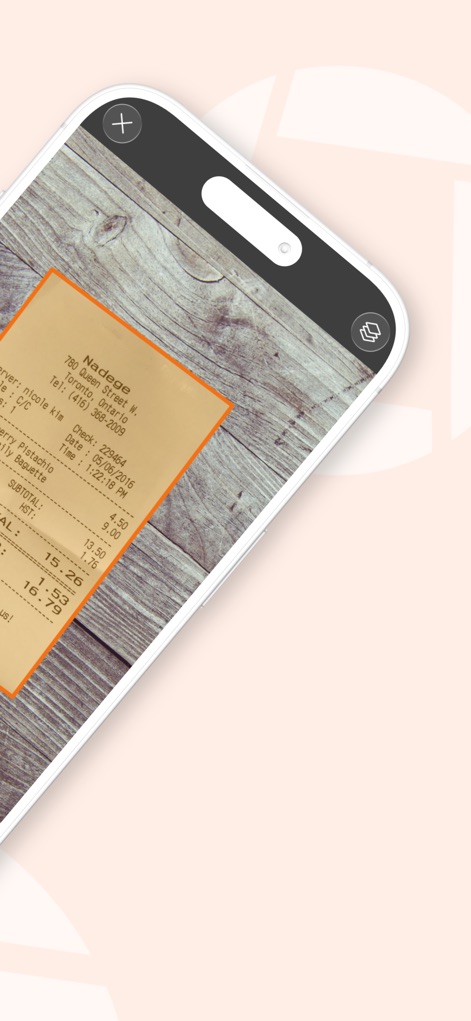
Automatisches Zuschneiden
Die intelligente Dokumentenerkennung rahmt den Beleg automatisch mit einem orangen Umriss ein und bereitet ihn für eine präzise Aufnahme vor.
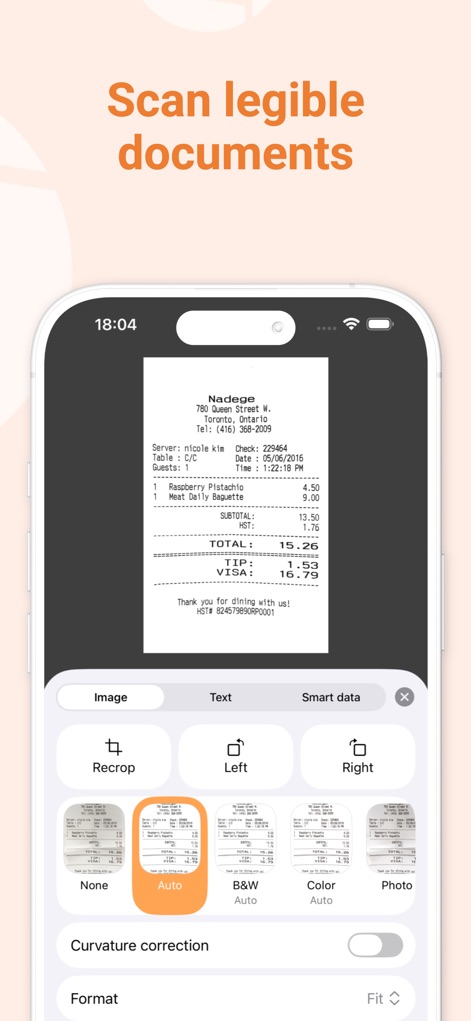
Dokumente optimieren
Nutzer können gescannte Dokumente mit Filtern wie "Auto" und weiteren Bildbearbeitungsoptionen wie "Recrop" anpassen, um die Lesbarkeit zu verbessern.
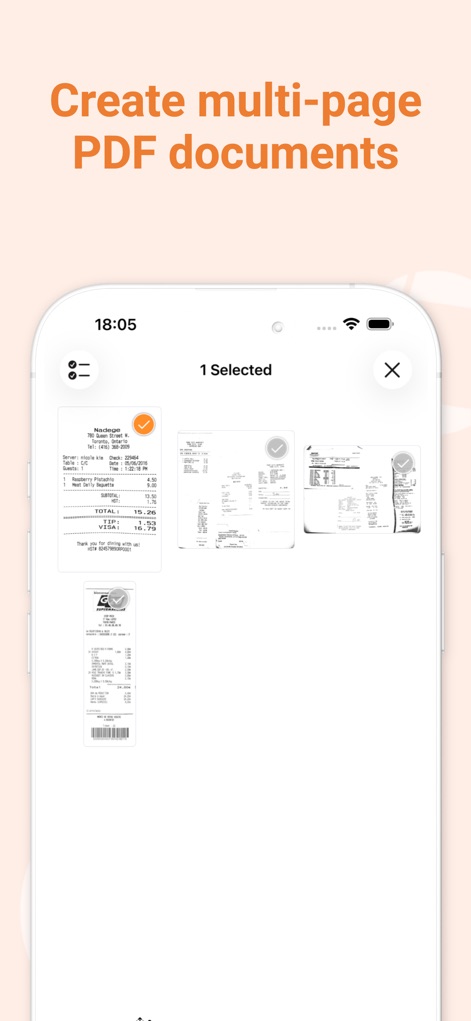
Mehrseitige PDFs
Es ist einfach, mehrere gescannte Seiten zu einem PDF zusammenzufügen, wobei die ausgewählten Dokumente mit einem Häkchen markiert sind und als Vorschaubilder angezeigt werden.
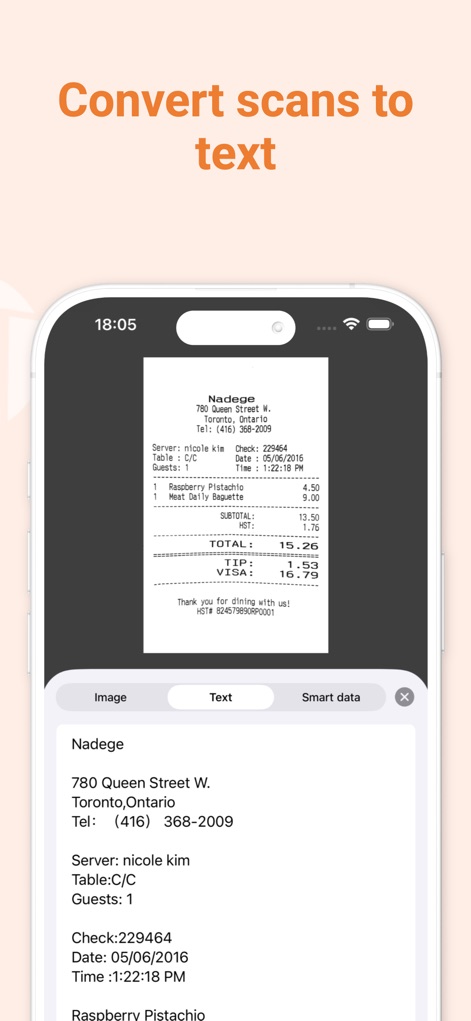
Text extrahieren
Die OCR-Funktion wandelt gescannte Bilder, wie den Beleg, in editierbaren Text um, der direkt unter der Originalansicht des Dokuments angezeigt wird.
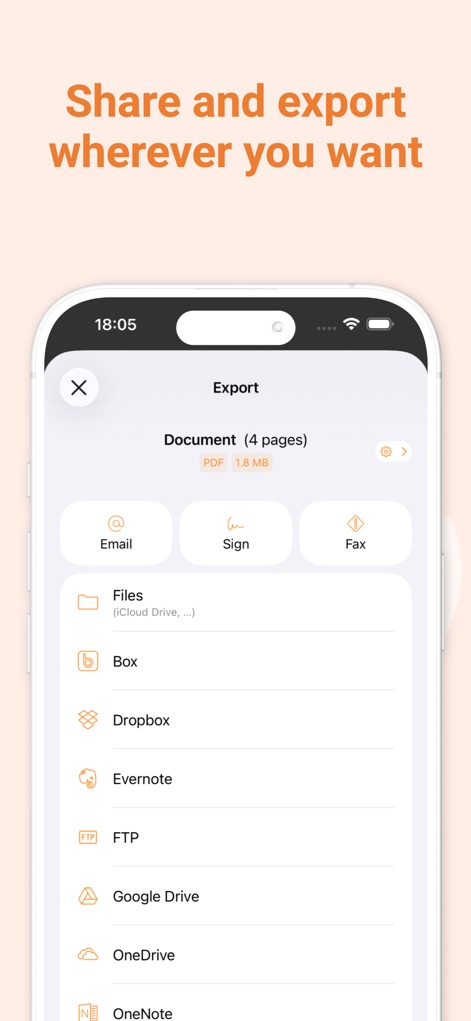
Teilen & Exportieren
Nutzer können gescannte Dokumente über eine Vielzahl von Diensten wie E-Mail und Cloud-Speicheranbieter, darunter Dropbox und Google Drive, teilen.
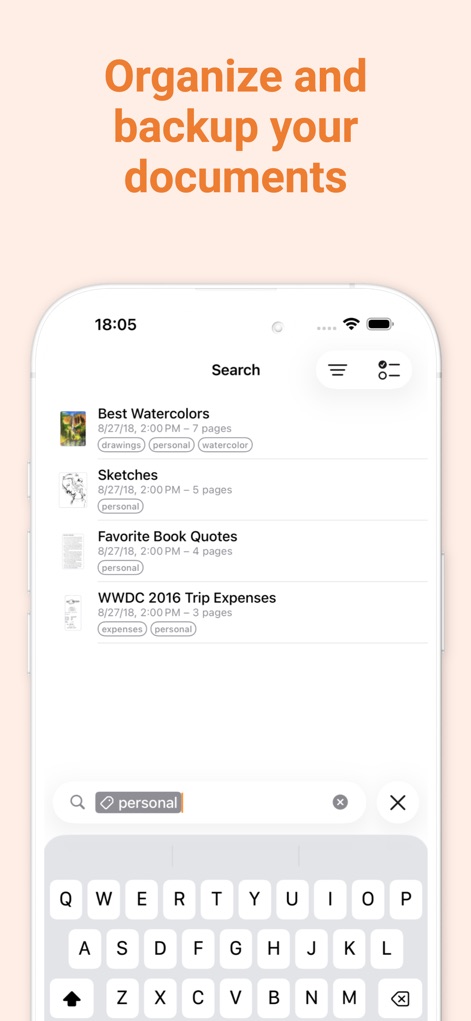
Dokumentenorganisation
Dieses Tool bietet eine Suchfunktion mit Filter-Tags wie "personal" und eine übersichtliche Listenansicht der Dokumente für eine einfache Verwaltung.

Sicher & Schnell
Die App bewirbt ihre zentralen Eigenschaften "Fast Private Secure" und visualisiert dies mit dem prominenten Kamerasymbol und dem "Made in France"-Stempel.
Beschreibung
Download
Ähnliche Apps
Apps mit ähnlichen Funktionen und Nutzererfahrung

PDF PRO Scan Image & Documents
Balzo srl

The PDF Scanner, PDF editor HQ
NEXT K.U.M. LTD

CamScanner - PDF Scanner App
INTSIG Information Co., Ltd

Adobe Scan: PDF & OCR Scanner
Adobe Inc.

WPS Office: PDF, Docs, Sheets
KINGSOFT OFFICE SOFTWARE CORPORATION LIMITED

iLovePDF - PDF Editor & Scan
ILOVEPDF S.L.

Microsoft Lens: PDF Scanner
Microsoft Corporation

Clear Scan: Doc Scanner App
INDY MOBILE APP COMPANY LIMITED

Document Scanner by Lufick
Lufick
Diese Seite ist keine offizielle Seite der App oder ihres Entwicklers, sondern eine unabhängige redaktionelle Veröffentlichung, die zu Informations- und Kommentarzwecken erstellt wurde. Sofern nicht ausdrücklich anders angegeben, sind weder die App noch ihr Entwickler mit MWM, Apple, Google Play, dem App-Herausgeber oder dem Entwickler der App verbunden, von ihnen unterstützt, gesponsert, autorisiert oder anderweitig offiziell verbunden, und nichts auf dieser Seite impliziert, dass die App unter Verwendung der Dienste von MWM entwickelt wurde. Alle Marken, Logos, Screenshots und andere Inhalte bleiben Eigentum ihrer jeweiligen Inhaber.