
Diese Seite ist keine offizielle Seite der App oder ihres Entwicklers, sondern eine unabhängige redaktionelle Veröffentlichung, die zu Informations- und Kommentarzwecken erstellt wurde. Sofern nicht ausdrücklich anders angegeben, sind weder die App noch ihr Entwickler mit MWM, Apple, Google Play, dem App-Herausgeber oder dem Entwickler der App verbunden, von ihnen unterstützt, gesponsert, autorisiert oder anderweitig offiziell verbunden, und nichts auf dieser Seite impliziert, dass die App unter Verwendung der Dienste von MWM entwickelt wurde. Alle Marken, Logos, Screenshots und andere Inhalte bleiben Eigentum ihrer jeweiligen Inhaber.

PhotoGrid: Video Collage Maker
Im digitalen Rausch verblasst Mittelmaß. PhotoGrid erweist sich als Werkzeug, das aus Schnappschüssen eine unwiderstehliche visuelle Erzählung schmiedet.
Downloads
25M+Bewertung
Bewertungen gesamt
603.0KHerausgeber
Kategorie
Photo & VideoSprachen
22Neueste Version
9.2.31Größe
339.2 MBErstveröffentlichung
1. Aug. 2012Kernfunktionen von PhotoGrid: Video Collage Maker
Eine detaillierte Analyse der Kernfunktionen von 'PhotoGrid: Video Collage Maker' für Social Media-affine Content Creator.
Umfassender Collage-Ersteller
Die App bietet eine riesige Auswahl von über 20.000 Collage-Vorlagen und ermöglicht die kreative Kombination von bis zu 16 Fotos für personalisierte Layouts und Fotostrecken.
Professioneller Foto- und Videoeditor
Dieses Tool verfügt über umfangreiche Bearbeitungsfunktionen wie Zuschneiden, Drehen, Größenanpassung, Weichzeichnen, Verschönern von Fotos sowie die Synchronisation und das Trimmen von Videos.
Optimierte Social-Media-Tools
Es ermöglicht Nutzern, Inhalte spezifisch für Plattformen wie Instagram, TikTok und Facebook mit angepassten Seitenverhältnissen, benutzerdefinierten Wasserzeichen und attraktiven Textoptionen zu gestalten.
Flexible Video-Raster-Erstellung
Die App unterstützt die Kombination von bis zu neun Videos in einem Raster und bietet die Möglichkeit, Videoclips für dynamische Collagen zu synchronisieren.
Zugang zu Tausenden von Gestaltungselementen (Premium)
Premium-Nutzer erhalten Zugriff auf über 20.000 Elemente, was die kreativen Möglichkeiten erheblich erweitert und eine große Designvielfalt bietet.
Hochauflösende 4K VideoGrid-Erstellung (Premium)
Premium-Funktionen umfassen die Erstellung von VideoGrids in Full HD 4K-Qualität mit einer Länge von bis zu 15 Minuten.
Keine Wasserzeichen beim Teilen (Premium)
Premium-Mitglieder können ihre Kreationen ohne störende Wasserzeichen teilen, was einen professionelleren Auftritt gewährleistet.
Werbefreie Nutzung (Premium)
Premium-Nutzer profitieren von einer werbefreien Erfahrung, die eine ununterbrochene und flüssigere Bearbeitung ermöglicht.
Häufig gestellte Fragen
Alles, was Sie über wissen müssen PhotoGrid: Video Collage Maker
What is PhotoGrid: Video Collage Maker?
PhotoGrid: Video Collage Maker is an app designed to create stunning image and video collages, social media content, and edit photos and videos. It offers extensive templates, editing tools, and features for various platforms.
Can PhotoGrid: Video Collage Maker combine photos and videos into grids?
Yes, PhotoGrid: Video Collage Maker can combine photos and videos to create video grids. Users can also trim videos and synchronize video clips to align to the same moment in time.
How many photos or videos can PhotoGrid: Video Collage Maker combine in a single layout?
PhotoGrid: Video Collage Maker allows users to remix up to 16 photos at a time. For video grids, it supports combining up to 9 videos in the free version.
Does PhotoGrid: Video Collage Maker offer pre-designed collage templates?
Yes, PhotoGrid: Video Collage Maker provides over 20,000 different collage templates. Users can also design their own photo creations, filmstrips, photo stitches, and personalized scrapbooks.
What social media marketing features does PhotoGrid: Video Collage Maker include?
PhotoGrid includes features like custom watermarks, adding Instagram/Facebook/WhatsApp logos, and various popular ratios for social media platforms such as Facebook cover, Apple Watch, A4, and A3 sizes.
Can users add custom text and fonts within the PhotoGrid: Video Collage Maker app?
Yes, PhotoGrid allows users to add any font they want and apply beautiful curved texts to their photos. The app offers a selection of over 1000 fonts.
Does PhotoGrid: Video Collage Maker include comprehensive photo editing tools?
Yes, PhotoGrid offers powerful photo editing tools. These include crop, rotate, resize, blur, beautify, stickers, text, backgrounds, graffiti, boarders, mosaic, and adjustments for brightness, contrast, saturation, and layout.
What benefits does a PhotoGrid: Video Collage Maker Premium Plan offer?
PhotoGrid Premium provides access to over 20,000 elements, video grids up to 15 minutes long, high-quality full HD 4K video grids, flexible aspect ratio selection, an ads-free experience, and sharing without watermarks.
How do users manage or cancel a PhotoGrid: Video Collage Maker Premium subscription?
Users manage and turn off auto-renewal for a PhotoGrid Premium subscription in their Apple Account Settings. Cancellation must occur at least 24 hours before the period ends to avoid auto-renewal.
Is a refund available after purchasing PhotoGrid: Video Collage Maker Premium?
No, PhotoGrid: Video Collage Maker does not offer refunds after a Premium Plan purchase. All purchases are final and non-refundable.
Can PhotoGrid: Video Collage Maker remove backgrounds or objects from photos?
Yes, PhotoGrid features 'AI Removal' for objects and 'Cutout & Change Backgrounds' functionality. This allows users to easily isolate subjects and modify their photo backdrops.
Does PhotoGrid: Video Collage Maker support creating slideshows?
Yes, PhotoGrid includes a 'Slideshow Maker' feature. Users can combine images and add elements to create dynamic slideshows within the app.
How many stickers are available in PhotoGrid: Video Collage Maker?
PhotoGrid: Video Collage Maker provides over 15,000 stickers for users to enhance their photos and collages. These can be added as part of the powerful photo editor features.
Die folgenden Screenshots und die Beschreibung stammen direkt aus dem offiziellen Store-Eintrag der App und sind Eigentum des Entwicklers.
App Store
Screenshots
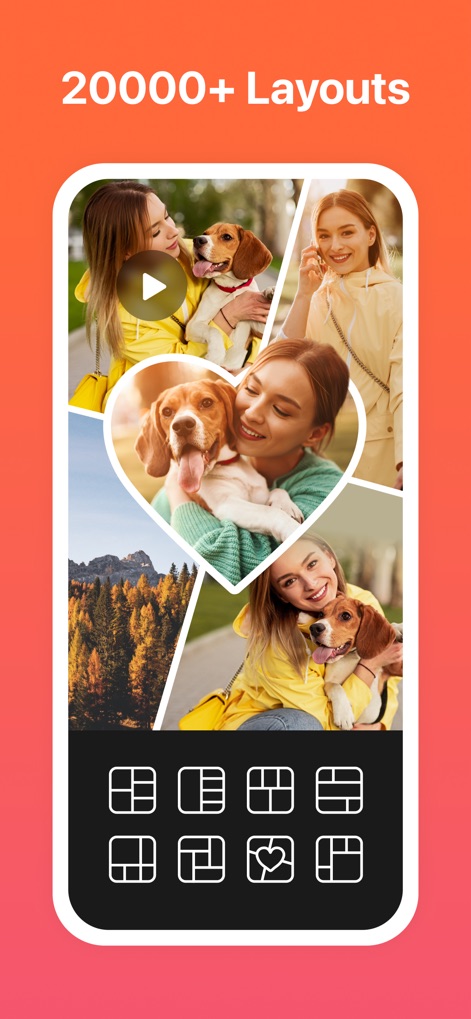
Vielfältige Layout-Optionen
Die App bietet über 20.000 verschiedene Layouts, die Nutzern ermöglichen, bis zu 16 Fotos in kreativen Designs zu kombinieren, wie dem herzförmigen Arrangement und der Vielfalt der vorgefertigten Gitter unten.
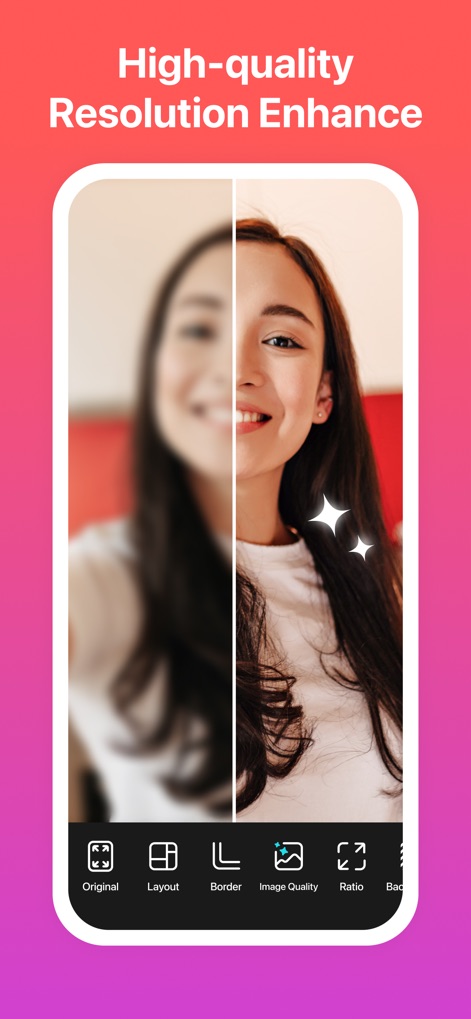
Hohe Auflösung, bessere Details
Dieses Tool ermöglicht die beeindruckende Verbesserung der Bildqualität, die sich im klaren Unterschied zwischen dem unscharfen und dem detailreichen Bereich des Gesichts sowie dem Glitzereffekt und der 'Image Quality'-Option manifestiert.
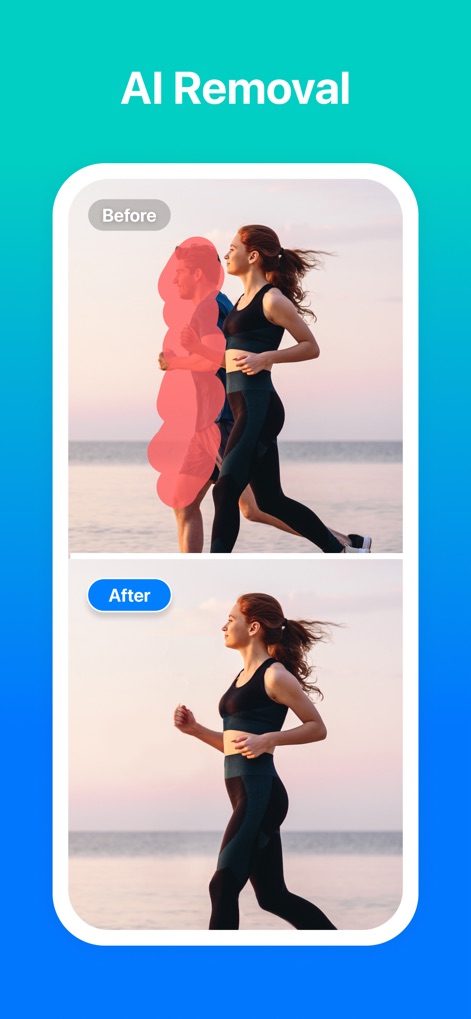
KI-Objektentfernung
Nutzer können unerwünschte Objekte präzise entfernen, was durch den Vergleich von 'Before' und 'After' deutlich wird, wo die rot markierte Person auf der linken Seite im Endergebnis nicht mehr sichtbar ist.
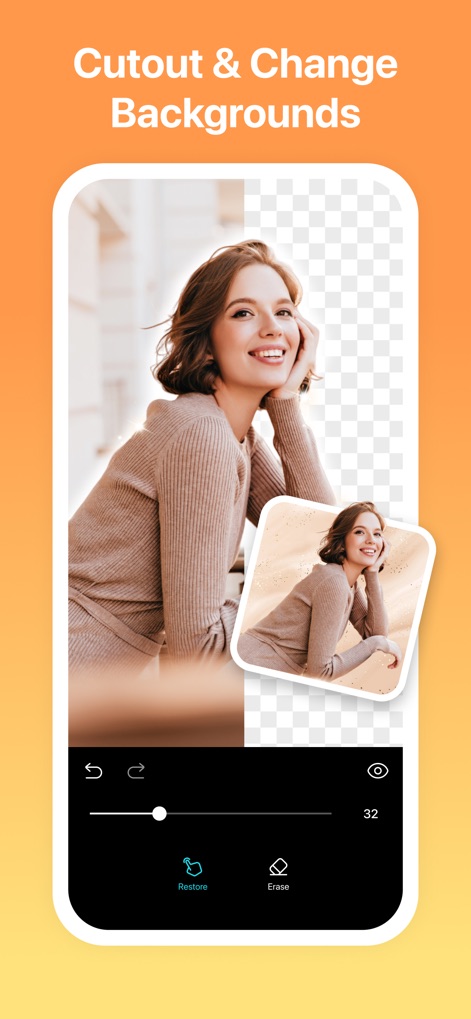
Hintergründe bearbeiten, neu gestalten
Mit der App ist es einfach, Motive freizustellen und Hintergründe zu ändern, ersichtlich an dem transparenten, schachbrettartigen Hintergrund und der Vorschau mit dem goldenen, neuen Hintergrund.
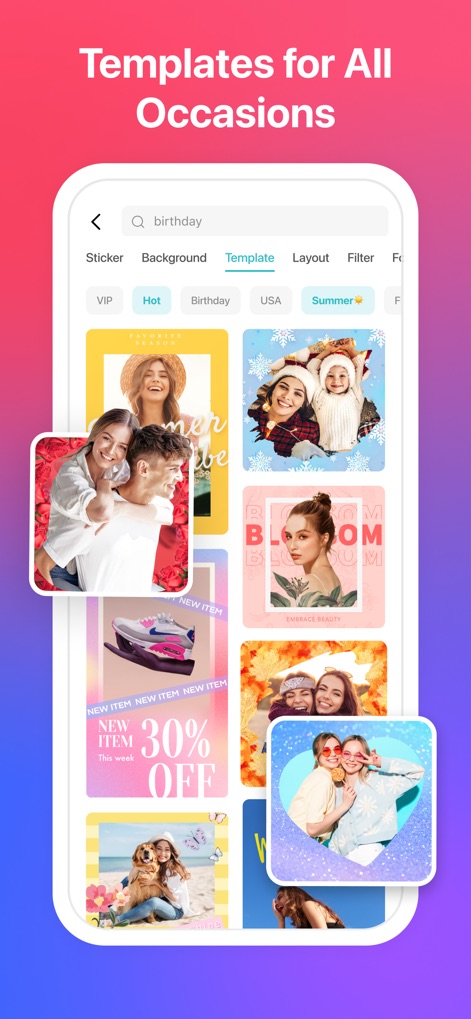
Vorlagen für jeden Anlass
Die App stellt unzählige Vorlagen für alle Anlässe bereit, demonstriert durch die vielfältigen Themen wie 'Birthday' und 'Summer' sowie die unterschiedlichen Designs für Posts und Stories.
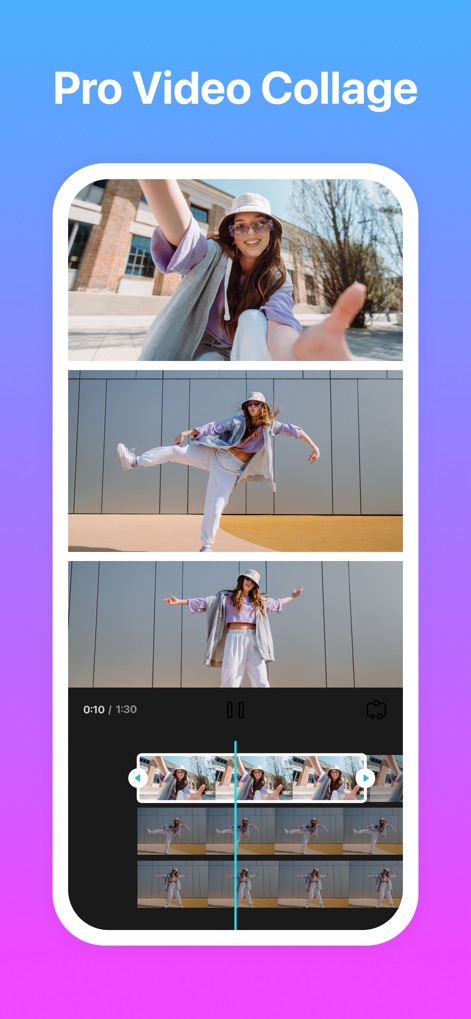
Profi-Video-Collagen
Nutzer können professionelle Video-Collagen erstellen, indem sie mehrere Videoclips kombinieren, wie die drei Tanzsequenzen in einem vertikalen Layout und die detaillierte Zeitleiste für die Bearbeitung zeigen.
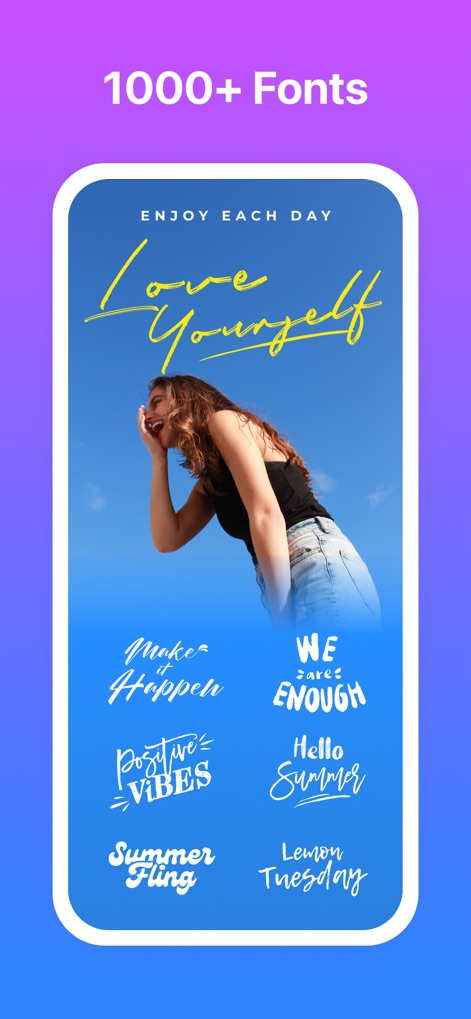
Kreative Schriftarten entdecken
Die App bietet über 1000 verschiedene Schriftarten, die Nutzern kreative Textgestaltung ermöglichen, wie die stilvolle 'Love Yourself'-Botschaft und die Auswahl an Schriftmustern am unteren Bildschirmrand illustrieren.
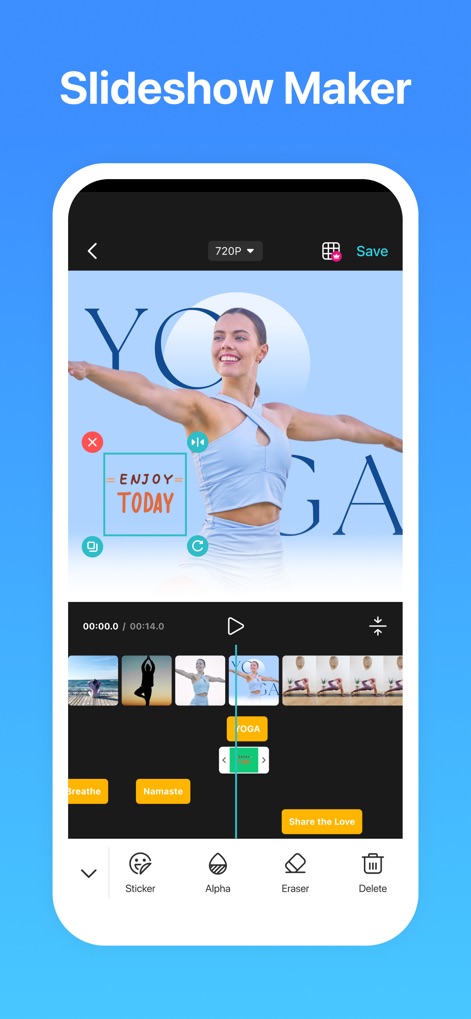
Dynamische Slideshows erstellen
Mit dem Slideshow Maker lassen sich dynamische Präsentationen erstellen, was durch die fertige 'YOGA'-Slide und die darunterliegende Zeitleiste mit einzelnen Bild- und Videoclips für die Sequenzierung veranschaulicht wird.
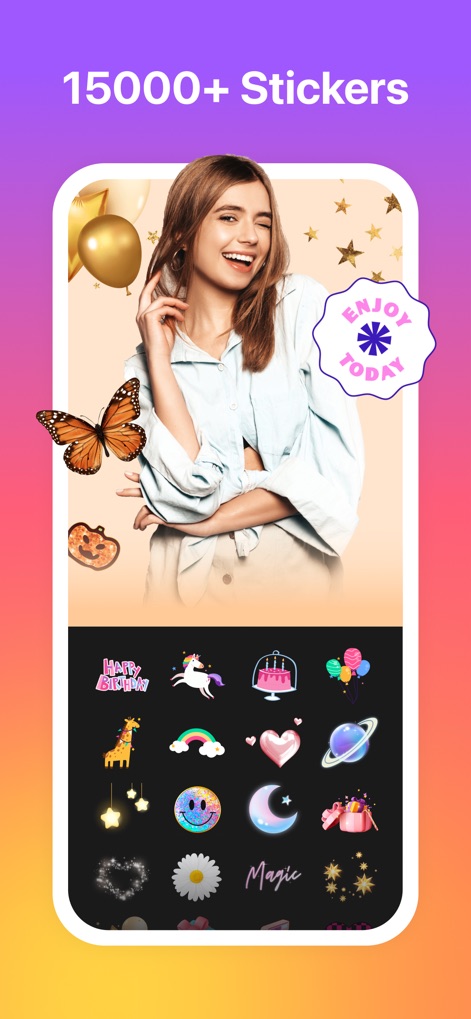
Tausende Sticker personalisieren
Die App verfügt über 15000+ Sticker, um Fotos zu personalisieren, was durch den Schmetterling und den Sternen-Sticker auf dem Foto der Frau sowie die umfangreiche Galerie verschiedener Sticker-Kategorien sichtbar wird.
Beschreibung
Download
Ähnliche Apps
Apps mit ähnlichen Funktionen und Nutzererfahrung

SCRL: Photo Collage Maker
Appostrophe AB

Layout for Instagram: Collage
Shamble, Inc.

Photo Collage Maker: InCollage
SHANTANU PTE. LTD.

TicPic
Zhuhai Kuxiong Network Technology Co., Ltd.

Collage Maker: CollagePlus
Shamble, Inc.

Photo Collage Montage Maker
Honk Honk Punch Pty Ltd

Photo Collage Maker & Creator
Honk Honk Punch Pty Ltd

Photo Collage Montage & Layout
Honk Honk Punch Pty Ltd

Jane - Art Collage & Video
Shanghai Ruishixinyan Information Technology Co., Ltd
Diese Seite ist keine offizielle Seite der App oder ihres Entwicklers, sondern eine unabhängige redaktionelle Veröffentlichung, die zu Informations- und Kommentarzwecken erstellt wurde. Sofern nicht ausdrücklich anders angegeben, sind weder die App noch ihr Entwickler mit MWM, Apple, Google Play, dem App-Herausgeber oder dem Entwickler der App verbunden, von ihnen unterstützt, gesponsert, autorisiert oder anderweitig offiziell verbunden, und nichts auf dieser Seite impliziert, dass die App unter Verwendung der Dienste von MWM entwickelt wurde. Alle Marken, Logos, Screenshots und andere Inhalte bleiben Eigentum ihrer jeweiligen Inhaber.