PhotoMapper: GPS EXIF Editor

PhotoMapper: GPS EXIF Editor


Herunterladen auf App Store
Logo von PhotoMapper: GPS EXIF Editor

PhotoMapper: GPS EXIF Editor – Vervollständigen Sie Ihre Fotokarte und schützen Sie Ihre Privatsphäre

Das unverzichtbare Hilfsprogramm für den digitalen Archivar und professionellen Fotografen. Fügen Sie mühelos fehlende Geotags zu DSLR-Aufnahmen hinzu, bearbeiten Sie Metadaten im Stapel und entfernen Sie Standortdaten sicher, bevor Sie sie teilen, um Ihr Privatleben zu schützen.

Herunterladen auf App Store

Herausgeber

Mykola Fiantsev

Kategorie

Photo & Video

Downloads

120K+

Bewertung

4.3/5

Bewertungen gesamt

400

Sprachen

8

Ihre Welt, kartiert

Entdecken Sie die Oberfläche, die von 120K+ Nutzern verwendet wird.
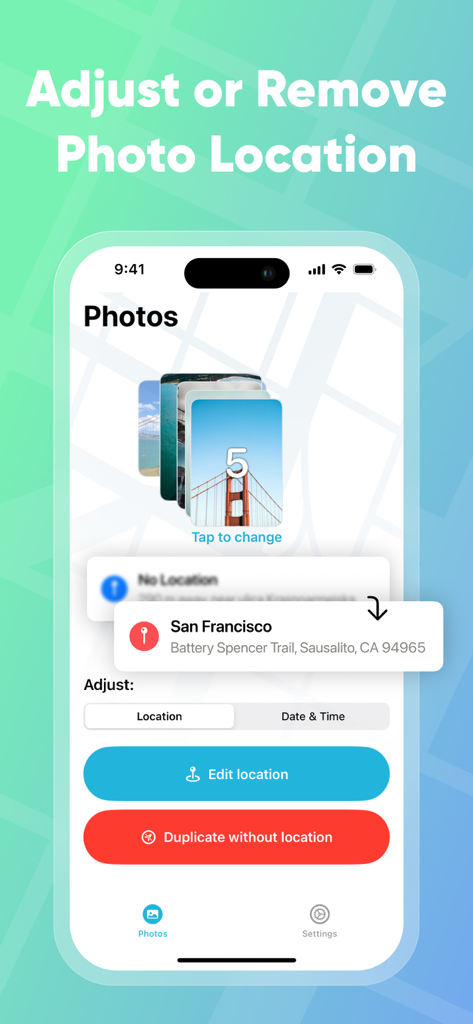
Benutzeroberfläche des PhotoMapper GPS EXIF Editors, der Optionen zur Standortanpassung und -entfernung für einen Stapel von Fotos zeigt.

Benutzeroberfläche des PhotoMapper GPS EXIF Editors, der Optionen zur Standortanpassung und -entfernung für einen Stapel von Fotos zeigt.

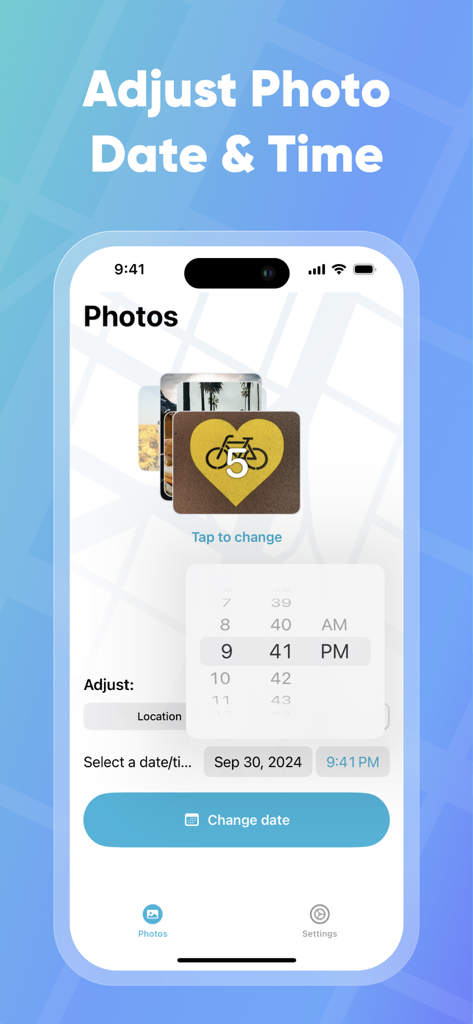
Benutzeroberfläche zum Anpassen von Foto-Datum und -Uhrzeit in der PhotoMapper App

Benutzeroberfläche zum Anpassen von Foto-Datum und -Uhrzeit in der PhotoMapper App

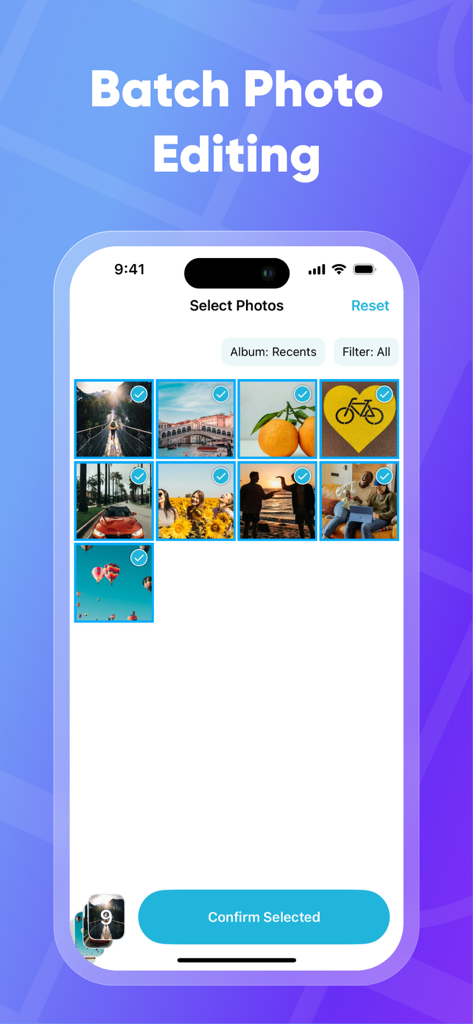
iPhone-Bildschirm, der die Stapel-Fotoauswahlfunktion in der PhotoMapper App zur Bearbeitung von EXIF-Daten zeigt

iPhone-Bildschirm, der die Stapel-Fotoauswahlfunktion in der PhotoMapper App zur Bearbeitung von EXIF-Daten zeigt

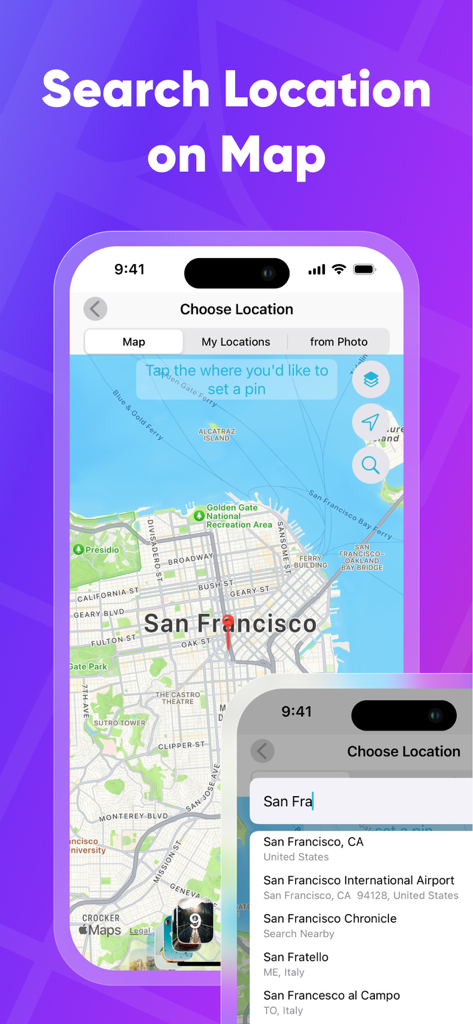
Suchen und auswählen eines geografischen Standorts auf einer Karte, um GPS-Metadaten zu Fotos hinzuzufügen

Suchen und auswählen eines geografischen Standorts auf einer Karte, um GPS-Metadaten zu Fotos hinzuzufügen

Perfektionieren Sie Ihr Fotoarchiv

Die Tools, die diese App auszeichnen, gewählt von 120K+ Nutzern.

📍

Vervollständigen Sie Ihre „Orte“-Karte

Lassen Sie keine DSLR-Aufnahme unkartiert. Fügen Sie GPS-Koordinaten manuell hinzu oder korrigieren Sie sie, damit jedes Foto genau dort erscheint, wo es in Ihrer iOS-Bibliothek hingehört.

🛡️

Mit vollständiger Privatsphäre teilen

Schützen Sie Ihre persönlichen Daten, indem Sie metadatenfreie Duplikate erstellen. Teilen Sie Ihre Lieblingsmomente in sozialen Medien, ohne Ihr Zuhause oder private Orte preiszugeben.

Effizienz für Power-User

Sparen Sie Stunden manueller Arbeit durch Stapelbearbeitung. Kopieren Sie Standortdaten von einem Foto und wenden Sie sie mit nur wenigen Fingertipps auf Hunderte andere an.

Über die App

Alles, was Sie über wissen müssen PhotoMapper: GPS EXIF Editor.

Beschreibung

PhotoMapper: GPS EXIF Editor is an essential app for anyone who wants to keep their iOS Photo library organized by the places where photos were taken. All photographers who store photos in their iOS Photos library and use geo-tags for systematization could be upset with lost geo-tag information due to using DSLRs or getting these photos from friends. Just add this info with our app and keep your geo-tag system in a consistent state. PhotoMapper: GPS EXIF Editor is also useful for people who want to protect their personal privacy. When you share your photos on social networks or send them via email, the geo-location information – where the photo was taken – is shared as well. If you are concerned about your personal privacy and would like to share photos without any mark of location in EXIF metadata, PhotoMapper can remove it. **FEATURES:** • Location info of your photos will always be correct and never missed Easily add or modify location info of photos in your iOS Photo library by simply placing a pin on the map. Never miss this info even if you use a DSLR or for any other reason. • Prepare photos for social sharing with clear location info - Keep the original photo for yourself and create a copy without any mark of the GPS location info (Geotagging) in EXIF metadata for sharing, reinforcing your privacy. • Batch photo editing Edit multiple photos in a few clicks, the fast and easy way. Forget about single selection. • Find all photo with missed location info Easily find all photos without location in one click. • Copy location info from one photo to another Long press in the gallery to open a large preview of the selected photo and use the “Copy Location” action. Now you can copy the location to as many other photos as you wish. **HOW TO ADD OR MODIFY LOCATION INFO:** This action adds a new location, which will be available in the iOS Photo library. 1. Select one or multiple photos 2. Click “Edit location” 3. Set the desired location by placing a pin on the map 4. Confirm the action. **HOW TO REMOVE LOCATION INFO:** This action keeps the original photo and creates a duplicate copy without GPS location info, which you can share. The EXIF metadata will be clean in this case. There is no location info of this photo in any app. 1. Select one or multiple photos on the first screen. 2. Click “Duplicate photo without location.” 3. Confirm the action. Thanks for all feedback! Please leave a 5-star review if you are happy with PhotoMapper :) Terms of Use: https://gist.github.com/bigMOTOR/27f60cb35180a150d38dc11df5462276 Privacy Policy: https://gist.github.com/bigMOTOR/e373f36ef179c17679d5083e5fb39e80

Neueste Version

4.2.0

Größe

21.6 MB

Erstveröffentlichung

26. März 2018

Perfektionieren Sie Ihre Fotobibliothek noch heute

Schließen Sie sich über 120.000 Benutzern an, die PhotoMapper verwenden, um ihre DSLR-Erinnerungen zu organisieren und Fotos sicher zu teilen, ohne ihren Standort preiszugeben.

Herunterladen auf App Store

App information, icons, screenshots, and descriptions displayed on this page are sourced from the Apple App Store and are the property of their respective developers. Download estimates and rankings are based on MWM's proprietary models and may not reflect actual figures. This page is provided for informational and analytical purposes only.

Believe this page infringes your intellectual property? File a dispute