
Diese Seite ist keine offizielle Seite der App oder ihres Entwicklers, sondern eine unabhängige redaktionelle Veröffentlichung, die zu Informations- und Kommentarzwecken erstellt wurde. Sofern nicht ausdrücklich anders angegeben, sind weder die App noch ihr Entwickler mit MWM, Apple, Google Play, dem App-Herausgeber oder dem Entwickler der App verbunden, von ihnen unterstützt, gesponsert, autorisiert oder anderweitig offiziell verbunden, und nichts auf dieser Seite impliziert, dass die App unter Verwendung der Dienste von MWM entwickelt wurde. Alle Marken, Logos, Screenshots und andere Inhalte bleiben Eigentum ihrer jeweiligen Inhaber.


Pixel Lab Photo Editor
Keine Ausreden mehr für fade Inhalte: MWMs Kreation zwingt Bilder und Videos in Form.
Downloads
1M+Bewertung
Bewertungen gesamt
28.1KHerausgeber
Kategorie
Photo & VideoSprachen
1Neueste Version
5.5Größe
176.5 MBErstveröffentlichung
21. März 2018Ein Überblick über die wesentlichen Tools für Gelegenheitskreatoren und Social-Media-Enthusiasten.
Analyse der Kernfunktionen von Pixel Lab Photo Editor
Umfassende Fotobearbeitung
Die App bietet grundlegende und erweiterte Werkzeuge zur Bildanpassung. Es ermöglicht Nutzern, Fotos zuzuschneiden, zu drehen, Helligkeit, Kontrast und Sättigung anzupassen sowie direkt auf Bildern zu zeichnen und zu malen.
Video-Editor (Schnitt, Geschwindigkeit, Zusammenführen)
Die App integriert einen leistungsstarken Video-Editor, der es Nutzern erlaubt, Videoclips zu schneiden, die Wiedergabegeschwindigkeit (langsam/schnell) anzupassen und mehrere Videos zusammenzuführen.
Vielfältige Filter & Effekte
Dieses Tool verfügt über eine breite Palette an Filtern und Effekten, um Fotos schnell und einfach zu verbessern und ihnen einen professionellen oder künstlerischen Touch zu verleihen.
Video-Filter
Die App stellt spezielle Filter bereit, um Videos visuell aufzuwerten und ihnen verschiedene Stimmungen oder Stile zu verleihen.
Kreative Sticker & Overlays
Es ermöglicht Nutzern, eine endlose Auswahl an lustigen und trendigen Stickern sowie dekorative Overlays zu Fotos und Videos hinzuzufügen, um Inhalte zu personalisieren.
Collage Maker
Die App bietet einen intuitiven Collagen-Ersteller, mit dem Anwender mehrere Fotos in ansprechenden Layouts zusammenfügen können, ideal für Social Media Beiträge.
Text hinzufügen mit Schriftarten
Dieses Tool ermöglicht es, Text mit verschiedenen Schriftarten zu Fotos und Videos hinzuzufügen, um Nachrichten, Zitate oder Bildunterschriften zu kommunizieren.
GIF-Erstellung (aus Bildern & Videos)
Es ermöglicht Nutzern, animierte GIFs entweder aus vorhandenen Videos oder aus einer Reihe von Bildern zu erstellen, um dynamische und teilbare Inhalte zu generieren.
Häufig gestellte Fragen
Alles, was Sie über wissen müssen Pixel Lab Photo Editor
What is Pixel Lab Photo Editor?
Pixel Lab Photo Editor is a powerful photo and video editing software. It includes filters, effects, frames, and more, designed to be simple and fun for average users, requiring no prior editing experience.
Does Pixel Lab Photo Editor include video editing features?
Yes, Pixel Lab Photo Editor offers video editing capabilities. Its features include Video To GIF, Video To MP3, Video Cutter, Slow/Fast Video, Add Watermark, Video Filter, Reverse Video, and Merge Video.
Can I create photo collages using Pixel Lab Photo Editor?
Yes, Pixel Lab Photo Editor allows users to create photo collages. It provides a Collage Maker feature, offering various grid layouts and a freestyle mode to design unique photo compositions.
What types of photo frames are available in Pixel Lab Photo Editor?
Pixel Lab Photo Editor provides a Photo Frames Creator feature. It includes numerous frame types such as Animal, Anniversary, Birthday, Flower, Love, Kids, and many others to enhance images.
Does Pixel Lab Photo Editor convert videos to GIFs?
Yes, Pixel Lab Photo Editor has a 'Video To GIF' function. This allows users to convert their video files directly into GIF images within the application quickly and easily.
Can I apply mirror effects to photos in Pixel Lab Photo Editor?
Yes, Pixel Lab Photo Editor offers mirror effects through its 'Mirror Photo Creator' tool. Users can easily mirror images and create stunning collages with various mirroring layouts.
How do I add text to a photo in Pixel Lab Photo Editor?
Yes, Pixel Lab Photo Editor enables users to add text to their photos. The app provides multiple fonts to customize text additions, enhancing photo personalization.
Where can I find the privacy policy for Pixel Lab Photo Editor?
The privacy policy for Pixel Lab Photo Editor is accessible via the link provided in the app description: http://photoframe.pixelphotogallery.com/api/page/privacy-policy.
Does Pixel Lab Photo Editor offer photo effects like neon or wings?
Yes, Pixel Lab Photo Editor allows users to apply various effects to their images. Examples include Wings Effects, Neon Effects, and Drip Effects, as well as general amazing effects.
Die folgenden Screenshots und die Beschreibung stammen direkt aus dem offiziellen Store-Eintrag der App und sind Eigentum des Entwicklers.
App Store
Screenshots
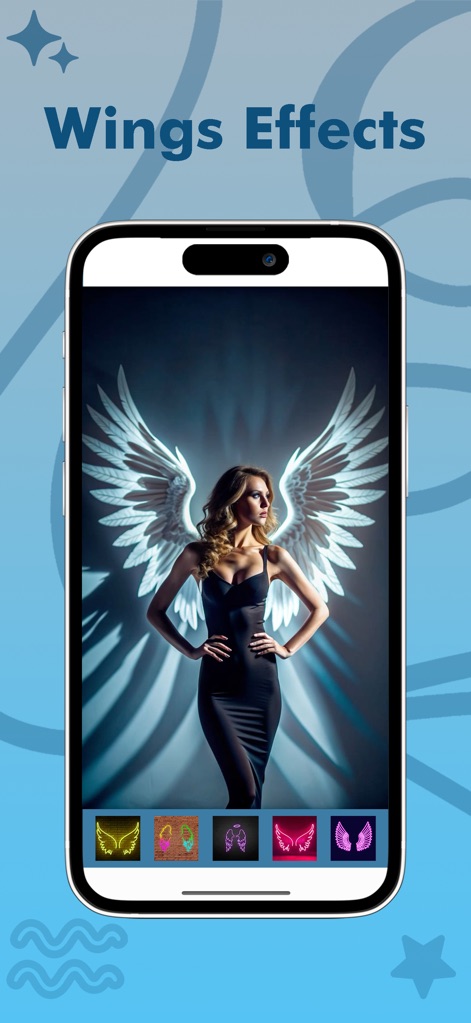
Nutzer können beeindruckende Flügel-Effekte zu Fotos hinzufügen, wie die leuchtenden Engelsflügel im Hintergrund und die farbigen Auswahloptionen am unteren Bildschirmrand.
Flügel Effekte
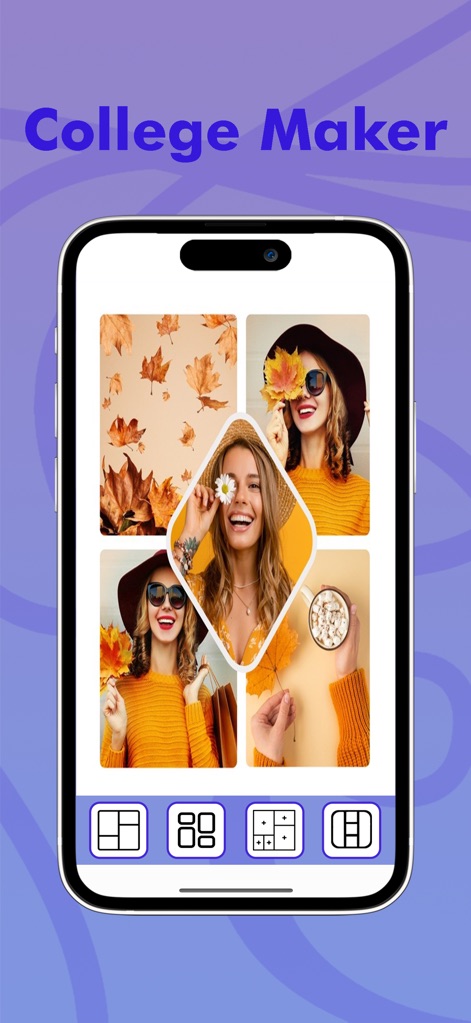
Die App erlaubt die schnelle Erstellung von Fotocollagen, wie das Gitter aus herbstlichen Motiven und die Auswahl an Layout-Optionen am unteren Bildschirmrand.
Kreative Collagen
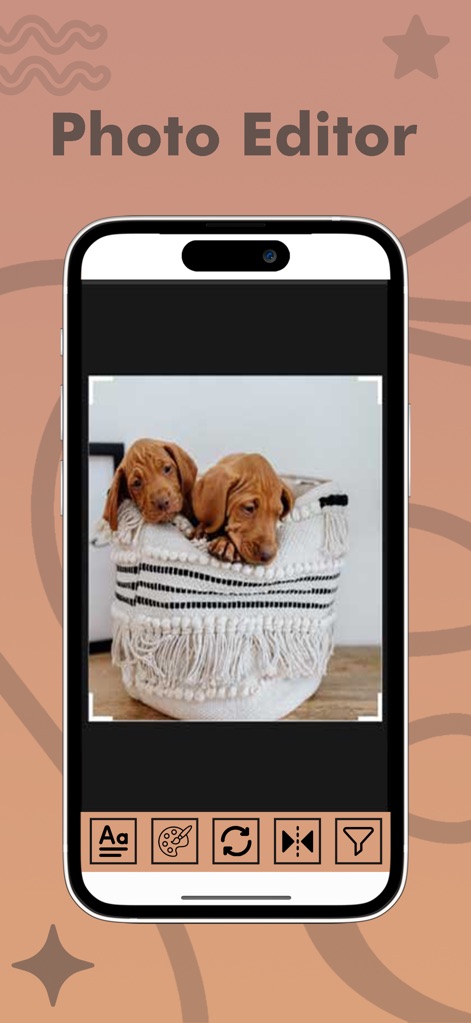
Die Bearbeitungsfunktion ermöglicht das präzise Zuschneiden von Bildern, wie im Beispiel der Welpen, und bietet eine Vielzahl von Werkzeugen in der unteren Symbolleiste.
Umfassende Bildbearbeitung

Verwandeln Sie Fotos mit dynamischen Neoneffekten, die als leuchtende Kopfbedeckung und als Social-Media-Icons dargestellt sind.
Leuchtende Neoneffekte
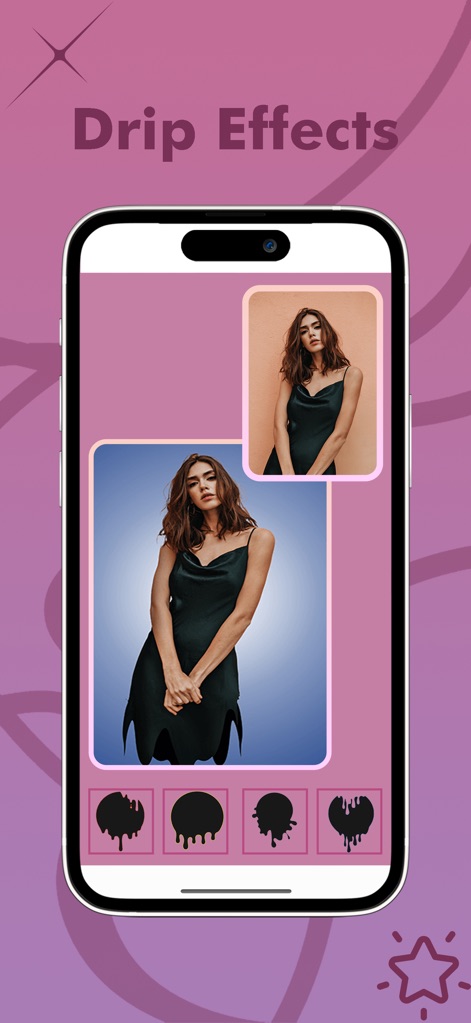
Fügen Sie Bildern moderne Drip-Effekte hinzu, die die Form von tropfender Farbe simulieren und verschiedene Varianten am unteren Rand zeigen.
Trendige Drip-Effekte
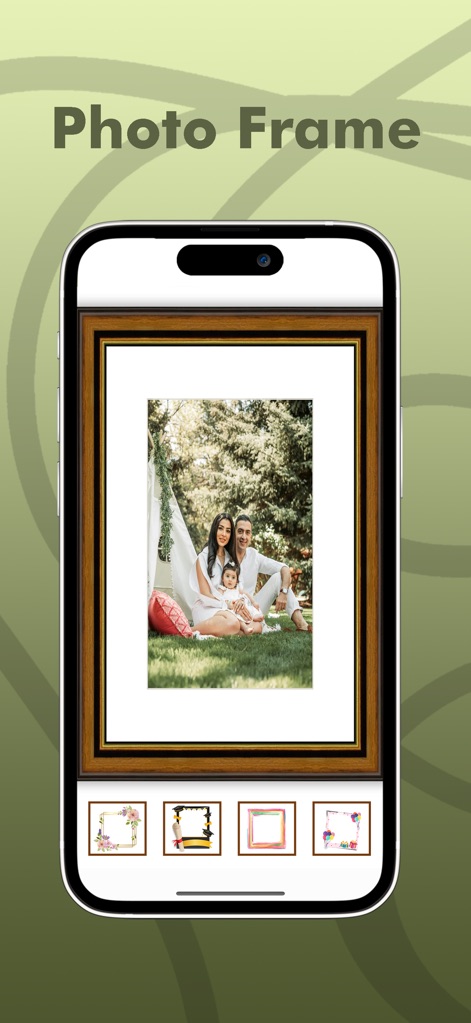
Nutzer können ihre Fotos mit stilvollen Rahmen versehen, wie dem klassischen Holzrahmen für das Familienbild und den vielfältigen Designoptionen unten.
Elegante Fotorahmen
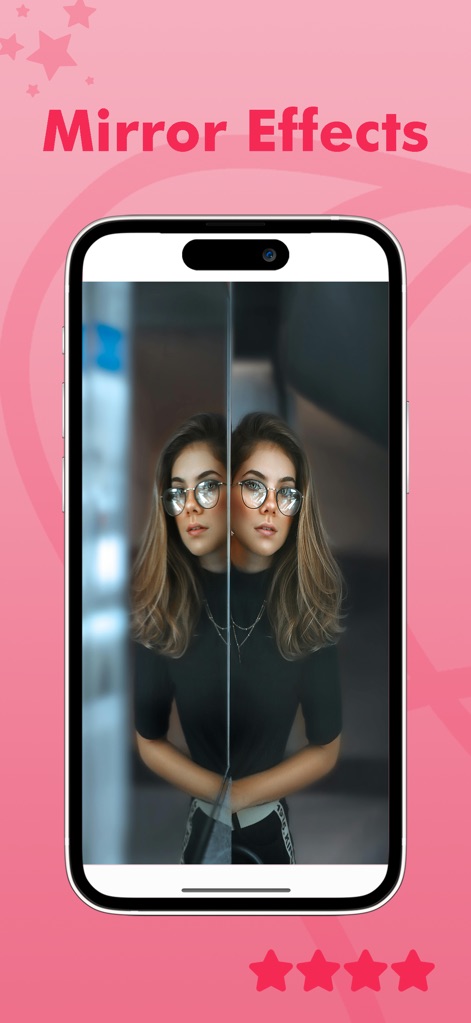
Dieses Tool ermöglicht eindrucksvolle Spiegelbild-Effekte, indem es das Motiv auf der rechten Seite dupliziert und den Hintergrund künstlerisch verschwommen darstellt.
Spiegelbild-Effekte
Beschreibung
Download
Ähnliche Apps
Apps mit ähnlichen Funktionen und Nutzererfahrung

一甜相机—超人气风格自拍
Beijing Kwai Technology Co., Ltd.
FotoRus -Camera & Photo Editor
Fotoable, Inc.

WeCamera - for Everyday Life
Tencent Technology (Shenzhen) Company Limited

in-capturing moments in life
Hangzhou Jiuyan Technology Co., Ltd.

Pitu - Best selfie and PS Soft
Tencent Technology (Shanghai) Company Limited
Rookie Cam - Photo Editor
JellyBus Inc.
Camera 720
Dung Le

SkyCamera: Use Various Filters
智帆 钟

Sweet Face Camera: Selfie Edit
炳超 黄
Diese Seite ist keine offizielle Seite der App oder ihres Entwicklers, sondern eine unabhängige redaktionelle Veröffentlichung, die zu Informations- und Kommentarzwecken erstellt wurde. Sofern nicht ausdrücklich anders angegeben, sind weder die App noch ihr Entwickler mit MWM, Apple, Google Play, dem App-Herausgeber oder dem Entwickler der App verbunden, von ihnen unterstützt, gesponsert, autorisiert oder anderweitig offiziell verbunden, und nichts auf dieser Seite impliziert, dass die App unter Verwendung der Dienste von MWM entwickelt wurde. Alle Marken, Logos, Screenshots und andere Inhalte bleiben Eigentum ihrer jeweiligen Inhaber.